
1. Introduction
This manual provides essential information for the safe and efficient operation, maintenance, and troubleshooting of your YUCHENGTECH 2800W Concrete Grinder, Model E-003. Please read this manual thoroughly before using the tool and keep it for future reference.
2. Safety Instructions
Always follow basic safety precautions to reduce the risk of fire, electric shock, and personal injury.
- Work Area Safety: Keep the work area clean and well-lit. Do not operate power tools in explosive atmospheres, such as in the presence of flammable liquids, gases, or dust.
- Electrical Safety: Power tool plugs must match the outlet. Never modify the plug. Avoid body contact with earthed or grounded surfaces. Do not expose power tools to rain or wet conditions.
- Personal Safety: Always wear eye protection, hearing protection, and a dust mask. Dress properly; avoid loose clothing or jewelry. Secure long hair.
- Tool Use and Care: Do not force the power tool. Use the correct power tool for your application. Disconnect the plug from the power source before making any adjustments, changing accessories, or storing power tools.
- Dust Extraction: This tool generates significant dust. Always connect to a suitable dust extraction system to minimize airborne particles.
3. Product Overview and Components
The YUCHENGTECH E-003 is a powerful 2800W concrete grinder designed for efficient surface preparation. It features a 3-head grinding system and 6 adjustable speeds for versatile applications.
3.1 Key Features
- 2800W Powerful Motor: Ensures stable performance for heavy-duty grinding tasks on concrete, marble, and granite.
- 3-Head Grinding System: Provides a wider contact area (7.9" diameter), increasing efficiency by 40% compared to single-disc models.
- 6-Speed Variable Control: Allows adjustment of grinding speed from 800 to 2800 RPM to suit different materials and applications.
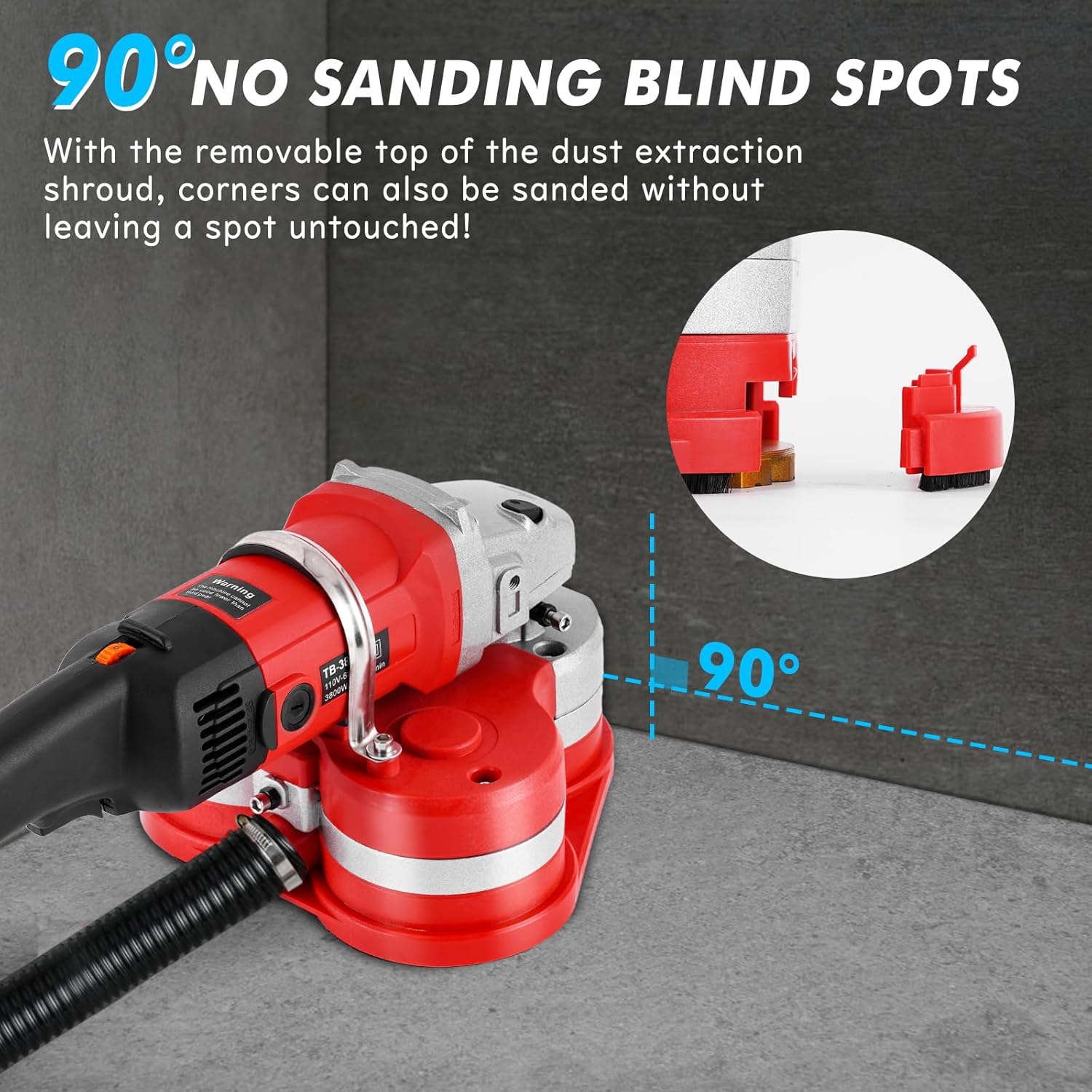
- 90° Removable Head: Enables grinding close to walls and into corners, ensuring thorough surface preparation.
- Integrated Dust Extraction Port: Connects to a vacuum cleaner for effective dust management.
- Auxiliary Handle Design: Provides enhanced control and comfort during operation.
3.2 Included Accessories
The package includes everything needed to start working:
- 1x 2800W Concrete Grinder
- 1x Side Handle
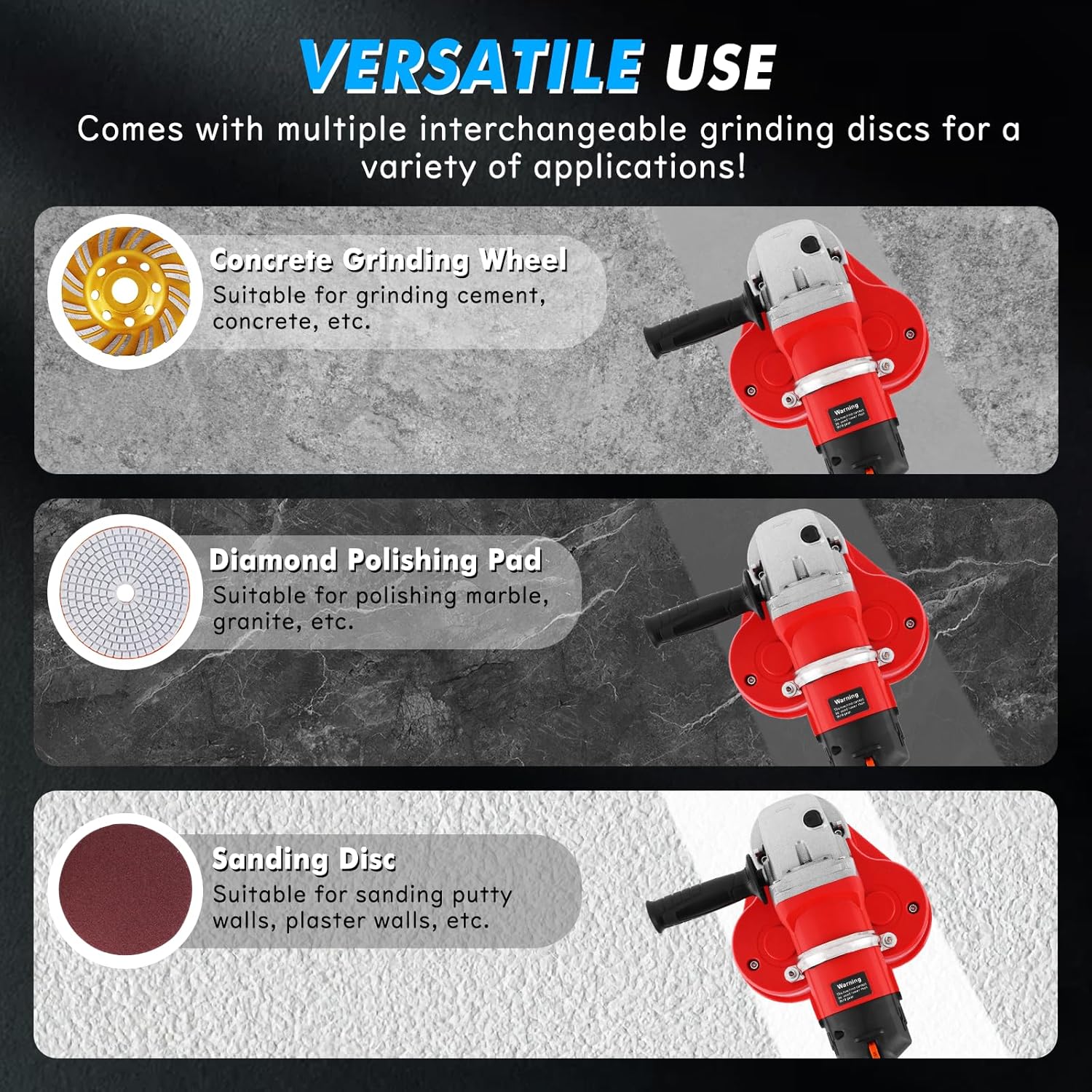
- 3x Diamond Grinding Wheels
- 3x Self-Adhesive Discs
- 3x Sanding Discs
- 3x Diamond Polishing Pads
- 1x Pair of Gloves
- 1x Pin Wrench
- 2x Carbon Brushes
- 1x Spare Drive Belt
- 2x Hose Clamps
- 1x Hex Wrench Set
- Hardware for Raised Handles

4. Setup
4.1 Attaching the Auxiliary Handle
Attach the auxiliary handle to the designated mounting points on the grinder body. Ensure it is securely fastened for optimal control and safety during operation. The handle can be positioned for side or raised grip depending on your preference and application.

4.2 Installing Grinding Discs/Pads
- Ensure the tool is unplugged from the power source.
- Select the appropriate grinding disc, sanding disc, or polishing pad for your task.
- Carefully align the disc with the mounting points on the grinder head.
- Secure the disc using the provided fasteners or mechanism. Refer to the specific disc type for detailed installation instructions.
4.3 Connecting Dust Extraction
Connect a suitable dust extraction hose to the external dust port on the grinder. Secure the hose with the provided clamps to effectively capture dust and debris during operation.

5. Operating Instructions
5.1 Powering On/Off and Lock Function
To start the grinder, press the power button. For continuous operation, press the safety lock button after engaging the trigger, then release the trigger. This maintains constant grinding without holding the trigger.

5.2 Speed Adjustment
The grinder features 6 adjustable speed settings. Rotate the speed control dial to select the appropriate speed for your material and task. Lower speeds are suitable for delicate materials like marble, while higher speeds are for aggressive removal on concrete.
- Speed 1: Fine grinding of walls.
- Speed 2: Slightly rough walls.
- Speed 3: Rough walls.
- Speed 4: Slightly hard walls.
- Speed 5: Hard walls.
- Speed 6: Grinding bumps/ridges.
Note: For grinding hard walls, it is not recommended to use a speed setting lower than three.

5.3 Grinding Techniques
- Maintain a firm grip on the tool with both hands.
- Apply even pressure and move the grinder steadily across the surface.
- For edge and corner grinding, remove the front section of the dust shroud to allow the grinding head to reach 90-degree angles.
- Always ensure the dust extraction system is active during operation.
6. Maintenance
6.1 Cleaning
- After each use, disconnect the tool from the power supply.
- Clean the exterior of the tool with a soft, damp cloth. Do not use harsh chemicals or abrasive cleaners.
- Remove any dust or debris from the ventilation openings to prevent overheating.
- Inspect the grinding heads and replace them if worn or damaged.
6.2 Carbon Brush Replacement
The carbon brushes are wear items and should be inspected periodically. If they are worn down, replace them with the provided spare carbon brushes. Refer to the tool's diagram for the location of the carbon brush covers.
6.3 Storage
Store the grinder in a clean, dry place, out of reach of children. Ensure the power cord is neatly coiled and not kinked.
7. Troubleshooting
| Problem | Possible Cause | Solution |
|---|---|---|
| Tool does not start | No power supply; faulty power cord; worn carbon brushes. | Check power connection; inspect power cord for damage; replace carbon brushes. |
| Reduced grinding performance | Worn grinding discs; incorrect speed setting; excessive pressure. | Replace grinding discs; adjust speed setting; apply lighter, even pressure. |
| Excessive vibration | Damaged or improperly installed disc; loose components. | Inspect and re-install disc; tighten all fasteners. |
| Overheating | Blocked ventilation; continuous heavy load. | Clean ventilation openings; allow tool to cool down; reduce load. |
8. Specifications
| Specification | Value |
|---|---|
| Brand | YUCHENGTECH |
| Model Number | E-003 |
| Power | 2800W |
| Voltage | 230 Volts (AC) |
| Power Source | Corded Electric |
| Maximum Rotation Speed | 2800 Revolutions per Minute |
| Number of Speeds | 6 |
| Disc Diameter | 100 mm (for each of the 3 heads) |
| Product Dimensions (L x W x H) | 38L x 23W x 56H cm |
| Item Weight | 7.5 Kilograms |
| Grit Type | Coarse (with various discs for different applications) |
| Country of Origin | China |
9. Warranty and Support
For warranty information or technical support, please contact YUCHENGTECH customer service. Refer to your purchase documentation for specific warranty terms and contact details. You may also visit the official YUCHENGTECH website for further assistance.
Online Support: YUCHENGTECH Store on Amazon
