
Shanqiu FX-36P
Shanqiu Mini UPS Battery Backup User Manual
Model: FX-36P
1. Introduction
The Shanqiu Mini UPS Battery Backup (Model FX-36P) is a compact uninterruptible power supply designed to provide continuous power to your essential electronic devices during power outages or fluctuations. It is compatible with a wide range of devices including routers, modems, security cameras, smartphones, LED strip lights, and DSL equipment. Featuring Gigabit POE, USB, and DC outputs, this device ensures your network and critical systems remain operational when the main power fails.
2. Safety Information
Please read and understand all safety instructions before operating this device. Failure to follow these instructions may result in electric shock, fire, or serious injury.
- Do not expose the device to rain, moisture, or extreme temperatures.
- Ensure proper ventilation; do not block any ventilation openings.
- Do not disassemble or modify the device. Refer all servicing to qualified personnel.
- Use only the provided power adapter and cables.
- Keep the device away from flammable materials.
- This device contains a Lithium Polymer battery. Handle with care and dispose of responsibly according to local regulations.
3. Package Contents
Verify that all items listed below are included in your package:
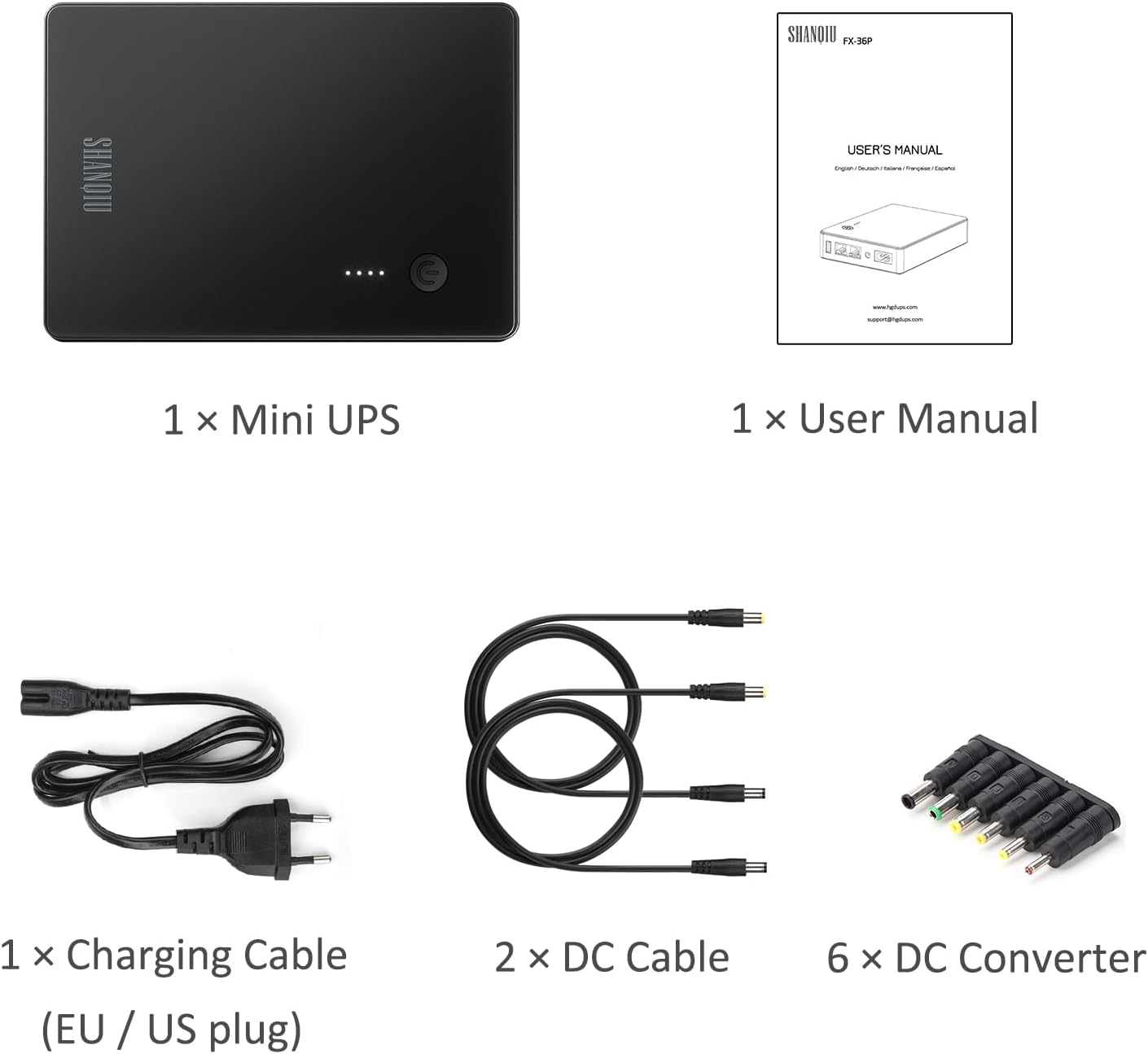
Image: Contents of the Shanqiu Mini UPS package.
- 1 x Shanqiu Mini UPS Unit
- 1 x User Manual
- 1 x AC Charging Cable (EU / US plug)
- 2 x DC Output Cables
- 6 x DC Converter Adapters (various sizes)
4. Product Overview
The Shanqiu Mini UPS features multiple input and output ports for versatile connectivity. Below is an overview of the device and its connection points.

Image: Front view of the Shanqiu Mini UPS with labeled ports.
Ports and Indicators:
- Power Button: Press to turn the unit on or off.
- LED Indicators: Four small LEDs indicate the battery charge level.
- 5V USB Output: Provides 5V DC at 3A for charging smartphones or powering USB devices.
- 48V POE Output (Gigabit): RJ45 port providing 48V DC at 0.5A, capable of transmitting data and power simultaneously for POE-compatible devices like IP cameras or access points.
- LAN Input: RJ45 port for connecting to your network (e.g., from a modem or router).
- 12V DC Output: Provides 12V DC at 3A for devices like routers or modems.
- AC Input: Connects to the main power supply (100-240V AC).
5. Setup
Follow these steps to set up your Shanqiu Mini UPS:
- Charge the UPS: Connect the provided AC charging cable to the AC Input port on the UPS and plug the other end into a wall outlet. The LED indicators will light up to show the charging status. Ensure the unit is fully charged before first use.
- Identify Device Voltage: Determine the input voltage and connector type of the device(s) you wish to power (e.g., router, modem, security camera). The UPS supports 5V USB, 12V DC, and 48V POE outputs.
- Select Correct Adapter: For DC-powered devices, choose the appropriate DC converter adapter from the included set that matches your device's power input port.
- Connect Devices:
- For 12V DC devices: Connect one end of a DC output cable to the 12V DC output port on the UPS, attach the correct DC converter adapter if needed, and connect the other end to your device.
- For 48V POE devices: Connect an Ethernet cable from your network source (e.g., modem LAN port) to the LAN Input port on the UPS. Then, connect another Ethernet cable from the 48V POE Output port on the UPS to your POE-compatible device (e.g., IP camera).
- For 5V USB devices: Connect a standard USB cable from the 5V USB output port on the UPS to your USB-powered device.
- Power On: Press the power button on the UPS to turn it on. Your connected devices should now receive power.

Image: Typical connection diagram for the Mini UPS.
6. Operating Instructions
The Shanqiu Mini UPS is designed for simple, automatic operation.
- Normal Operation: When the UPS is connected to AC power and turned on, it will continuously supply power to your connected devices while simultaneously charging its internal battery. The LED indicators will show the current battery charge level.
- Power Outage: In the event of a power outage, the UPS will automatically switch to battery power without interruption, ensuring your connected devices remain operational. The LED indicators will reflect the decreasing battery level.
- Power Restoration: Once AC power is restored, the UPS will automatically switch back to AC power and begin recharging its battery.
- Power Off: To turn off the UPS, press and hold the power button until the LED indicators turn off. This will cut power to connected devices.
7. Maintenance
Proper maintenance ensures the longevity and optimal performance of your Mini UPS.
- Cleaning: Use a soft, dry cloth to clean the exterior of the device. Do not use liquid cleaners or aerosols.
- Battery Care: To prolong battery life, fully charge the UPS every 3 months if it is not in regular use. Avoid completely discharging the battery frequently.
- Storage: Store the UPS in a cool, dry place away from direct sunlight and extreme temperatures.
- Ventilation: Ensure the device has adequate airflow around it to prevent overheating.
8. Troubleshooting
If you encounter issues with your Shanqiu Mini UPS, refer to the following common problems and solutions:
| Problem | Possible Cause | Solution |
|---|---|---|
| UPS does not power on. | Battery is completely discharged; power button not pressed correctly. | Connect the UPS to AC power and allow it to charge for several hours. Press and hold the power button for a few seconds to turn on. |
| Connected device not receiving power. | Incorrect voltage/amperage selected; loose cable connection; device not compatible. | Verify the output voltage (5V USB, 12V DC, 48V POE) matches your device's requirements. Ensure all cables are securely connected. Check if the correct DC converter adapter is used. |
| UPS does not provide backup power during outage. | UPS not charged; battery fault. | Ensure the UPS is fully charged. If the issue persists, contact customer support. |
| Device gets warm during operation. | Normal operation; insufficient ventilation. | A slight warmth is normal. Ensure the device is placed in a well-ventilated area and not covered. If it becomes excessively hot, disconnect immediately and contact support. |
9. Specifications
Detailed technical specifications for the Shanqiu Mini UPS (Model FX-36P):
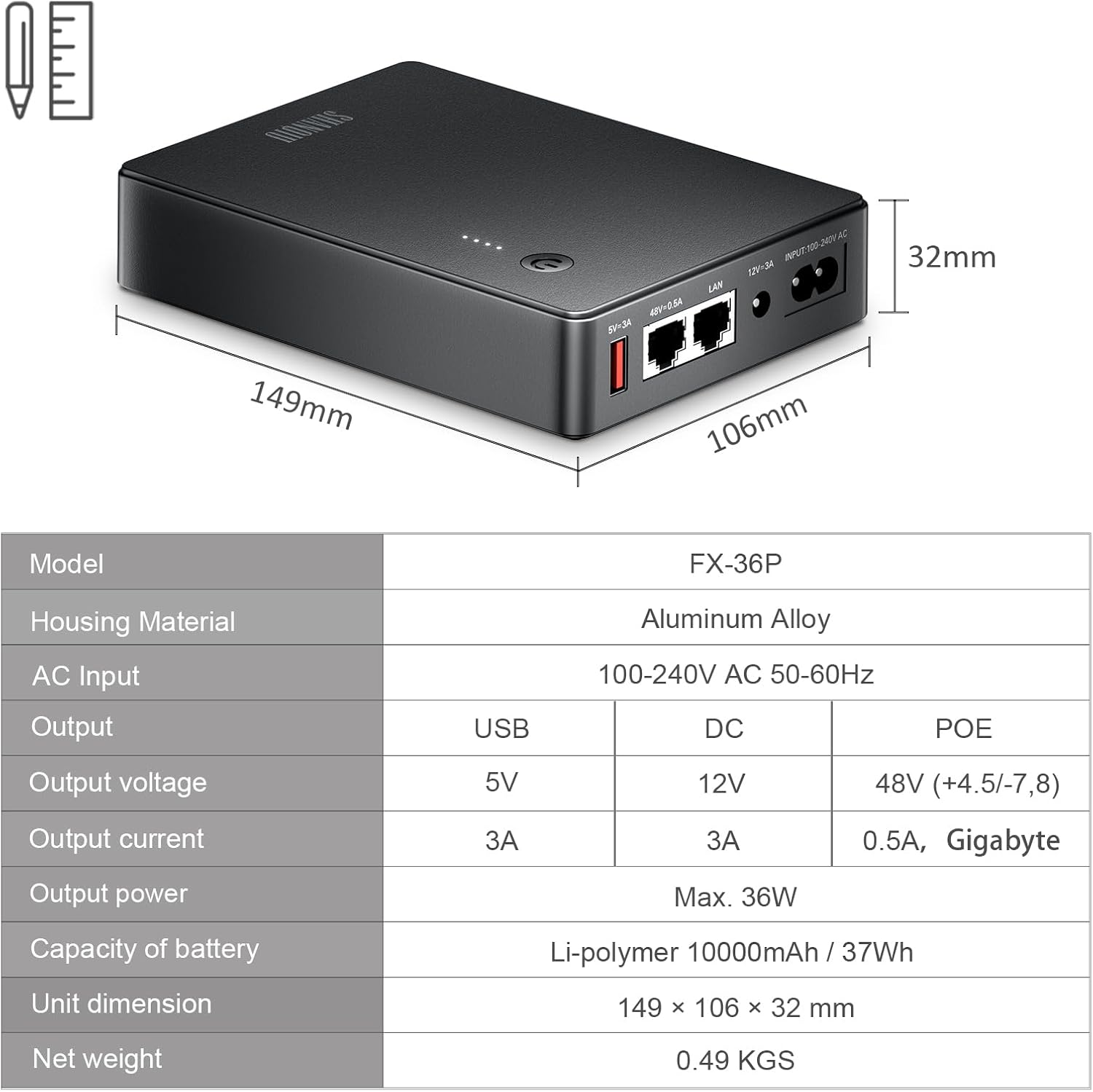
Image: Specifications table for the Mini UPS.
- Model: FX-36P
- Housing Material: Alloy Steel
- Product Dimensions: 1.26 x 4.17 x 5.87 inches (149 x 106 x 32 mm)
- Item Weight: 1.08 pounds (0.49 KGS)
- AC Input: 100~240V AC, 50-60Hz
- Output (USB): 5V = 3A
- Output (DC): 12V = 3A
- Output (POE): 48V = 0.5A (+4,5/-7,8), Gigabit
- Max Output Power: 36W
- Battery Type: Lithium Polymer
- Battery Capacity: 10000mAh / 37Wh
- Protections: Short circuit protection, voltage fluctuation protection, overcharge protection, over discharge protection, temperature protection.
10. Warranty and Support
For warranty information and customer support, please refer to the documentation provided with your purchase or visit the official Shanqiu store on Amazon: Shanqiu Store.
For product-specific inquiries, you may also reference the ASIN: B0F5H1GVZ9.
Related documentsFX-36P


Ask a question about this manual
Ask about setup, troubleshooting, compatibility, parts, safety, or missing instructions. Manuals+ will review the question and use this page’s manual context to help answer it.