
1. Introduction
This manual provides detailed instructions for the proper setup, operation, and maintenance of your Folgtek A106W 4K WiFi Trail Camera. Please read this manual thoroughly before using the device to ensure optimal performance and longevity. Keep this manual for future reference.
2. Product Overview
The Folgtek A106W is a high-performance trail camera designed for wildlife observation, hunting, and security applications. It features 4K video recording, 64MP photo capabilities, WiFi connectivity, and advanced night vision.
2.1 Key Features
- Crystal Clear 64MP Photos & 4K Videos: Capture ultra-high resolution images and videos with detailed metadata including temperature and time stamps.
- 100ft/30m HD Night Vision: Equipped with 44 invisible 940nm infrared LEDs for clear animal activity capture in complete darkness, without detection.
- 0.1s Lightning Fast Trigger: A three-stage trigger zone (60° main + 30° pre-activation zones) ensures rapid capture of even lateral movements.
- 120° Wide Angle Lens: Provides a broad field of view to cover larger areas.
- IP66 Extreme Weatherproof: Durable metal housing designed to withstand harsh environmental conditions, including rain, dust, snow, and ice, with an operating temperature range of -20°C to +60°C.
- WiFi Access & Cloud Storage: Connect to your smartphone via a dedicated app to view footage, record scenarios, and transfer photos/videos wirelessly.
2.2 Camera Components
Familiarize yourself with the main components of your trail camera:
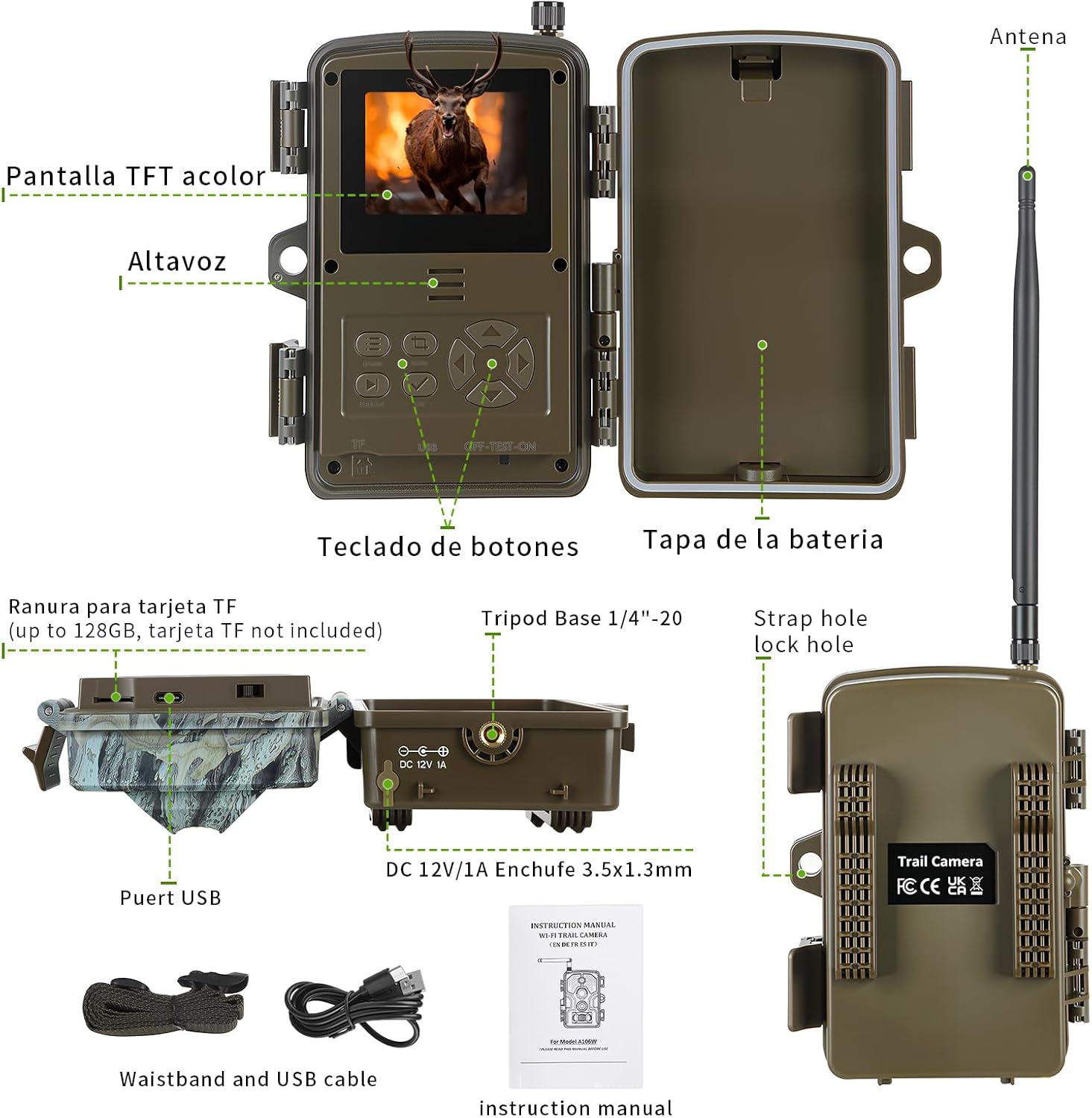
Image Description: An exploded view of the Folgtek A106W Trail Camera, showing its internal and external components. Key parts include the antenna, TFT color screen, speaker, button keypad, battery compartment, TF card slot (up to 128GB), tripod base (1/4"-20), strap hole, USB port, DC 12V/1A adapter input, and the instruction manual. The camera casing is camouflage grey.
- Antenna: For WiFi and Bluetooth connectivity.
- TFT Color Screen: 2.31-inch LCD for menu navigation and playback.
- Speaker: For audio playback.
- Button Keypad: For navigating menus and settings.
- Battery Compartment: Holds 8x AA batteries.
- TF Card Slot: Supports memory cards up to 128GB (not included).
- Tripod Base (1/4"-20): For mounting on a tripod.
- Strap Hole: For securing the camera with a mounting strap.
- USB Port: For connecting to a computer.
- DC 12V/1A Input: For external power adapter.
3. Setup
3.1 Battery Installation
- Open the camera casing by unlatching the side clips.
- Locate the battery compartment.
- Insert 8x AA batteries, ensuring correct polarity (+/-).
- Close the battery compartment securely.
Note: The camera operates on 8x AA batteries. For optimal performance, use high-quality alkaline or rechargeable batteries. An external DC 12V/1A adapter can also be used.
3.2 Memory Card Insertion
- Ensure the camera is powered off.
- Locate the TF card slot inside the camera.
- Insert a TF (microSD) card (up to 128GB) into the slot until it clicks into place.
- To remove, press the card gently until it springs out.
Note: A memory card is required for storing photos and videos. Format the memory card in the camera's settings menu before first use.
3.3 Mounting the Camera
The camera can be mounted using the included belt/holder or a standard tripod.
- Strap Mounting: Thread the provided strap through the strap holes on the back of the camera and secure it around a tree or pole.
- Tripod Mounting: Attach the camera to a tripod using the 1/4"-20 tripod base screw hole located at the bottom.

Image Description: The Folgtek A106W Trail Camera, in a camouflage grey casing, is shown mounted on a tree trunk using a strap. The camera's front panel with the lens, IR LEDs, and sensors is visible.
4. Operating Instructions
4.1 Powering On/Off
To power on the camera, slide the power switch to the "ON" position. To power off, slide it to "OFF".
4.2 Menu Navigation
Use the button keypad to navigate through the camera's menu on the 2.31-inch LCD screen. The buttons typically include UP, DOWN, LEFT, RIGHT, OK (confirm), and MENU (access/exit menu).
4.3 Recording Modes and Settings
The camera offers various settings to customize your recording experience:
- Photo Resolution: Select from 64MP, 48MP, 42MP, 36MP, 32MP, 24MP, 20MP, 16MP, 8MP, 4MP, 2MP.
- Video Resolution: Choose between 4K, 2.7K, 1080P, or 720P.
- Photo Series: Set the number of photos taken per trigger (1-5 photos).
- Video Length: Adjust video duration from 5 seconds to 1 minute.
- PIR Sensitivity: Set to Low, Medium, or High based on environmental conditions to optimize motion detection.
- Triggering Interval: Define the delay between triggers, from 5 seconds to 60 minutes.
- Time Lapse: Program intervals from 1-60 seconds, 1-60 minutes, or 1-24 hours for continuous monitoring.
- IR Flash: Adjust infrared LED power to Low, Medium, or High for night vision.
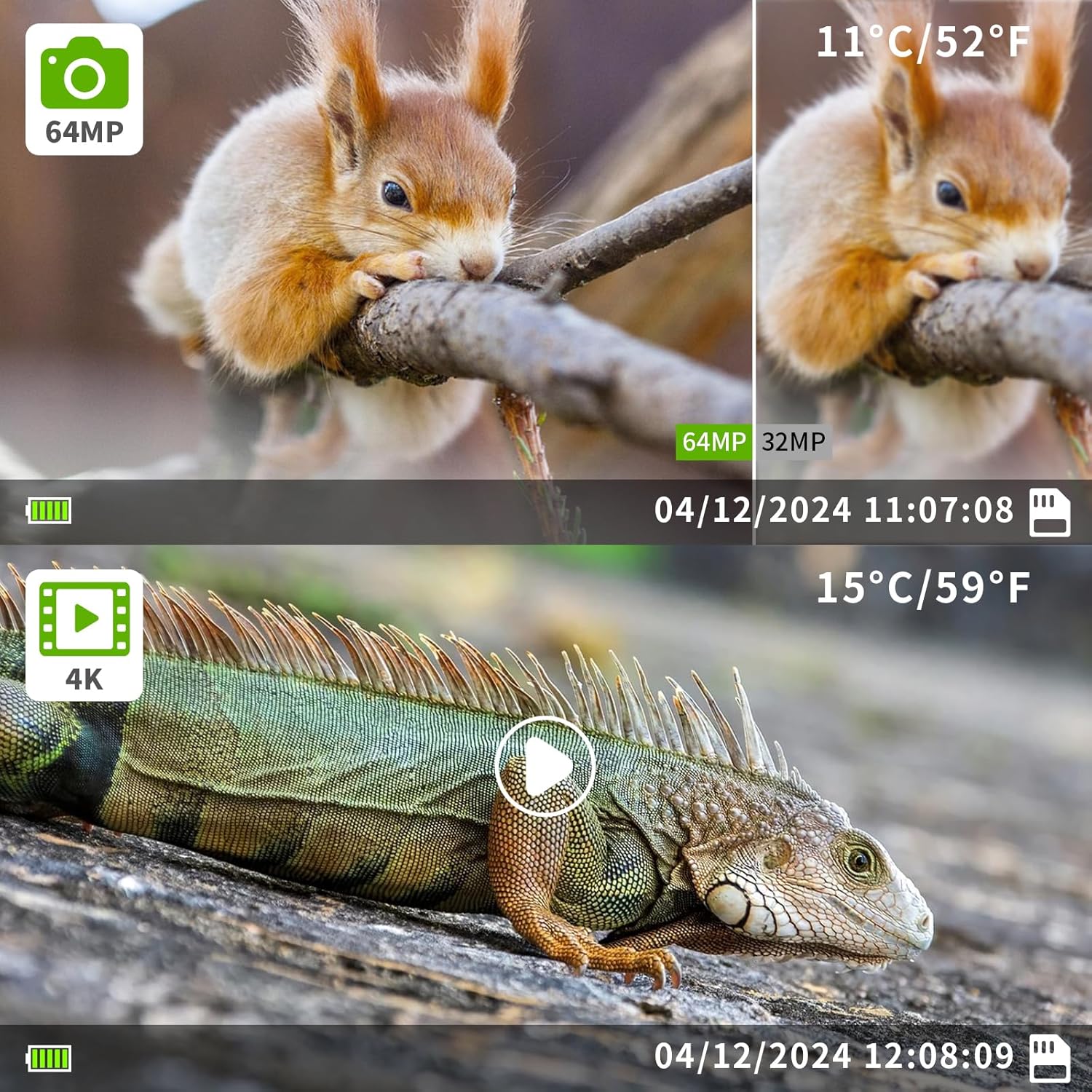
Image Description: Two examples of media captured by the camera. The top image shows a 64MP photo of a squirrel with a timestamp and temperature (11°C/52°F). The bottom image shows a still from a 4K video of an iguana, also with a timestamp and temperature (15°C/59°F). Both images demonstrate the clarity and detail captured by the camera.
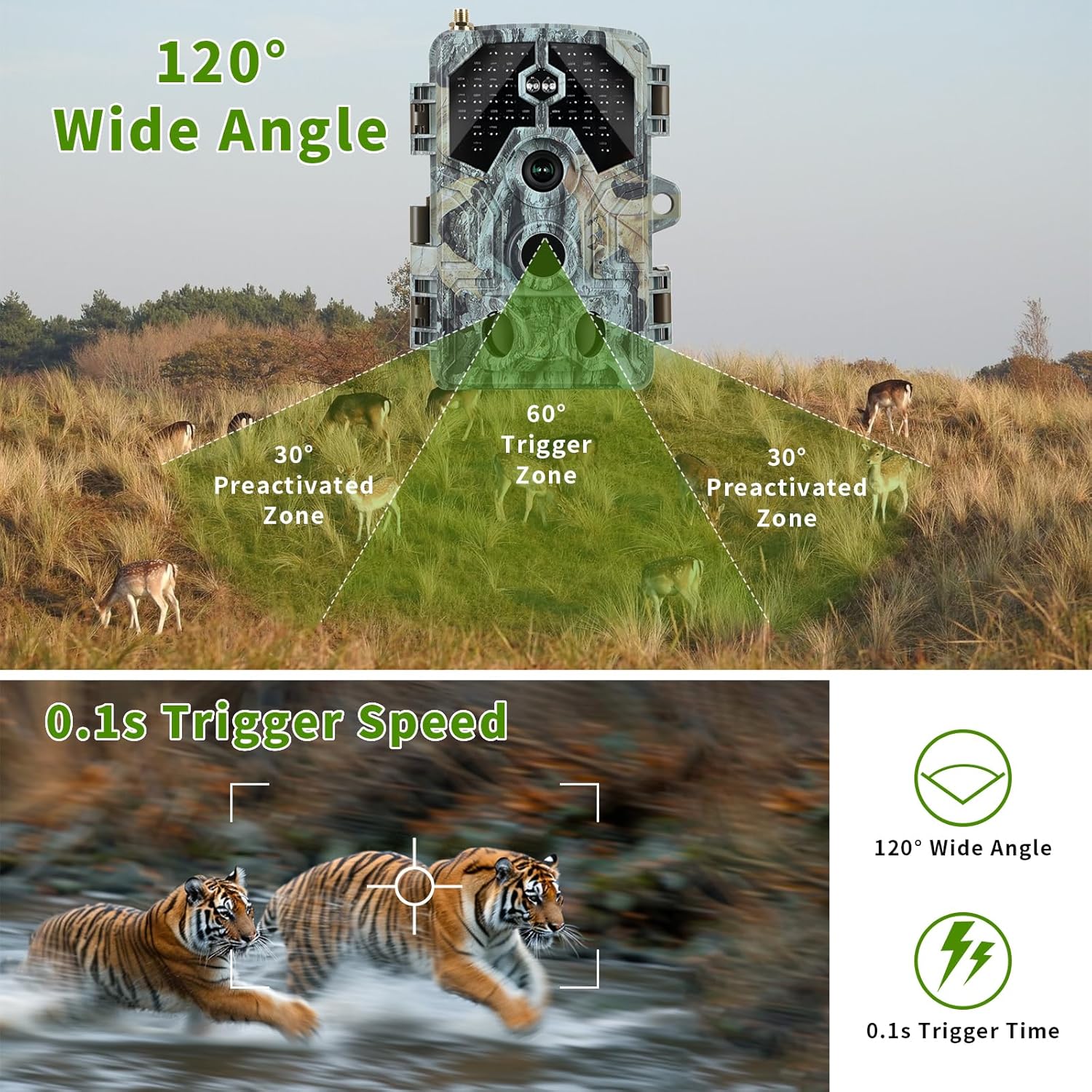
Image Description: A diagram illustrating the camera's detection capabilities. It shows a 120° wide-angle field of view with a 60° main trigger zone and two 30° pre-activated zones. Below, an image of two tigers running demonstrates the 0.1-second trigger speed, capturing fast-moving subjects clearly.
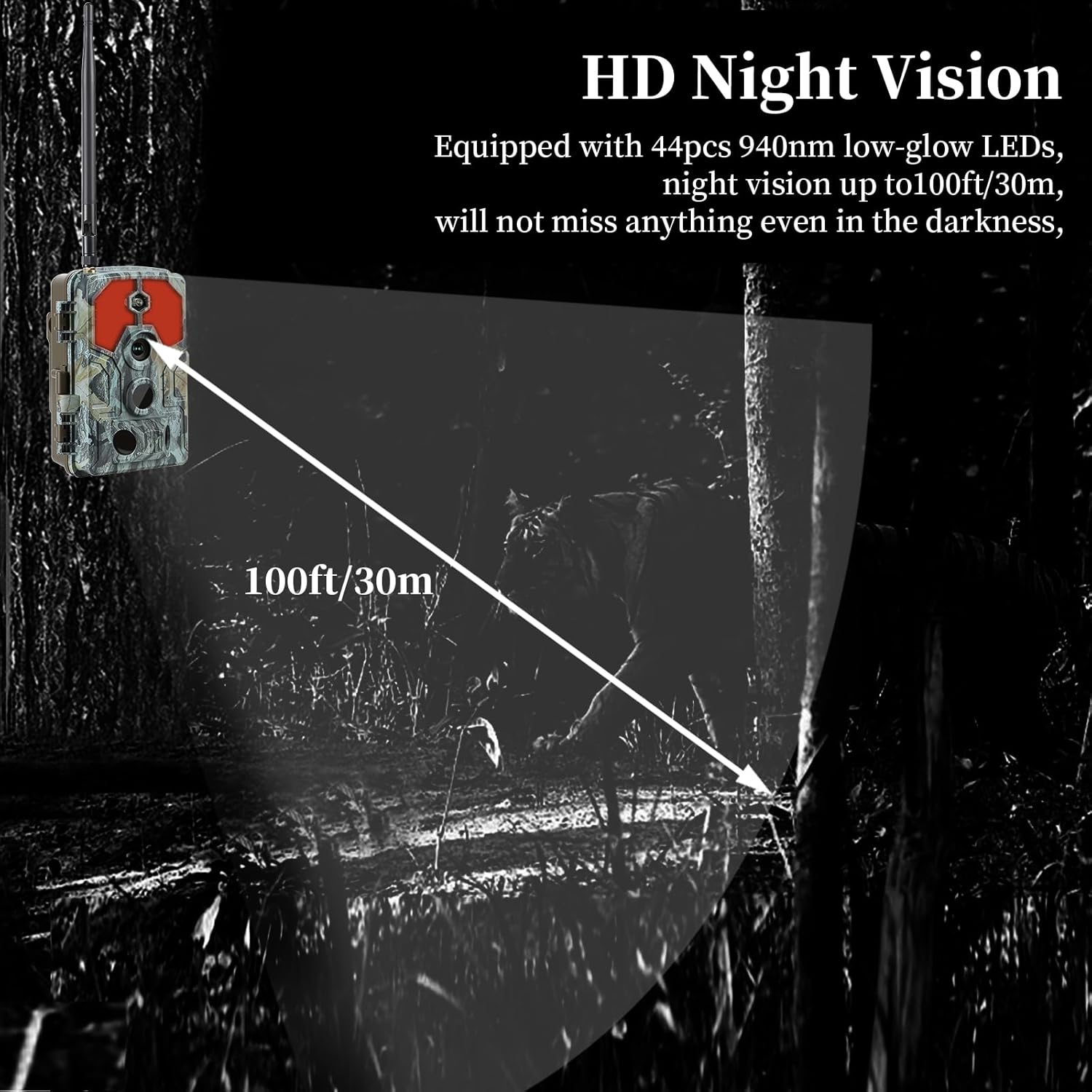
Image Description: A dark forest scene with a trail camera mounted on a tree. A cone of light extends 100ft (30m) from the camera, illustrating its HD night vision range, capable of capturing images in complete darkness.
5. App Connection (WiFi & Bluetooth)
The Folgtek A106W camera can connect to your smartphone via Wi-Fi and Bluetooth for remote control and media management.
5.1 App Installation
Download the official Folgtek trail camera app from your smartphone's app store. The app requires iOS 11.0 or higher, or Android 7.0 or higher.
5.2 Connecting to the Camera
- Ensure Bluetooth is enabled on your smartphone.
- Open the Folgtek app and follow the on-screen instructions to search for your camera via Bluetooth.
- Once connected via Bluetooth, the app will prompt you to establish a Wi-Fi connection with the camera.
- Connect to the camera's Wi-Fi network (SSID and password will be displayed on the camera screen or in the app).
Note: The Wi-Fi connection is 2.4GHz 802.11b/g/n. This connection allows for live view, changing settings, viewing captured media, and transferring files wirelessly to your phone.

Image Description: The Folgtek A106W Trail Camera is shown next to a smartphone displaying a live feed of a deer, illustrating the camera's 4K resolution and WiFi connectivity features.
6. Maintenance
- Cleaning: Use a soft, dry cloth to clean the camera lens and PIR sensors. Avoid abrasive cleaners.
- Battery Replacement: Replace batteries when the low battery warning LED indicator illuminates.
- Storage: When not in use for extended periods, remove batteries and store the camera in a cool, dry place within the recommended storage temperature of -30°C to +70°C.
- Weather Protection: While the camera is IP66 weatherproof, ensure the battery compartment and all ports are securely closed to prevent moisture ingress.

Image Description: This image highlights the camera's durability. It shows the camera in a rainy environment and another in a snowy, icy environment, emphasizing its IP66 waterproof rating and ability to operate in extreme temperatures (-20°C to +60°C operating, -30°C to +70°C storage).
7. Troubleshooting
| Problem | Possible Cause | Solution |
|---|---|---|
| Camera does not power on. | Low or dead batteries; incorrect battery polarity. | Replace batteries with fresh ones; ensure correct +/- orientation. |
| No photos/videos captured. | Memory card full or not inserted; PIR sensitivity too low; camera in wrong mode. | Insert/format memory card; increase PIR sensitivity; check camera mode settings. |
| Poor night vision images. | IR flash setting too low; objects too far. | Increase IR flash setting; ensure subjects are within 100ft/30m range. |
| Cannot connect via WiFi/Bluetooth. | Bluetooth/WiFi off on phone; app not installed; camera too far from phone. | Enable Bluetooth/WiFi; install app; move closer to camera; restart camera and phone. |
| Camera freezes or malfunctions. | Software glitch; memory card issue. | Remove batteries for a few minutes and reinsert; format memory card. |
8. Technical Specifications
| Feature | Specification |
|---|---|
| Model Name | A106W Trail Camera |
| Wi-Fi | 2.4GHz 802.11b/g/n |
| Bluetooth | BLE4.2 |
| App System Requirements | iOS 11.0 or higher; Android 7.0 or higher |
| Photo Resolution | 64MP, 48MP, 42MP, 36MP, 32MP, 24MP, 20MP, 16MP, 8MP, 4MP, 2MP |
| Video Resolution | 4K, 2.7K, 1080P, 720P |
| Lens | F/NO=1.6; FOV 70° Auto IR-Cut |
| IR Flash | 44pcs 940nm low-glow LEDs (100ft/30m range) |
| Screen | 2.31 inch LCD |
| Memory Card | Up to 128GB (TF card) |
| PIR Sensor | Multiple zones, adjustable sensitivity (low/medium/high) |
| Trigger Time | 0.1 second |
| Triggering Interval | 5 sec. - 60 min. (Programmable) |
| Time Lapse | 1-60 sec; 1-60 min; 1-24 hours (Programmable) |
| Photo Series | 1-5 photos per trigger |
| Video Length | 5 sec. - 1 min. (Programmable) |
| Power Supply | 8x AA batteries; DC: 12V/1A adapter |
| Stand-by Current | <0.3mA (<7mAh/day) |
| Low Battery Warning | LED indicator |
| Operating Temperature | -20°C to +60°C |
| Storage Temperature | -30°C to +70°C |
| Operating Humidity | 5%-90% |
| Dimensions | 134 x 102 x 84mm (5.28 x 4.02 x 3.31 inches) |
| Weight | 0.3 kg (without battery) / 1 pound (with packaging) |
| Weatherproof Rating | IP66 |
| Safety Authentication | FCC, CE, RoHS |
| Mounting Type | Tree Mount, Tripod Base |
| Included Components | Instruction Manual, Waistband, USB cable |
9. Warranty and Support
Folgtek products are designed for reliability and performance. For warranty information, technical support, or any questions regarding your A106W Trail Camera, please refer to the contact information provided with your purchase or visit the official Folgtek website.
Please retain your proof of purchase for warranty claims.


