
1. Introduction
Thank you for choosing the FULMINARE HS02-W Portable Bluetooth Speaker. This manual provides essential information for setting up, operating, and maintaining your speaker. Please read it carefully before use to ensure optimal performance and longevity of your device.
2. Package Contents
Verify that all items listed below are included in your package:
- FULMINARE HS02-W Portable Bluetooth Speaker
- USB Charging Cable
- 3.5mm AUX Cable
- User Manual
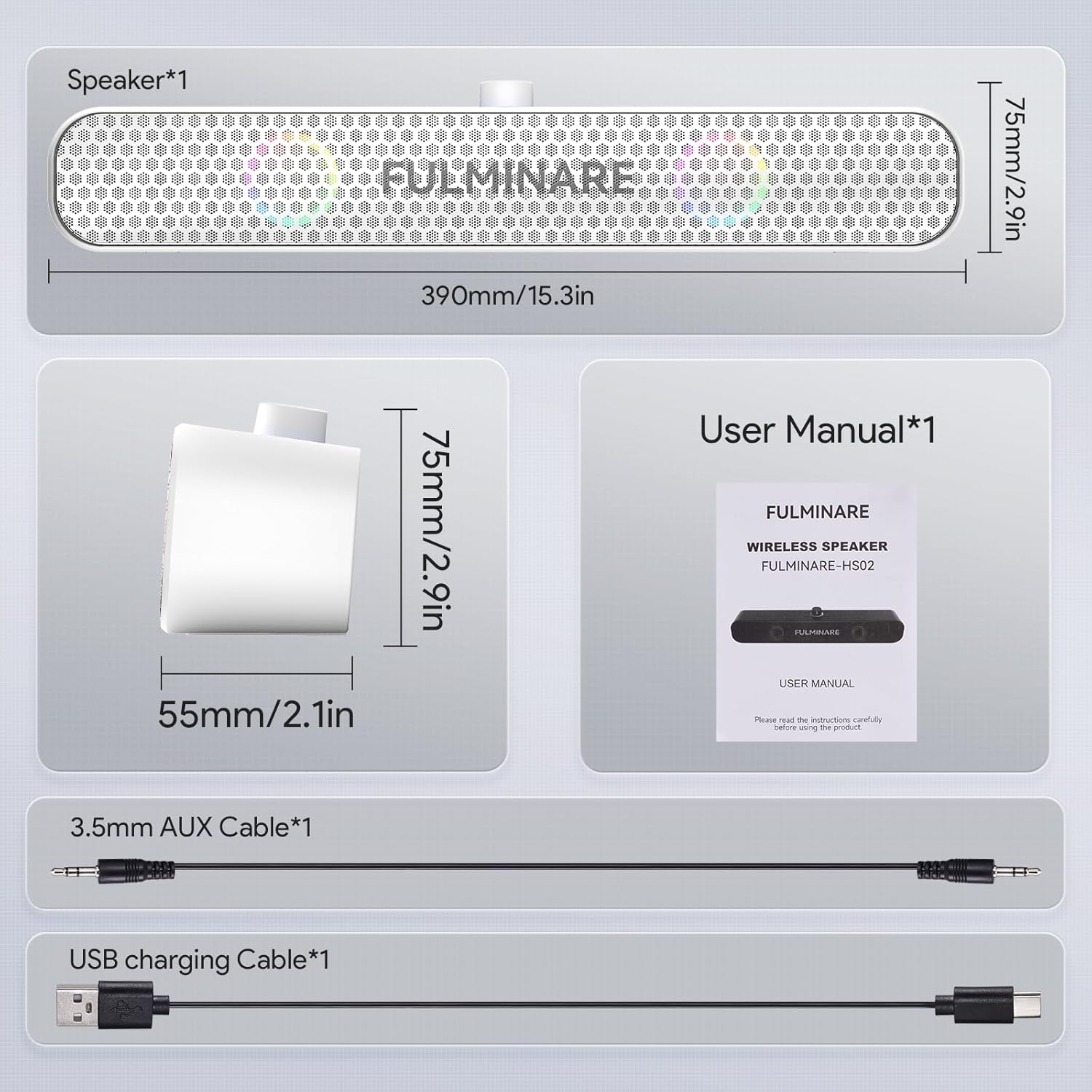
Figure 2.1: Package Contents (Speaker, USB cable, AUX cable, User Manual)
3. Product Features
- 360° Hi-Fi Stereo & Immersive Bass: Dual 13W drivers deliver 26W total output for clear 3D stereo sound with deep bass, maintaining clarity at all volumes.
- RGB Light Show: Dynamic LED lights pulse and shift through vibrant colors, enhancing the audio experience.
- 4-in-1 Playback Options: Supports Bluetooth 5.3, TF card, USB drive, and AUX input for versatile music playback.
- Wireless Calling: Built-in microphone allows for clear, hands-free communication directly through the speaker.
- Long Playtime: Up to 30 hours of continuous music playback on a single charge.
- Portable Design: Compact and lightweight, suitable for home, party, office, or outdoor use.

Figure 3.1: Enhanced Audio Performance Details

Figure 3.2: Soothing Light & Sound Fusion
4. Setup and Basic Operation
4.1 Power On/Off
- To power on, press and hold the power button (usually integrated with the volume knob) until the LED indicator lights up.
- To power off, press and hold the power button again until the LED indicator turns off.
4.2 Bluetooth Pairing
- Ensure the speaker is powered on and in Bluetooth pairing mode. The LED indicator will flash blue, indicating it is ready to pair.
- On your device (smartphone, tablet, laptop), enable Bluetooth and search for available devices.
- Select "FULMINARE HS02-W" from the list of devices.
- Once connected, the LED indicator will turn solid blue, and you will hear an audible confirmation.

Figure 4.1: Bluetooth Wireless Playback
5. Operating Instructions
5.1 Playback Modes
The FULMINARE HS02-W speaker supports multiple playback options:
- Bluetooth: Connect wirelessly to your devices.
- TF Card: Insert a TF (MicroSD) card into the designated slot for direct music playback.
- USB Drive: Insert a USB flash drive into the USB port for direct music playback.
- AUX Input: Connect external audio devices using the provided 3.5mm AUX cable.
To switch between modes, press the 'M' (Mode) button on the speaker.

Figure 5.1: 4-in-1 Playback Options
5.2 TF Card Playback
- Insert a TF card (with MP3 format songs) into the TF card slot on the back of the speaker.
- The speaker will automatically switch to TF card mode or you can select it using the 'M' button.
- Use the playback controls (play/pause, next/previous track) on the speaker to manage your music.

Figure 5.2: TF Card Playback
5.3 USB Drive Playback
- Insert a USB drive (with MP3 format songs) into the USB port on the back of the speaker.
- The speaker will automatically switch to USB mode or you can select it using the 'M' button.
- Use the playback controls on the speaker to manage your music.

Figure 5.3: USB Drive Playback
5.4 AUX Input
- Connect one end of the 3.5mm AUX cable to the AUX port on the speaker.
- Connect the other end to the headphone jack of your audio device.
- The speaker will automatically switch to AUX mode or you can select it using the 'M' button.
- Control playback and volume from your connected device.

Figure 5.4: AUX Device Connectivity
5.5 LED Lights Control
The speaker features an RGB light show. To cycle through light modes or turn the lights off, press the dedicated light control button (refer to the speaker's physical controls for exact button location).
5.6 Wireless Calling
When connected via Bluetooth to your smartphone, you can use the speaker for hands-free calls.
- Answer/End Call: Press the Play/Pause button once.
- Reject Call: Press and hold the Play/Pause button.
- Redial Last Number: Double-press the Play/Pause button.

Figure 5.5: Wireless Calling Feature
6. Charging
When the battery is low, the speaker will indicate this with an audible prompt or a flashing LED. To charge the speaker:
- Connect the small end of the USB charging cable to the charging port on the speaker.
- Connect the large end of the USB charging cable to a USB power adapter (not included) or a computer's USB port.
- The LED indicator will show charging status (e.g., red for charging, off or blue for fully charged).
A full charge provides up to 30 hours of playtime, depending on volume level and LED light usage.
7. Maintenance
- Keep the speaker away from extreme temperatures, direct sunlight, and moisture.
- Clean the speaker with a soft, dry cloth. Do not use abrasive cleaners or solvents.
- Avoid dropping or subjecting the speaker to strong impacts.
- When not in use for extended periods, charge the speaker at least once every three months to maintain battery health.
8. Troubleshooting
| Problem | Possible Cause | Solution |
|---|---|---|
| Speaker does not power on. | Low battery. | Charge the speaker for at least 30 minutes. |
| Cannot pair via Bluetooth. | Speaker not in pairing mode; Bluetooth disabled on device; too far from device. | Ensure speaker is in pairing mode (flashing blue LED). Enable Bluetooth on your device. Move speaker closer to device (within 10 meters). |
| No sound. | Volume too low; incorrect input mode; device not playing. | Increase speaker and device volume. Ensure correct input mode is selected. Check if audio is playing on the connected device. |
| Sound distortion. | Volume too high; weak signal. | Reduce volume on speaker and/or device. Move closer to the Bluetooth device. |
| TF card/USB playback not working. | Incorrect file format; card/drive not inserted correctly. | Ensure music files are in MP3 format. Reinsert the TF card or USB drive firmly. |
9. Specifications
| Feature | Specification |
|---|---|
| Model Number | HS02-W |
| Brand | FULMINARE |
| Output Power | 26W (Dual 13W drivers) |
| Bluetooth Version | 5.3 |
| Playtime | Up to 30 Hours |
| Input Options | Bluetooth, TF Card, USB, AUX |
| Control Method | Touch |
| Color | White |
| Material | Plastic |
| Dimensions | 0.07 x 0.52 x 0.08 inches (Product) |
| Item Weight | 1.79 pounds (0.81 Kilograms) |
| Speaker Size | 41.5 Centimeters (Length) |
| Waterproof | True |
| UPC | 797533299260 |
10. Safety Information
- Do not disassemble, repair, or modify the speaker. This may cause damage, electric shock, or fire.
- Keep the speaker away from water and other liquids. While it is waterproof, prolonged submersion is not recommended.
- Do not expose the speaker to open flames or extreme heat.
- Avoid listening at high volumes for extended periods to prevent hearing damage.
- Keep out of reach of children.
11. Warranty and Support
This FULMINARE product comes with a limited warranty. For detailed warranty information, support, or service inquiries, please refer to the warranty card included in your package or contact FULMINARE customer service through the official website or your retailer.
