
Introduction
Thank you for choosing the SUNLINKCO Smart RGB+IC LED Curtain Light. This product features 400 LEDs, offering dynamic color-changing capabilities and smart control for various indoor decorative applications. This manual provides essential information for safe and effective use of your new LED curtain light.

Image: SUNLINKCO Smart Curtain Lights illuminating a house exterior with various patterns.
What's in the Box
- LED Curtain Light (400 LEDs)
- Power Adapter
- Remote Control
- User Manual
Setup Instructions
- Unpack the Lights: Carefully remove the LED curtain light from its packaging. Untangle the individual strings gently.
- Choose Installation Method: The LED curtain light can be installed using two primary methods:
- Using Hooks: Hang the integrated hooks on a steel wire rope or similar fixture that is securely fixed to your wall or window frame.
- Using Adhesive Clips: Peel off the protective paper from the back of the adhesive clips and firmly attach them directly to a clean, dry wall or window surface.
- Ensure Vertical Alignment: Each string light is equipped with a pendant at its end. Ensure these pendants hang freely to keep the strings vertical and prevent pattern deformation.
- Connect Power: Plug the power adapter into a standard AC/DC power outlet. Connect the other end of the adapter to the LED curtain light's control box.
- Download the App: For full smart control features, download the 'Surplife' app from your smartphone's app store (Google Play or Apple App Store).
- Pair with App: Follow the in-app instructions to pair your LED curtain light with the 'Surplife' app via Bluetooth.
Video: Official SUNLINKCO Lighting video demonstrating the unboxing and basic setup of the LED Curtain Light, including components and initial installation steps.
Operating Instructions
1. Smart APP Control
The 'Surplife' app provides comprehensive control over your LED curtain light:
- Color Selection: Choose from 16 million colors to create custom lighting.
- Preset Modes: Access hundreds of pre-programmed pictures, animations, and dynamic effects for various occasions (e.g., holidays, parties).
- DIY Customization: Create your own text messages with different fonts and backgrounds, or draw custom pixel art and animations directly in the app.
- Adjustments: Easily adjust the speed and brightness of effects to enhance the visual experience.
- Scheduling: Set schedules for the lights to turn on/off automatically at specific times.
- Group Control: If you have multiple SUNLINKCO curtain lights, use the group control feature to synchronize them for larger displays.

Image: The 'Surplife' app interface displaying various color and scene selection options for the LED curtain light.
2. Remote Control
The included remote control offers convenient access to basic functions:
- Power On/Off: Turn the lights on or off.
- Static Color Switch: Cycle through various static colors.
- Brightness Adjustment: Increase or decrease the light brightness.
- Effect Mode: Select different pre-programmed lighting effects.
- Dynamic Gallery: Browse and select dynamic patterns.
- Speed Control: Adjust the speed of dynamic effects.
- Music Modes: Activate music sync modes.
- Timer: Set a timer for automatic shut-off.
3. Music Sync Mode
Enhance your ambiance with music synchronization:
- Music Import Mode: Synchronize lights with music imported into the app.
- Phone Mic Mode: Lights react to music played through your phone's microphone.
- Device Mic Mode: Lights react to ambient sounds picked up by the control box's built-in microphone.

Image: The LED curtain light displaying dynamic spectrum effects in a room with people enjoying music, illustrating the Music Sync Mode.
4. Voice Control
Integrate with smart home assistants for hands-free control:
- The LED curtain light supports voice control with Amazon Alexa and Google Assistant.
- Follow the instructions in the 'Surplife' app to link your device with your preferred voice assistant.
- Use voice commands to change colors, effects, and turn the lights on/off.
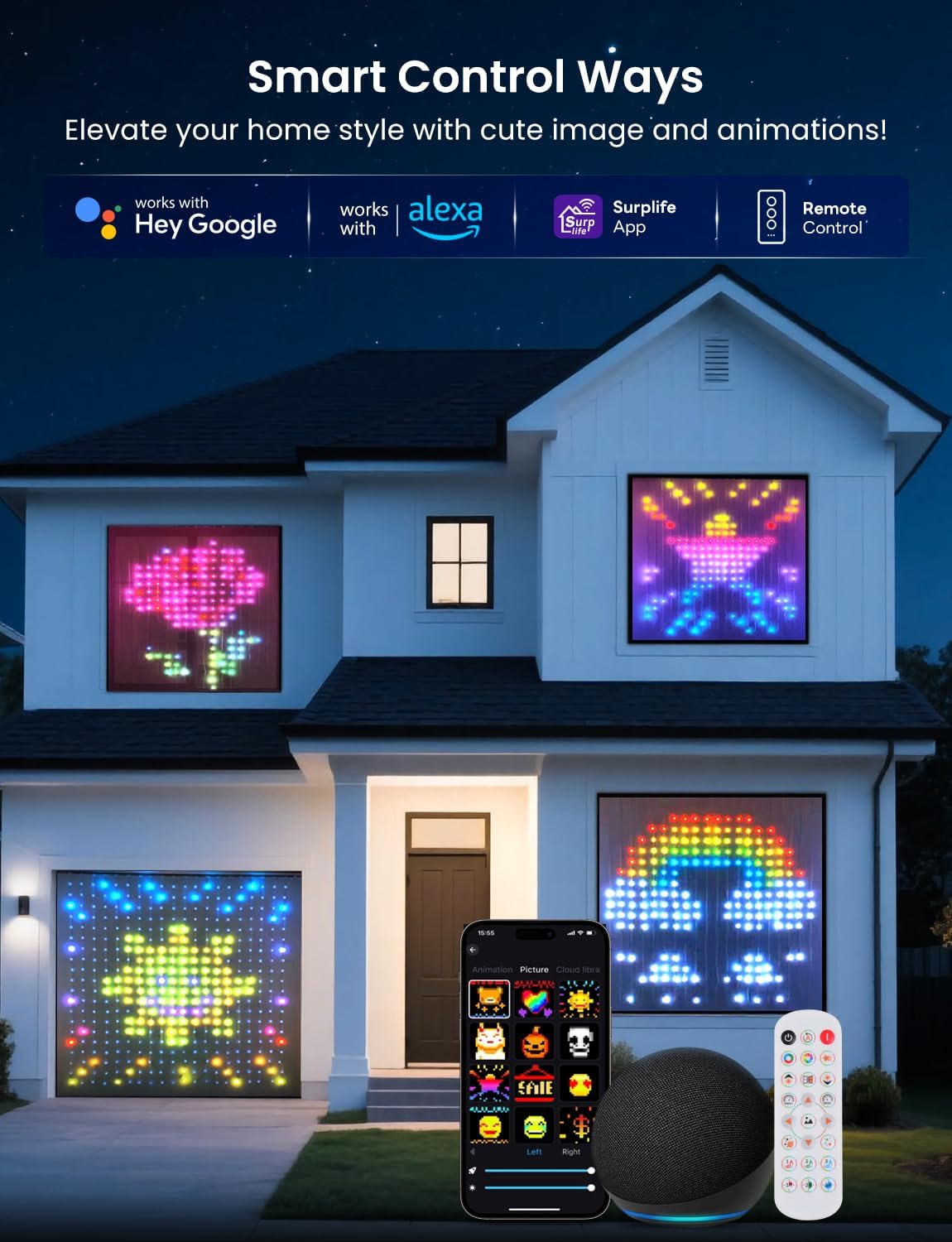
Image: A house exterior showcasing the LED curtain lights displaying different patterns in windows, highlighting smart control options via app, Alexa, and Google Home.
Features
- High-Density LED Display: 400 RGB+IC lamp beads provide high-definition pattern display with 16 million color options.
- Dynamic DIY Customization: Offers hundreds of pre-set pictures, animations, and dynamic effects. Users can customize text, patterns, and animations.
- Smart Control: Control via 'Surplife' app, remote control, and voice commands through Alexa and Google Assistant.
- Music Synchronization: Three music sync modes (import, phone mic, device mic) allow lights to react to music and ambient sounds.
- Easy Installation: Designed for simple setup with hooks for curtain rods or adhesive clips for direct wall mounting.

Image: A visual comparison showing the density and size of the 400-LED curtain light (6.6 x 6.6 ft) displaying vibrant patterns.
Specifications
| Attribute | Value |
|---|---|
| Brand | SUNLINKCO |
| Model Number | LSCL400D |
| Color | RGB+IC (Multicolor) |
| Number of Light Sources | 400 |
| Indoor/Outdoor Usage | Indoor |
| Power Source | AC/DC |
| Special Feature | Corded |
| Controller Type | App Control |
| Material | Polycarbonate |
| Item Weight | 1.69 Pounds |
| Item Length | 6.56 Feet |
| Package Dimensions | 8.27 x 8.15 x 3.5 inches |
Maintenance
- Cleaning: Gently wipe the LED strings with a soft, dry cloth. Do not use liquid cleaners or immerse the product in water.
- Storage: When not in use, carefully coil the LED strings and store them in a cool, dry place away from direct sunlight and extreme temperatures.
- Handling: Avoid pulling or tugging on the LED strings excessively to prevent damage to the wiring or individual lights.
Troubleshooting
- Lights Not Turning On:
- Ensure the power adapter is securely plugged into both the outlet and the control box.
- Check if the power outlet is functional.
- Verify the remote control or app is sending the 'On' command.
- App Connectivity Issues:
- Make sure Bluetooth is enabled on your smartphone.
- Ensure your phone is within close proximity to the LED curtain light.
- Restart the 'Surplife' app and try pairing again.
- Unplug the LED curtain light for 10 seconds and plug it back in to reset.
- Remote Control Not Working:
- Ensure there are no obstructions between the remote and the control box.
- Check and replace the remote control battery if necessary.
- Inconsistent Light Patterns/Colors:
- Ensure all light strings are hanging freely and are not tangled.
- If using adhesive clips, ensure they are firmly attached and not allowing strings to sag.
Warranty & Support
For warranty information, technical support, or any product-related inquiries, please refer to the contact details provided in the 'Thank You' card included in your product packaging or visit the official SUNLINKCO website. Keep your purchase receipt for warranty claims.