
Treocho NT2403-BK
Treocho NT2403-BK LED Nightstand Instruction Manual
Model: NT2403-BK
Introduction
Thank you for choosing the Treocho NT2403-BK LED Nightstand. This manual provides detailed instructions for assembly, operation, maintenance, and troubleshooting to ensure safe and efficient use of your new nightstand. Please read this manual thoroughly before assembly and retain it for future reference.
Safety Information
Your safety is paramount. Please observe the following precautions:
- Always follow the assembly instructions carefully.
- Keep small parts away from children during assembly.
- Be cautious of sharp edges and pinch points during handling and assembly.
- Do not overload the nightstand. Refer to specifications for weight limits.
- Always secure the nightstand to the wall using the provided anti-tip kit to prevent tipping, especially in households with children or pets.
- Ensure all electrical connections for the charging station and LED lights are properly secured and not damaged.
- Do not expose the nightstand to excessive moisture or direct sunlight.
Setup and Assembly
The Treocho NT2403-BK nightstand requires assembly. All necessary panels are numbered, and clear instructions are provided in the included assembly guide. A screwdriver is recommended for assembly.
Assembly Steps Overview:
- Unpack all components and verify against the parts list in the assembly guide.
- Assemble the main frame of the nightstand according to the numbered panels.
- Install the drawer slides and assemble the three drawers.
- Integrate the charging station module and LED light strips as directed.
- Attach the hidden storage compartment mechanism.
- Secure the nightstand to the wall using the anti-tip hardware.

Image: Product dimensions for assembly planning.
Video: Overview of the Treocho LED Nightstand's features, including the charging station and LED lights. This video provides a visual guide to the assembled product.
Operating Instructions
Charging Station
The nightstand is equipped with a 3-in-1 charging station. Locate the AC outlets, USB port, and Type-C port on the side of the unit. Connect your devices to the appropriate ports for charging. Ensure the nightstand's power cord is plugged into a functional wall outlet.
- AC Outlets: 120V/12A
- USB Port: 5V/2A
- Type-C Port: 5V/2A

Image: Detail of the integrated charging station with AC, USB, and Type-C ports.
LED Lighting System
The integrated RGB LED lights can be controlled via the included remote control. The lights offer multiple brightness modes and color options to customize your ambiance.
- Power On/Off: Press the power button on the remote.
- Color Selection: Use the color buttons to choose from 20 available colors.
- Brightness Adjustment: Use the brightness up/down buttons to select from 6 brightness levels.
- Dynamic Modes: Select from various dynamic lighting effects.

Image: The nightstand with its customizable RGB LED lighting and remote control.
Hidden Storage Space
The top section of the nightstand features a hidden, lockable compartment for secure storage of valuables. To access, slide the top panel. To lock, ensure the panel is closed and engage the locking mechanism.

Image: The hidden, lockable storage compartment with the top panel open.
Drawer Operation
The nightstand includes three smooth-gliding drawers for organizing personal items. Pull the handles to open and push to close. Avoid forcing drawers if they encounter resistance.

Image: The three storage drawers in an open position.
Maintenance
To maintain the appearance and functionality of your Treocho nightstand, follow these simple care instructions:
- Cleaning: Wipe the glossy surfaces with a soft, damp cloth. Avoid abrasive cleaners or harsh chemicals that may damage the finish.
- Dusting: Regularly dust with a dry, soft cloth.
- Spills: Immediately wipe up any spills to prevent staining or damage to the engineered wood.
- Drawer Slides: Periodically check drawer slides for smooth operation. If needed, a small amount of silicone lubricant can be applied.
- Electrical Components: Ensure all cables and connections for the charging station and LED lights are secure and free from damage. Do not attempt to repair electrical components yourself.
Troubleshooting
If you encounter issues with your nightstand, refer to the following common problems and solutions:
| Problem | Possible Cause | Solution |
|---|---|---|
| Charging station not working. | Power cord unplugged; outlet malfunction; device cable issue. | Ensure the nightstand is plugged into a live outlet. Test the outlet with another device. Try a different charging cable for your device. |
| LED lights not turning on. | Power cord unplugged; remote control battery dead; LED strip connection loose. | Verify the nightstand is powered. Replace the remote control battery. Check the LED strip connections as per assembly guide. |
| Drawers are stiff or not closing properly. | Overloaded drawer; obstruction in the slide; misaligned drawer. | Reduce the weight in the drawer. Check for any objects blocking the slides. Re-align the drawer on its slides. |
| Hidden compartment not locking. | Panel not fully closed; locking mechanism obstruction. | Ensure the top panel is completely closed and flush. Check for any debris or obstruction preventing the lock from engaging. |
If the problem persists, please contact customer support.
Specifications
| Feature | Detail |
|---|---|
| Brand | Treocho |
| Model Number | NT2403-BK |
| Product Dimensions (D x W x H) | 15.75"D x 16.93"W x 26.77"H (40cm D x 43cm W x 68cm H) |
| Item Weight | 36.4 Pounds (16.5 kg) |
| Frame Material | Engineered Wood |
| Color | Black |
| Furniture Finish | Glossy |
| Number of Drawers | 3 |
| Charging Station | 2 AC Outlets (120V/12A), 1 USB Port (5V/2A), 1 Type-C Port (5V/2A) |
| Power Cord Length | 4.9 Feet |
| LED Lights | RGB, Remote Controlled, 20 Colors, 6 Brightness Modes |
| Assembly Required | Yes |
| Tools Recommended for Assembly | Screwdriver |
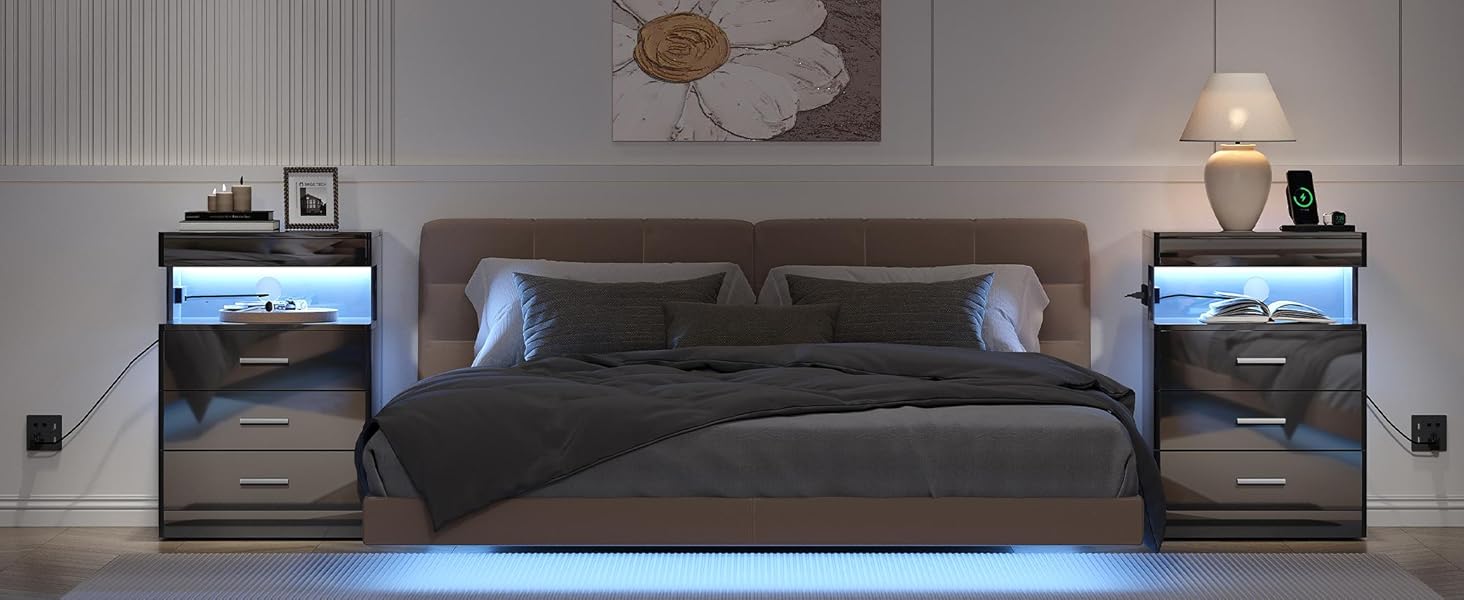
Image: Visual summary of key product specifications.
Warranty and Support
For warranty information or technical support, please refer to the contact details provided with your purchase documentation or visit the official Treocho website. Please have your model number (NT2403-BK) and purchase date available when contacting support.
Manufacturer: Treocho
Brand Store: Treocho Store on Amazon
Ask a question about this manual
Ask about setup, troubleshooting, compatibility, parts, safety, or missing instructions. Manuals+ will review the question and use this page’s manual context to help answer it.