
1. Overview
The VAIO SX-R Laptop is a high-performance portable computer designed for productivity and creative tasks. It features an Intel Core Ultra 7 processor, a vibrant 14-inch WQXGA touch display, ample memory, and fast storage, all running on Windows 11 Pro.

Figure 1: VAIO SX-R Laptop, open view.
2. Product Features
- Intel Core Ultra 7 Processor: Equipped with 16 cores and AI-enhanced performance for speed and intelligent task management.
- 14" WQXGA Touch Display (2560x1600): High-resolution screen with wide color gamut and touch capability.
- 32GB LPDDR5 RAM: Provides superior multitasking capabilities with instant responsiveness.
- 1TB PCIe NVMe SSD: Offers massive storage with ultra-fast read/write speeds.
- Windows 11 Pro: Includes enterprise-grade security and productivity features.
- IR Camera & Fingerprint Reader: Enhanced security and convenient login options.
- Carbon Fiber Chassis: Lightweight and durable construction.
- Water Resistant Keyboard: Designed to withstand accidental spills.

Figure 2: Key features of the VAIO SX-R Laptop.
3. Physical Overview
3.1 Ports and Connectors
The VAIO SX-R Laptop is equipped with a variety of ports for connectivity. Refer to the diagram below for port locations and types.
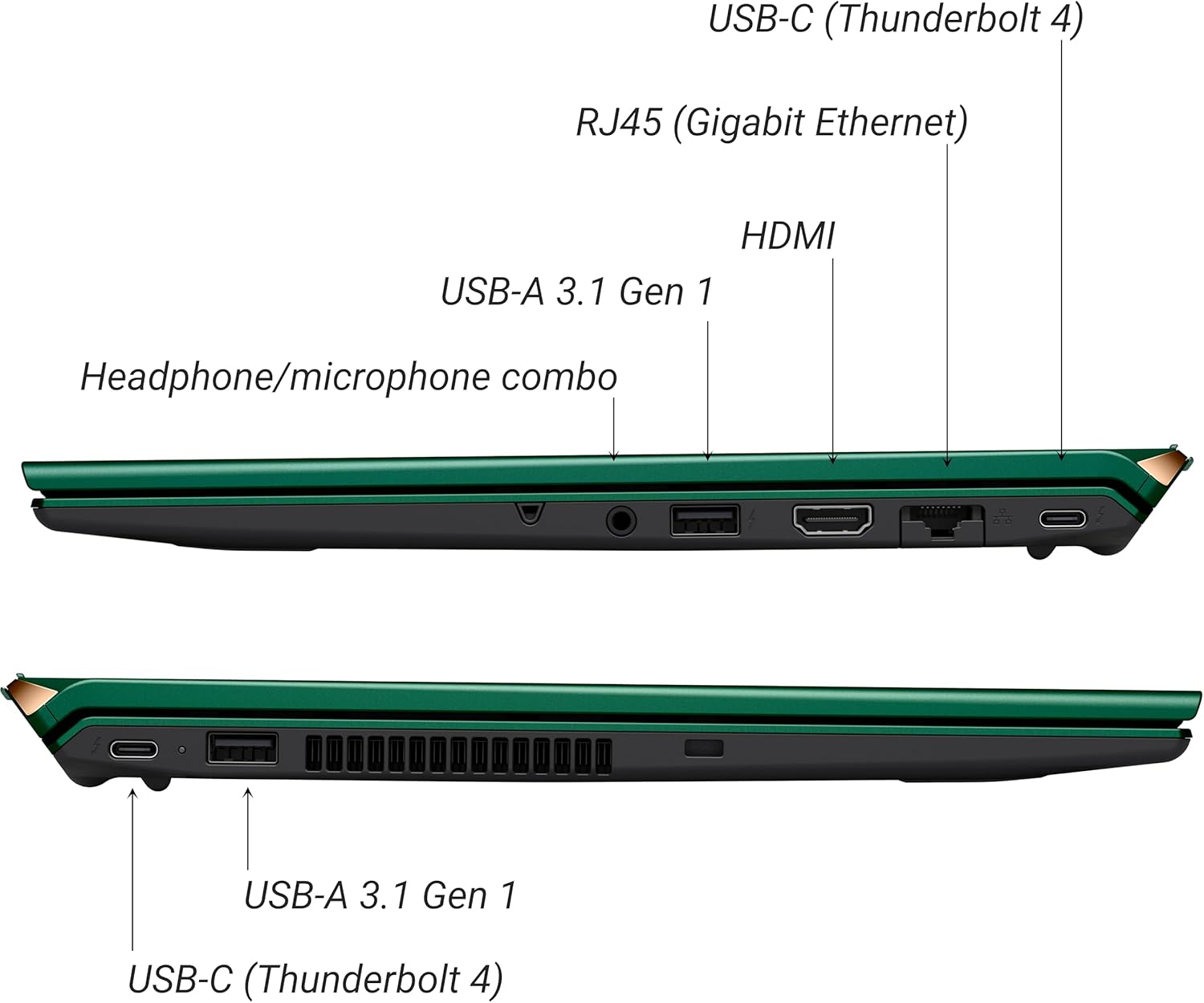
Figure 3: Side view of VAIO SX-R Laptop ports.
- USB-C (Thunderbolt 4): High-speed data transfer, video output, and power delivery.
- RJ45 (Gigabit Ethernet): For wired network connections.
- HDMI: For connecting to external displays.
- USB-A 3.1 Gen 1: For connecting USB devices.
- Headphone/Microphone Combo Jack: For audio input and output.
3.2 Keyboard and Touchpad
The laptop features a full-sized keyboard and a responsive touchpad for navigation and input.

Figure 4: Keyboard and touchpad layout.
4. Setup
4.1 Initial Power-On
- Unpack the VAIO SX-R laptop and all accessories.
- Connect the power adapter to the laptop's charging port and then to a power outlet.
- Open the laptop lid. The system may power on automatically or you may need to press the power button located on the top right of the keyboard.
- Follow the on-screen instructions to complete the Windows 11 Pro setup, including language, region, network connection, and user account creation.
4.2 Connecting to a Network
- Wi-Fi: During initial setup or via Windows settings, select your preferred Wi-Fi network and enter the password. The VAIO SX-R supports Wi-Fi 7 for fast and stable wireless connectivity.
- Wired (Ethernet): Connect an Ethernet cable from your router or modem to the RJ45 port on the laptop.
5. Operating Instructions
5.1 Power On/Off and Sleep
- Power On: Open the lid or press the power button.
- Shut Down: Click the Start button, then Power > Shut down.
- Sleep: Close the lid or click the Start button, then Power > Sleep.
5.2 Using the Touch Display
The 14-inch WQXGA display supports touch input. You can interact with the screen using gestures similar to a tablet or smartphone.
5.3 IR Camera and Fingerprint Reader
For enhanced security and convenience, the laptop includes an IR camera for Windows Hello face recognition and a fingerprint reader.
- Windows Hello Face Recognition: Configure this feature in Windows Settings > Accounts > Sign-in options. The IR camera will recognize your face to unlock the device.
- Fingerprint Reader: Set up your fingerprint in Windows Settings > Accounts > Sign-in options for quick and secure access.
6. Maintenance
6.1 General Care
- Keep the laptop in a clean, dry environment.
- Avoid exposing the laptop to extreme temperatures or direct sunlight.
- Do not place heavy objects on the laptop.
6.2 Cleaning
- Use a soft, lint-free cloth to clean the screen and exterior.
- For stubborn smudges, lightly dampen the cloth with water or a screen-cleaning solution.
- Do not spray cleaners directly onto the laptop.
6.3 Battery Care
- To prolong battery life, avoid fully discharging the battery frequently.
- Store the laptop with a partial charge (around 50%) if not used for extended periods.
7. Troubleshooting
7.1 Power Issues
- Laptop not turning on: Ensure the power adapter is securely connected and the outlet is functional. Try a different outlet.
- Battery not charging: Check the power adapter and cable for damage. Ensure the charging port is clean.
7.2 Display Problems
- No display: Connect an external monitor to check if the issue is with the laptop's internal display.
- Touchscreen unresponsive: Restart the laptop. Ensure display drivers are up to date.
7.3 Connectivity Issues
- No Wi-Fi connection: Check if Wi-Fi is enabled in Windows settings. Restart your router. Update wireless drivers.
- Bluetooth not working: Ensure Bluetooth is enabled and your device is discoverable.
8. Specifications
| Feature | Detail |
|---|---|
| Model Name | VAIO SX-R (VJS4R1X0811G) |
| Processor | Intel Core Ultra 7 (16-Core, AI-Boosted) |
| Operating System | Windows 11 Pro |
| Display | 14 Inches WQXGA Touch (2560x1600) |
| RAM | 32GB LPDDR5 |
| Storage | 1TB PCIe NVMe SSD |
| Graphics | Integrated Intel Arc Graphics |
| Wireless Connectivity | 802.11ax (Wi-Fi 7), Bluetooth |
| Ports | USB-C (Thunderbolt 4) x2, USB-A 3.1 Gen 1 x3, HDMI x1, RJ45 (Gigabit Ethernet) x1, Headphone/microphone combo x1 |
| Camera | IR Camera (Windows Hello compatible) |
| Security Features | Fingerprint Reader, IR Camera |
| Battery Life | Up to 10 Hours (Average) |
| Weight | 3.1 pounds |
| Dimensions (LxWxH) | 14.2 x 15 x 3.3 inches |
9. Durability and Testing
VAIO laptops are engineered with Japanese precision and undergo rigorous quality control to ensure reliability and performance. This includes various tests to withstand daily use.
9.1 Manufacturing and Quality Assurance
Video 1: VAIO Manufacturing and Durability Testing. This video demonstrates the quality control processes and durability tests performed on VAIO laptops, including keystroke testing, dust testing, LCD screen pressure testing, and opening/closure testing.
9.2 Key Durability Features
- Water Resistant Keyboard: The keyboard is designed to resist damage from accidental liquid spills.
- Screen Durability: The display undergoes pressure testing to ensure resilience.
- Drop Test: The laptop is tested to withstand drops from up to 3 feet.

Figure 5: Water resistant keyboard testing.

Figure 6: Screen durability test in progress.

Figure 7: 3-foot drop test for VAIO laptops.
10. Warranty and Support
Your VAIO SX-R Laptop comes with a standard manufacturer's warranty. For specific warranty terms and conditions, please refer to the documentation included with your product or visit the official VAIO support website.
For technical support, troubleshooting assistance, or service requests, please contact VAIO customer support. Information regarding support channels can be found on the VAIO website or in your product's packaging.
Protection plans are available for purchase to extend coverage beyond the standard warranty. Options include 2-Year and 4-Year Protection Plans, as well as a Complete Protect + Norton 360 monthly plan.