Introduction
This manual provides essential information for setting up, operating, maintaining, and troubleshooting your MSI Aegis ZS2 Gaming Desktop PC. Please read this guide thoroughly before using your new system to ensure optimal performance and longevity.
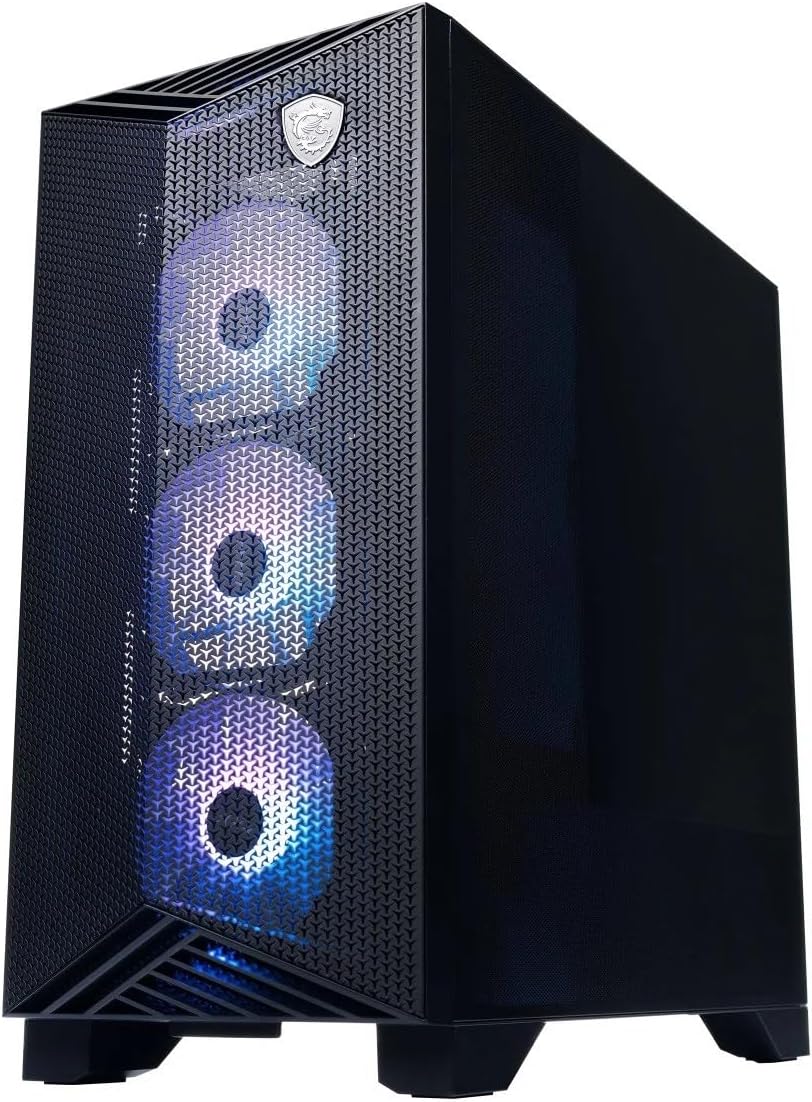
Image: Front view of the MSI Aegis ZS2 Gaming Desktop PC, showcasing its design and illuminated front fans.
Package Contents
Verify that all items listed below are included in your product package. If any items are missing or damaged, contact your retailer.
- MSI Aegis ZS2 Gaming Desktop PC
- MSI Gaming Keyboard
- MSI Gaming Mouse
- Power Cable
- Wi-Fi Antennas (2x)
- Quick Start Guide / Documentation

Image: Included accessories: MSI Gaming Keyboard, MSI Gaming Mouse, power cable, and two Wi-Fi antennas.
Setup
Follow these steps to set up your MSI Aegis ZS2 Gaming Desktop PC.
- Unpack the PC: Carefully remove the PC and all accessories from the packaging. Remove any protective films or internal foam inserts from the PC chassis.
- Install Wi-Fi Antennas: Locate the two antenna connectors on the rear I/O panel. Screw the provided Wi-Fi antennas onto these connectors. Ensure they are securely fastened for optimal wireless performance.
- Connect Peripherals:
- Monitor: Connect your monitor to the NVIDIA GeForce RTX 5080 graphics card's display outputs (HDMI or DisplayPort) on the rear of the PC.
- Keyboard and Mouse: Connect the MSI Gaming Keyboard and Mouse to any available USB ports on the rear or front of the PC.
- Other USB Devices: Connect any other USB devices (e.g., external hard drives, headsets) as needed.
- Connect Power: Plug the power cable into the power supply unit (PSU) on the rear of the PC, then plug the other end into a grounded electrical outlet.
- Power On: Press the power button located on the top front panel of the PC. The system will boot up, and you will be guided through the initial Windows 11 Home setup process.

Image: Rear I/O panel of the MSI Aegis ZS2, highlighting display outputs, USB ports, and Wi-Fi antenna connectors.

Image: Close-up of the top front panel, showing USB 3.2 Gen 1 Type-A, USB 3.2 Gen 1 Type-C, audio jacks, and the power button.
Operating Your PC
Your MSI Aegis ZS2 comes pre-installed with Windows 11 Home, offering a user-friendly interface for gaming and productivity.
Front Panel Overview
- Power Button: Located on the top panel, used to turn the PC on or off.
- USB 3.2 Gen 1 Type-A (5 Gbps): For connecting standard USB devices.
- USB 3.2 Gen 1 Type-C (5 Gbps): Reversible connector for modern USB-C devices.
- Mic-in Jack: For connecting a microphone.
- Headphone-out Jack: For connecting headphones or speakers.
Rear Panel Overview
- Video Ports (NVIDIA GeForce RTX 5080): 1x HDMI-out, 3x DisplayPort-out for connecting multiple monitors.
- USB 2.0 Ports (4x): For connecting peripherals like keyboards, mice, or printers.
- USB 3.2 Gen 1 Type-A (5 Gbps) (2x): For faster data transfer with compatible devices.
- USB 3.2 Gen 2 Type-A (10 Gbps) (2x): For high-speed data transfer.
- LAN Port (Realtek 8111H 1 Gigabit LAN): For wired network connection.
- Wi-Fi 7 Antennas: For wireless network connectivity.
- Audio Jacks: For connecting speakers, headphones, or microphones.
Maintenance
Regular maintenance helps ensure the longevity and optimal performance of your PC.
- Cleaning:
- Periodically clean dust from the exterior of the chassis using a soft, dry cloth.
- Use compressed air to clear dust from fan vents and internal components (e.g., GPU, CPU cooler fins) at least every 3-6 months. Ensure the PC is powered off and unplugged before cleaning.
- Software Updates:
- Keep your Windows 11 Home operating system updated through Windows Update.
- Regularly update graphics drivers (NVIDIA GeForce) and motherboard drivers from the MSI website to ensure compatibility and performance.
- Liquid Cooling: The 360mm liquid cooler is a closed-loop system and generally requires no maintenance. However, ensure adequate airflow around the PC to prevent overheating.

Image: Side view of the MSI Aegis ZS2, showing the internal layout including the liquid cooler and graphics card, useful for understanding airflow and cleaning access.
Troubleshooting
This section addresses common issues you might encounter.
- PC Does Not Power On:
- Ensure the power cable is securely connected to both the PC and the electrical outlet.
- Verify the power switch on the PSU (located on the rear of the PC) is in the 'ON' position.
- Try a different power outlet.
- No Display on Monitor:
- Check that the monitor's power cable is connected and the monitor is turned on.
- Ensure the video cable (HDMI/DisplayPort) is securely connected to both the graphics card on the PC and the monitor.
- Confirm the monitor's input source is set correctly.
- No Internet Connection:
- Wired: Check the Ethernet cable connection to the LAN port and your router/modem.
- Wireless: Ensure Wi-Fi antennas are properly installed. Check Wi-Fi settings in Windows 11 and confirm you are connected to the correct network. Restart your router/modem if necessary.
- System Performance Issues:
- Ensure all drivers (especially graphics drivers) are up to date.
- Check for background applications consuming excessive resources using Task Manager (Ctrl+Shift+Esc).
- Ensure the PC has adequate ventilation and is not overheating.
Specifications
Detailed technical specifications for the MSI Aegis ZS2 Gaming Desktop PC.
| Component | Specification |
|---|---|
| Operating System | Windows 11 Home (64-bit) |
| CPU | AMD Ryzen 9 9900X (12-Core, 5.6 GHz) |
| Motherboard | PRO B650-VC WIFI III |
| CPU Cooler | 360mm Liquid Cooler |
| Graphics Card (VGA) | NVIDIA GeForce RTX 5080 16GB GDDR6 |
| Memory (RAM) | 32GB DDR5 6000MHz RAM |
| Storage | 2TB M.2 NVMe SSD |
| LAN | Realtek 8111H 1 Gigabit LAN |
| Wireless Communication | Wi-Fi 7, Bluetooth 5.3 |
| Audio | 1x Mic-in, 1x Headphone-out (Front) |
| Video Ports | 1x HDMI-out, 3x DP-out |
| USB Front | 1x USB 3.2 Gen 1 Type A (5 Gbps), 1x USB 3.2 Gen 1 Type C (5 Gbps) |
| USB Rear | 4x USB 2.0, 2x USB 3.2 Gen1 Type A (5 Gbps), 2x USB 3.2 Gen2 Type A (10 Gbps) |
| Power Supply | 850W (80+ Gold Efficiency) |
| Color | Black |
| Dimensions (H x W x D) | 19.4'' x 9.1'' x 19'' |
| Weight | 36.9 lbs |
Warranty and Support
For warranty information and technical support, please refer to the documentation included with your PC or visit the official MSI website. You can typically find support resources, driver downloads, and contact information for customer service there.
MSI Official Website: www.msi.com


