
1. Introduction
Thank you for choosing the Aroepurt Adventure Phone Case for your INOI A35 device. This product is designed to provide robust protection and enhanced functionality for your smartphone. It includes a durable phone case with an integrated ring support and a high-quality tempered glass screen protector. This manual will guide you through the installation, features, and maintenance of your new product.
2. Package Contents
Please verify that all items are present in your package:
- 1 x Aroepurt INOI A35 Adventure Phone Case (IMDH-HS)
- 1 x Tempered Glass Screen Protector

Image 1: Contents of the package including the phone case, ring holder, and screen protector.
3. Product Features
- Dual-Layer Protection: Constructed with a hard PC back panel and a soft silicone frame for comprehensive impact absorption.
- Shock Airbags: Four-corner shock airbags provide enhanced drop protection.
- Integrated Ring Support: Features an adhesive metal finger ring that rotates 360 degrees for secure grip and stand functionality.
- Magnetic Car Mount Compatibility: The ring support is designed to be compatible with magnetic car mounts (mount not included).
- IMD Laser Style: The back panel features a multi-layered design with a clear, scratch-resistant surface, a special process layer, an ultra-HD pattern layer, and a solid PC base, creating colorful reflective light effects.
- Screen and Camera Protection: The case design ensures that the edges are raised above the screen and camera lenses for flat surface protection.
- Tempered Glass Screen Protector: Included 9H high hardness, shatterproof, 99.9% super transparency, perfect adhesion, case-friendly, and anti-fingerprint screen protector.

Image 2: Illustration of the shockproof design with reinforced corners and shock airbags.
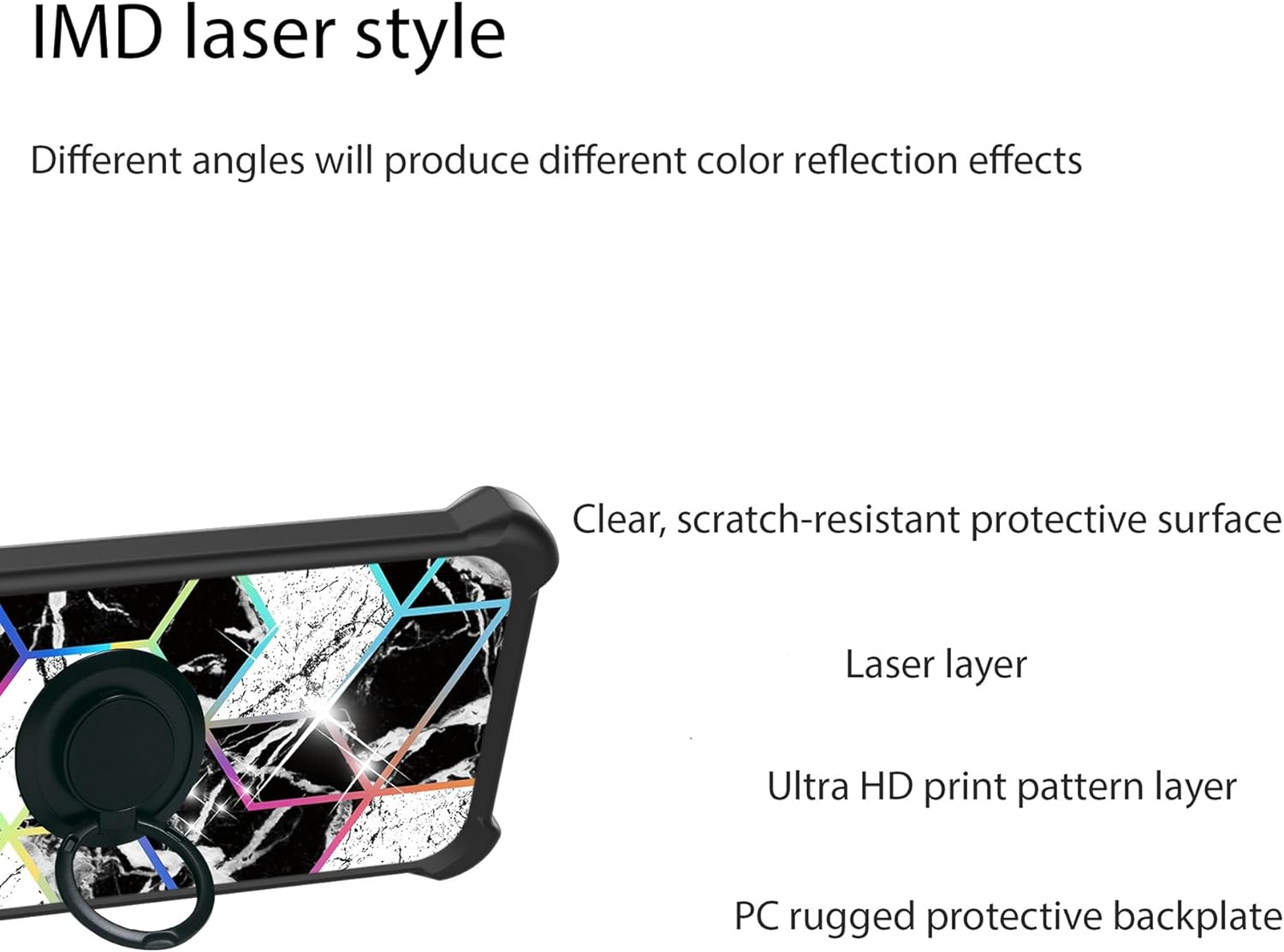
Image 3: Diagram showing the multi-layered construction of the case back, including the laser layer and scratch-resistant surface.
4. Setup and Installation
4.1. Installing the Phone Case
- Ensure your INOI A35 phone is clean and free of dust or debris.
- Align the phone with the soft silicone frame of the case.
- Gently press the phone into the case, starting from one corner and working your way around, ensuring all edges are securely seated within the frame.
- Verify that all ports, buttons, and camera cutouts align correctly with your phone.
4.2. Installing the Tempered Glass Screen Protector
For optimal adhesion and clarity, perform this installation in a clean, dust-free environment.
- Clean the Screen: Use the provided cleaning wipes (if included, otherwise a microfiber cloth and screen cleaner) to thoroughly clean your phone's screen. Ensure no dust, smudges, or fingerprints remain.
- Dry the Screen: Use a dry cloth to remove any moisture.
- Remove Protective Film: Carefully peel off the protective film from the adhesive side of the tempered glass screen protector. Avoid touching the adhesive surface.
- Align the Protector: Carefully align the screen protector with your phone's screen, paying attention to the edges, camera, and speaker cutouts.
- Apply: Once aligned, gently lower the screen protector onto the screen. It will begin to adhere automatically.
- Remove Bubbles: If any bubbles appear, gently push them towards the edges of the screen using a soft cloth or a squeegee (if provided).

Image 4: Overview of the tempered glass screen protector's properties, including 9H hardness and anti-fingerprint coating.

Image 5: Demonstration of the screen protector's scratch-proof capabilities.
5. Operating Instructions
5.1. Using the Ring Support
The integrated ring support provides multiple functionalities:
- Secure Grip: Insert your finger through the ring for a more secure hold on your phone, reducing the risk of accidental drops.
- Kickstand Function: Rotate the ring to a desired angle and prop your phone up on a flat surface for hands-free viewing in landscape or portrait mode. The ring rotates 360 degrees.

Image 6: Illustration of how the ring support enables easier one-hand operation and reach across the screen.
5.2. Magnetic Car Mount Compatibility
The metal plate within the ring support allows your phone to attach to compatible magnetic car mounts (sold separately). Simply place the back of the case onto a magnetic car mount for secure hands-free navigation or media viewing while driving.
Note: This case does not support wireless charging due to the metal ring component. Please remove the case or use a wired charger for charging your device.

Image 7: Depiction of the case's compatibility with magnetic car mounts, showing the ring rotating 180 and 360 degrees.
6. Maintenance
To maintain the appearance and functionality of your phone case and screen protector:
- Cleaning the Case: Wipe the case regularly with a soft, damp cloth to remove dust and smudges. Avoid harsh chemicals or abrasive materials.
- Cleaning the Screen Protector: Use a microfiber cloth to gently wipe the screen protector. For stubborn smudges, a small amount of screen cleaner can be applied to the cloth, not directly to the screen.
- Avoid Extreme Conditions: Do not expose the product to extreme temperatures or direct sunlight for prolonged periods, as this may affect material integrity.
7. Troubleshooting
- Case Fit Issues: If the case does not fit properly, ensure you have the correct model (INOI A35) and that the phone is fully seated within the silicone frame.
- Screen Protector Bubbles: Small bubbles after installation can often be pushed out to the edges with a soft cloth. If large bubbles persist, it may indicate dust trapped underneath, requiring re-installation after thorough cleaning.
- Ring Looseness: The ring is designed for smooth rotation. If it becomes excessively loose or stiff, check for any obstructions.
8. Specifications
| Product Dimensions | 0.39 x 0.39 x 0.39 inches |
| Item Weight | 2.46 ounces |
| Material | Hard PC, Soft Silicone, Tempered Glass |
| Special Features | 360 Rotating Ring, Car Magnetic Fixing, Stylish Design, Shock Airbags |
| Form Factor | Basic Case |
| Compatibility | INOI A35 |
9. Warranty and Support
This product is covered by a standard return policy. For specific warranty details or technical support, please refer to the seller's information on the purchase platform or contact Aroepurt customer service directly. Keep your purchase receipt as proof of purchase.
For further assistance, please visit the Aroepurt support page or contact your retailer.