
ONEMIX desk lamp
ONEMIX 42" LED Desk Lamp
Instruction Manual
Model: desk lamp
Introduction
This manual provides detailed instructions for the setup, operation, maintenance, and troubleshooting of your ONEMIX 42" LED Desk Lamp. Please read this manual thoroughly before using the product to ensure safe and optimal performance.

Image: The ONEMIX 42" LED Desk Lamp positioned above two computer monitors, providing wide and even illumination to the workspace. A remote control is visible in the foreground.
Safety Information
To reduce the risk of fire, electric shock, or injury, please observe the following safety precautions:
- Ensure the power adapter is connected to a suitable power outlet (120V AC).
- Do not expose the lamp to water or excessive moisture.
- Do not attempt to disassemble or modify the lamp. Refer all servicing to qualified personnel.
- Keep the lamp away from heat sources and direct sunlight.
- Ensure the clamp is securely fastened to a stable surface before use.
- Avoid looking directly into the LED light source for extended periods.
Package Contents
Verify that all components are present in the package:
- 42" LED Light Bar
- Dual-Segment Support Arm
- Upgraded Metal Clamp
- 24W Power Adapter (with 150cm Cable)
- IR Remote Control (2xAAA Batteries Not Included)
- Screw Kit with Screwdriver
- User Manual

Image: A visual representation of all items included in the product package, including the LED light bar, support arm, clamp, power adapter, remote control, screw kit, screwdriver, and user manual.
Setup Instructions
Follow these steps to assemble and install your desk lamp:
- Secure the Clamp: Attach the heavy-duty metal clamp to the edge of your desk. Ensure the desk thickness is within 2.75 inches (70mm). Tighten the screw until the clamp is firmly secured without wobble. The anti-slip pads should prevent surface damage.
- Assemble the Pole: Connect the upper and lower sections of the dual-segment support arm by screwing them together.
- Insert the Stand: Slide the assembled support arm into the clamp slot. Ensure it is fully seated and stable.
- Attach the Lamp: Insert the 42-inch LED light bar into the top of the support arm and connect the necessary cables.
- Connect Power: Plug the 24W power adapter into the lamp and then into a wall outlet.

Image: A visual guide illustrating the four main steps for setting up the desk lamp: securing the clamp, assembling the pole, inserting the stand, and attaching the lamp.
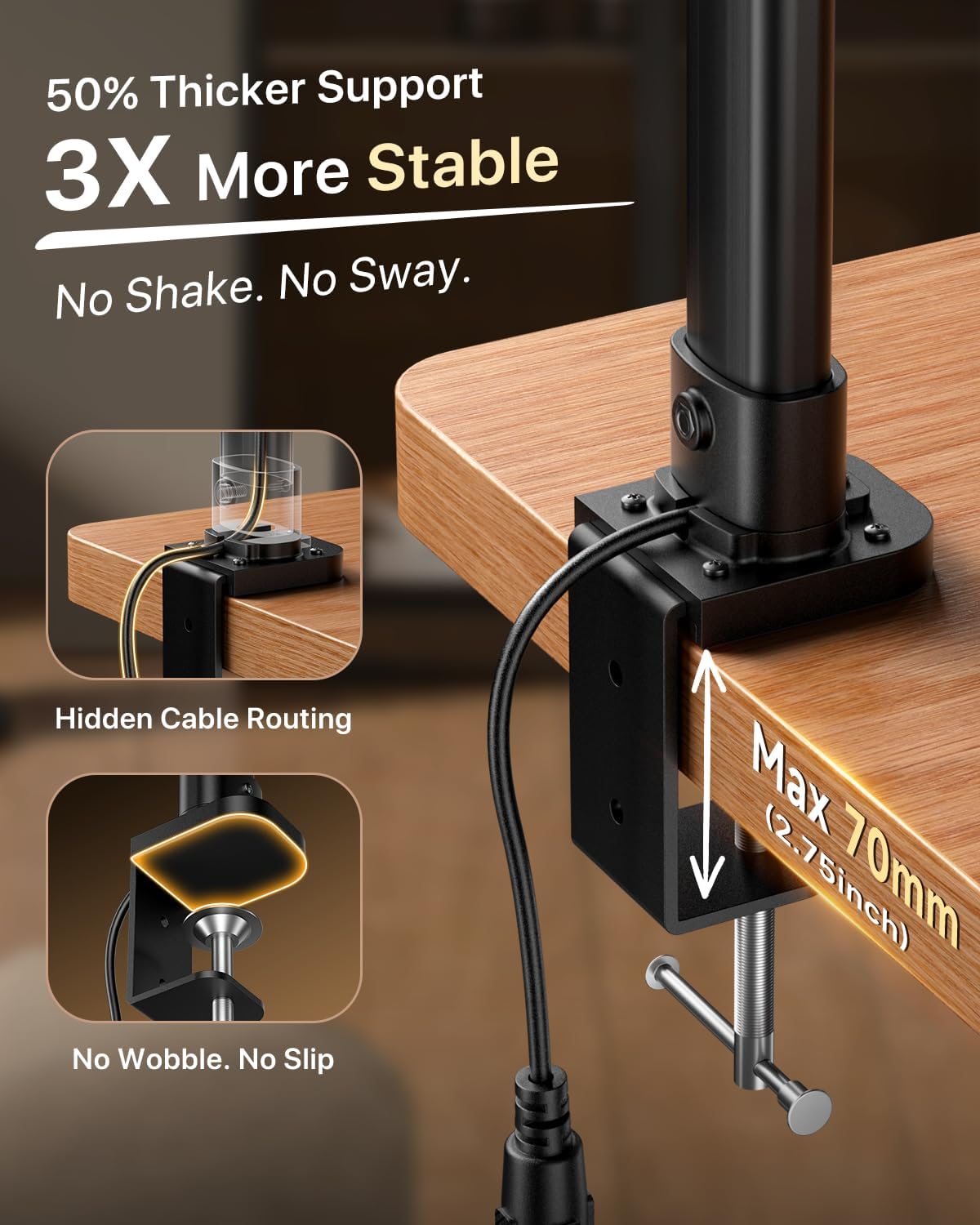
Image: Detail of the robust metal clamp, highlighting its stability and maximum desk thickness compatibility (2.75 inches).
Operating Instructions
Your ONEMIX desk lamp offers versatile control options and adjustable lighting features.
Adjusting the Lamp Position
The lamp features a flexible gooseneck and a 4-segment architect-style light bar with independently rotatable panels. This allows for precise light placement and coverage.
- Gooseneck Adjustment: The 27.7-inch support arm can bend up to 180° to direct light as needed.
- Panel Rotation: Each of the four light bar segments can be rotated 180° horizontally and 90° vertically. Fold segments inward for focused lighting or swivel them outward for wide illumination (up to 80 inches of workspace).

Image: Illustrations demonstrating the lamp's flexibility, including the adjustable gooseneck and the 180° and 90° rotation capabilities of the light bar segments.
Control Options: Remote & Buttons
Control your lamp using either the built-in physical buttons on the lamp head or the included wireless remote control.
- On/Off Button: Press to turn the lamp on or off.
- Brightness Adjustment: Use the '+' and '-' buttons to cycle through 5 brightness levels (20%, 40%, 60%, 80%, 100%).
- Color Temperature Adjustment: Use the 'Color Temp' button to cycle through 5 color temperatures (3200K, 3500K, 4000K, 5000K, 6500K).
- Timer Settings: Set an auto-off timer for 1, 2, or 4 hours.
- Preset Modes: The remote control offers 6 preset modes for quick access: Work, Game, Study, Relax, Night, and Mother & Baby.

Image: A user operating the lamp with the wireless remote, alongside a close-up of the lamp's physical control buttons for brightness, color temperature, and power.

Image: A grid displaying the 5 available color temperatures (from warm 3200K to cool 6500K) and 5 brightness levels (20% to 100%), illustrating the lamp's 25 customizable light settings.

Image: A visual indicating the timer settings (1H, 2H, 4H) for the lamp's auto-off function, designed for convenience during relaxation or sleep.
Maintenance
Proper maintenance ensures the longevity and optimal performance of your lamp.
- Cleaning: Disconnect the power before cleaning. Use a soft, dry cloth to wipe the lamp. Do not use abrasive cleaners, solvents, or harsh chemicals, as these may damage the finish or electronic components.
- Storage: If storing the lamp for an extended period, disconnect it from power and store it in a cool, dry place, away from direct sunlight and extreme temperatures.
- Lamp Life: The LED light source has an estimated lifespan of 65,000 hours. LEDs are not user-replaceable.
Troubleshooting
If you encounter issues with your ONEMIX desk lamp, refer to the following common problems and solutions:
| Problem | Possible Cause | Solution |
|---|---|---|
| Lamp does not turn on. | No power connection; Power adapter faulty; Lamp faulty. | Check if the power adapter is securely plugged into the lamp and the wall outlet. Try a different outlet. Contact customer support if the issue persists. |
| Remote control not working. | Batteries are dead or incorrectly inserted; Remote not aimed at lamp; Obstruction between remote and lamp. | Replace the 2xAAA batteries in the remote. Ensure the remote is aimed directly at the lamp's receiver. Remove any obstructions. |
| Light flickers or is unstable. | Loose connection; Power supply issue. | Check all connections. Ensure the power adapter is functioning correctly. If flickering persists, contact customer support. |
| Cannot adjust brightness or color temperature. | Control buttons/remote malfunction; Lamp in a fixed mode. | Ensure you are using the correct buttons/remote functions. If using the remote, check batteries. Try resetting the lamp by unplugging and replugging it. |
Specifications
Key technical specifications for the ONEMIX 42" LED Desk Lamp:
| Feature | Detail |
|---|---|
| Model Name | Desk Lamp |
| Product Dimensions | 42"D x 1.57"W x 27.7"H |
| Item Weight | 2.45 Pounds |
| Lamp Type | Desk Lamp |
| Light Source Type | LED |
| Brightness | 1800 Lumen |
| Color Temperature | 3200K-6500K (Adjustable) |
| Wattage | 24 watts |
| Voltage | 120 Volts (AC) |
| Control Method | Push Button, Remote Control |
| Mounting Type | Tabletop (Clamp On) |
| Max Clamp Thickness | 2.75 inches (70mm) |
| Material | Acrylonitrile Butadiene Styrene, Metal |
| Special Features | Adjustable Arm, Adjustable Color Temperature, Dimmable, Memory Function, Timer |
| LED Lifespan | 65,000 hours |
Warranty and Support
ONEMIX stands behind the quality of its products. Your 42" LED Desk Lamp comes with the following:
- 1-Year Warranty: Covers manufacturing defects and malfunctions under normal use.
- 90-Day Refund Policy: For returns or refunds within 90 days of purchase.
- 24/7 Support: Dedicated customer support team available to assist you.
- Lifetime Customer Care: Ongoing support for the product.
For any inquiries or assistance, please contact our support team:
Email: lamp-service@outlook.com

Image: A graphic summarizing the warranty and support benefits, including 1-year coverage, 24/7 support, 90-day money back guarantee, and lifetime customer care, along with the support email address.
Ask a question about this manual
Ask about setup, troubleshooting, compatibility, parts, safety, or missing instructions. Manuals+ will review the question and use this page’s manual context to help answer it.