
1. Overview
The Doriteney RG557 is a retro handheld game console designed for an immersive gaming experience. It features a 5.48-inch AMOLED HD screen, runs on Android 14, and is powered by a MediaTek Dimensity 8300 octa-core processor. This console supports various gaming modes, including Android gaming, cloud gaming, and streaming, with responsive controls and customizable RGB lighting.
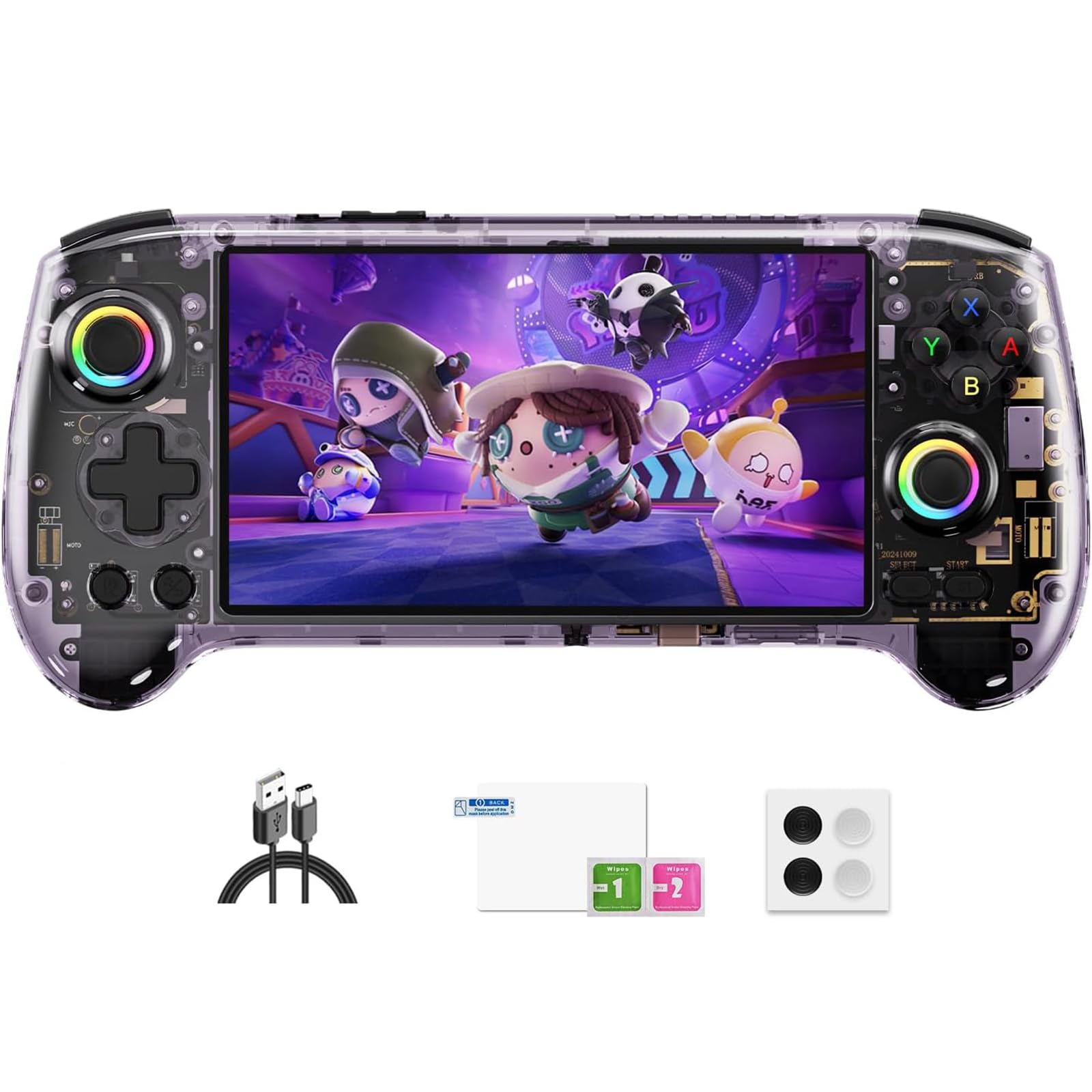
Image: The Doriteney RG557 Retro Handheld Game Console in Transparent Purple.
2. What's in the Box
Verify that all items are present in the package:
- RG557 Handheld Game Console
- User Manual
- Type-C Charging Cable
- Screen Protector
- Joystick Caps (x4)
3. Product Features
3.1 Powerful Dimensity 8300 Performance
The RG557 is equipped with a 4nm MediaTek Dimensity 8300 octa-core processor and Mali-G615 MC6 GPU. It features 12GB LPDDR5X RAM and 256GB UFS 4.0 storage, ensuring fast loading times, responsive controls, and smooth performance across Android games, cloud gaming, streaming, and compatible emulation software.

Image: Diagram illustrating the Dimensity 8300 processor and its core specifications including CPU, GPU, RAM, and storage.
3.2 5.48-inch Full HD AMOLED Display
Experience vibrant colors, deep blacks, and sharp details on the 5.48-inch AMOLED touchscreen. The fully laminated 1920 × 1080 display provides an immersive visual experience for all content, maintaining portability.

Image: Close-up of the 5.48-inch AMOLED display, highlighting its full lamination technology and 1920x1080 resolution for clear, vibrant visuals.
3.3 Android 14 Operating System and Connectivity
Running on Android 14, the console supports a wide range of compatible Android applications, game streaming platforms, and user-installed software. Wi-Fi 6E and Bluetooth 5.3 ensure stable connections for online gaming, wireless controllers, headphones, and other compatible accessories.
3.4 RGB Joysticks and Responsive Controls
The RG557 features customizable 16-million-color RGB joystick lighting with various effects. Capacitive joysticks, Hall-effect triggers, a six-axis gyroscope, and vibration feedback provide precise control and an enhanced gaming experience. Dual speakers deliver high-fidelity audio, and active fan cooling maintains stable performance during extended sessions.

Image: Depiction of the RG557's control layout, emphasizing capacitive joysticks, Hall triggers, ergonomic grip, six-axis gyroscope, and vibration motors.

Image: View of the RG557's internal active cooling system, showing the turbo cooling fan and pure copper heat sink for efficient temperature management.
3.5 Battery and Storage
The console is powered by a 5500mAh battery, offering up to 8 hours of use depending on settings. It supports 27W fast charging via USB-C. Storage can be expanded up to 2TB using a microSD card. Note: No preinstalled games or game memory card are included. Users must download and install their own legally obtained games and software.

Image: Features of the RG557 including RGB joystick lights, Android 14, Wi-Fi 6E, Bluetooth 5.3, OTA updates, and the 5500mAh battery with 27W fast charging.
3.6 Multiple Entertainment Modes
The RG557 supports various entertainment modes to meet diverse gaming needs, including handheld play, screen casting to a TV for a larger display, online multiplayer via Wi-Fi, and streaming AAA games.

Image: Visual representation of the RG557's multiple entertainment modes: Handheld Mode, Screen Casting, Online Multiplayer, and Game Streaming.
3.7 Product Video
Video: An official product video showcasing the RG557 Handheld Video Game Console and its features.
4. Setup Guide
4.1 Initial Charging
- Connect the provided Type-C charging cable to the console's USB-C port.
- Plug the other end of the cable into a compatible 27W (or higher) USB power adapter (not included).
- Allow the console to charge fully before first use. The charging indicator will change when complete.
4.2 Power On/Off
- To Power On: Press and hold the Power button located on the top edge of the console until the screen illuminates.
- To Power Off: Press and hold the Power button until the power options appear on screen, then select 'Power Off'. A short press will put the device to sleep.
4.3 MicroSD Card Installation
- Locate the microSD card slot on the console.
- Insert a compatible microSDXC card (up to 2TB) into the slot until it clicks into place. Ensure the card is inserted in the correct orientation.
- The console will detect the card. You may need to format it via the Android settings if it's a new card or not recognized.
4.4 Network Connection (Wi-Fi & Bluetooth)
- Wi-Fi: Go to Android Settings > Network & internet > Wi-Fi. Select your desired network and enter the password.
- Bluetooth: Go to Android Settings > Connected devices > Connection preferences > Bluetooth. Turn Bluetooth on and pair with compatible devices like controllers or headphones.
4.5 Game and Application Installation
Since no games are pre-installed, you will need to download and install your own. This can be done via the Google Play Store (if available and configured) or by sideloading APK files from trusted sources onto your microSD card and installing them through a file manager.
5. Operating Instructions
5.1 Basic Navigation
- Use the left joystick or D-pad to navigate menus and select options.
- The A/B/X/Y buttons typically function as confirmation and cancellation buttons, similar to standard game controllers.
- The touchscreen allows for direct interaction with the Android interface.
5.2 Gaming
- Launch your desired game or emulator from the home screen or app drawer.
- Utilize the joysticks, D-pad, A/B/X/Y buttons, shoulder buttons (L1/L2, R1/R2), and Hall-effect triggers for in-game control.
- The six-axis gyroscope provides motion control in supported games.
5.3 Connecting to an External Display
The RG557 supports 1080p video output via its USB-C port.
- Connect a compatible USB-C to HDMI adapter (not included) to the console's USB-C port.
- Connect an HDMI cable from the adapter to your TV or monitor.
- The console's display should automatically mirror or extend to the external screen. Adjust display settings in Android if necessary.
5.4 Customizing RGB Lighting
Access the RGB lighting settings through the console's system menu or a dedicated application (if provided) to change colors, effects (breathing, rainbow, marquee, chasing), and brightness of the joysticks.
6. Maintenance
6.1 Cleaning the Device
- Use a soft, dry, lint-free cloth to clean the console's exterior.
- For the screen, use a screen-specific cleaning solution and a microfiber cloth.
- Avoid using harsh chemicals, abrasives, or excessive moisture.
6.2 Battery Care
- To prolong battery life, avoid fully discharging the battery frequently.
- Store the device in a cool, dry place when not in use for extended periods.
- Use only the recommended charging cable and a compatible power adapter.
6.3 Software Updates
The RG557 supports OTA (Over-The-Air) online updates. Regularly check for and install updates to ensure optimal performance, new features, and security enhancements. You can usually find this option in the Android system settings under 'System' or 'About device'.
7. Troubleshooting
| Issue | Possible Solution |
|---|---|
| Device does not power on | Ensure the battery is charged. Connect to a power source and try again. If unresponsive, perform a hard reset by holding the power button for 10-15 seconds. |
| Games are not loading or performing poorly | Verify that games are correctly installed on the microSD card. Check emulator settings for performance optimization. Ensure the console's software is up to date. Close background applications. |
| Wi-Fi or Bluetooth connectivity issues | Restart the console and your router/Bluetooth device. Ensure you are within range. Check Android network settings for correct configuration. |
| Screen is unresponsive or frozen | Perform a soft reset by holding the power button until the device restarts. If persistent, a factory reset may be necessary (Note: This will erase all data). |
| RGB lighting not working | Check the RGB lighting settings in the system menu. Ensure the feature is enabled and configured as desired. |
8. Specifications
| Feature | Detail |
|---|---|
| Brand | Doriteney |
| Model Name | RG557 |
| Processor | MediaTek Dimensity 8300 Octa-core (4nm) |
| GPU | Mali-G615 MC6 |
| RAM | 12GB LPDDR5X |
| Storage | 256GB UFS 4.0 |
| Display | 5.48-inch AMOLED, 1920 x 1080 resolution, Full Lamination Touchscreen |
| Operating System | Android 14 |
| Connectivity | Wi-Fi 6E, Bluetooth 5.3, USB-C |
| Battery | 5500mAh, 27W Fast Charging |
| Video Output | USB-C 1080p |
| Expandable Storage | microSDXC up to 2TB |
| Controls | Capacitive Joysticks, Hall-effect Triggers, Six-axis Gyroscope, Vibration Feedback, RGB Lighting |
| Audio | Dual Speakers |
9. Warranty and Support
9.1 Warranty Information
The Doriteney RG557 Retro Handheld Game Console comes with a standard manufacturer's warranty. Please refer to the warranty card included in your package or contact the retailer for specific terms and conditions regarding warranty coverage and duration.
9.2 Customer Support
For technical assistance, troubleshooting, or any product-related inquiries, please contact Doriteney customer support. Contact information can typically be found on the official Doriteney website or through your purchase platform.