
Juboos 8206B
Juboos Kids Digital Sports Watch Model 8206B User Manual
Comprehensive guide for your Juboos Kids Digital Sports Watch, featuring 7-color LED light, waterproof design, alarm, and stopwatch functions.
Introduction
Thank you for choosing the Juboos Kids Digital Sports Watch Model 8206B. This manual provides detailed instructions for setting up, operating, and maintaining your watch to ensure optimal performance and longevity. Please read this manual carefully before use.

Image: The Juboos Kids Digital Sports Watch in Navy Blue, highlighting its digital display and the range of 7 LED backlight colors available.
Key Features
- Multifunctional Display: Time, week, calendar, alarm clock, timer, 12/24H format, hourly chime.
- 7-Color LED Backlight: Long press the LIGHT button for 3 seconds to switch between dark blue, green, red, yellow, light blue, purple, and white monochrome LED lights, and a color flash mode.
- 3ATM Water Resistance: Suitable for daily use like handwashing and rain. Not recommended for bathing or swimming. Avoid pressing buttons underwater.
- Durable Materials: Resin strap, acrylic mirror, stainless steel clasp and back cover.
- Japanese Movement & Battery: Ensures reliable timekeeping.
- Ideal for Ages 5-18: Designed for boys, girls, toddlers, and youth.

Image: Visual representation of the watch's multi-functional capabilities, including LED light, 30M water resistance, alarm, stopwatch, calendar, 12/24H display, hourly chime, and anti-shock design.
Setup Guide
Follow these steps to set up your Juboos Digital Sports Watch.
Button Functions:
- LIGHT (L): Activates backlight.
- MODE (M): Cycles through display modes (Time, Alarm, Stopwatch).
- START (S): Adjusts settings, starts/stops stopwatch.
- RESET (R): Shifts selection during setting, resets stopwatch.
1. Setting Time:
- Press the MODE (M) button 3 times to enter time setting mode. The minutes will flash.
- Press the RESET (R) button to select minutes.
- Press the START (S) button to adjust the minute value.
- Press the RESET (R) button to select hours.
- Press the START (S) button to adjust the hour value.
- Press the MODE (M) button once to return to time display mode.
2. Setting Date:
- Press the MODE (M) button 3 times to enter time setting mode.
- Press the RESET (R) button 3 times. The day will flash.
- Press the START (S) button to set the day.
- Press the RESET (R) button 1 time. The month will flash.
- Press the START (S) button to set the month.
- Press the MODE (M) button once to return to time display mode.
3. Setting Week:
- Press the MODE (M) button 3 times to enter time setting mode.
- Press the RESET (R) button 5 times. The week will flash.
- Press the START (S) button to set the week (Monday-MO, Tuesday-TU, Wednesday-WE, Thursday-TH, Friday-FR, Saturday-SA, Sunday-SU).
- Press the MODE (M) button once to return to time display mode.
4. Setting Alarm:
- Press the MODE (M) button 2 times to enter alarm setting mode. The hour will flash.
- Press the START (S) button to set the alarm hour.
- Press the RESET (R) button 1 time. The minutes will flash.
- Press the START (S) button to set the alarm minute.
- Press the MODE (M) button once to return to time display mode.
5. Setting 12/24 Hour Format:
- Press the MODE (M) button 3 times to enter time setting mode.
- Press the RESET (R) button 2 times. The hour will flash.
- Press the START (S) button to cycle through 'A' (AM), 'P' (PM) for 12-hour format, or 'H' for 24-hour format.
- Press the MODE (M) button once to return to time display mode.
Video: A detailed demonstration of how to set the time, date, week, alarm, and 12/24 hour format on the Juboos Kids Digital Sports Watch.
Operating Instructions
1. Using the Stopwatch:
- Press the MODE (M) button once to enter stopwatch mode.
- Press the START (S) button to begin timing.
- Press the START (S) button again to pause the stopwatch.
- Press the RESET (R) button to reset the stopwatch to zero.
- Press the MODE (M) button once to return to time display mode.
2. Turning On/Off Hourly Chime:
- To turn on the hourly chime: In time display mode, press and hold the RESET (R) button. Observe the day of the week letters (SMTWTFS). If they are surrounded by a box, the hourly chime is on.
- To turn off the hourly chime: In time display mode, press and hold the RESET (R) button. If the box surrounding the day of the week letters disappears, the hourly chime is off.
3. Activating 7-Color LED Backlight:
- Press the LIGHT (L) button to illuminate the display.
- Long press the LIGHT (L) button for 3 seconds to cycle through the 7 monochrome LED colors (dark blue, green, red, yellow, light blue, purple, white) and a color flash mode.

Image: Illustration demonstrating the location of the LED Light button and how pressing it activates the 7-color backlight feature on the watch.
Care and Maintenance
- Water Resistance: The watch is 3ATM water resistant, suitable for splashes, handwashing, and rain. It is not recommended for bathing, showering, or swimming. Do not press any buttons while the watch is submerged in water.
- Cleaning: Wipe the watch with a soft, dry cloth. For stubborn dirt, a slightly damp cloth can be used, followed by immediate drying. Avoid harsh chemicals or abrasive cleaners.
- Storage: Store the watch in a cool, dry place away from direct sunlight and extreme temperatures.
- Battery: The watch uses a nonstandard battery (included). Battery replacement should ideally be performed by a qualified technician to maintain water resistance.

Image: Visual guide to the watch's 30M water resistance, showing it can withstand handwashing, rain, and sweat, with a caution against high temperatures.
Video: A demonstration of the Juboos Kids Digital Sports Watch's waterproof capabilities, showing it being rinsed under running water.
Troubleshooting
| Problem | Possible Cause | Solution |
|---|---|---|
| Display is blank or dim. | Low or dead battery. | Replace the battery. |
| Time is incorrect. | Time not set properly. | Refer to "Setting Time" instructions in the Setup Guide. |
| Alarm does not sound. | Alarm not set or turned off. | Refer to "Setting Alarm" instructions in the Setup Guide. Ensure alarm is activated. |
| Hourly chime is not working. | Hourly chime is turned off. | Refer to "Turning On/Off Hourly Chime" instructions in the Operating Instructions. |
| Water inside the watch. | Buttons pressed underwater or exposed to high-pressure water. | Stop using the watch immediately and seek professional repair to prevent further damage. |
Specifications
- Model Number: 8206B
- Brand: Juboos
- Dial Size: 1.26 inches (3.2 cm)
- Case Thickness: 0.55 inches (1.4 cm)
- Strap Length: 8.86 inches (22.5 cm)
- Watch Bandwidth: 0.55 inches (1.4 cm)
- Watch Weight: 0.051 lbs (23 g)
- Minimum Fit Wrist: 5.31 inches (13.5 cm)
- Maximum Fit Wrist: 7.48 inches (19 cm)
- Water Resistance: 3ATM (30 meters / 98 feet)
- Clasp Type: Buckle
- Battery: 1 Nonstandard Battery (included)
- Movement: Japanese Imported Movement
- Materials: Resin strap, acrylic mirror, stainless steel clasp and back cover
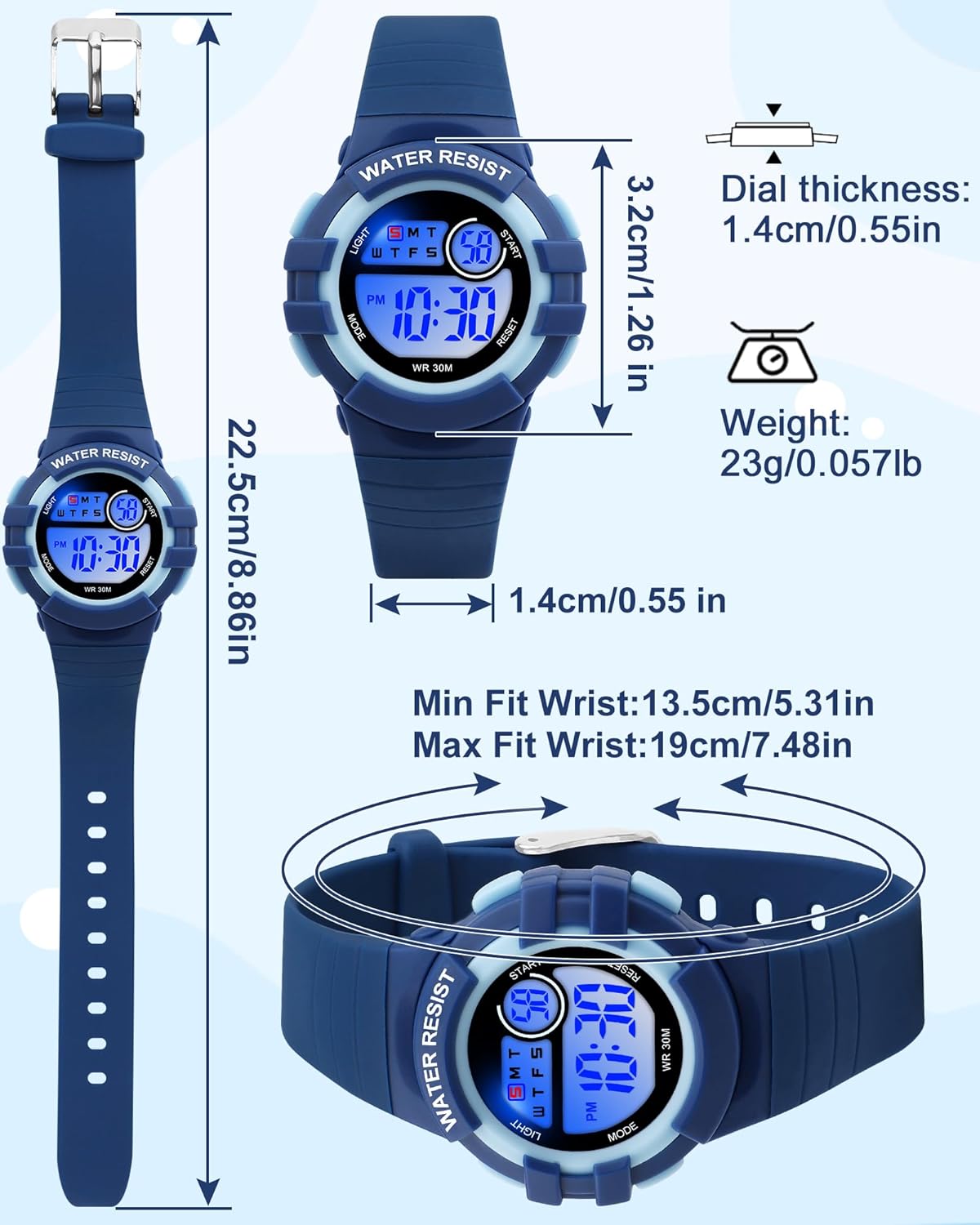
Image: Detailed measurements of the watch, including dial size, case thickness, strap length, bandwidth, and overall weight, along with minimum and maximum wrist fit.
Warranty and Support
For any questions, concerns, or support needs regarding your Juboos Kids Digital Sports Watch, please contact the manufacturer or your retailer. Keep your purchase receipt for warranty claims.
Manufacturer: Juboos
Return Policy: This product is eligible for refund/replacement for 2026 days from the date of purchase. Please refer to your retailer's specific return policy for details.
Ask a question about this manual
Ask about setup, troubleshooting, compatibility, parts, safety, or missing instructions. Manuals+ will review the question and use this page’s manual context to help answer it.