
VOWNER VOWNER-489
VOWNER Vanity Desk with Lighted Mirror and 9 Drawers (Model VOWNER-489)
Instruction Manual
1. Introduction
Thank you for choosing the VOWNER Vanity Desk with Lighted Mirror. This manual provides essential information for the safe assembly, operation, and maintenance of your new vanity desk. Please read all instructions carefully before beginning assembly and retain this manual for future reference.
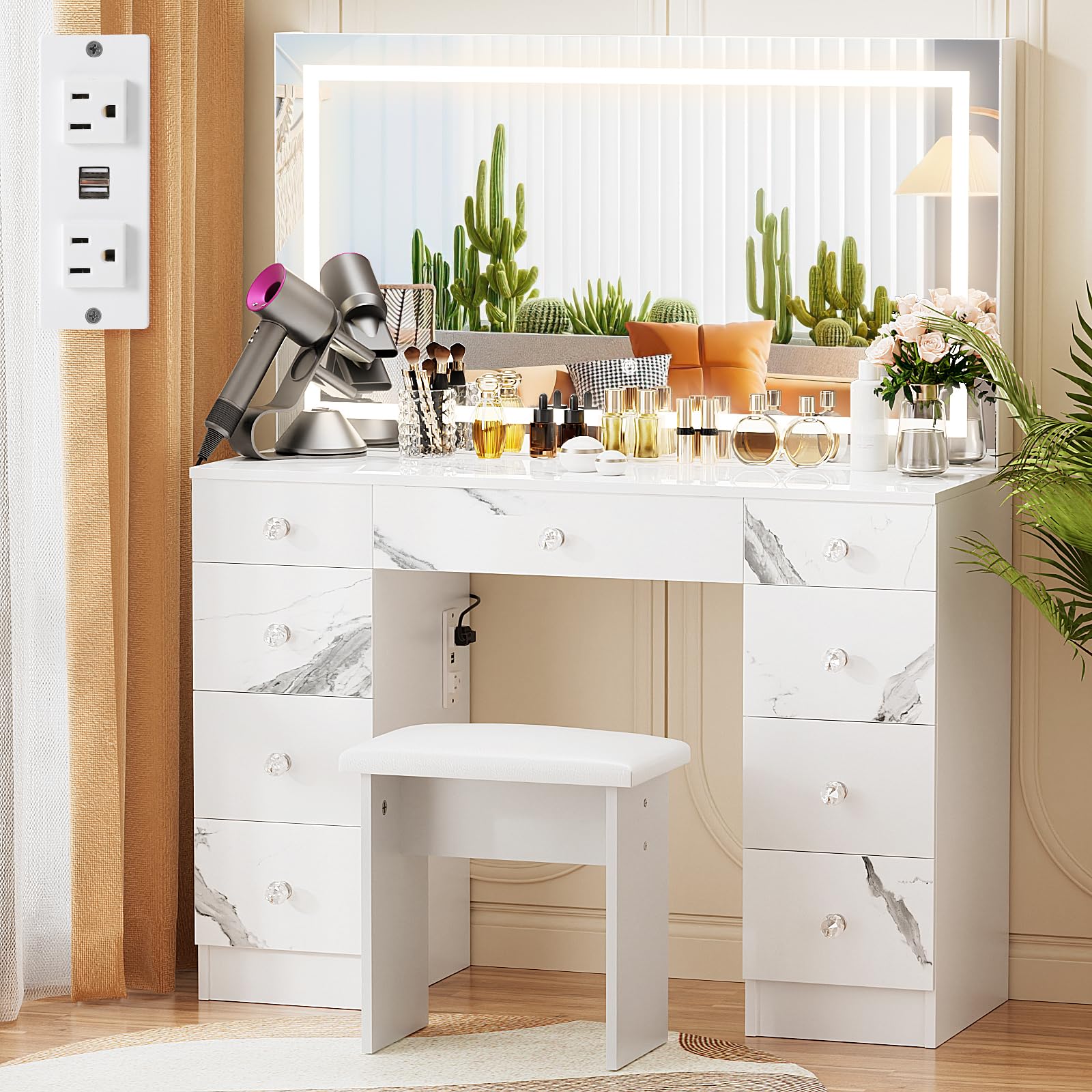
Figure 1: VOWNER Vanity Desk with Lighted Mirror and Stool.
2. Safety Information
- Always secure the vanity to the wall using the provided anti-tip kit to prevent tip-over, especially in households with children or pets.
- Keep small children and pets away from the vanity during assembly and use to prevent injury from sharp edges and small parts.
- Ensure all screws and fasteners are securely tightened before use. Periodically check and re-tighten as necessary.
- Do not overload drawers or place excessively heavy items on the desktop.
- Keep electrical components (mirror lights, power outlet) away from water and moisture.
- Use only the specified power supply for the lighted mirror and power outlet.
- Avoid direct sunlight exposure to prevent material degradation and color fading.
3. Product Overview
The VOWNER Vanity Desk is designed for convenience and organization, featuring a large lighted mirror, ample storage, and integrated power solutions.
Key Features:
- Lighted Mirror: Features 3 color temperature modes (Warm White, Natural White, Cool White) and adjustable brightness for optimal lighting during makeup application.
- Ample Storage: Equipped with 9 large drawers and a spacious desktop to store beauty essentials, accessories, and more.
- Convenient Power Outlet: Includes 2 standard plug sockets and 2 USB ports for charging devices and powering beauty tools.
- Soft Cushioned Stool: A comfortable stool is included for extended use.

Figure 2: Top-down view highlighting the vanity's storage capacity and desktop space.
Video 1: Overview of the VOWNER Glass Top Vanity with Lighted Mirror and 9 Drawers, demonstrating its features and storage.
4. Setup and Assembly
Assembly is required for this vanity desk. Please follow the included detailed assembly instructions provided in the packaging. An Allen Key and Screwdriver are recommended for assembly.
General Assembly Steps:
- Unpack all components and verify against the parts list.
- Assemble the main frame of the vanity desk according to the diagrams.
- Install the drawer slides and assemble the drawers.
- Attach the lighted mirror to the main desk unit.
- Install the power outlet unit.
- Assemble the cushioned stool.
- Secure the vanity to the wall using the anti-tip hardware.

Figure 3: Example of vanity desk components during assembly.
5. Operating Instructions
5.1 Lighted Mirror Operation
The mirror features touch controls for lighting adjustments.
- Power On/Off: Touch the power icon on the mirror to turn the lights on or off.
- Change Color Mode: With the lights on, tap the mode icon to cycle through 3 color temperatures: Warm White, Natural White, and Cool White.
- Adjust Brightness: Press and hold the power icon to smoothly adjust the brightness level. Release when desired brightness is reached.

Figure 4: Demonstrating the 3 color light options and adjustable brightness of the mirror.
5.2 Using the Built-in Power Outlet
The vanity includes a built-in power strip for convenience.
- Plug the vanity's main power cord into a standard wall outlet.
- Use the 2 standard AC outlets (125V/12A) for hair dryers, curling irons, or other beauty devices.
- Use the 2 USB ports (5V/2A) to charge mobile phones or other USB-powered devices.

Figure 5: Detail of the built-in power strip for charging and powering devices.
6. Maintenance
- Cleaning: Wipe the vanity surfaces with a dry, soft cloth. Avoid abrasive cleaners or harsh chemicals that may damage the finish.
- Mirror Cleaning: Use a glass cleaner specifically designed for mirrors and a soft, lint-free cloth.
- Drawer Slides: Periodically check drawer slides for smooth operation. If needed, apply a small amount of silicone lubricant.
- Fasteners: Regularly inspect all screws and fasteners to ensure they remain tight. Re-tighten if any looseness is detected.
- Spills: Clean up spills immediately to prevent staining, especially on the marble engineered wood desktop. The product is not stain resistant.
7. Troubleshooting
| Problem | Possible Cause | Solution |
|---|---|---|
| Mirror lights not turning on. | Power cord not plugged in; power outlet not receiving power; faulty connection. | Ensure the vanity's power cord is securely plugged into a working wall outlet. Check the wall outlet with another device. Verify all internal connections are secure. |
| Lights are dim or flickering. | Brightness setting too low; unstable power supply. | Adjust the brightness using the touch control. Ensure the power supply is stable. |
| Drawers are difficult to open/close. | Overloaded drawer; misaligned drawer slides; debris in slides. | Reduce the weight in the drawer. Check for proper alignment of drawer slides. Clean any debris from the slides and apply lubricant if necessary. |
| Power outlets not working. | Vanity not powered; tripped circuit breaker. | Ensure the vanity's main power cord is plugged in. Check your home's circuit breaker. |
8. Specifications
| Brand: | VOWNER |
| Model Name: | VOWNER-489 |
| Item Dimensions (L x W x H): | 43 x 16 x 54 inches |
| Item Weight: | 109 Pounds |
| Color: | Marble |
| Frame Material: | Engineered Wood |
| Top Material Type: | Marble Engineered Wood |
| Number of Drawers: | 9 |
| Included Components: | Vanity desk, vanity stool, power outlet |
| Required Assembly: | Yes |
| Product Care Instructions: | Wipe with Dry Cloth |

Figure 6: Dimensional diagram of the VOWNER Vanity Desk.
9. Warranty Information
Specific warranty details for the VOWNER Vanity Desk are not provided in the product information. For warranty inquiries, please contact VOWNER customer support directly.
10. Customer Support
For further assistance, questions, or to report any issues with your VOWNER Vanity Desk, please contact VOWNER customer support through their official channels. You may find contact information on the VOWNER Brand Store on Amazon or through the contact details provided in your product packaging.
Ask a question about this manual
Ask about setup, troubleshooting, compatibility, parts, safety, or missing instructions. Manuals+ will review the question and use this page’s manual context to help answer it.