1. Introduction
Thank you for choosing the WAYXIN T2 Motorcycle Intercom Headset. This device is designed to provide clear and reliable communication for motorcyclists, featuring advanced Bluetooth 5.1 technology, DSP/CVC noise cancellation, and IP67 waterproof rating. Please read this manual thoroughly before use to ensure proper operation and maintenance.
Package Contents:
- WAYXIN T2 Host Unit (2 units for 2pcs variant)
- Type-C Speaker (2 sets)
- Soft Wire Microphone (2 units)
- Boom Microphone (2 units)
- Metal Clip Base (2 units)
- Adhesive Base (2 units)
- Velcro Pads (for speakers and microphone)
- Type-C Charging Cable (2 units)
- User Manual
- Packaging Box

Image: The WAYXIN T2 intercom units with included speakers and microphones, ready for installation.

Image: A visual representation of all items included in the package, such as the host unit, speakers, microphones, mounting bases, charging cable, and user manual.
2. Safety Information
Always prioritize safety while riding. Do not operate the device in a way that distracts you from the road. Ensure the device is securely mounted and does not obstruct your vision or movement. Keep the volume at a level that allows you to hear ambient traffic sounds.
- Do not attempt to disassemble or modify the device.
- Keep the device away from extreme temperatures and open flames.
- Ensure the charging port is dry before connecting the charging cable.
- Dispose of the battery according to local regulations.
3. Setup and Installation
The WAYXIN T2 intercom can be installed in most motorcycle helmets. Two types of microphones (boom and soft wire) are provided for different helmet types.
3.1 Choosing the Right Microphone:
- Boom Microphone: Recommended for open-face helmets or modular helmets where the microphone can be positioned directly in front of the mouth.
- Soft Wire Microphone: Ideal for full-face helmets where the microphone can be discreetly placed inside the helmet lining near the mouth.

Image: Illustrates the compatibility of the WAYXIN T2 with different helmet types, including full-face, retro, open-face, and motocross helmets, showing the two microphone options.
3.2 Mounting the Intercom Unit:
The T2 unit can be mounted using either the metal clip base or the adhesive base.
- Choose Mounting Location: Select a flat surface on the left side of your helmet, preferably near the bottom edge, that does not obstruct helmet functionality.
- Attach Mounting Base:
- Metal Clip Base: Slide the clip between the helmet shell and the inner padding. Ensure it is firmly secured.
- Adhesive Base: Clean the chosen area on the helmet thoroughly. Peel off the protective film from the adhesive base and firmly press it onto the helmet for at least 30 seconds. Allow 24 hours for the adhesive to cure before use.
- Insert T2 Host Unit: Slide the T2 host unit onto the mounted base until it clicks securely into place.

Image: Step-by-step guide on how to mount the WAYXIN T2 intercom unit to a helmet using either the clip or adhesive base, and then attaching the main unit.
3.3 Installing Speakers and Microphone:
- Connect Speakers and Microphone: Plug the speaker and microphone cables into the corresponding ports on the T2 host unit. The speaker jack is USB-C.
- Position Speakers: Use the provided Velcro pads to attach the speakers inside the helmet, aligning them with your ears. Ensure they are flat and do not cause discomfort. The 7mm thin design helps reduce ear pressure.
- Position Microphone: Attach the microphone using Velcro inside the helmet. For boom mics, position it about 1-2 cm from your mouth. For soft wire mics, place it discreetly near your mouth within the helmet lining.
- Route Cables: Carefully tuck all cables under the helmet padding to prevent them from dangling or interfering with your comfort.

Image: Close-up view of the 40mm Hi-Fi stereo speakers and microphone, highlighting the 7mm thin speaker design compared to standard 11mm speakers.
4. Operating Instructions

Image: Diagram showing the layout of buttons on the WAYXIN T2 unit, including volume controls, phone button, power button, intercom button, charging port, and headphone jack. Also shows product dimensions.
4.1 Power On/Off:
- Power On: Press and hold the Power Button (Phone/Power Button) for approximately 3 seconds until you hear a voice prompt.
- Power Off: Press and hold the Power Button for approximately 3 seconds until you hear a voice prompt.
4.2 Bluetooth Pairing (with Phone):
- Ensure the T2 unit is powered off.
- Press and hold the Power Button for about 5-7 seconds until the LED indicator flashes red and blue alternately, indicating pairing mode.
- On your smartphone, enable Bluetooth and search for "WAYXIN T2".
- Select "WAYXIN T2" to connect. Once connected, the LED will flash blue slowly.
The T2 supports connecting to two Bluetooth devices simultaneously (e.g., phone and GPS). You can switch between devices for audio playback.

Image: Depicts the WAYXIN T2 connected to two smartphones, one for calls and one for music, illustrating its dual device connectivity feature.
4.3 Intercom Communication (Rider-to-Rider):
The T2 supports full-duplex communication between two riders up to 300 meters.
- Ensure both T2 units are powered on and not connected to other intercoms.
- On one T2 unit, press and hold the Intercom Button (the large circular button) for approximately 3 seconds until the LED flashes blue rapidly.
- On the second T2 unit, press and hold the Intercom Button for approximately 3 seconds until the LED flashes blue rapidly.
- The units will automatically search and pair with each other. Once connected, the LED will flash blue slowly on both units, and you will hear a confirmation tone.
If the intercom connection is lost due to distance, the units will automatically reconnect when they come back within range.

Image: Two motorcyclists riding, with a dotted line and Bluetooth icon indicating the 300-meter intercom communication range between their WAYXIN T2 units.
4.4 Music Playback:
- Play/Pause: Short press the Power Button.
- Next Track: Short press the Volume + button.
- Previous Track: Short press the Volume - button.
4.5 Call Management:
- Answer Call: Short press the Power Button when an incoming call rings.
- End Call: Short press the Power Button during a call.
- Reject Call: Press and hold the Power Button for 2 seconds when an incoming call rings.
- Redial Last Number: Double-press the Power Button.
- Automatic Answer: The device is set to automatically answer incoming calls after a few rings, allowing hands-free operation.

Image: A motorcyclist receiving a call on their phone, with the WAYXIN T2 automatically answering, emphasizing hands-free safety.
4.6 Voice Assistant (Siri/Google Assistant):
Activate your smartphone's voice assistant for GPS navigation, music control, or hands-free calls.
- Activate Voice Assistant: Double-click the Power Button.
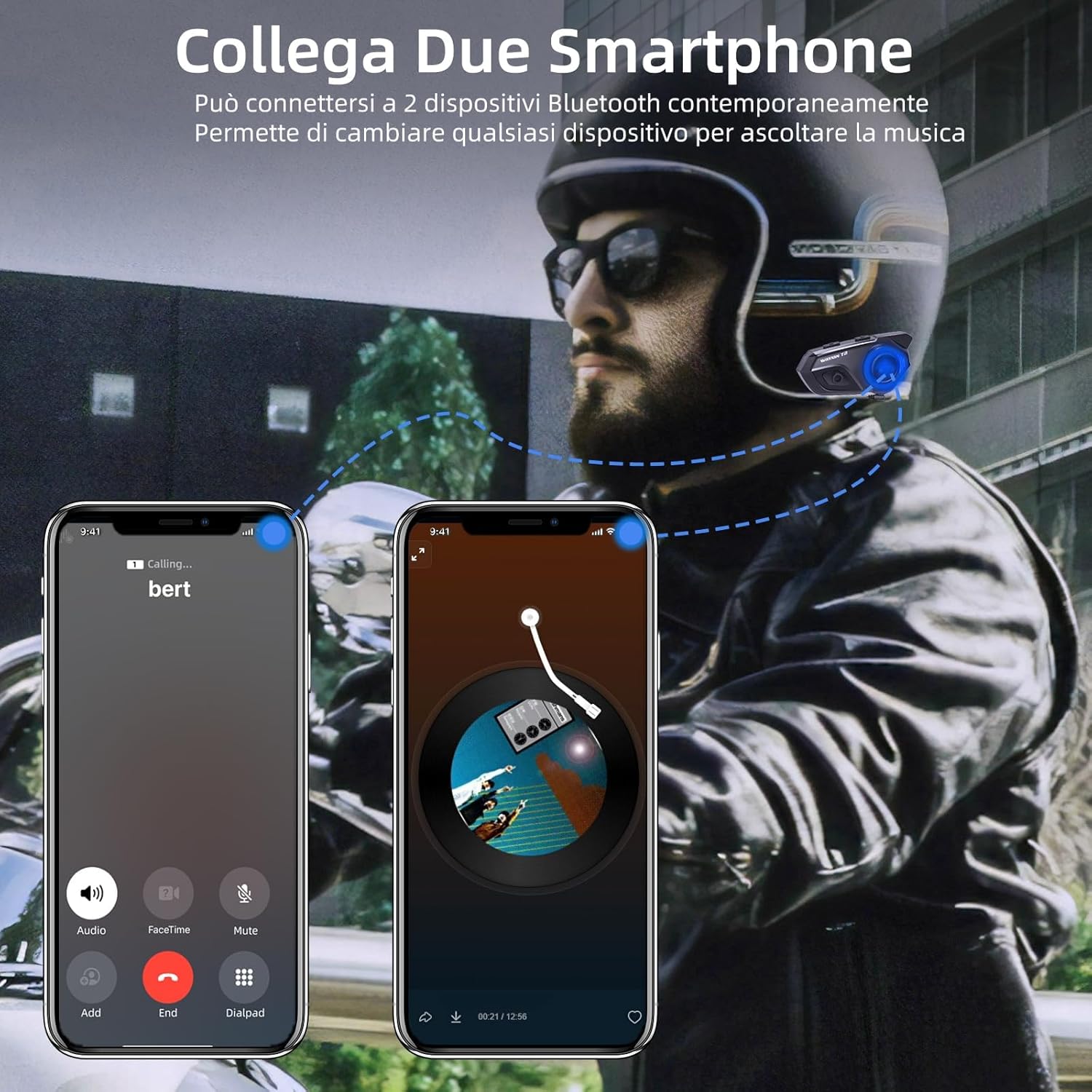
Image: A hand in a motorcycle glove pressing the large button on the WAYXIN T2, with icons for Siri, Google Assistant, and Bixby, indicating voice assistant activation.
4.7 Volume Control:
- Increase Volume: Short press the Volume + button.
- Decrease Volume: Short press the Volume - button.
5. Charging and Battery
The WAYXIN T2 is equipped with an 800mAh battery, providing extended usage time.
- Charging Time: Approximately 2.5 hours for a full charge.
- Music Playback Time: Up to 15 hours.
- Talk Time: Up to 10 hours.
- Standby Time: Up to 380 hours.
Use the provided Type-C charging cable to connect the device to a USB power source (e.g., computer, wall adapter). The LED indicator will show charging status.

Image: Diagram illustrating the 800mAh battery capacity, 2-hour charging time, 15 hours of work time, and 380 hours of standby time, with a Type-C charging port shown.
6. Maintenance and Care
- Cleaning: Wipe the unit with a soft, damp cloth. Do not use harsh chemicals or abrasive cleaners.
- Water Resistance: The T2 is IP67 waterproof, meaning it is protected against dust and temporary immersion in water. However, avoid prolonged submersion or high-pressure water jets. Ensure the charging port cover is securely closed when not charging.
- Storage: Store the device in a cool, dry place when not in use. If storing for an extended period, charge the battery periodically to maintain its health.
- Disassembly: Do not attempt to disassemble the unit. This will void the warranty and may cause damage.

Image: A motorcyclist riding in the rain, highlighting the IP67 waterproof feature of the WAYXIN T2, with an internal view showing the integrated waterproof silicone seal.
7. Troubleshooting
| Problem | Possible Cause | Solution |
|---|---|---|
| Device does not power on. | Low battery. | Charge the device for at least 2.5 hours. |
| Cannot pair with phone. | Device not in pairing mode; Bluetooth off on phone. | Ensure T2 is in pairing mode (flashing red/blue). Turn phone's Bluetooth off and on. Forget previous pairings. |
| Intercom connection unstable or lost. | Out of range; interference. | Move closer to the other intercom unit. Avoid areas with strong electromagnetic interference. |
| Poor audio quality / Noise. | Microphone not positioned correctly; high wind noise; volume too high. | Adjust microphone position. Ensure DSP/CVC noise cancellation is active. Lower volume if distorted. |
| No sound from speakers. | Speakers not connected properly; volume too low. | Check speaker connection to the unit. Increase volume. |
8. Specifications
| Model Name | T2 |
| Bluetooth Version | Bluetooth 5.1 (Qualcomm Chip) |
| Intercom Range | Up to 300 meters (rider to rider) |
| Battery Capacity | 800mAh |
| Charging Time | Approx. 2.5 hours |
| Music Playback Time | Up to 15 hours |
| Talk Time | Up to 10 hours |
| Standby Time | Up to 380 hours |
| Waterproof Rating | IP67 |
| Noise Cancellation | DSP & CVC 8.0 |
| Speaker Diameter | 40mm (7mm thin) |
| Charging Port | USB-C |
| Material | Acrylonitrile Butadiene Styrene (ABS) |
| Weight | Approx. 52g (per unit) |
9. Warranty and Support
For warranty information and customer support, please refer to the warranty card included in your package or contact WAYXIN customer service through the retailer where you purchased the product. Keep your proof of purchase for warranty claims.
For further assistance or technical inquiries, please visit the official WAYXIN website or contact their support team directly.


