
1. Product Overview
The Panasonic Lamdash Palm-in LITE ES-P330U-A is a compact and powerful 3-blade men's electric shaver designed for a smooth and comfortable shave. Its ergonomic palm-sized design incorporates advanced Lamdash shaving technology, making it ideal for both daily use at home and convenient travel. This shaver supports USB Type-C charging and features a waterproof design for easy cleaning.

Image: The Lamdash Palm-in LITE series, showcasing three distinct color options for the shaver.
2. Important Safety Information
Please read all safety instructions carefully before using this appliance to prevent injury to yourself and others, and to avoid damage to the product. Keep this manual for future reference.
- Do not use the shaver if the outer foil or blades are damaged, as this may cause skin injury.
- This appliance is not intended for use by persons (including children) with reduced physical, sensory or mental capabilities, or lack of experience and knowledge, unless they have been given supervision or instruction concerning use of the appliance by a person responsible for their safety.
- Do not disassemble, repair, or modify the shaver yourself. Contact an authorized service center for repairs.
- Keep the USB cable and charging port dry. Do not handle the USB cable with wet hands.
- Do not use or store the shaver in direct sunlight, high temperatures, or high humidity.
- Ensure the shaver is fully dry before charging.
- Only use the provided USB cable for charging. When using overseas, a country-specific plug adapter may be required (sold separately).
3. Package Contents
Verify that all items are present in the package:
- Panasonic Lamdash Palm-in LITE Shaver Unit (ES-P330U-A)
- Semi-hard Carrying Case
- USB Type-C Charging Cable
- Dedicated Shaver Oil
- Cleaning Brush

Image: The shaver and its semi-hard case, highlighting its portability for travel.
4. Product Features
The ES-P330U-A shaver is equipped with several advanced features for an optimal shaving experience:
- 3-Blade Lamdash Technology: Experience a close and gentle shave with Panasonic's advanced 3-blade system, designed to capture and cut various beard types effectively.
- Palm-sized Ergonomic Design: Compact and comfortable to hold, allowing for easy maneuverability and precise control during shaving.
- High-Speed Linear Motor: Delivers approximately 13,000 strokes per minute for a powerful and consistent shave, even on thick beards.
- Wet/Dry Shaving: Fully waterproof (IPX7 standard) for convenient dry shaving or refreshing wet shaving with foam or gel, even in the shower.
- Foam Making Mode: Generates rich foam directly from your shaving gel or soap for a smoother, more comfortable wet shave.
- USB Type-C Charging: Modern and convenient charging via a standard USB Type-C cable, making it easy to charge at home or on the go.
- 3-Level Battery Indicator: Clearly displays the remaining battery charge, allowing you to know when to recharge.
- Switch Lock Function: Prevents accidental power-on, ideal for travel.
- International Voltage Compatibility: Supports AC100-240V for worldwide use (requires a separate plug adapter for different regions).

Image: The shaver held in a hand, illustrating its compact, palm-sized design.
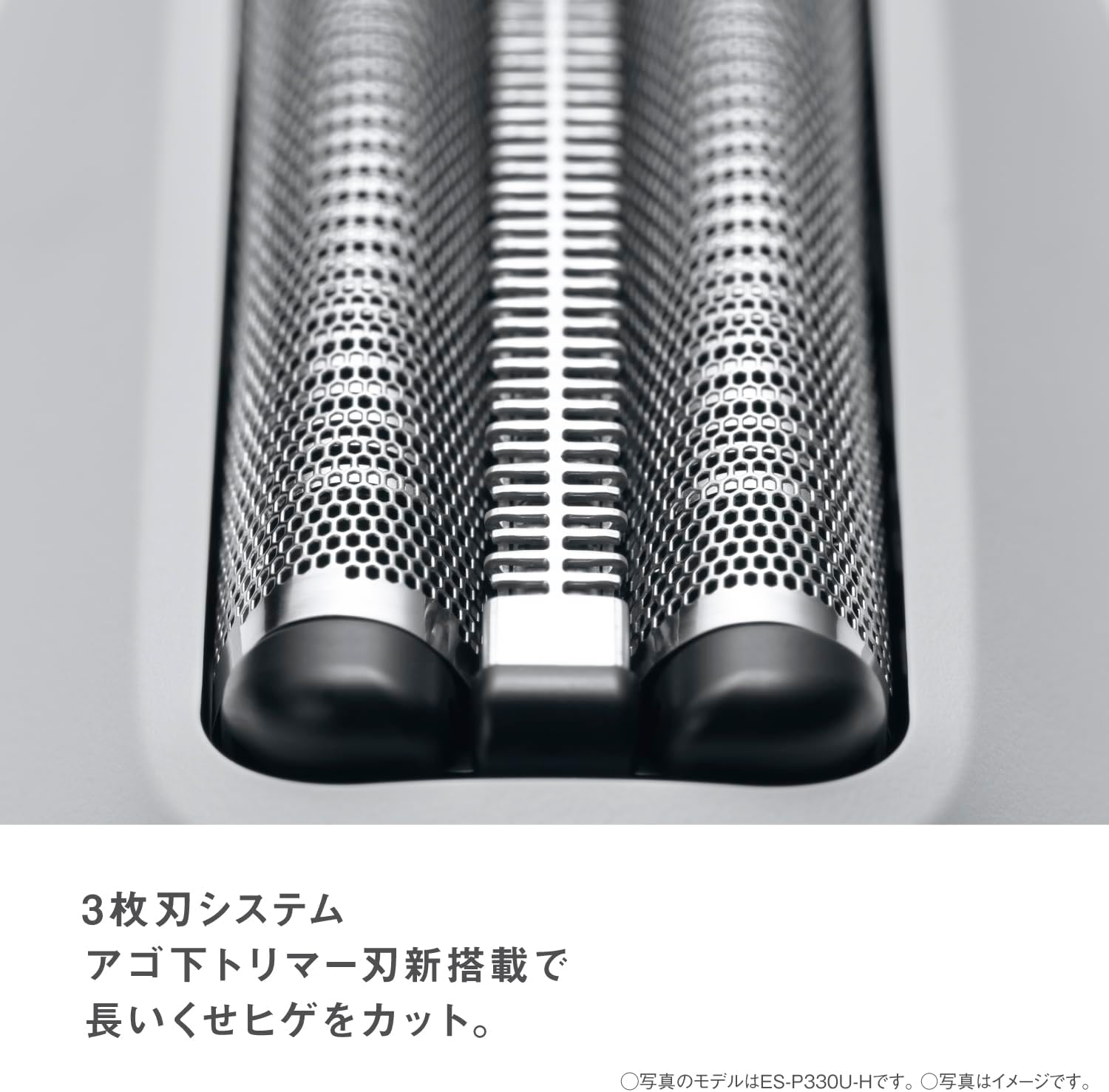
Image: Detailed view of the 3-blade cutting system.
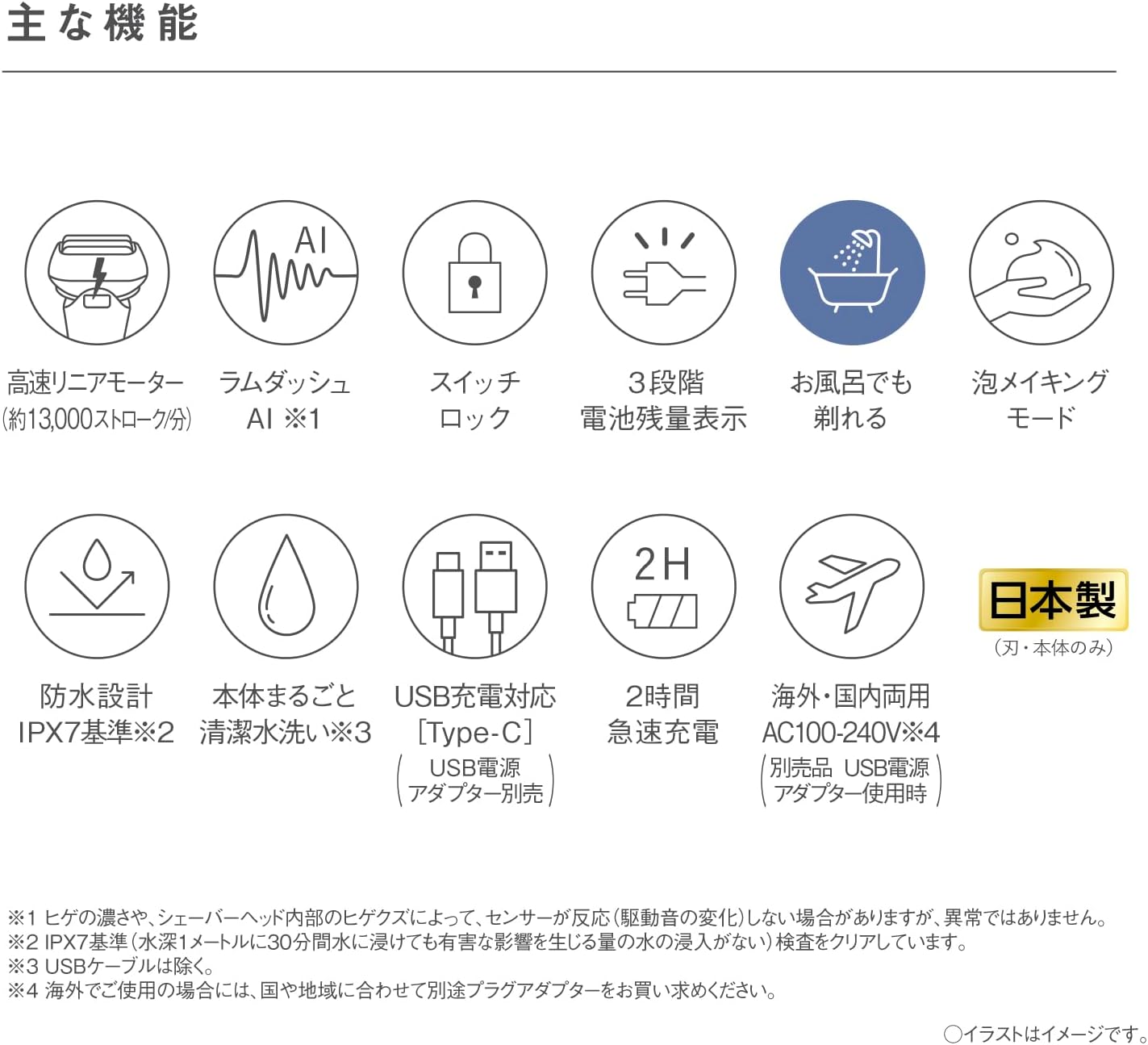
Image: Pictorial representation of the shaver's main functions and capabilities.
5. Setup and Initial Use
5.1 Charging the Shaver
- Ensure the shaver is turned off and completely dry before charging.
- Connect the provided USB Type-C cable to the charging port on the shaver.
- Plug the other end of the USB cable into a compatible USB power adapter (not included) or a USB port on a computer.
- The battery indicator light will illuminate to show charging status. A full charge typically takes approximately 2 hours.
- Once fully charged, disconnect the USB cable.

Image: The shaver connected to a USB Type-C charging cable.
5.2 Initial Checks
- Before first use, ensure the shaver is fully charged.
- Check that the outer foil and blades are securely attached and undamaged.
6. Operating Instructions
6.1 Turning On/Off
- To turn on the shaver, slide the power switch upwards.
- To turn off the shaver, slide the power switch downwards.
6.2 Shaving Technique
For best results, hold the shaver at a right angle to your skin and move it slowly against the direction of beard growth. Apply gentle pressure; the shaver is designed to cut effectively without excessive force.
Dry Shaving:
- Ensure your face is clean and dry.
- Shave before washing your face, as skin tends to swell after washing.
Wet Shaving (with foam/gel):
- Apply shaving foam or gel to your face.
- You can use the shaver's foam making mode for convenience.
- Shave as usual, rinsing the shaver head under running water periodically to remove lather and stubble.

Image: The shaver's battery indicator light, showing a green light for sufficient charge.
6.3 Using the Switch Lock
- To activate the switch lock, slide the power switch to the 'OFF' position and then engage the lock mechanism (refer to the diagram on the shaver if available).
- To unlock, disengage the lock mechanism and then slide the power switch to 'ON'.
7. Maintenance and Cleaning
Regular cleaning and maintenance will ensure optimal performance and extend the life of your shaver.
7.1 Daily Cleaning (Water Washable)
- After each use, turn off the shaver.
- Remove the outer foil frame.
- Rinse the outer foil frame and the inner blades thoroughly under running water to remove stubble and debris.
- You can also use the cleaning brush to gently remove stubborn hairs from the inner blades and shaver body.
- Shake off excess water and allow the parts to air dry completely before reattaching the outer foil frame.
7.2 Oiling the Blades
Apply a small drop of the dedicated shaver oil to each inner blade once a week or as needed to maintain smooth operation and blade sharpness.
- After cleaning and drying the blades, apply one drop of oil to each inner blade.
- Run the shaver for a few seconds to distribute the oil.
- Wipe off any excess oil from the outer foil.
7.3 Blade and Foil Replacement
The outer foil and inner blades are precision components that wear out over time. For optimal shaving performance, it is recommended to replace them periodically. Replacement parts can be purchased from authorized Panasonic retailers or service centers.
8. Troubleshooting
If you encounter any issues with your shaver, please refer to the following common problems and solutions:
| Problem | Possible Cause | Solution |
|---|---|---|
| Shaver does not turn on. | Battery is depleted. Switch lock is engaged. | Charge the shaver. Disengage the switch lock. |
| Poor shaving performance. | Blades/foil are dull or dirty. Insufficient battery charge. | Clean the blades and foil. Apply oil. Replace blades/foil if worn. Charge the shaver fully. |
| Shaver stops during use. | Battery is low. | Recharge the shaver. |
| Charging indicator not working. | Cable not properly connected. Faulty USB adapter. | Ensure cable is securely connected. Try a different USB adapter or port. |
If the problem persists after trying these solutions, please contact Panasonic customer support.
9. Product Specifications
| Feature | Specification |
|---|---|
| Brand | Panasonic |
| Model Number | ES-P330U-A |
| Power Source | Rechargeable Battery |
| Charging System | USB Type-C |
| Number of Blades | 3 |
| Head Type | Reciprocating |
| Product Weight | Approx. 130g (excluding cap) |
| Dimensions (H x W x D) | 6.0 x 7.1 x 4.2 cm (excluding cap) |
| Battery Life | Approx. 14 days (based on 3 minutes of use once a day) |
| Waterproof | IPX7 Standard |
| International Voltage | AC100-240V (requires separate plug adapter) |
| Blade Material | Stainless Steel |
| Included Components | Semi-hard case, USB cable, dedicated oil, cleaning brush |
10. Warranty and Support
10.1 Manufacturer's Warranty
This Panasonic Lamdash Palm-in LITE shaver comes with a 12-month manufacturer's warranty from the date of purchase. This warranty covers defects in materials and workmanship under normal use. Please retain your proof of purchase for warranty claims.
The warranty does not cover:
- Damage caused by improper use, accident, or neglect.
- Normal wear and tear of consumable parts such as outer foils and inner blades.
- Damage caused by unauthorized repairs or modifications.
10.2 Customer Support
For technical assistance, warranty service, or to purchase replacement parts, please contact Panasonic customer support through their official website or the contact information provided in your product packaging. When contacting support, please have your model number (ES-P330U-A) and proof of purchase readily available.


