
Introduction
This manual provides instructions for the installation, operation, and maintenance of the SHAUOTR H13 HEPA and Deodorizing Filter set. This filter set is designed for use with specific Sharp air purifier models to maintain optimal air purification performance.
Product Overview
The SHAUOTR filter set includes a multi-layer filtration system designed to capture various airborne particles and odors. It consists of a True HEPA filter and an Activated Carbon Deodorizing filter.
- Pre-filter Layer: Designed to intercept larger particles such as hair and dust, extending the lifespan of the main filters. This layer is typically integrated or can be a separate component.
- H13 HEPA Filter: A high-efficiency particulate air filter capable of capturing 99.97% of airborne particles 0.3 micrometers in size, including dust mites, pet dander, pollen, and mold spores.
- Activated Carbon Deodorizing Filter: Contains activated carbon granules that absorb various odors, volatile organic compounds (VOCs), and harmful gases from the air.

Image: The SHAUOTR H13 HEPA filter and the Activated Carbon Deodorizing filter, shown together.
Compatibility
This filter set is compatible with the following Sharp air purifier models:
- KCG60LW
- KC-G60E-W
- KC-G60TA-W
- KC-G60EV-W
It is designed as a replacement for Sharp filter models:
- FZ-D60HFE
- FZ-G60DFE
- FZ-D60DFE
Setup and Installation
Follow these steps to replace the filters in your Sharp air purifier:
- Power Off and Unplug: Before beginning, ensure your air purifier is turned off and unplugged from the power outlet to prevent electrical hazards.
- Access Filter Compartment: Refer to your air purifier's original manual to locate and open the filter compartment cover. This usually involves removing the front or back panel.
- Remove Old Filters: Carefully remove the used HEPA and deodorizing filters. Dispose of them according to local regulations.
- Install New Filters:
- Insert the new Activated Carbon Deodorizing filter first. Ensure it is oriented correctly, typically with the carbon side facing the pre-filter or intake.
- Next, insert the new H13 HEPA filter. Ensure it fits snugly into the compartment.
- If your air purifier uses a separate pre-filter, ensure it is clean and properly reinstalled in front of the other filters.

Image: The SHAUOTR Activated Carbon Deodorizing filter. This filter layer is designed to absorb odors and gases.

Image: The SHAUOTR H13 HEPA filter. This filter captures fine particulate matter.
- Close Compartment: Securely close the filter compartment cover.
- Restore Power: Plug the air purifier back into the power outlet and turn it on. Reset the filter replacement indicator if your model has one (refer to your air purifier's manual for specific instructions).
Operating Principles
Once installed, the filters work in conjunction with your air purifier's fan system to clean the air. Air is drawn into the purifier, passes through the pre-filter (if applicable), then the activated carbon filter, and finally the HEPA filter before being released back into the room.
- The Pre-filter captures larger dust and debris.
- The Activated Carbon Filter absorbs odors, smoke, and harmful gases.
- The H13 HEPA Filter traps microscopic allergens and particles.
Maintenance
Regular maintenance ensures the longevity and effectiveness of your air purification system.
- Filter Replacement: The HEPA and Deodorizing filters are not washable and should be replaced periodically. The replacement frequency depends on air quality, usage, and environmental factors. Generally, these filters should be replaced every 6-12 months for optimal performance. Refer to your air purifier's manual for specific recommendations or when the filter indicator light illuminates.
- Pre-filter Cleaning: If your air purifier has a washable pre-filter, it should be cleaned regularly (e.g., monthly) by vacuuming or rinsing with water. Ensure it is completely dry before reinstallation.
- Do Not Wash: The H13 HEPA and Activated Carbon filters are designed for single use and should not be washed or cleaned with water, as this can damage the filter media and reduce their effectiveness.
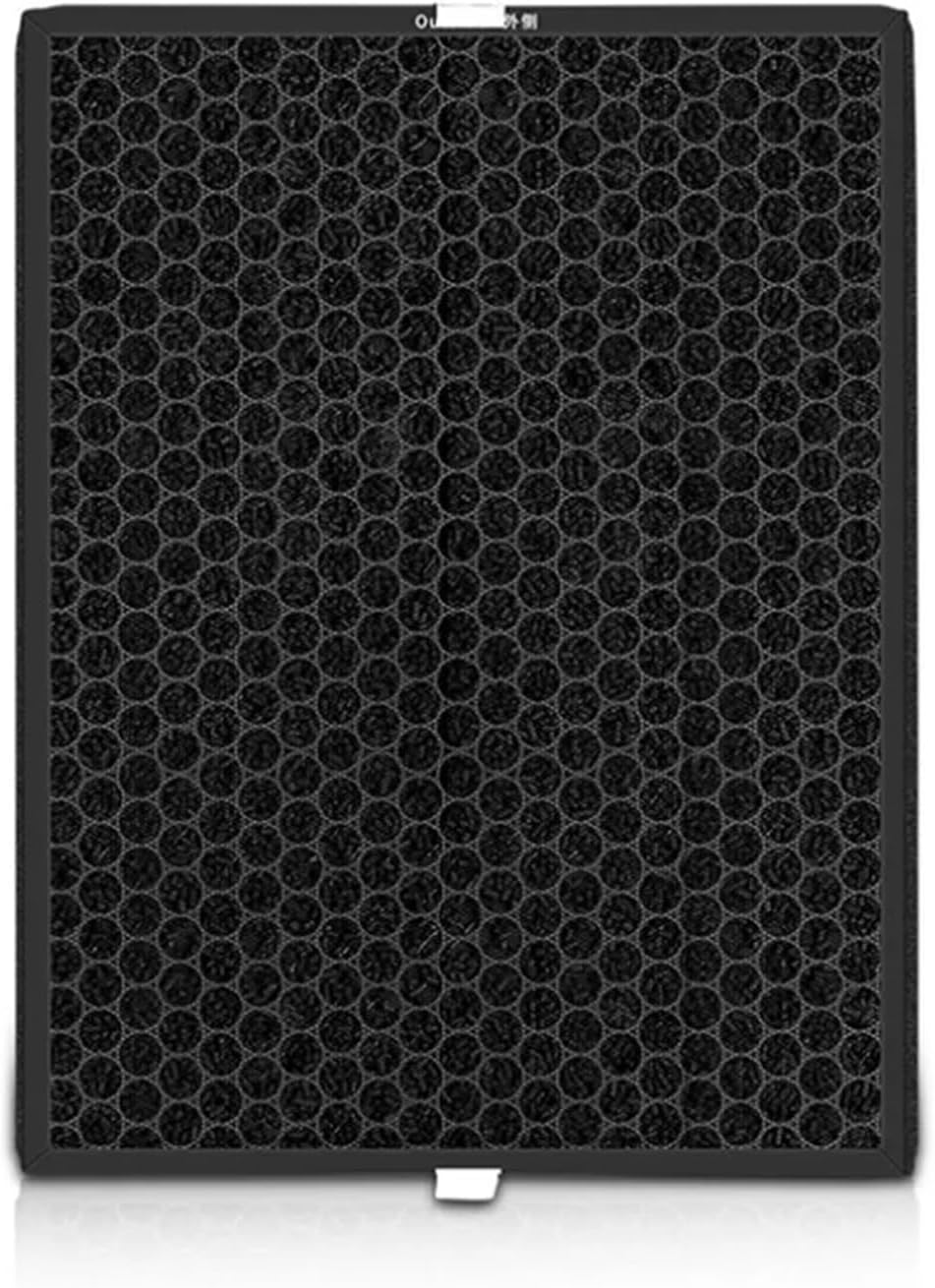
Image: A close-up view of the Activated Carbon Deodorizing filter, highlighting its honeycomb structure for odor absorption.
Troubleshooting
If you experience issues after installing the new filters, consider the following:
- Reduced Airflow:
- Ensure filters are installed correctly and not obstructed.
- Check if the filter compartment cover is fully closed and secured.
- Verify that the pre-filter (if separate) is clean and not clogged.
- Unusual Odors:
- A slight odor may be present initially with new carbon filters; this should dissipate quickly.
- If strong or persistent odors occur, ensure the carbon filter is correctly installed and not damaged.
- Filter Indicator Light Remains On:
- After replacing filters, you may need to manually reset the filter life indicator on your air purifier. Refer to your air purifier's user manual for specific instructions on how to reset it.
Specifications
| Feature | Detail |
|---|---|
| Filter Type | H13 HEPA + Activated Carbon Deodorizing Filter |
| Compatibility | Sharp KCG60LW, KC-G60E-W, KC-G60TA-W, KC-G60EV-W Air Purifiers |
| Replacement For | Sharp FZ-D60HFE, FZ-G60DFE, FZ-D60DFE |
| Package Dimensions | 1.18 x 0.79 x 0.39 inches |
| Item Weight | 1.76 ounces |
| Number of Pieces | 1 set (includes HEPA and Deodorizing filters) |
| Assembly Required | No |
Warranty and Support
Specific warranty information for this SHAUOTR filter set is not provided in the product details. For any questions regarding product performance or compatibility, please contact the seller or manufacturer directly through your purchase platform.