
1. Introduction
Thank you for choosing the TCL 32V4C 32-inch HD Smart QLED Android TV. This manual provides essential information for setting up, operating, and maintaining your new television. Please read it thoroughly before use and keep it for future reference.
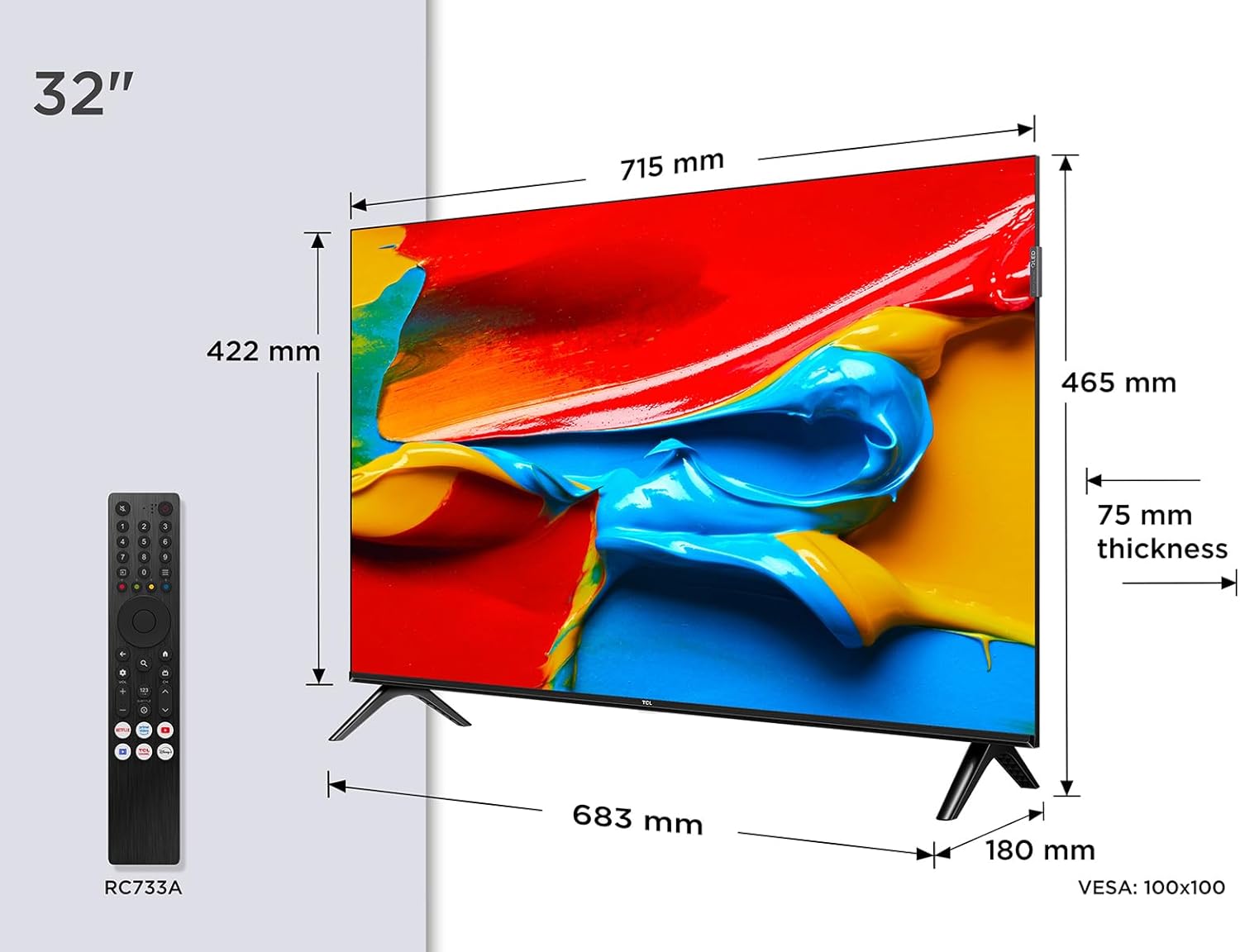
Image: Front view of the TCL 32V4C 32-inch HD Smart QLED Android TV.
2. Safety Information
Always follow basic safety precautions when using this product to reduce the risk of fire, electric shock, and injury.
- Do not expose the TV to rain or moisture.
- Do not block ventilation openings.
- Ensure proper grounding for the power cord.
- Keep the TV away from direct sunlight, heat sources, and open flames.
- Use only attachments/accessories specified by the manufacturer.
- Unplug the TV during lightning storms or when unused for long periods.
3. What's in the Box
Upon unpacking, please ensure all the following items are present:
- TCL 32V4C 32-inch HD Smart QLED Android TV
- Remote Control
- Power Cable
- Stand (with screws)
- User Manual (this document)
4. Setup
4.1. Installing the Stand
Place the TV screen-down on a soft, flat surface. Attach the stand bases to the bottom of the TV using the provided screws. Ensure the stand is securely fastened.
4.2. Wall Mounting (Optional)
If you choose to wall-mount your TV, please refer to the instructions provided with your wall-mount bracket. The TV supports VESA 100x100mm mounting. Ensure the wall mount is installed by qualified personnel.

Image: TCL 32V4C TV placed on its stand.
4.3. Connecting Devices
Connect your external devices (e.g., cable box, Blu-ray player, gaming console) to the TV's ports. The TCL 32V4C features multiple connectivity options including HDMI, USB, Ethernet, and Wi-Fi.

Image: Close-up of the TCL 32V4C TV's connectivity ports, including HDMI, USB, Optical, Cable, Satellite, AV Input, Headphone, and CI Slot.
- HDMI: Connect high-definition devices.
- USB: For media playback from USB drives.
- Ethernet/Wi-Fi: For internet connection and Smart TV features.
- Antenna/Satellite: Connect your antenna or satellite dish for broadcast TV.
4.4. Initial Power-On and Configuration
Plug the power cable into the TV and a power outlet. Press the power button on the remote control. Follow the on-screen instructions to select your language, connect to a network, and complete the initial setup of Android TV.
5. Operating Instructions
5.1. Android TV Features
Your TCL 32V4C TV comes with Android TV, providing access to a vast library of content. You can stream from popular services, use Google Cast to mirror content from your smart devices, and utilize Google Home compatibility for voice control.

Image: Screenshot of the Android TV interface displaying various streaming applications and content.
5.2. Picture Quality (QLED & HDR)
The QLED technology uses quantum dots to deliver intense, vibrant colors and exceptional visual perception. Combined with Direct LED backlighting, this ensures improved image quality and brightness. HDR (High Dynamic Range) further enhances contrast and detail, especially in bright and dark scenes.

Image: Visual explanation of TCL QLED technology, highlighting vibrant colors compared to traditional displays.

Image: Demonstrates the enhanced detail and contrast provided by HDR 10 technology.
5.3. Audio Quality (Dolby Audio)
Experience high-quality, immersive sound thanks to the integrated Dolby Audio processing. This technology ensures clear and detailed audio for all your entertainment, from movies to sports.

Image: Visual representation of immersive Dolby Audio technology.
5.4. Multiple Viewing Modes
The TV offers personalized viewing modes to optimize your experience for different content types:
- Game Mode: Reduces input lag for a more responsive gaming experience.
- Sports Mode: Enhances motion clarity and color for live sports.
- Movie Mode: Optimizes picture settings for cinematic viewing.

Image: Depiction of various viewing modes (Game, Sports, Movie) available on the TV.
5.5. Official Product Video
Video: An official TCL video showcasing features like QLED, HDR, Android TV, and Slim Design. This video provides a visual overview of the TV's capabilities and user experience.
6. Maintenance
6.1. Cleaning the Screen
Gently wipe the screen with a soft, lint-free cloth. For stubborn marks, lightly dampen the cloth with water or a specialized screen cleaner. Never spray liquid directly onto the screen.
6.2. Cleaning the Cabinet
Wipe the TV cabinet with a soft, dry cloth. Avoid using abrasive cleaners or solvents that may damage the finish.
6.3. Cable Management
Ensure all cables are neatly organized and not tangled to prevent damage or accidental disconnections.
7. Troubleshooting
If you encounter issues with your TV, refer to the following common problems and solutions:
| Problem | Possible Solution |
|---|---|
| No power | Check if the power cable is securely connected and the power outlet is working. |
| No picture/sound | Verify input source, check cable connections, and ensure volume is not muted. |
| Remote control not working | Replace batteries, ensure no obstructions between remote and TV, and check remote sensor. |
| Poor picture quality | Adjust picture settings (brightness, contrast, sharpness), check antenna/cable signal. |
| Cannot connect to Wi-Fi | Restart your router, check Wi-Fi password, or try a wired Ethernet connection. |
8. Specifications
Detailed technical specifications for the TCL 32V4C TV:
| Feature | Description |
|---|---|
| Brand | TCL |
| Model Number | 5901292526764 |
| Screen Size | 32 Inches |
| Screen Technology | QLED |
| Resolution | 2K (HD) |
| Refresh Rate | 60 Hz |
| Special Features | QLED, Android TV, HDR |
| Connectivity Technology | Bluetooth, Ethernet, HDMI, USB, Wi-Fi |
| Aspect Ratio | 16:9 |
| Product Dimensions | 18 x 71.5 x 46.5 cm |
| Weight | 5 kg |
| Energy Efficiency Rating | F |
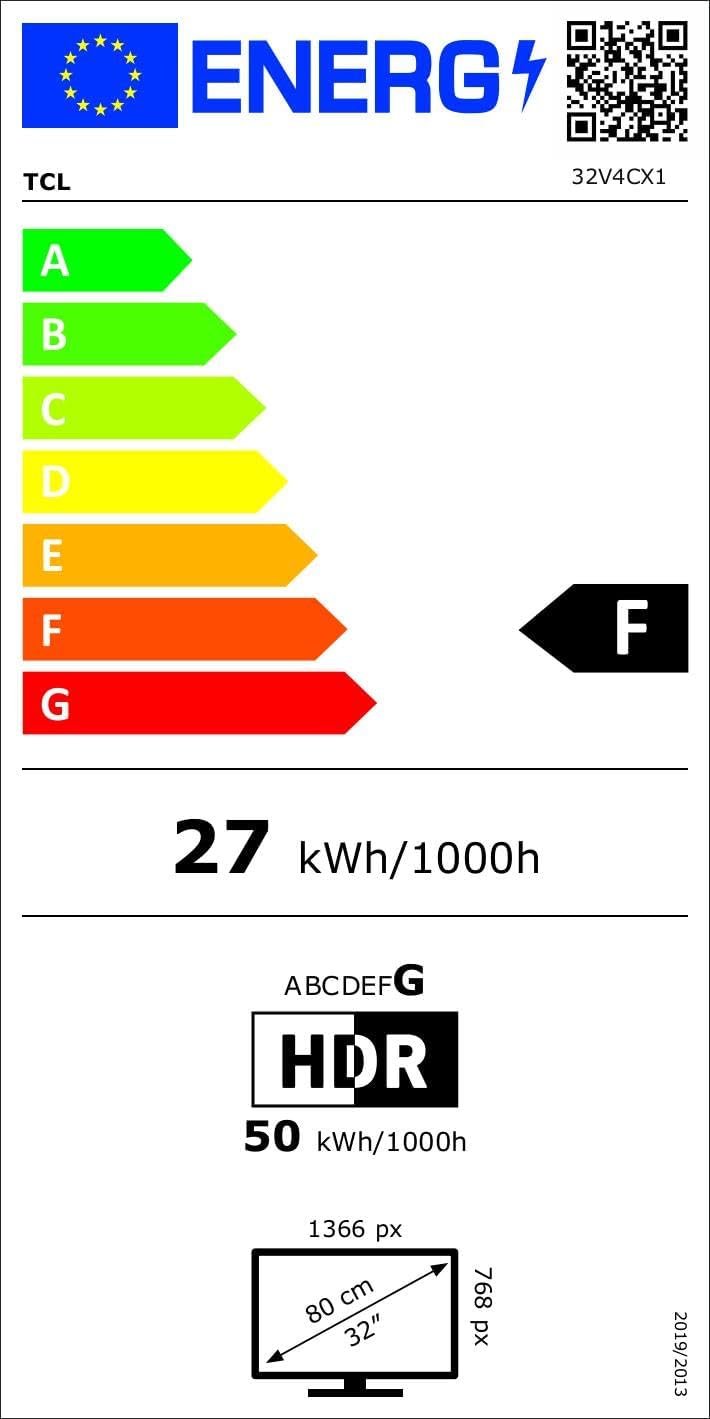
Image: Energy efficiency label for the TCL 32V4C TV, showing a rating of F and energy consumption details. For more details, visit the EPREL database.
9. Warranty & Support
Your TCL 32V4C TV comes with a 2-year general warranty from the manufacturer. For specific warranty terms, service, or technical support, please refer to the warranty card included with your product or visit the official TCL support website.
For spare parts and software/firmware updates, availability is guaranteed for 8 years from the date of market introduction.


