
Freego X2 Pro
Freego X2 Pro Electric Dirt Bike User Manual
Model: X2 Pro
1. Introduction
This manual provides essential information for the safe operation, assembly, maintenance, and troubleshooting of your Freego X2 Pro Electric Dirt Bike. Please read this manual thoroughly before operating the bike to ensure proper use and to maximize your riding experience.
The Freego X2 Pro is designed for both city commuting and off-road adventures, featuring a powerful motor, long-range battery, and advanced braking and suspension systems.
2. Safety Information
Always prioritize safety when operating your electric dirt bike. Failure to follow safety guidelines can result in serious injury or damage to the product.
- Wear Protective Gear: Always wear a helmet, gloves, and appropriate protective clothing.
- Understand Local Regulations: Be aware of and comply with all local laws and regulations regarding electric bicycles and motorcycles. The X2 Pro offers dual-working modes (City and Off-road) to help comply with varying speed and power limits.
- Pre-Ride Checks: Before each ride, inspect brakes, tires, battery level, and all fasteners to ensure they are secure.
- Rider Height: This bike is suitable for riders between 5'6" and 6'4" (167-193 cm).
- Maximum Weight: Do not exceed the maximum weight recommendation of 300 pounds (136 kg).
- Avoid Water Immersion: While components are designed for durability, avoid submerging the bike in water.
3. Components Overview
Familiarize yourself with the key components of your Freego X2 Pro Electric Dirt Bike.

Image: Numbered diagram of the Freego X2 Pro, highlighting key features.
- M5 Display: Provides real-time speed, battery level, speed level, total mileage, and trip mileage.
- Current Limit Upgrade (80A): Ensures robust power output and smoother acceleration.
- Rear Light with Turn Signal: Enhances visibility and safety.
- Front & Rear Hydraulic Disc Brakes: Motorcycle-grade four-piston system with 203mm rotors for strong stopping power.
- Magnetic Pedal-Assist Sensor: Activates motor assistance when pedals rotate.
4. Setup and Assembly
Your Freego X2 Pro requires some assembly before its first use. A tool kit is included to assist with this process.
4.1 Unboxing and Initial Inspection
- Carefully remove all components from the packaging.
- Verify that all included components (Charger, E Bike Accessory Kit, Electric Dirt Bike, Tool Kit) are present.
- Inspect the bike for any signs of shipping damage. Contact customer support immediately if any damage or missing parts are found.
4.2 Assembly Steps
While assembly is generally straightforward, it is recommended to consult the detailed assembly guide provided in the physical packaging for step-by-step instructions. Key assembly areas typically include:
- Handlebar Installation: Secure the handlebars to the stem.
- Front Wheel Attachment: Install the front wheel and ensure the brake caliper aligns correctly with the disc.
- Pedal Installation: Attach the pedals, noting left and right threading.
- Seat Adjustment: Adjust the seat height for comfortable riding. The seat is 10% thicker and wider for enhanced comfort.
- Battery Installation: Ensure the battery is securely seated in its compartment. Note: One user reported issues with the battery rail being too high, causing error codes. Ensure the battery is properly seated and secured.
4.3 Initial Charge
Before your first ride, fully charge the 60V/30Ah (1800Wh) lithium-ion battery using the provided fan-cooled charger with an XLR-connector. Refer to the charging section for detailed instructions.
5. Operating Instructions
5.1 Powering On/Off
- To power on, press and hold the power button on the M5 display.
- To power off, press and hold the power button again until the display turns off.
5.2 M5 LCD Display

Image: The M5 Multifunctional LCD Display showing speed, battery, and mileage.
The M5 display provides critical riding information:
- Real-time Speed: Current riding speed.
- Battery Level: Indication of remaining battery charge. Note: For more accurate battery status, refer to the voltage readout (65V when full).
- Speed Level/PAS Level: Current pedal-assist or power level.
- Total Mileage: Odometer reading.
- Trip Mileage: Distance covered in the current ride.
5.3 Riding Modes
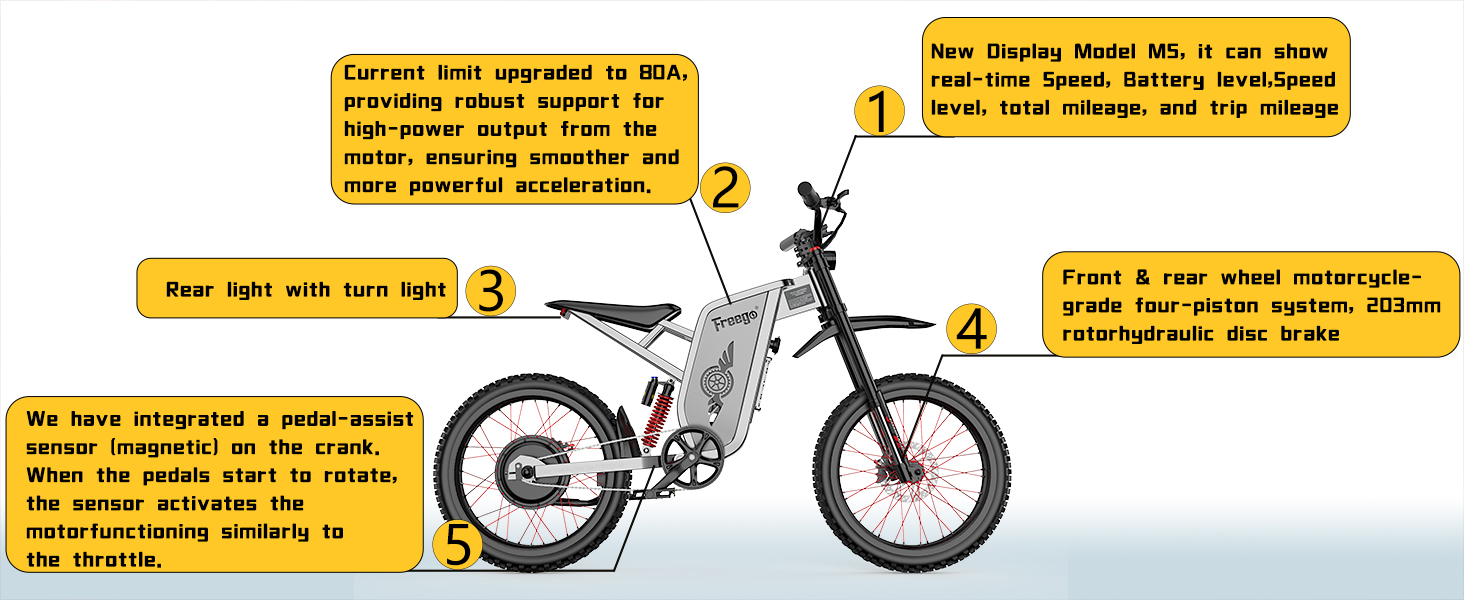
Image: Visual representation of the three available riding modes.
The X2 Pro features dual-working modes for versatile riding:
- City Mode: Limits speed to 28 MPH with a controlled output of 750W. This mode is designed for urban environments and compliance with certain regulations.
- Off-road Mode: Unleashes the bike's full potential, reaching speeds up to 50 MPH with 3000W output (6000W peak). This mode is intended for off-road use where higher speeds and power are permissible.
5.4 Pedal Assist System (PAS)
The magnetic pedal-assist sensor activates the motor when pedaling begins, providing assistance. The PAS offers three levels:
- Level 1: Assists up to 20 MPH.
- Level 2: Assists up to 28 MPH.
- Level 3: Provides full motor power, especially in Off-road mode.
5.5 Throttle Operation
The half-twisted throttle provides direct motor power. Twist the throttle to engage the motor and control speed. Release the throttle to disengage power.
5.6 Braking System

Image: Detail of the front hydraulic disc brake system.
The X2 Pro is equipped with a high-performance four-piston hydraulic brake system with 203mm discs on both front and rear wheels. Apply both brakes smoothly and evenly for effective stopping. Avoid sudden, hard braking, especially at high speeds, to prevent loss of control.
5.7 Gearing
The bike features a 7-speed gearing system. Use the thumb shifter to change gears according to terrain and desired pedaling effort. This allows for efficient pedaling even with motor assistance.
5.8 Suspension System
Image: Illustration of the full suspension system for shock absorption.
The dual full suspension system (front and rear) absorbs shocks on rough terrain, enhancing comfort and control. Adjust the suspension settings as needed for your weight and riding style.
5.9 Lighting

Image: Rear light with integrated turn signal for improved visibility.
The bike is equipped with bright headlights and a rear light with integrated turn signals for improved visibility during night riding or in low-light conditions. Ensure lights are functional before riding.
6. Maintenance
Regular maintenance ensures the longevity and safe operation of your Freego X2 Pro.
6.1 Battery Care and Charging
- Always use the original Freego charger.
- Charge the battery in a dry, well-ventilated area, away from flammable materials.
- Do not overcharge the battery; disconnect the charger once charging is complete.
- Store the battery in a cool, dry place if not in use for extended periods, maintaining a partial charge (50-70%).
6.2 Brake System Maintenance
- Regularly check brake pads for wear and replace them when necessary.
- Inspect brake fluid levels and hydraulic lines for leaks or damage.
- Ensure brake levers operate smoothly and provide adequate stopping power.
6.3 Tire Care

Image: The 19" x 2.0" fat tires are designed for adaptability across snow, mountain, beach, and city roads.
- Maintain correct tire pressure as specified on the tire sidewall.
- Inspect tires for cuts, punctures, or excessive wear.
6.4 General Cleaning
- Clean the bike regularly with a damp cloth. Avoid high-pressure washing directly on electrical components.
- Lubricate the chain periodically to ensure smooth operation.
7. Troubleshooting
This section addresses common issues you might encounter with your Freego X2 Pro.
| Problem | Possible Cause | Solution |
|---|---|---|
| Bike does not power on. | Low battery, loose battery connection, power button issue. | Charge the battery. Ensure the battery is securely installed. Check power button connection. |
| Motor not assisting or inconsistent power. | PAS sensor misalignment, loose motor cable, low battery. | Check PAS sensor alignment. Ensure all motor connections are secure. Charge the battery. |
| Brakes feel weak or spongy. | Worn brake pads, air in hydraulic lines, low brake fluid. | Inspect and replace brake pads. Bleed the brake system or add fluid (professional service recommended). |
| Charger not working consistently. | Faulty charger, loose connection. | Ensure charger is properly plugged into both wall and bike. Contact support if issue persists. |
| Error codes on M5 display. | Various electrical or sensor issues. | Consult the detailed error code list in the full manual (if available) or contact customer support with the specific code. Ensure battery is correctly seated. |
For issues not covered here, or if troubleshooting steps do not resolve the problem, please contact Freego customer support.
8. Specifications
| Feature | Detail |
|---|---|
| Brand | Freego |
| Model Name | X2 Pro |
| Bike Type | Electric Dirt Bike, Electric Motorcycle, Off-road Mountain Bike |
| Age Range | Adult |
| Color | Gray |
| Motor Power | 3000W (Nominal), 6000W (Peak) |
| Max Speed | 50 MPH |
| Battery | 60V/30Ah (1800Wh) Removable Lithium-ion |
| Max Range | Approximately 60 Miles (depending on conditions) |
| Torque | 130 N·m |
| Number of Speeds | 7 |
| Wheel Size | 19 Inches |
| Tires | 19" x 2.0" Fat Tires |
| Frame Material | High-strength steel pipe |
| Suspension Type | Dual (Front & Rear Full Suspension) |
| Brake Style | Front & Rear Hydraulic Brake, four-piston system with 203mm disc |
| Item Weight | 105 Pounds (approx. 47.6 kg) |
| Maximum Weight Recommendation | 300 Pounds (approx. 136 kg) |
| Rider Height Recommendation | 5'6" - 6'4" (167-193 cm) |
| Seat Height | 81 cm (32.67 inches) from the ground |
| Assembly Required | Yes |
| Special Features | M5 Smart LCD Screen, Bright Head and Tail Lights, Magnetic Pedal-Assist Sensor, Fan-cooled Charger |
| Warranty | 12 months (Limited) |
9. Warranty Information
The Freego X2 Pro Electric Dirt Bike comes with a 12-month limited warranty. This warranty covers manufacturing defects and workmanship under normal use. Please retain your proof of purchase for warranty claims.
For detailed warranty terms and conditions, refer to the documentation included with your product or contact Freego customer support.
10. Customer Support
If you have any questions, require technical assistance, or need to report an issue, please contact Freego customer support:
- Via Amazon Messages: For the fastest response, use the Amazon messaging system to contact the seller.
- Email: You can also reach support via email at simailongamzi@163.com.
- Online FAQs: Visit the Freego Official Store on Amazon for additional information and FAQs.
Ask a question about this manual
Ask about setup, troubleshooting, compatibility, parts, safety, or missing instructions. Manuals+ will review the question and use this page’s manual context to help answer it.