
BEITONG KP20
BEITONG KP20 Wireless Controller User Manual
Model: KP20
Introduction
This manual provides detailed instructions for the setup, operation, maintenance, and troubleshooting of your BEITONG KP20 Wireless Controller. Please read this manual thoroughly before using the product to ensure optimal performance and longevity.
Product Overview
The BEITONG KP20 is a versatile wireless controller designed for PC, Nintendo Switch, and mobile devices. It features advanced TMR Joysticks, Hall Effect Linear Triggers, mechanical buttons, and multiple connection options for a superior gaming experience.
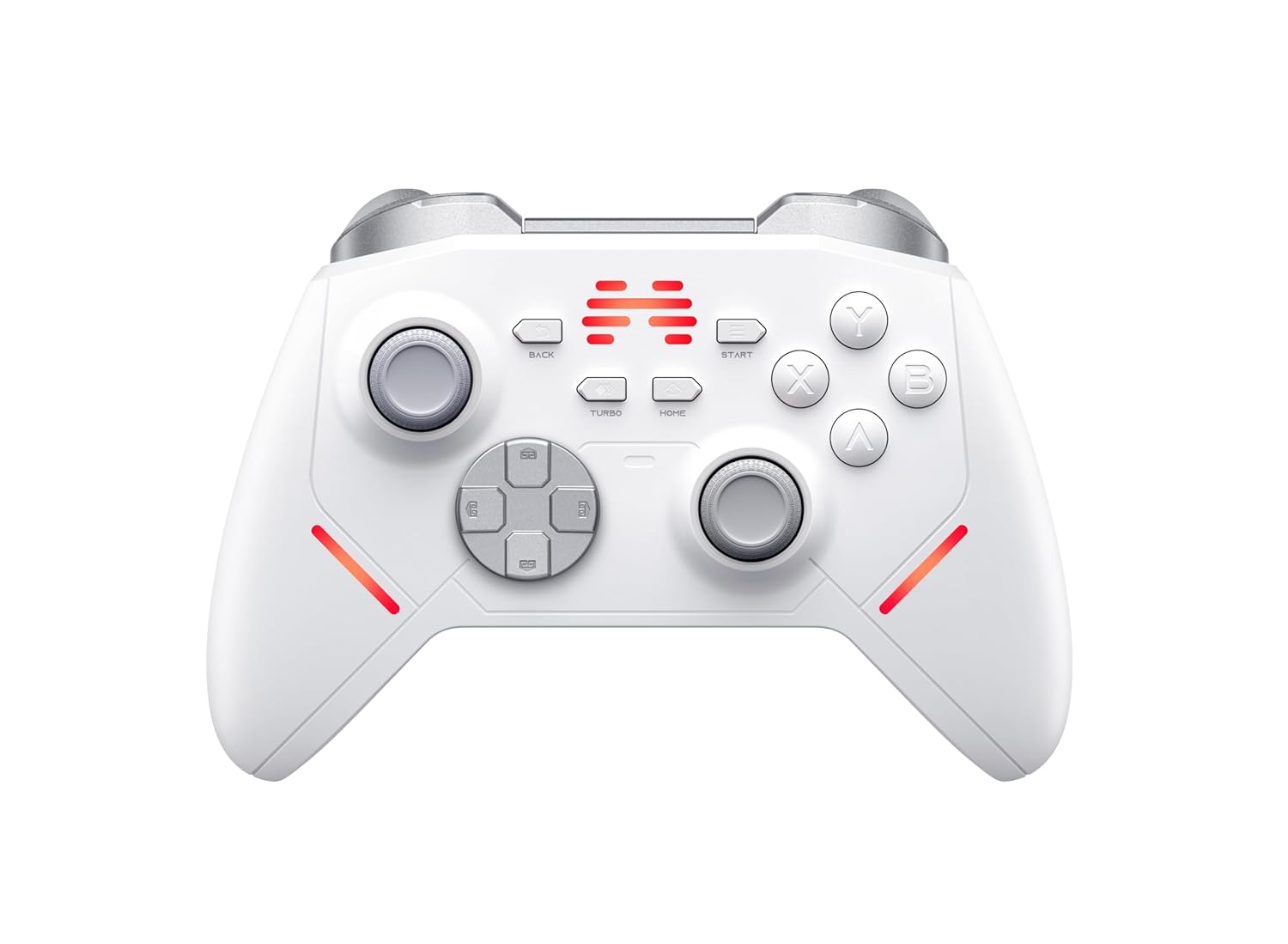
Figure 1: Front view of the BEITONG KP20 Wireless Controller, showcasing its button layout and ergonomic design.

Figure 2: Angled view of the BEITONG KP20 Wireless Controller, highlighting its contours and trigger buttons.
Key Features
- TMR Joysticks: Experience less than 1% drift, 5400+ resolution, and a 1000Hz+ polling rate (wired/2.4G dongle) for precise control.

Figure 3: Illustration of Beitong TMR Electromagnetic Joysticks, detailing components like the 1000Hz+ polling rate, 12bit ADC sampling chip, and 5400+ sampling resolution.
- Hall Effect Linear Triggers: Provides smooth control with an accuracy of 0.1mm, reducing friction and preventing drift.

Figure 4: Close-up view of the Hall Effect Linear Trigger mechanism, emphasizing its 0.1mm accuracy and touch-free linear sensing.
- Enhanced Mechanical Buttons & Hybrid D-Pad: Custom Hybrid D-Pad offers 8-direction precision, and mechanical buttons are designed for over 10 million presses with frictionless operation.
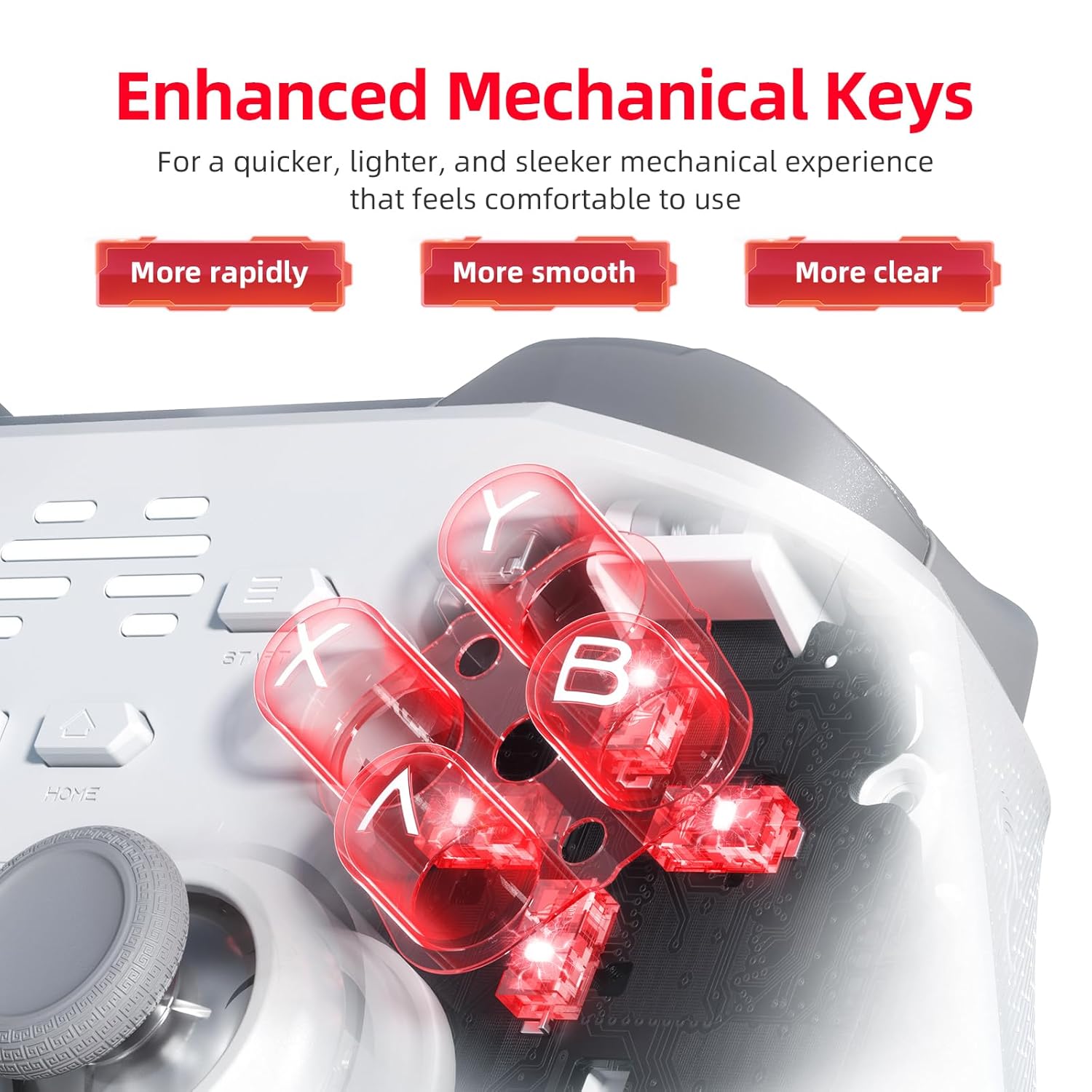
Figure 5: Detailed view of the enhanced mechanical keys, illustrating their internal structure for quicker, smoother, and clearer feedback.
- Multi-Connection Options: Supports wired, Bluetooth, and 2.4GHz wireless connections. Easily switch between modes using the dedicated back platform button.
- 6-Axis Gyro Motion Control & Turbo Mode: Built-in 6-axis gyroscope for motion control on PC, Switch, and Android. Features 3 Macro Keys (M1/M2/Turbo) that can be remapped.

Figure 6: Visual representation of 6-axis motion control being used for aiming in a game, with vibration feedback indicated.

Figure 7: Rear view of the controller, highlighting the M1, M2, and Turbo programmable keys and their mapping capabilities.
- Smart Wake-Up Charging Station: (Sold separately) Allows for convenient charging by simply placing the controller on the dock. The controller automatically reconnects upon pickup.

Figure 8: Detailed view of the charging dock, showing the USB-C connector, charging terminals, anti-slip pads, and 2.4G dongle storage.
Setup Guide
1. Charging the Controller
Before initial use, fully charge the controller. Connect the provided USB-C cable to the controller and a power source (e.g., PC USB port, USB wall adapter 5V/1A). If using the optional charging dock, simply place the controller onto the dock.

Figure 9: The controller charging on its dock, illustrating that a full charge takes approximately 2.5 hours with a 5V/1A power supply.
A full charge typically takes 2.5 hours when using a 5V/1A power source. The charging indicator on the controller will show charging status.
2. Connecting the Controller
The KP20 controller supports three connection methods:
- 2.4GHz Wireless (via Dongle):
- Insert the 2.4GHz USB dongle into an available USB port on your PC or compatible device.
- Turn on the controller. It should automatically connect to the dongle.
- The controller's indicator lights will confirm a successful connection.
- Bluetooth Wireless:
- Ensure Bluetooth is enabled on your device (PC, mobile, Nintendo Switch).
- Put the controller into Bluetooth pairing mode (refer to the controller's specific button combination for pairing, usually holding a specific button like HOME or a dedicated pairing button).
- On your device, search for new Bluetooth devices and select "BEITONG KP20" to pair.
- The controller's indicator lights will confirm a successful connection.
- Wired Connection:
- Connect the controller to your PC or device using a USB-C cable.
- The controller will be recognized automatically.
To switch between connection modes, use the dedicated back platform button on the controller.
Operating Instructions
Button Layout and Functions
The KP20 controller features standard gamepad buttons, including:
- Left/Right Joysticks: TMR Joysticks for precise movement and camera control.
- D-Pad: Hybrid D-Pad for directional input.
- Action Buttons (A, B, X, Y): Mechanical buttons for in-game actions.
- Shoulder Buttons (LB, RB) & Triggers (LT, RT): Hall Effect Linear Triggers for analog input.
- BACK/SELECT, START, HOME Buttons: Standard system function buttons.
- TURBO Button: Activates Turbo mode for rapid fire.
- M1, M2 Buttons: Programmable back paddle buttons.
Using Macro Keys (M1, M2, Turbo)
The M1, M2, and Turbo buttons can be remapped to other controller inputs. Refer to the "Beitong Gamepad Assistant" software for detailed customization options, including remapping, adjusting joystick dead zones, turbo speed, vibration strength, and RGB lighting.
Motion Control
The built-in 6-axis gyroscope enables motion control functionality on compatible games and platforms (PC, Nintendo Switch, Android). This allows for intuitive aiming and control based on the physical movement of the controller.
Maintenance
- Cleaning: Use a soft, dry cloth to wipe the controller. For stubborn dirt, slightly dampen the cloth with water. Avoid using harsh chemicals or abrasive materials.
- Storage: Store the controller in a cool, dry place away from direct sunlight and extreme temperatures.
- Battery Care: To prolong battery life, avoid fully discharging the controller frequently. Charge it regularly, even if not in constant use.
Troubleshooting
| Problem | Possible Cause | Solution |
|---|---|---|
| Controller does not turn on. | Low battery. | Charge the controller for at least 30 minutes. |
| Controller does not connect wirelessly. | Incorrect pairing mode, out of range, interference, or dongle not properly inserted. |
|
| Input lag or dropped connection. | Wireless interference, low battery, or distance. |
|
| Joysticks or triggers not responding correctly. | Calibration issue or software glitch. |
|
If you encounter issues not listed here, or if the suggested solutions do not resolve the problem, please contact customer support.
Specifications
- Model: KP20
- Polling Rate: 1000Hz+ (wired/2.4G wireless)
- Joystick Resolution: 5400+
- Trigger Accuracy: 0.1mm
- Button Lifespan: Over 10 million presses
- Connection Types: Wired (USB-C), Bluetooth, 2.4GHz Wireless
- Compatibility: PC, Nintendo Switch, Mobile (Android)
- Charging Time: Approximately 2.5 hours (with 5V/1A power supply)
- Joystick Type: TMR Electromagnetic Joysticks
- Trigger Type: Hall Effect Linear Triggers
- Motion Control: 6-Axis Gyroscope
- Programmable Keys: M1, M2, Turbo
Warranty and Support
Limited Warranty
The BEITONG KP20 Wireless Controller comes with a limited warranty against defects in materials and workmanship under normal use. Please refer to the warranty card included with your product or visit the official BEITONG website for detailed warranty terms and conditions.
Customer Support
For technical assistance, troubleshooting, or warranty inquiries, please contact BEITONG customer support through their official website or the contact information provided in your product packaging. When contacting support, please have your product model (KP20) and purchase details ready.
Related documentsKP20


Ask a question about this manual
Ask about setup, troubleshooting, compatibility, parts, safety, or missing instructions. Manuals+ will review the question and use this page’s manual context to help answer it.