
1. Product Overview
This manual provides instructions for the UNITOPSCI 4G+64G 8 Core Android Car Stereo Radio. This unit features a 7-inch IPS touchscreen, integrated Wireless CarPlay and Android Auto, Bluetooth 5.0, GPS navigation, Wi-Fi connectivity, FM/RDS radio, DSP audio processing, and support for AHD backup cameras and steering wheel controls. It is designed for specific Volkswagen, Seat, and Skoda models.

Image: The UNITOPSCI Android Car Stereo seamlessly integrated into a Volkswagen dashboard, showcasing its 7-inch display and user interface.
2. Package Contents
Verify that all items listed below are included in your package:
- Android Car Stereo Unit
- Backup Camera
- Microphone
- Wire Harness (36-pin and 40-pin options)
- GPS Antenna
- USB Cable
- RCA Cable
- Radio Antenna
- Canbus Box (if applicable for your vehicle)
- User Manual
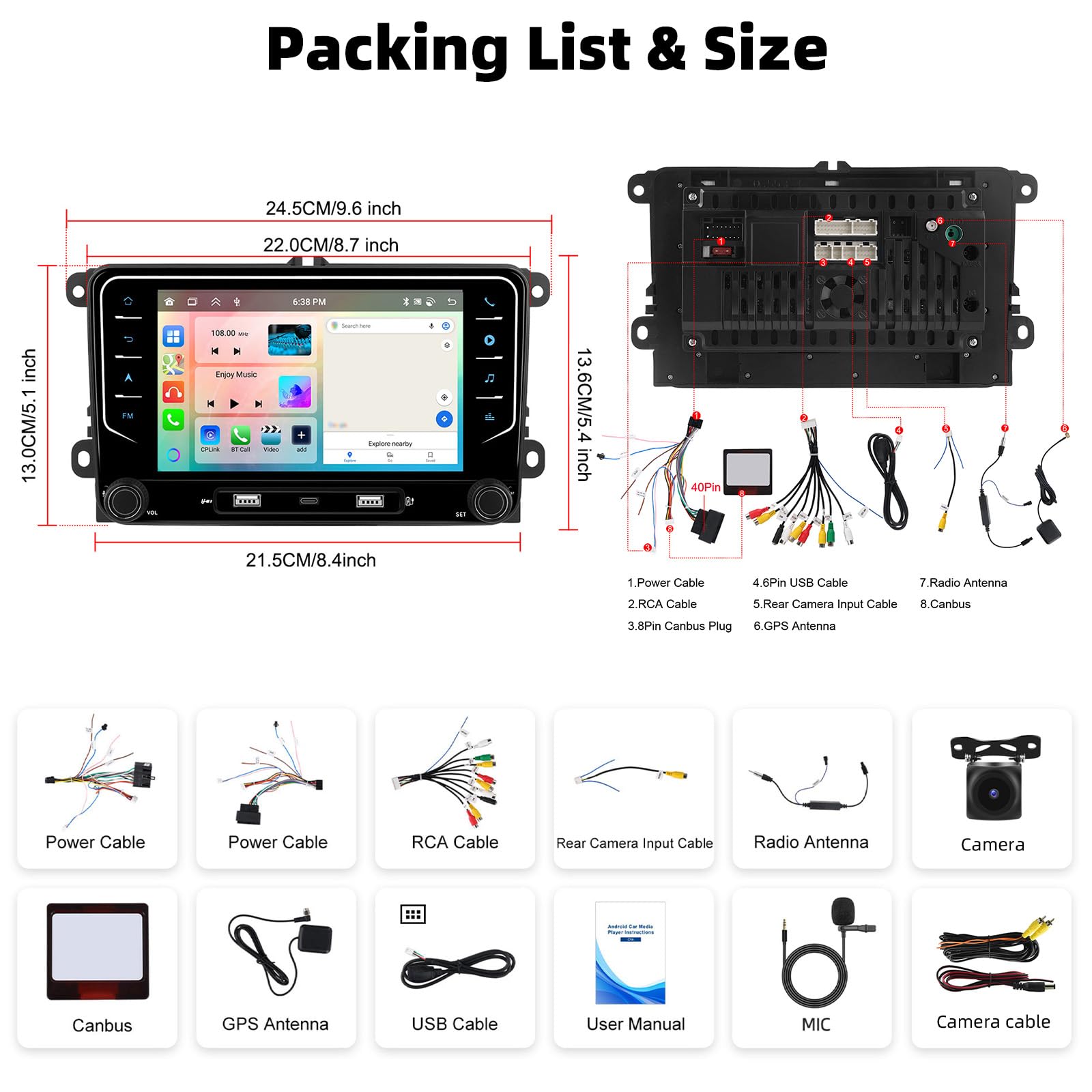
Image: Detailed diagram illustrating the dimensions of the car stereo unit and a visual representation of all included accessories such as power cables, RCA cables, GPS antenna, microphone, and backup camera.
3. Vehicle Compatibility
This car stereo is compatible with various Volkswagen, Seat, and Skoda models. Please ensure your vehicle's model and year match the list below. If unsure, consult with a professional or the manufacturer.
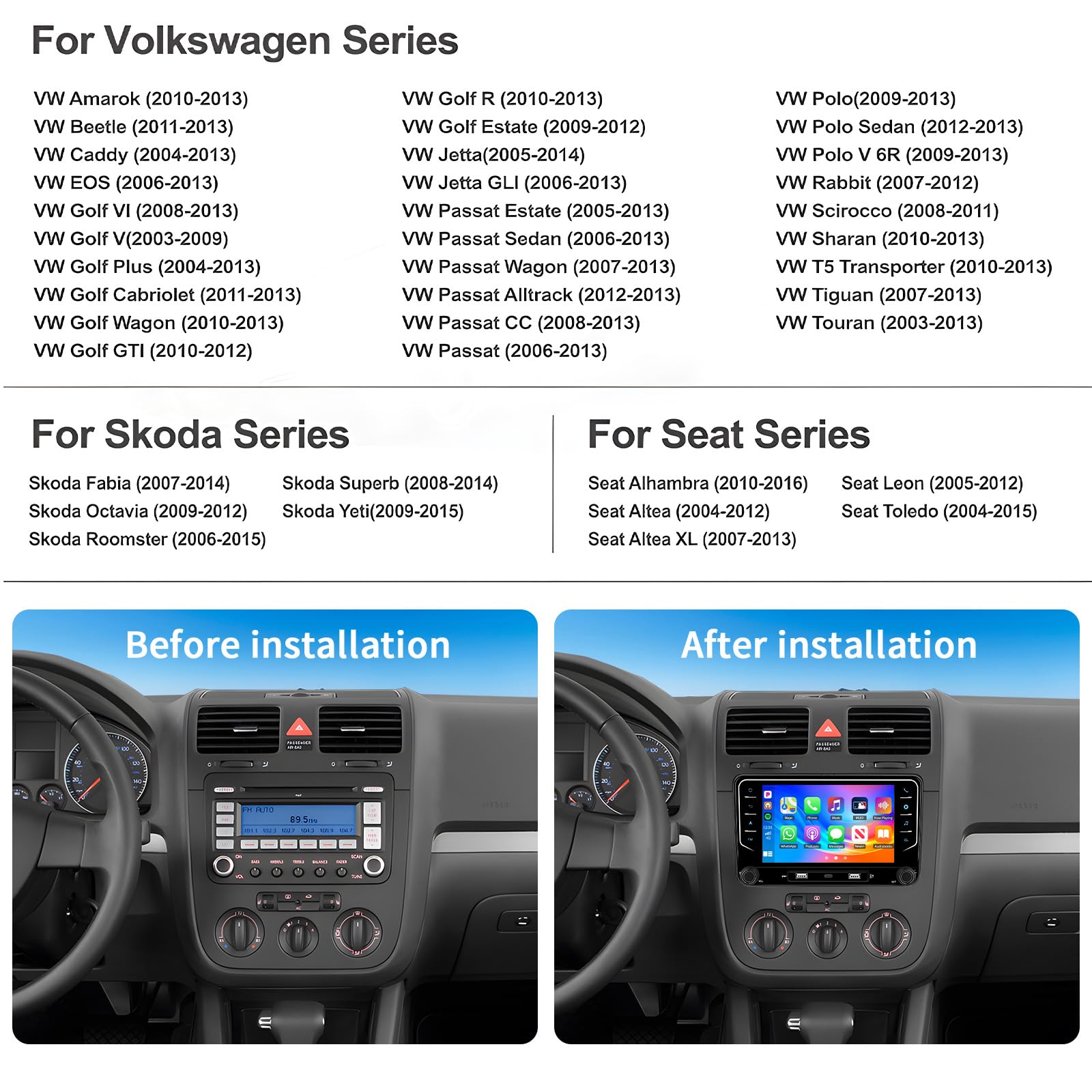
Image: A comprehensive list detailing compatible Volkswagen, Skoda, and Seat vehicle models along with their respective manufacturing years.
Compatible Volkswagen Models:
- VW Amarok (2010-2013)
- VW Beetle (2011-2013)
- VW Caddy (2004-2013)
- VW EOS (2006-2013)
- VW Golf VI (2008-2013)
- VW Golf V (2003-2009)
- VW Golf Plus (2004-2013)
- VW Golf Cabriolet (2011-2013)
- VW Golf Wagon (2010-2013)
- VW Golf GTI (2010-2012)
- VW Golf R (2010-2013)
- VW Golf Estate (2009-2012)
- VW Jetta (2005-2014)
- VW Jetta GLI (2006-2013)
- VW Passat Estate (2005-2013)
- VW Passat Sedan (2006-2013)
- VW Passat Wagon (2007-2013)
- VW Passat Alltrack (2012-2013)
- VW Passat CC (2008-2013)
- VW Passat (2006-2013)
- VW Polo (2009-2013)
- VW Polo Sedan (2012-2013)
- VW Polo V 6R (2009-2013)
- VW Rabbit (2007-2012)
- VW Scirocco (2008-2011)
- VW Sharan (2010-2013)
- VW T5 Transporter (2010-2013)
- VW Tiguan (2007-2013)
- VW Touran (2003-2013)
Compatible Skoda Models:
- Skoda Fabia (2007-2014)
- Skoda Octavia (2009-2012)
- Skoda Roomster (2006-2015)
- Skoda Superb (2008-2014)
- Skoda Yeti (2009-2015)
Compatible Seat Models:
- Seat Alhambra (2010-2016)
- Seat Altea (2004-2012)
- Seat Altea XL (2007-2013)
- Seat Leon (2005-2012)
- Seat Toledo (2004-2015)
4. Installation Guide
Professional installation is recommended. Ensure the vehicle's power is disconnected before beginning installation.
4.1 Wiring Connection
Refer to the wiring diagram to connect the appropriate harness (36-pin or 40-pin) for your car model. Ensure all connections are secure.

Image: Detailed wiring diagrams illustrating connections for both 36-pin and 40-pin harnesses, including ACC, Canbus, and power cables. Please read the manual carefully before wiring.
4.2 Mounting the Unit
Carefully remove your existing car stereo. Install the new UNITOPSCI unit into the dashboard slot, ensuring it is securely fastened. Connect all cables as per the wiring diagram.
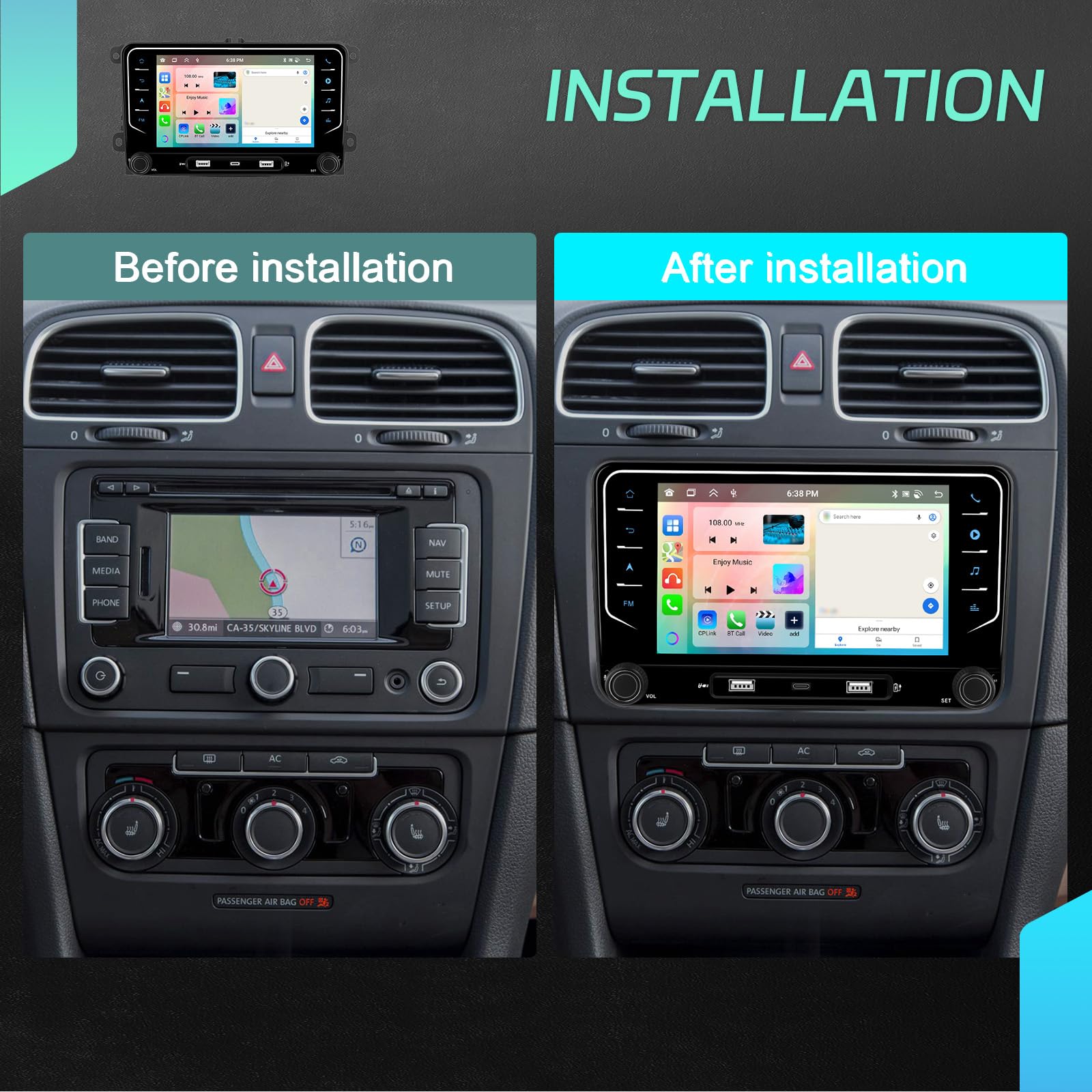
Image: A visual comparison showing a car's dashboard before and after the installation of the UNITOPSCI Android Car Stereo, highlighting the integrated appearance.
4.3 Backup Camera Installation
Install the AHD backup camera at the rear of your vehicle. Connect the camera's video output to the designated input on the car stereo unit. Ensure the camera's power is connected to the reverse light circuit for automatic activation.

Image: An illustration demonstrating the features of the AHD backup camera, including night vision, waterproofing, and wide-angle view, along with its connection to the car stereo for reverse imaging.
5. Operating Instructions
5.1 Power On/Off and Basic Controls
Press the power button to turn the unit on or off. Use the volume knobs or touchscreen controls to adjust audio levels. Navigate through menus using the touchscreen interface.
5.2 Wireless CarPlay and Android Auto
Connect your iPhone or Android smartphone wirelessly via Bluetooth and Wi-Fi to activate CarPlay or Android Auto. This allows access to phone calls, GPS navigation, music, and other compatible apps directly on the stereo screen.
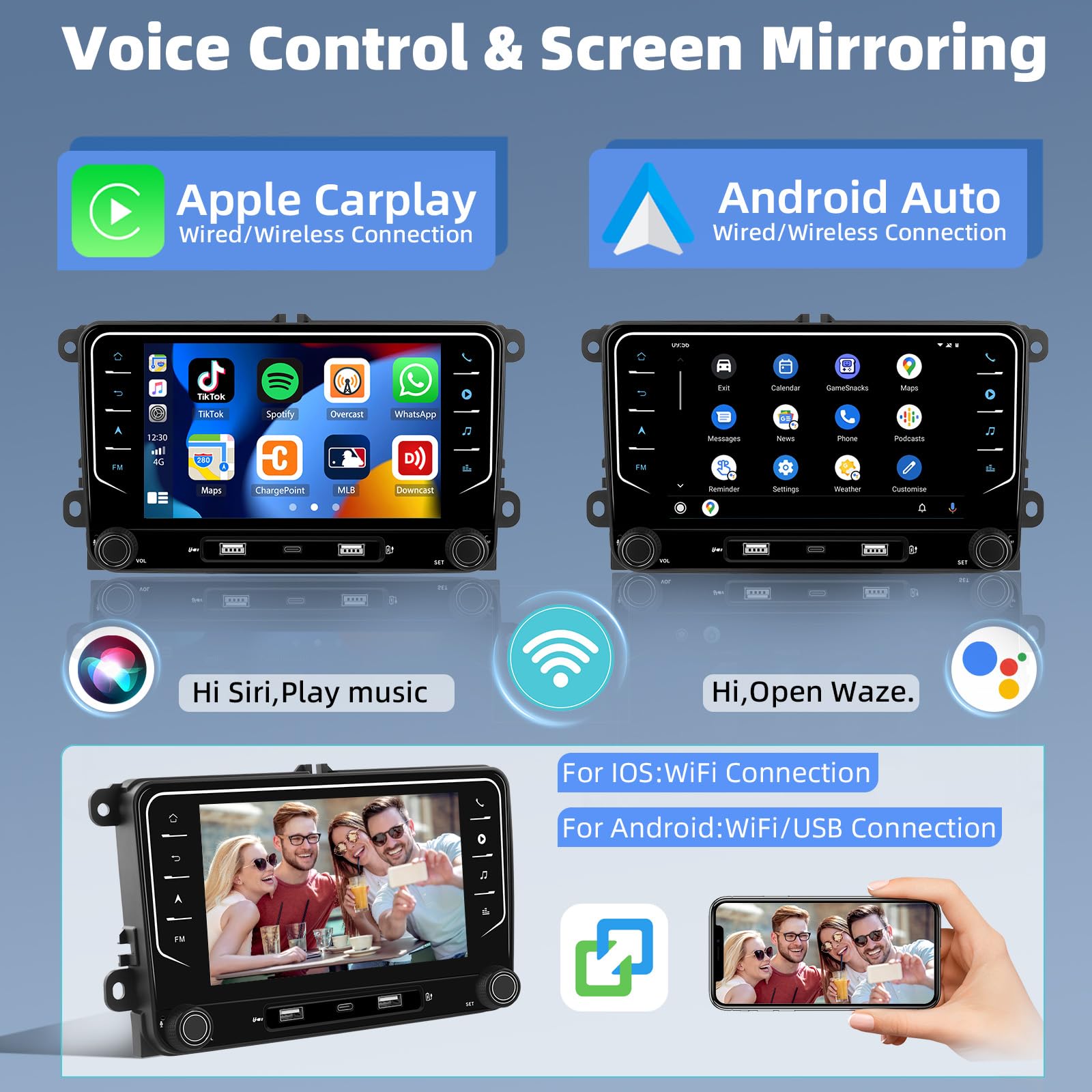
Image: Screenshots displaying the user interfaces for Apple CarPlay and Android Auto, showing how phone applications are integrated into the car stereo display.
5.3 GPS Navigation
The unit comes with pre-installed offline maps. Connect to Wi-Fi to download additional maps or use online navigation services. The built-in GPS supports BeiDou, GLONASS, and GPS systems.

Image: Screenshots illustrating the Wi-Fi connection interface and a GPS navigation map display on the car stereo.
5.4 Bluetooth 5.0
Pair your mobile device via Bluetooth for hands-free calling and audio streaming. Access your phone book and call history directly from the stereo. An external microphone is included for clear call quality.

Image: Screenshots demonstrating the Bluetooth interface for hands-free calls and music playback on the car stereo.
5.5 FM/RDS Radio
Tune into your favorite FM radio stations. The RDS (Radio Data System) feature displays station information where available.

Image: Screenshots showing the FM/RDS radio interface with frequency display and preset station options.
5.6 Steering Wheel Control (SWC)
Configure the steering wheel controls to manage functions like volume, track skipping, and answering calls, enhancing driving safety.

Image: A diagram illustrating how to map steering wheel control buttons to various functions on the car stereo for convenient operation.
5.7 Split Screen Function
Utilize the split-screen feature to run two applications simultaneously, such as navigation and music playback.

Image: A screenshot showing the split-screen functionality, displaying a navigation app on one side and a media player on the other.
6. Key Features
6.1 High Performance Processor
Equipped with an 8-core CPU, 4GB RAM, and 64GB ROM, this unit ensures smooth operation and ample storage for apps and media.

Image: A visual representation highlighting the 8-core CPU, 4GB RAM, and 64GB ROM, emphasizing increased performance, heat dissipation, and productivity.
6.2 DSP 32-band EQ
The built-in Digital Sound Processor (DSP) with a 32-band equalizer allows for precise audio customization, delivering enhanced sound quality.

Image: Screenshots of the DSP audio settings and 32-band equalizer interface, showing options for sound field, balance, and custom EQ adjustments.
6.3 7-inch IPS Touchscreen
The 7-inch IPS touchscreen offers a clear display with a resolution of 1024*600 (or 1280*720P for optimal viewing), providing vibrant colors and wide viewing angles.

Image: A visual comparison demonstrating the superior clarity and resolution of the 7-inch IPS touchscreen compared to other standard screens.
6.4 Customizable UI Themes
Personalize your stereo's interface with 59 available UI themes to match your preference.

Image: Screenshots showcasing different customizable UI themes and wallpaper options available for the car stereo interface.
6.5 DVR Input Support
Connect an external DVR (Digital Video Recorder) to record your driving journeys, providing valuable evidence in case of incidents.
7. Technical Specifications
| Feature | Specification |
|---|---|
| Brand | UNITOPSCI |
| Model Name | VW Android Car Stereo Radio |
| Operating System | Android |
| CPU | 8 Core Processor |
| RAM | 4GB |
| ROM | 64GB |
| Screen Size | 7 Inches |
| Display Type | IPS LCD |
| Screen Resolution | 1024*600 (or 1280*720P) |
| Touch Screen Type | Capacitive |
| Connectivity | Bluetooth 5.0, Wi-Fi |
| Special Features | CarPlay, Android Auto, Mirror Link, DSP Audio, AHD Backup Camera, FM/RDS Radio, Steering Wheel Control, GPS Navigation |
| Supported Sat Nav Systems | BeiDou, GLONASS, GPS |
| Map Type | North America, Worldwide |
| Audio Output Mode | Stereo |
8. Troubleshooting
8.1 No Power
- Check all power connections, including the ACC and ground wires.
- Ensure the vehicle's fuse for the stereo is not blown.
- Verify the Canbus connection if your vehicle requires it.
8.2 No Sound
- Check speaker wire connections.
- Ensure the volume is not muted or set too low.
- Verify audio settings in the DSP equalizer.
8.3 GPS Not Working
- Ensure the GPS antenna is properly connected and placed in an area with clear sky view.
- Check GPS settings in the system menu.
- Verify that maps are downloaded and up to date.
8.4 Bluetooth Connection Issues
- Ensure Bluetooth is enabled on both the stereo and your mobile device.
- Delete previous pairings and try reconnecting.
- Move your device closer to the stereo.
8.5 Backup Camera Not Displaying
- Check the video input connection from the camera to the stereo.
- Ensure the camera is receiving power and its trigger wire is correctly connected to the reverse light.
- Verify camera settings in the system menu.
9. Warranty and Support
9.1 Warranty Information
This product comes with a 1-year warranty from the date of purchase, covering manufacturing defects. Please retain your proof of purchase for warranty claims.
9.2 Customer Support
For technical assistance, troubleshooting, or warranty inquiries, please contact UNITOPSCI customer support:
- Email: UNITOPSCI@126.com

Image: Information regarding UNITOPSCI's customer service, including contact email for support.

