
Uwell Caliburn G4
Uwell Caliburn G4 Pod Kit User Manual
Model: Caliburn G4 | Brand: Uwell
Introduction
The Uwell Caliburn G4 Pod Kit is an advanced electronic vaping device designed for both new and experienced users. It features an upgraded Caliburn GPP cartridge system, a powerful 1300mAh battery, and a maximum output of 35W. The device offers precise airflow control and a vibrant 0.85-inch HD color screen for an enhanced user experience. This manual provides essential information for the safe and effective operation and maintenance of your Caliburn G4.

Figure 1: Uwell Caliburn G4 Pod Kit (Polar Black). This image shows the sleek design of the Caliburn G4 device, highlighting its compact form factor and the integrated display screen.
Package Contents
Before proceeding, please ensure all items listed below are present in your package:
- 1 x Caliburn G4 Device
- 1 x 0.4Ω Caliburn GPP Integrated Coil Cartridge (side refill)
- 1 x 0.9Ω Caliburn GPP Integrated Coil Cartridge (side refill)
- 1 x User Manual
Setup Guide
1. Charging the Device
The Caliburn G4 is equipped with a 1300mAh internal battery. For optimal performance, fully charge the device before first use.
- Connect the USB Type-C cable (not included) to the charging port located at the bottom of the device.
- Connect the other end of the cable to a 5V/2A power adapter.
- The screen will indicate charging status. Once fully charged, the indicator will change.
2. Installing and Filling the Cartridge
The Caliburn G4 uses Caliburn GPP Integrated Coil Cartridges with side refill capability.
- Remove the cartridge from the device.
- Locate the silicone stopper on the side of the cartridge.
- Carefully open the stopper and fill the cartridge with your desired e-liquid. Do not overfill.
- Securely close the silicone stopper.
- Insert the filled cartridge back into the device. Ensure it clicks firmly into place.
- After filling a new cartridge, wait at least 5-10 minutes before vaping to allow the coil to saturate with e-liquid. This prevents dry hits and extends coil life.
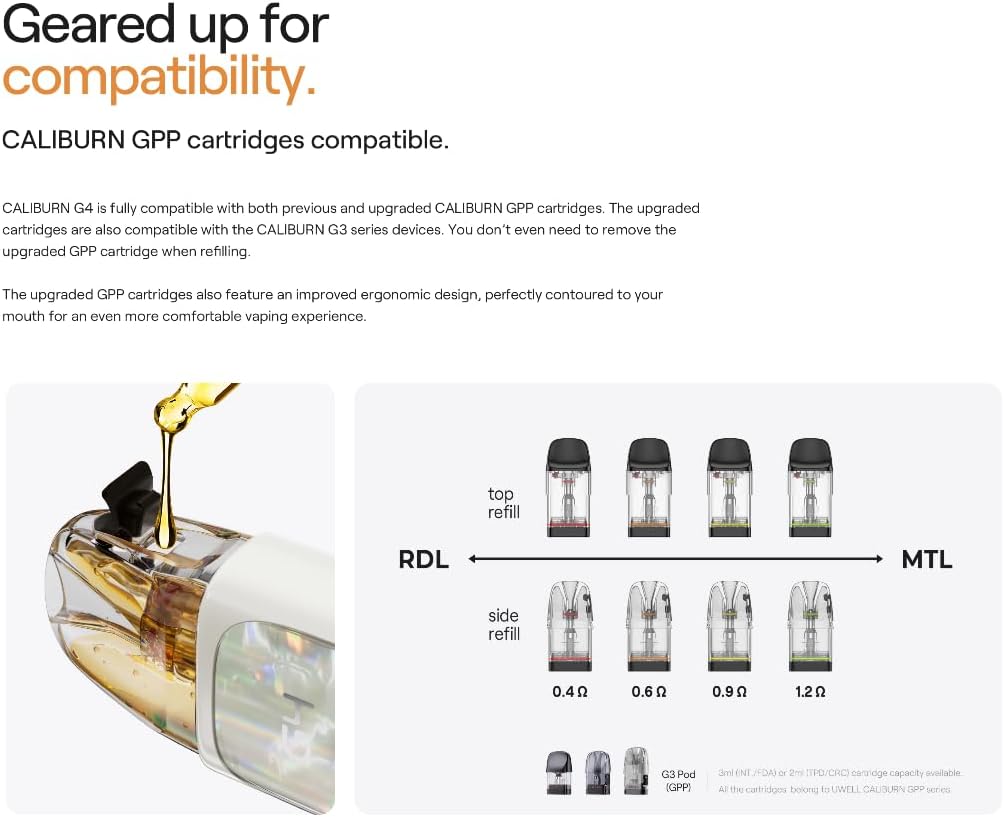
Figure 2: Illustration of Caliburn GPP cartridge refilling process and compatibility with various coil resistances (0.4Ω, 0.6Ω, 0.9Ω, 1.2Ω).
Operating Instructions
1. Power ON/OFF
To turn the device ON or OFF, press the multifunctional control button 5 times rapidly.
2. Vaping
The Caliburn G4 supports both button-activated and draw-activated vaping. Simply inhale from the mouthpiece or press and hold the control button while inhaling.
3. Multifunctional Control Button Operations

Figure 3: Detailed view of the multifunctional control button and its various functions.
- 1 Click: Lights up the screen.
- 2 Clicks: Locks/unlocks ignition through the button.
- 3 Clicks: Adjusts wattage.
- 4 Clicks: Enters the menu.
- 5 Clicks: Powers ON/OFF the device.
4. Vaping Modes: Storm and Waves
The Caliburn G4 offers two distinct vaping modes:
- Storm Mode: Provides an immediate and intense vapor delivery, ideal for users seeking a strong initial hit.
- Waves Mode: Delivers a smoother, more consistent vapor experience, enhancing the purity and stability of flavor.
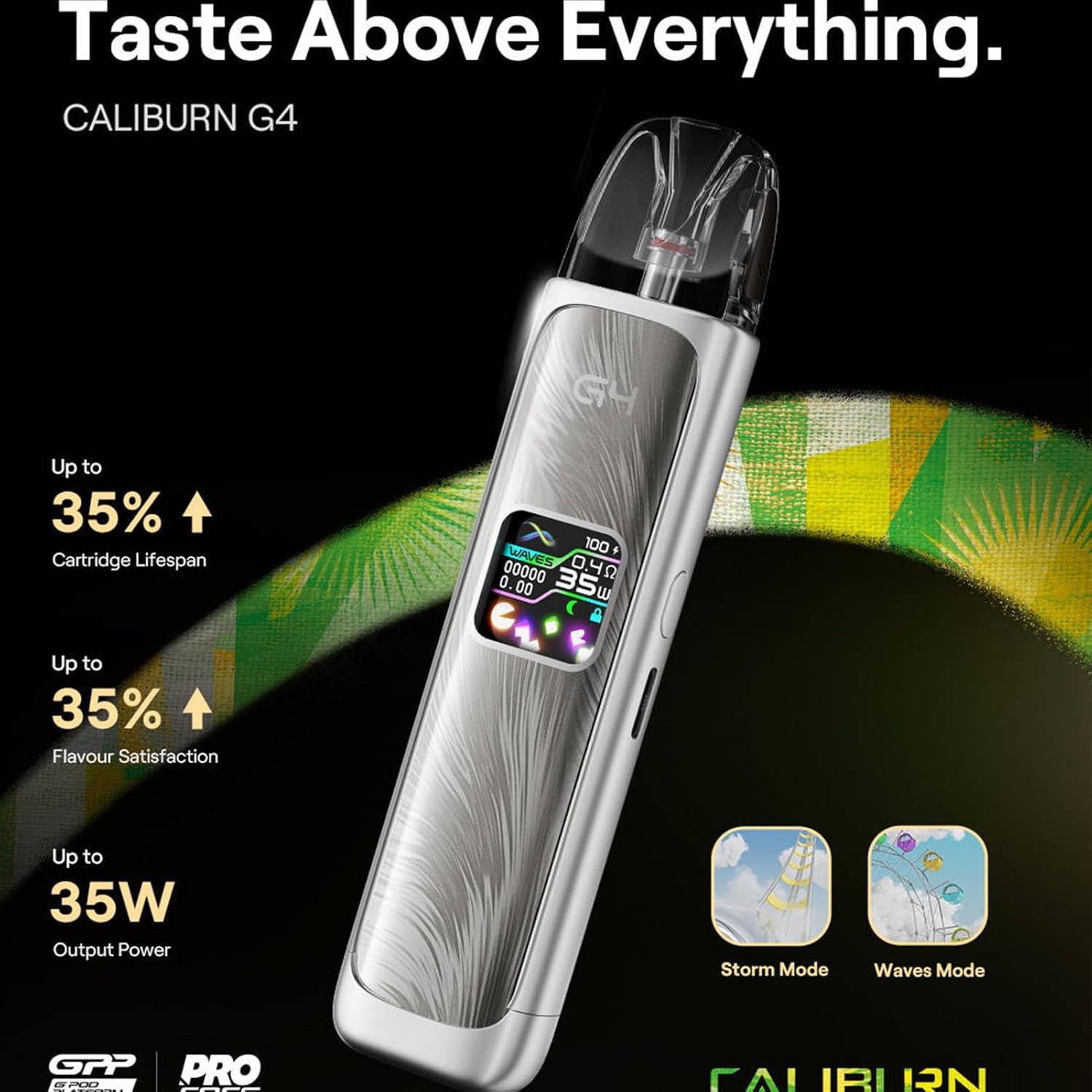
Figure 4: Visual representation of the Storm and Waves vaping modes available on the Caliburn G4.
5. Airflow Control
The Caliburn G4 features precise airflow control, allowing you to customize your vaping experience from a tight Mouth-to-Lung (MTL) draw to a looser Restricted Direct-to-Lung (RDL) draw.
- Locate the airflow adjustment slider on the side of the device.
- Slide the valve up or down to increase or decrease airflow.
- Additionally, rotating the cartridge within the device can also fine-tune the airflow.

Figure 5: Diagram illustrating how to adjust the airflow on the Caliburn G4 device for a personalized vaping experience.
6. HD Color Screen and UI
The 0.85-inch HD color screen displays essential information such as battery level, wattage, coil resistance, and puff count. The device features a newly minted dynamic theme UI for clear and intuitive navigation.

Figure 6: Examples of the dynamic theme user interface on the Caliburn G4's HD color screen, showing various display modes.
Maintenance
1. Cleaning the Device
Regular cleaning helps maintain the performance and longevity of your Caliburn G4.
- Wipe the device body with a soft, dry cloth.
- Clean the inside of the pod slot and the charging port with a cotton swab to remove any dust or e-liquid residue.
- Ensure no liquid enters the device's internal components.
2. Cartridge Replacement
The Caliburn GPP cartridges are integrated coil cartridges and should be replaced when you notice a burnt taste, reduced vapor production, or diminished flavor.
- Remove the old cartridge from the device.
- Dispose of the old cartridge responsibly.
- Install a new, pre-filled or freshly filled cartridge as described in the "Setup Guide" section.
3. Battery Care
- Avoid exposing the device to extreme temperatures (hot or cold).
- Do not store the device with a completely depleted battery for extended periods.
- Use only compatible charging cables and adapters.
Troubleshooting
| Problem | Possible Cause | Solution |
|---|---|---|
| No vapor production |
|
|
| Burnt taste |
|
|
| Leaking from cartridge |
|
|
| Device not charging |
|
|
Specifications
| Brand | Uwell |
| Product Name | Caliburn G4 Kit |
| Material | PCTG, ABS, ADC12 Aluminum Alloy |
| Dimensions | 26 x 15.65 x 114.98 mm |
| Pod Capacity | 3ml |
| Battery Capacity | 1300mAh |
| Output Power | Max 35W |
| Cartridge Types (Included) | FeCrAI Meshed 0.4Ω (side refill), FeCrAI Meshed 0.9Ω (side refill) |
| Charging | Type-C, 5V/2A Fast Charging |
| Screen | 0.85-inch HD Color Screen |
| Weight | 100 grams (device only) |
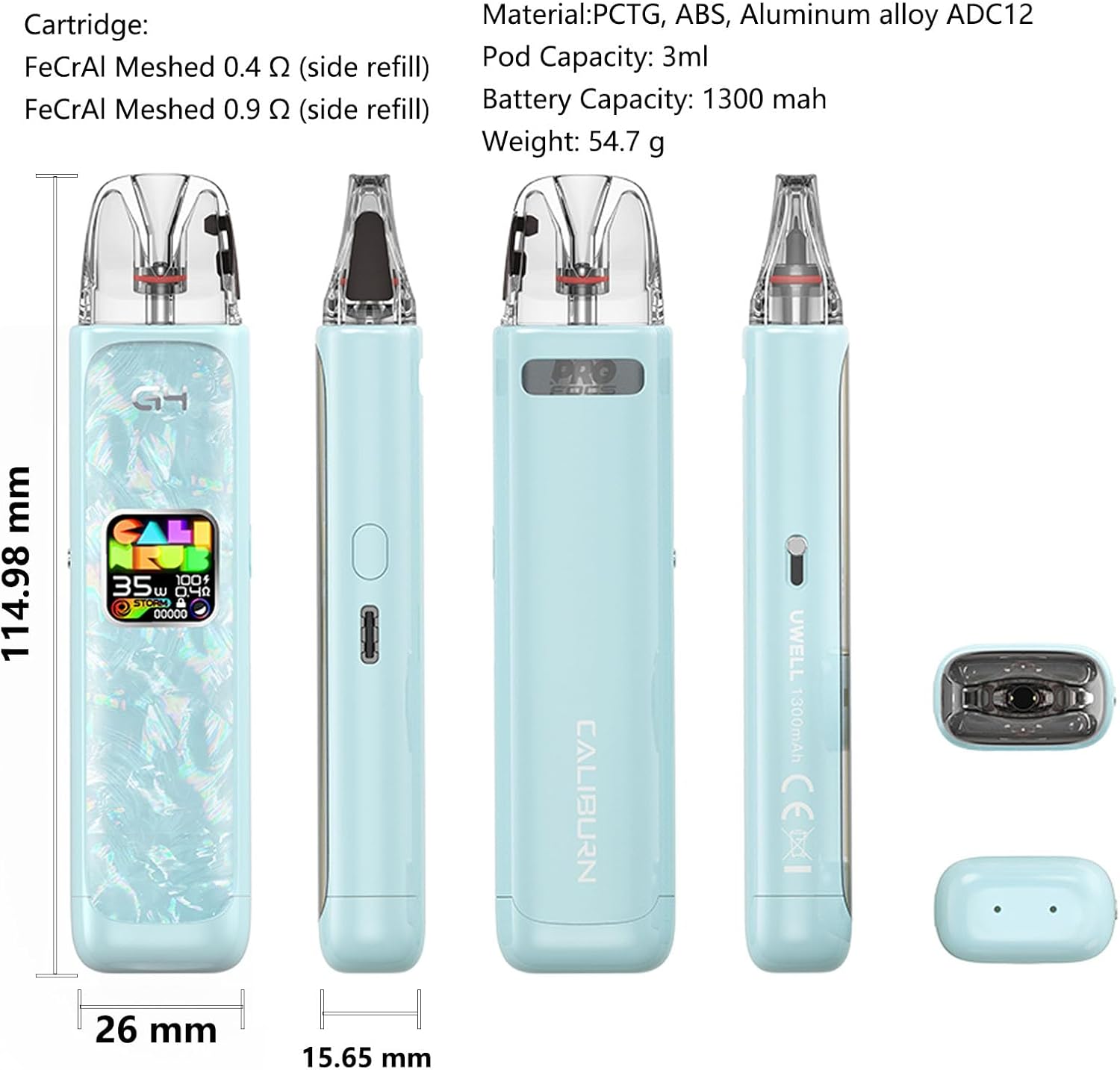
Figure 7: Visual representation of the Caliburn G4's dimensions and key specifications.
Safety Information
- Keep the device away from water and other liquids.
- Do not expose the device to direct sunlight or extreme temperatures.
- Do not disassemble or attempt to repair the device yourself.
- Keep out of reach of children and pets.
- This product is intended for adult smokers and vapers. It is not suitable for non-smokers, pregnant or breastfeeding women, or persons with heart disease, high blood pressure, diabetes, or taking medication for depression or asthma.
- This product does not contain nicotine or tobacco.
Warranty and Support
For warranty information and customer support, please refer to the warranty card included in your product packaging or contact the retailer or manufacturer directly. Please retain your proof of purchase for warranty claims.
Uwell Official Website: www.myuwell.com
Related documentsCaliburn G4


Ask a question about this manual
Ask about setup, troubleshooting, compatibility, parts, safety, or missing instructions. Manuals+ will review the question and use this page’s manual context to help answer it.