
Introduction
Thank you for choosing the dbsono 100W Bluetooth Speaker. This outdoor wireless boombox is designed to deliver powerful, immersive sound with vibrant RGB lights, making it ideal for parties, camping, poolside, and beach activities. Featuring IPX7 waterproofing, a long 30-hour playtime, and versatile connectivity options including USB-C, TWS, and AUX, this portable speaker ensures your music accompanies you wherever you go. Please read this manual carefully to ensure proper use and maintenance of your speaker.
Safety Information
- Do not expose the speaker to extreme temperatures or direct sunlight for prolonged periods.
- Ensure the rubber cover for the charging port is securely sealed for effective waterproofing, especially before exposing the speaker to water.
- Do not disassemble, repair, or modify the speaker. This may void the warranty and pose safety risks.
- Keep the speaker away from medical devices, as its magnetic components may interfere with their operation.
- Use only the provided charging cable and a compatible 5V power adapter.
- Avoid dropping or subjecting the speaker to strong impacts.
- Clean the speaker with a soft, damp cloth. Do not use harsh chemicals or abrasive cleaners.
Package Contents
Please check the package for the following items:
- 1 x dbsono 100W Bluetooth Speaker
- 1 x Power Cable (USB-C)
- 1 x AUX Cable
- 1 x User Manual
Product Overview

Figure 1: Front view of the dbsono 100W Bluetooth Speaker, showcasing its robust design and IPX7 waterproof capability with water splashes around it.

Figure 2: Diagram illustrating the internal speaker components, including dual 35W woofers, dual 15W woofers (likely tweeters based on product description), and 3-inch passive radiators, contributing to the 100W sound output.
The dbsono F29MAX speaker features a durable, portable design with integrated controls and dynamic RGB lighting. Key components include:
- Control Panel: Located on the top handle, featuring touch controls for power, volume, playback, light modes, and EX-Bass.
- Speaker Grille: Front-facing grille protecting the main drivers.
- RGB Light Rings: Located on both ends of the speaker, providing beat-synced lighting effects.
- Charging Port (USB-C): Located under a waterproof flap, used for charging the speaker and for power bank functionality.
- AUX-in Port: For wired audio connection.
- USB-A Port: For USB audio playback and power bank functionality.
- TF Card Slot: For playing music directly from a TF card.
Setup
1. Charging the Speaker
Before first use, fully charge the speaker. The speaker comes with a C battery included.
- Open the waterproof flap on the side/rear of the speaker to access the USB-C charging port.
- Connect the provided USB-C power cable to the speaker's charging port.
- Connect the other end of the cable to a 5V USB power adapter (not included) or a computer USB port.
- The charging indicator light will illuminate. Once fully charged, the light will change or turn off (refer to specific indicator behavior on your device).
- A full charge provides up to 30 hours of playtime (tested at 30% volume with lights off).
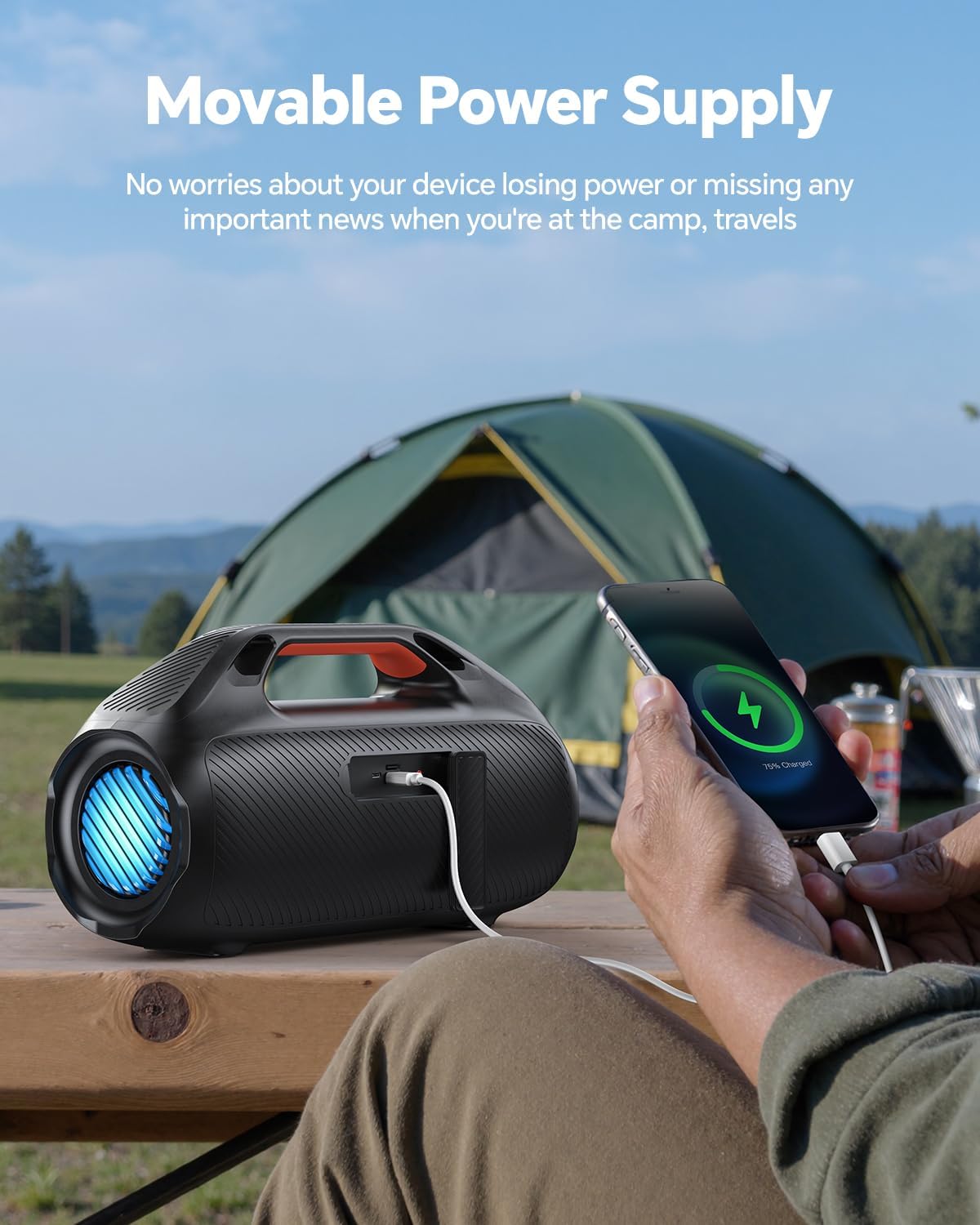
Figure 3: The speaker functioning as a movable power supply, charging a smartphone via its USB-A port. This feature is useful for keeping devices powered during outdoor activities.
2. Powering On/Off
- To Power On: Press and hold the Power button on the control panel for a few seconds until you hear an audible prompt and the lights illuminate.
- To Power Off: Press and hold the Power button again for a few seconds until you hear an audible prompt and the lights turn off.
3. Bluetooth Pairing
- Ensure the speaker is powered on and in Bluetooth pairing mode (indicated by a flashing Bluetooth indicator light). If not, briefly press the Bluetooth button.
- On your device (smartphone, tablet, laptop), enable Bluetooth and search for available devices.
- Select "dbsono F29MAX" from the list of devices.
- Once paired, the speaker will emit an audible confirmation, and the Bluetooth indicator light will become solid.
- The speaker will automatically reconnect to the last paired device when powered on, if within range (up to 100 feet).
4. True Wireless Stereo (TWS) Pairing
TWS allows you to connect two dbsono F29MAX speakers for a stereo sound experience.
- Ensure both speakers are powered on and not connected to any Bluetooth device.
- On one speaker (this will be the primary speaker), press and hold the TWS button (if available, or a combination of buttons as per specific model instructions, typically the Bluetooth button).
- The primary speaker will search for the secondary speaker. Once connected, both speakers will emit an audible confirmation.
- Now, connect your device to the primary speaker via Bluetooth as described in step 3. Audio will play in stereo through both speakers.

Figure 4: Two dbsono F29MAX speakers operating in True Wireless Stereo (TWS) mode, enhancing the audio experience for a larger outdoor gathering.
5. AUX/USB/TF Card Connection
- AUX-in: Connect one end of the provided AUX cable to the speaker's AUX-in port and the other end to your audio device's headphone jack. The speaker will automatically switch to AUX mode.
- USB Playback: Insert a USB flash drive containing MP3 audio files into the USB-A port. The speaker will automatically detect and begin playing music from the drive.
- TF Card Playback: Insert a TF (microSD) card containing MP3 audio files into the TF card slot. The speaker will automatically detect and begin playing music from the card.
Operating Instructions
1. Volume Control
- Increase Volume: Press the '+' button on the control panel.
- Decrease Volume: Press the '-' button on the control panel.
2. Playback Control
- Play/Pause: Press the Play/Pause button.
- Next Track: Press and hold the '+' button (or a dedicated next track button if available).
- Previous Track: Press and hold the '-' button (or a dedicated previous track button if available).
3. Light Modes
The speaker features beat-synced RGB lights with multiple modes.
- Change Light Mode: Press the Light button (usually indicated by a light bulb icon) to cycle through different light effects.
- Turn Lights Off: Continue pressing the Light button until the lights turn off.

Figure 5: Multiple dbsono speakers displaying various dynamic light show patterns, which pulsate and change color in sync with the music.
4. EX-Bass Mode
Activate EX-Bass mode for enhanced low-end bass performance.
- Activate/Deactivate EX-Bass: Press the "EX-Bass" button (or a button with a bass icon) on the control panel. An audible prompt or indicator light will confirm activation/deactivation.

Figure 6: A person enjoying music with the dbsono speaker on a beach, emphasizing the powerful and astounding bass output, ideal for outdoor environments.
5. Using as Power Bank
The speaker can function as a mobile power source to charge other devices.
- Connect your device's charging cable to the USB-A output port on the speaker.
- The speaker will begin charging your device. Ensure the speaker has sufficient battery charge.
6. Waterproof Guidelines (IPX7)
The speaker is IPX7 waterproof, meaning it can be submerged in up to 1 meter of water for 30 minutes. However, proper precautions are necessary:
- Always ensure the rubber cover for the charging and input ports is completely sealed before exposing the speaker to water.
- Do not expose the speaker to saltwater or chlorinated water for extended periods. Rinse with fresh water after exposure to such environments.
- Do not charge the speaker if it or the charging port is wet.

Figure 7: The dbsono speaker being used near water, highlighting its IPX7 waterproof rating, suitable for marine and poolside environments. Note: The rubber cover needs to be sealed for effective waterproofing.
Maintenance
- Cleaning: Wipe the speaker with a soft, damp cloth. Do not use abrasive cleaners, alcohol, or chemical solvents.
- Storage: Store the speaker in a cool, dry place away from direct sunlight and extreme temperatures. If storing for a long period, charge the battery to about 50% every few months to maintain battery health.
- Port Care: Keep the charging and input ports free of dust and debris. Ensure the waterproof flap is always securely closed when not in use or when near water.
Troubleshooting
| Problem | Possible Cause | Solution |
|---|---|---|
| Speaker does not power on. | Battery is depleted. | Charge the speaker fully using the provided USB-C cable. |
| No sound from speaker. | Volume is too low or muted. Device not connected. Incorrect input mode. | Increase speaker and device volume. Ensure Bluetooth is paired or AUX/USB/TF card is properly connected. Check input mode. |
| Bluetooth connection unstable or disconnects. | Device is out of range. Interference from other devices. | Move the device closer to the speaker (within 100 feet). Avoid obstacles. Disconnect other Bluetooth devices. |
| Cannot pair two speakers for TWS. | Speakers are already connected to another device. Incorrect pairing procedure. | Ensure both speakers are disconnected from any Bluetooth device. Follow TWS pairing instructions carefully. |
| Lights are not working. | Lights are turned off. | Press the Light button to cycle through modes or turn them on. |
| Speaker not charging external device. | Speaker battery is low. Cable issue. | Ensure the speaker has sufficient charge. Try a different USB cable. |
Specifications
| Feature | Detail |
|---|---|
| Model Name | F29MAX |
| Brand | dbsono |
| Speaker Maximum Output Power | 100 Watts |
| Speaker Type | Surround Sound, Outdoor, Portable, Waterproof |
| Connectivity Technology | Bluetooth 5.3, Auxiliary, USB |
| Bluetooth Range | Up to 100 feet (30 meters) |
| Water Resistance Level | IPX7 (Submersible up to 1 meter for 30 minutes) |
| Battery Life | Up to 30 Hours (at 30% volume, lights off) |
| Power Source | Battery Powered (1 C battery included) |
| Input Voltage | 5 Volts |
| Product Dimensions (D x W x H) | 15.88" x 8.79" x 6.55" |
| Item Weight | 8.8 Pounds |
| Material | Acrylonitrile Butadiene Styrene (ABS) |
| Special Features | Bass Boost (EX-Bass), Built-In Powerbank, LED Light, Portable |
| Compatible Devices | Laptop, Smartphone, Tablet |
Warranty and Support
The dbsono 100W Bluetooth Speaker is designed for durability and performance. For specific warranty details, please refer to the warranty card included in your product packaging or contact dbsono customer support.
If you encounter any issues not covered in this manual or require further assistance, please contact dbsono customer support through their official website or the contact information provided with your purchase. Please have your model number (F29MAX) and purchase details ready when contacting support.
Official Product Videos
No official product videos with "Seller" as creator type were found in the provided data to embed in this manual.

