
MeLE Quieter4C
MeLE Mini PC Quieter 4C N150 User Manual
Model: Quieter 4C-N150 NO OS
Brand: MeLE
1. Introduction
The MeLE Mini PC Quieter 4C N150 is a compact, fanless mini computer designed for a wide range of applications, from home and office use to education and specialized tasks like astrophotography. Featuring the 12th Generation Alder Lake-N150 processor, 8GB LPDDR4x RAM, and 128GB eMMC storage, it delivers robust performance with exceptionally low power consumption. Its fanless design ensures silent operation and dust resistance, making it ideal for quiet environments. This manual will guide you through the setup, operation, and maintenance of your new mini PC.

Figure 1.1: MeLE Mini PC Quieter 4C N150, showcasing its compact and sleek design.
2. What's in the Box
Please verify that all items are present in your package:
- 1x MeLE Quieter 4C PC
- 1x Power Adapter (12V/2A)
- 1x HDMI Cable
- 1x VESA Mount
- 1x User Manual (this document)
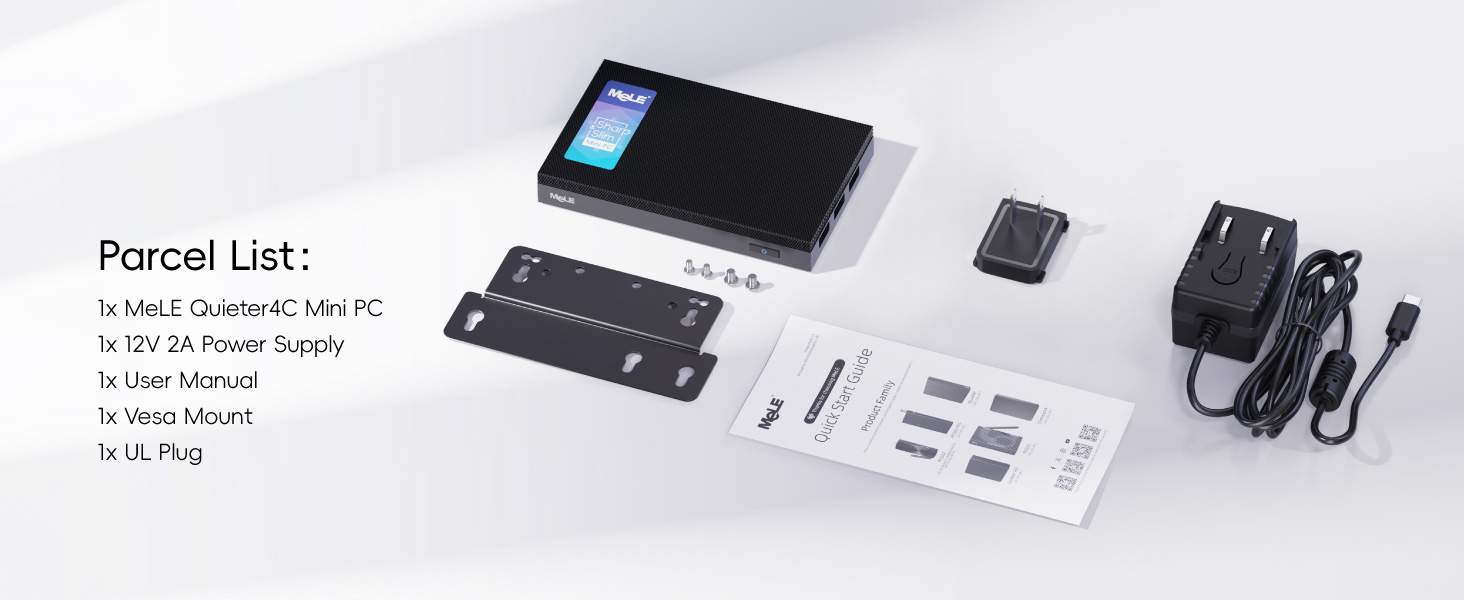
Figure 2.1: All components included in the MeLE Quieter 4C N150 package.
3. Setup Guide
3.1 Physical Connections
Connect your MeLE Mini PC to a power source, display, and peripherals using the available ports.
- Power Connection: Connect the included 12V/2A power adapter to the DC IN port on the mini PC and then to a power outlet.
- Display Connection: Use the provided HDMI cable to connect the mini PC to your monitor or TV. The device supports triple display output via two HDMI 2.0 ports and one full-function USB-C port.
- Peripheral Connection: Connect your keyboard, mouse, and other USB devices to the available USB 3.2 Gen1 (5Gbps), USB 3.2 Gen2 (10Gbps), or USB 2.0 (480Mbps) ports.
- Network Connection: For a wired connection, connect an Ethernet cable to the Gigabit Ethernet port. For wireless, the device supports 2.4/5G Wi-Fi.
- Audio: Connect headphones or speakers to the 3.5mm audio combo jack.
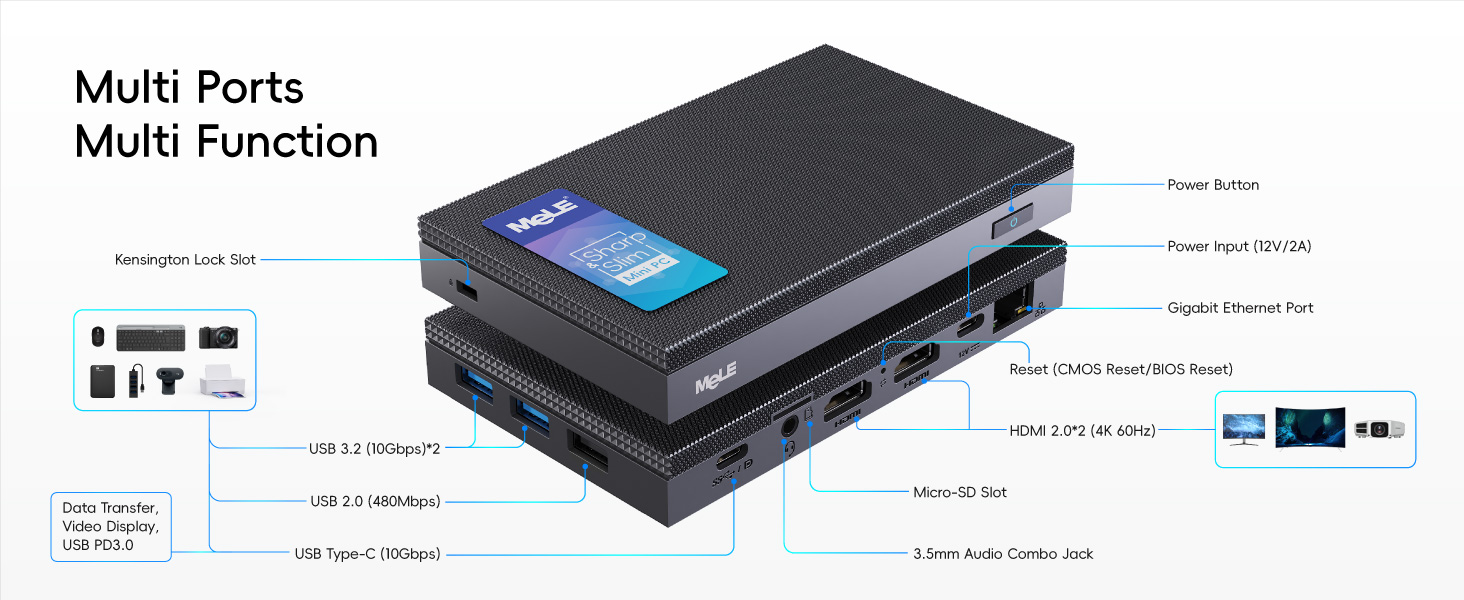
Figure 3.1: Detailed diagram of the MeLE Quieter 4C N150's multi-function ports.
3.2 Operating System Installation
This model comes without a pre-installed operating system. You will need to install your preferred OS (e.g., Windows, Linux) from a bootable USB drive or external media. Refer to your chosen operating system's installation guide for detailed steps.
3.3 VESA Mount Installation
The included VESA mount allows you to attach the mini PC to the back of a compatible monitor or TV, saving desk space and creating a clean setup.
- Attach the VESA mount bracket to the back of your monitor using the provided screws.
- Slide the MeLE Mini PC onto the bracket until it clicks securely into place.
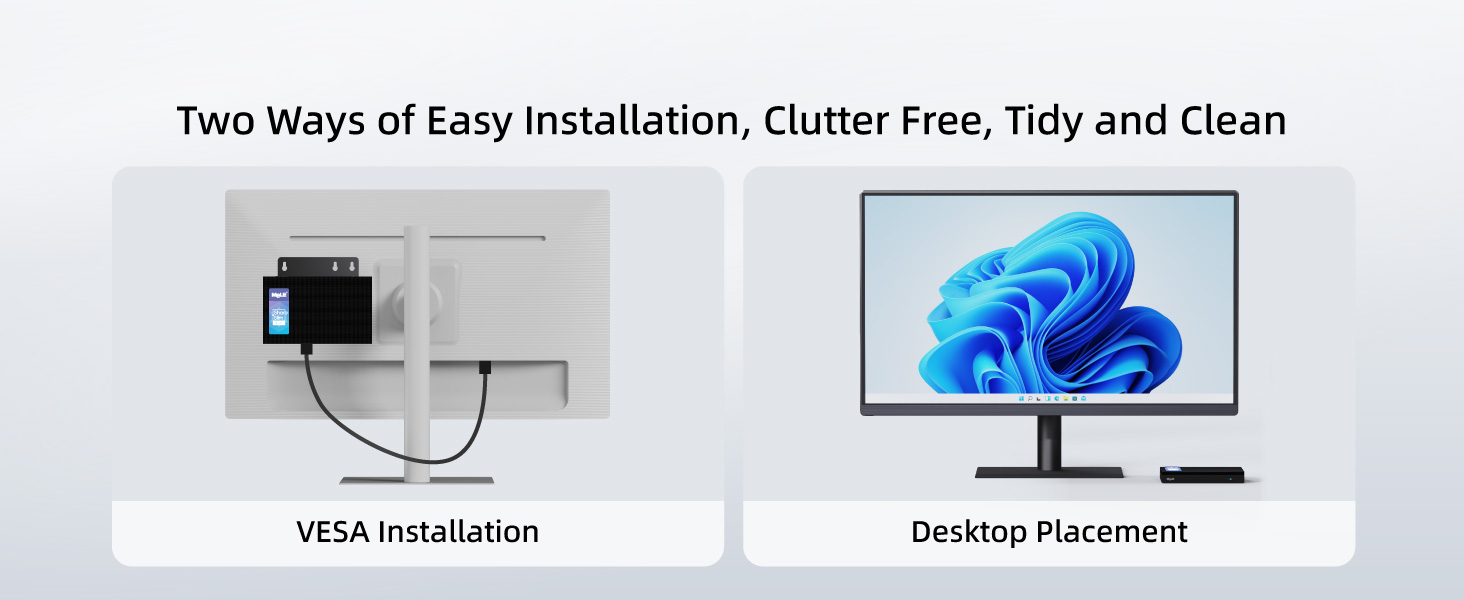
Figure 3.2: Two installation methods: VESA mount for a tidy setup or traditional desktop placement.
4. Operating Your Mini PC
4.1 Basic Operation
Once the operating system is installed, your MeLE Mini PC functions like a standard desktop computer. It is suitable for web browsing, office applications, media consumption, and light multitasking.
4.2 Triple Display Support
The integrated Ultra UHD graphics card supports 4K @ 60Hz output. You can connect up to three displays simultaneously using the two HDMI 2.0 ports and the full-function USB-C port, enhancing your productivity or entertainment experience.
4.3 Storage Expansion
The mini PC includes 128GB eMMC storage. For additional storage, you can utilize the empty M.2 2280 Key M slot (supports PCIe 3.0x4 NVMe and SATA M.2 SSDs up to 4TB) or the Micro SD card slot (up to 2TB).
4.4 Fanless Design
The fanless design ensures completely silent operation and prevents dust accumulation, contributing to a longer lifespan. Due to passive cooling, the surface temperature of the device may reach 55°C to 70°C under load, which is within safety standards (IEC62368-1:2018). Ensure adequate airflow around the device.

Figure 4.1: Illustration of the fanless design and heat dissipation mechanism of the MeLE Quieter 4C N150.
5. Maintenance
To ensure optimal performance and longevity of your MeLE Mini PC, follow these maintenance guidelines:
- Placement: Place the mini PC in a well-ventilated area to allow for proper heat dissipation. Avoid enclosing it in tight spaces or placing it on soft surfaces that can block airflow.
- Cleaning: Although fanless, dust can still accumulate on the exterior. Regularly wipe the device with a soft, dry cloth. Do not use liquid cleaners or abrasive materials.
- Temperature: While designed to operate at higher surface temperatures, avoid direct sunlight or extreme heat sources.
- Power Supply: Always use the original power adapter provided with the device. Using incompatible power supplies can damage the unit.
6. Troubleshooting
This section addresses common issues you might encounter with your MeLE Mini PC.
6.1 How to Enable Auto Power On
If you wish for your mini PC to automatically power on when power is restored after an outage, you can enable this feature in the BIOS settings.
Video 6.1: A step-by-step guide on how to enable the Auto Power On feature in the BIOS settings of your MeLE Mini PC.
6.2 Ethernet Port Not Working
If your Ethernet connection is not detected, it might be disabled in the BIOS by default. To enable it:
- Turn on your mini PC and repeatedly press the DELETE key (or F7 for boot menu, then select Enter Setup) during startup to enter the BIOS setup utility.
- Navigate to the Boot tab.
- Find the setting for "Network Stack Driver Support" and set it to Enabled.
- Go to the Save & Exit tab, select "Save Changes and Exit", and confirm with Yes.
6.3 Screen Resolution Issues
If your display resolution is incorrect or the screen goes blank, try the following:
- Ensure your display cable (HDMI or USB-C) is securely connected.
- Connect the mini PC to another monitor to verify if the issue is with the PC or the original display.
- Once you have a display, access your operating system's display settings and adjust the resolution to match your monitor's native resolution.
- Update your graphics drivers to the latest version.
7. Specifications
| Feature | Detail |
|---|---|
| Processor | 12th Gen Intel Alder Lake-N150 (4 Cores, 4 Threads, up to 3.4 GHz) |
| RAM | 8 GB LPDDR4x (4266 MHz) |
| Storage | 128 GB eMMC + M.2 2280 Key M slot (supports PCIe 3.0x4 NVMe/SATA SSD up to 4TB) |
| Graphics | Intel Ultra UHD Graphics (4K @ 60Hz) |
| Display Output | 2x HDMI 2.0, 1x Full-Function USB-C (supports 4K display) |
| Networking | 2.4/5G Wi-Fi, Gigabit Ethernet |
| USB Ports | USB 3.2 Gen1, USB 3.2 Gen2, USB 2.0, Full-Function USB-C (PD3.0) |
| Audio | 3.5mm Audio Combo Jack |
| Operating System | No OS (Supports Windows, Linux, IoT) |
| Cooling | Fanless Passive Cooling |
| Dimensions | Approximately 5.2 x 3.2 x 0.7 inches (13.1 x 8.1 x 1.83 cm) |
| Weight | Approximately 0.45 lbs (203g) |
| Power Input | 12V/2A DC |

Figure 7.1: Dimensions and size comparison of the MeLE Quieter 4C N150.
8. Warranty and Support
MeLE products are backed by a manufacturer's warranty. For specific warranty terms and conditions, please refer to the warranty card included with your product or visit the official MeLE website. For technical support, troubleshooting assistance, or service inquiries, please contact MeLE customer support through their official channels.
You can visit the official MeLE Store on Amazon for more information and support resources: MeLE Official Store
Related documentsQuieter4C

Ask a question about this manual
Ask about setup, troubleshooting, compatibility, parts, safety, or missing instructions. Manuals+ will review the question and use this page’s manual context to help answer it.