
1. Introduction
Thank you for purchasing the FOHERE Z1 Portable Desktop Range Hood. This manual provides essential information for the safe and efficient use of your new appliance. Please read it thoroughly before operation and retain it for future reference.
2. Package Contents
Ensure all items are present upon unpacking:
- 1 x Portable Range Hood (Model: Z1)
- Activated Charcoal Air Filters
- User Manual
3. Important Safety Instructions
To reduce the risk of fire, electric shock, or injury, observe the following:
- Read all instructions before using this appliance.
- Do not use this appliance near water or in wet conditions.
- Always unplug the appliance from the power outlet before cleaning or servicing.
- Keep the power cord away from heated surfaces.
- Do not operate any appliance with a damaged cord or plug.
- This appliance is for household use only. Do not use outdoors.
- Ensure proper ventilation around the appliance during use.
- Keep fingers and other objects away from moving parts.
- Gas Stovetops Forbidden: Do not use this range hood over gas stovetops.
- Electric Ceramic Stovetops Forbidden: Do not use this range hood over electric ceramic stovetops.
- Maintain a minimum distance of 4 inches from the cooking surface to the range hood.

4. Product Overview
4.1 Features
- Enhanced Filtration System: Features a newly designed air duct for superior suction and purification. Filtered airflow is released from the rear.
- Quick Fume Removal: Offers low, medium, and high-speed settings for various cooking needs.
- Zero-Installation Freedom: Compact size (15.8 x 9.29 x 8 inches) allows for easy placement and storage without installation.
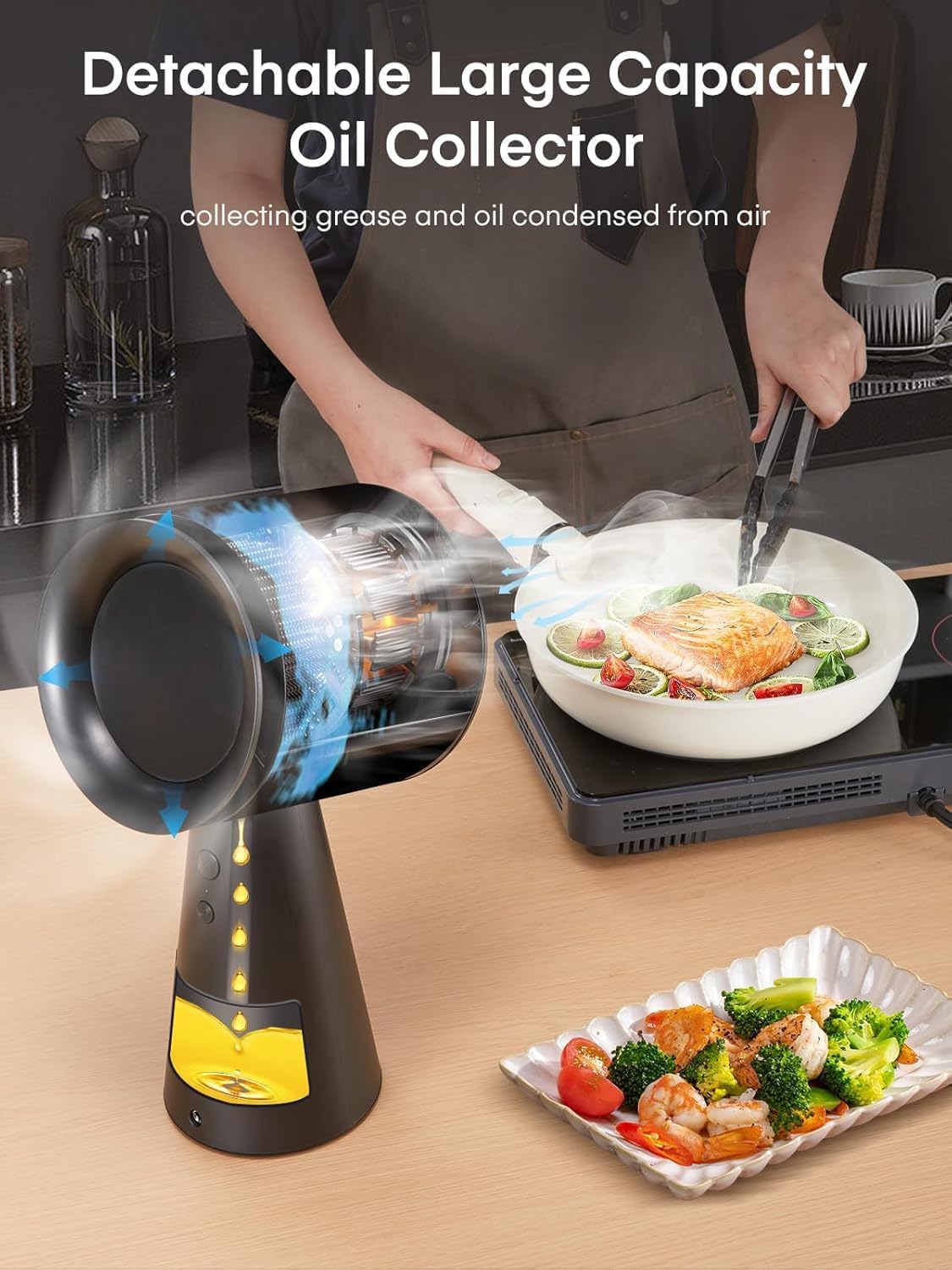
- Hassle-Free Cleanup: Equipped with a large-capacity grease collector and detachable filters for easy cleaning.
- Plug-&-Play Power: No complex installation required; simply plug in and operate.
4.2 Components


5. Setup
5.1 Placement
The FOHERE Z1 is designed for desktop use and requires no permanent installation. Place the unit on a stable, flat surface near your cooking area. Ensure there is at least 4 inches of space between the range hood's intake and the cooking surface for optimal performance. Avoid placing it directly over gas or electric ceramic stovetops.

5.2 Initial Filter Installation
The activated charcoal air filters are typically pre-installed or included for easy insertion. Refer to the maintenance section for detailed instructions on filter handling.
5.3 Power Connection
Connect the power adapter to the range hood and then plug it into a standard electrical outlet. The unit is ready for operation once plugged in.
6. Operation
6.1 Powering On and Speed Adjustment
The FOHERE Z1 features three speed settings for varying cooking intensity:
- Speed 1 (Low): Press the first large button once. A flashing white light indicates this speed.
- Speed 2 (Medium): Press the first large button again. A red light indicates this speed.
- Speed 3 (High): Press the second small button. A flashing red light indicates this speed. This mode is suitable for heavy fumes and can be maintained for 5 minutes before returning to the previous speed.

6.2 Effective Fume Extraction
Position the range hood to effectively capture cooking fumes. The powerful suction helps remove smoke and odors, improving indoor air quality.
Video 6.1: Demonstration of the FOHERE Z1 Portable Range Hood's fume extraction capabilities during cooking. This video shows the compact size, ease of use, and effective removal of smoke and odors from a cooking pan.
7. Maintenance
7.1 Cleaning the Oil Collection Cup
The large-capacity oil collection cup efficiently gathers grease. To clean, gently pull out the cup from its housing. Wash it with warm, soapy water, rinse thoroughly, and dry before reinserting.
7.2 Cleaning and Replacing Filters
The detachable aluminum carbon filter system requires regular cleaning to maintain efficiency. Carefully remove the filter assembly. The filters can be washed with mild detergent and water. Ensure they are completely dry before reinstallation. Replace filters as needed based on usage.

8. Troubleshooting
If you encounter issues with your FOHERE Z1 Portable Desktop Range Hood, refer to the following common problems and solutions:
| Problem | Possible Cause | Solution |
|---|---|---|
| Unit does not power on. | Not plugged in; power outlet issue; damaged cord. | Ensure the power cord is securely plugged into a working outlet. Check the power cord for any damage. |
| Low suction power. | Clogged filters; incorrect speed setting; unit too far from cooking surface. | Clean or replace the filters. Select a higher speed setting. Ensure the unit is positioned within 4-6 inches of the cooking area. |
| Unit automatically switches to lower speed. | Overheating protection activated. | This is a safety feature. Allow the unit to cool down. Avoid prolonged use on the highest setting if this occurs frequently. |
| Unusual noise during operation. | Obstruction in fan; loose components. | Turn off and unplug the unit. Inspect the fan area for any foreign objects. If the issue persists, contact customer support. |
9. Specifications
| Feature | Detail |
|---|---|
| Brand | FOHERE |
| Model Info | Z1 |
| Material | ABS, Aluminum |
| Noise Level | 55 Decibels |
| Mounting Type | Desktop |
| Controls Type | Push Button, Touch |
| Voltage | 24 Volts (DC) |
| Number of Speeds | 3 |
| Item Weight | 3.1 Pounds |
| Wattage | 24 watts |
| Filter Type | Mesh, Activated Charcoal |
| Ventilation Type | Ductless/Recirculating |
| Product Dimensions | 14.8 x 8.27 x 6.62 inches (D x W x H) |
| Airflow Displacement | 360 Cubic Feet Per Minute |
10. Warranty and Support
FOHERE products are manufactured to high-quality standards. For warranty information or technical support, please refer to the contact details provided with your purchase documentation or visit the official FOHERE website. Keep your proof of purchase for any warranty claims.


