
Introduction
The ARRIS MN-128 is a 1:12 scale 4WD RC rock crawler designed for off-road and climbing performance. This model features a realistic design with a durable hard plastic shell, functional doors, roof racks, bumpers, and side mirrors. It is equipped with a 4WD system, a powerful 390 magnetic motor, and a 250g waterproof servo for exceptional traction and stability across various terrains.
This manual provides essential information for setting up, operating, maintaining, and troubleshooting your MN-128 RC Rock Crawler to ensure optimal performance and longevity.

Image: The ARRIS MN-128 RC Rock Crawler, highlighting its realistic design and robust build.
Setup
1. Unboxing and Initial Inspection
Carefully remove all components from the packaging. Verify that all items listed in the package contents are present and undamaged. The package typically includes the RC crawler, remote control, 7.4V 1200mAh battery, and charger.
2. Battery Installation and Charging
- Vehicle Battery: Locate the battery compartment on the MN-128 RC crawler. Insert the provided 7.4V 1200mAh battery. Ensure the battery is securely connected to the vehicle's power connector.
- Charging: Connect the 7.4V 1200mAh battery to the included charger. Plug the charger into a suitable power outlet. The charging indicator light will show the charging status (refer to charger instructions for specific light patterns). Do not overcharge the battery.
- Remote Control Battery: The remote control requires 1 AA battery (included). Open the battery compartment on the remote control and insert the AA battery, observing correct polarity.

Image: Underside view of the MN-128 chassis, illustrating the battery tray and internal components.
3. Remote Control Pairing
The MN-128 utilizes a 2.4GHz transmitter for interference-free control. Typically, the remote control and vehicle are pre-paired from the factory. If re-pairing is necessary:
- Ensure both the vehicle and remote control are powered off.
- Turn on the vehicle. The vehicle's indicator light may flash.
- Turn on the remote control. The indicator light on the remote should become solid, indicating a successful connection.
- If the connection fails, power off both devices and repeat the steps.
Operating Instructions
1. Basic Controls
- Throttle: Use the trigger on the remote control to accelerate forward or reverse. Pull the trigger to move forward, push it to brake or reverse. The proportional throttle allows for precise speed control.
- Steering: Use the steering wheel on the remote control to turn the vehicle left or right. The proportional steering provides responsive turning.
- Lighting System: The MN-128 features a precision lighting system including headlights, brake lights, reverse lights, and turn signals. These lights operate in conjunction with vehicle movement. Some models may have a dedicated button on the remote to toggle headlights.

Image: Rear view of the MN-128, demonstrating the functional brake lights and turn signals.
2. Terrain Capabilities
The MN-128 is designed for various off-road conditions thanks to its 4x4 drive system, durable vacuum tires, independent suspension, and high-elastic shock absorbers. It performs well on:
- Rocky terrains
- Grassy areas
- Sandy surfaces
- Muddy trails
- Mountain trails
Its high ground clearance and robust suspension enable impressive climbing ability and obstacle navigation.

Image: MN-128 RC Crawlers demonstrating their versatility across different terrains.
3. Driving Tips
- Always operate the vehicle in open areas free from obstacles, people, or pets.
- Avoid driving in deep water or extreme mud to prevent damage to electronic components, despite the waterproof servo.
- Practice proportional throttle and steering for smoother control and better obstacle negotiation.
- Monitor battery life and return the vehicle to a safe location before the battery is fully depleted.
Video: The MN-128 RC off-road truck navigating various outdoor terrains, showcasing its climbing and driving capabilities.
Maintenance
1. General Cleaning
- After each use, especially in dusty or muddy conditions, clean the vehicle to remove dirt and debris. Use a soft brush or compressed air for hard-to-reach areas.
- Wipe down the body with a damp cloth. Avoid using harsh chemicals that could damage the paint or plastic.
- Inspect the wheels and suspension for any trapped debris that could hinder performance.
2. Battery Care and Storage
- Always disconnect the battery from the vehicle when not in use.
- Store batteries in a cool, dry place, away from direct sunlight and extreme temperatures.
- Do not store fully charged or fully depleted batteries for extended periods. Charge them to approximately 50% for long-term storage.
3. Upgrades and Customization
The MN-128 is designed to be customizable and upgradable. Aftermarket enhancements such as metal gears, upgraded servos, and larger batteries can improve durability and performance. The paintable body shell also allows for personalized colors and decals.
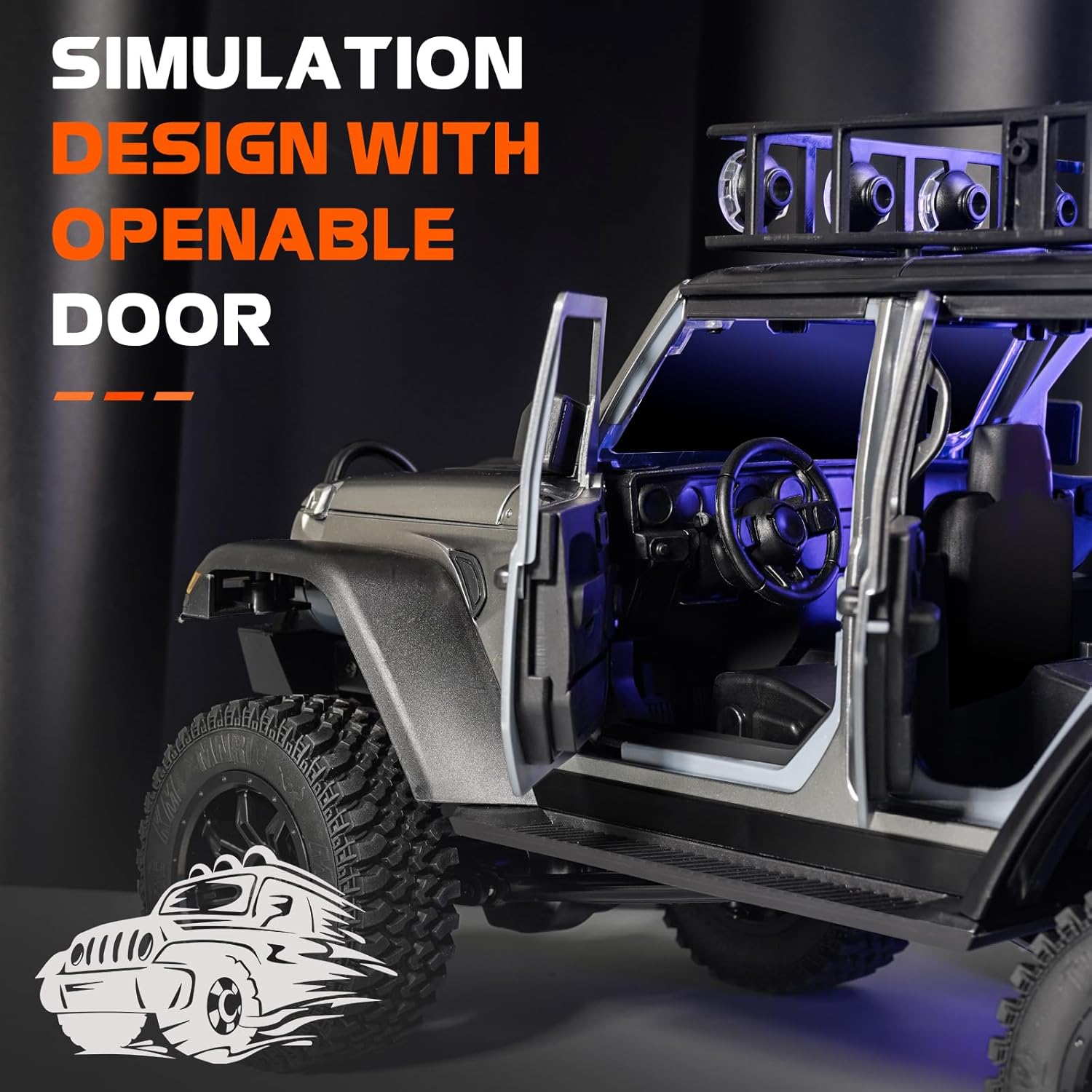
Image: The MN-128 with an open door, showcasing its detailed interior and potential for customization.
Troubleshooting
| Problem | Possible Cause | Solution |
|---|---|---|
| Vehicle does not respond to remote. | Low battery in vehicle or remote; not paired; interference. | Charge vehicle battery, replace remote battery, re-pair remote and vehicle, move to an area with less interference. |
| Poor climbing performance. | Low battery; unsuitable terrain; worn tires. | Ensure battery is fully charged, choose appropriate terrain, inspect and replace worn tires. |
| Vehicle turns poorly (wide turning radius). | Inherent design characteristic; steering trim adjustment needed. | Adjust steering trim on the remote control. Be aware that some RC crawlers may have a wider turning radius by design. |
| Battery difficult to access. | Design of the battery compartment. | Refer to the vehicle diagram for the correct battery compartment access method. Practice removal and insertion. |
| Spare tire or accessories break off. | Impact during operation. | Re-attach with appropriate adhesive if possible. Consider removing delicate accessories for aggressive off-road use. |
Specifications
| Feature | Detail |
|---|---|
| Model | MN-128 |
| Scale | 1:12 |
| Product Dimensions | 14 x 7 x 6 inches |
| Item Weight | 4.91 pounds |
| Manufacturer Recommended Age | 16 years and up |
| Drive System | 4WD Central Drive |
| Motor | 390 Strong Magnetic Motor |
| Servo | 25g Waterproof Servo |
| ESC | 50A Independent ESC |
| Battery (Vehicle) | 7.4V 1200mAh (included) |
| Battery (Remote) | 1 AA battery (included) |
| Remote Control Frequency | 2.4GHz |
| Control Distance | Up to 50m |
| Max Speed | 8 KM/H |
| Climbing Angle | ≤45° |
| Tractive Force | 20KG |
| Loading Weight | 5KG |

Image: Visual representation of the MN-128 with key specifications.
Warranty and Support
ARRIS is committed to providing quality products and customer satisfaction. While specific warranty details are not provided in this document, if any issues arise with your MN-128 RC Rock Crawler, please contact the ARRIS support team for assistance. Our team is ready to help with any product-related inquiries or concerns.
For further support, you may visit the official ARRIS store on Amazon: ARRIS Store.