
1. Introduction
This manual provides detailed instructions for the installation and operation of your PHEZEN Car Radio Stereo. Designed for Ford Focus models from 2012 to 2018, this 9.7-inch touchscreen head unit features Android 13, CarPlay, Android Auto, GPS navigation, and various multimedia functions. Please read this manual thoroughly before installation and use to ensure proper functionality and safety.
2. What's in the Box
- PHEZEN Car Radio Stereo Head Unit
- Power Cable
- RCA Input/Output Cables
- 2 USB Cables
- Camera Input Cable
- Radio Extension Cable
- GPS Antenna
- Instruction Manual
- USB Adapter
- Canbus Box
- AHD Backup Camera
- Car Compass

Figure 1: Included components of the PHEZEN Car Radio Stereo system.
3. Setup and Installation
Proper installation is crucial for optimal performance. It is recommended to have this unit installed by a professional. Ensure the vehicle's power is disconnected before beginning installation.
3.1 Disassembly of Original Unit
- Unscrew the bottom two screws of the original radio panel.
- Carefully take out the dash kit of your car.
- Disconnect the emergency light cable.
- Unscrew the top four screws holding the original head unit.
- Take out the original head unit and disconnect all wires on the back.
- Take out the original small screen and disconnect the display cable.
Video 1: Detailed installation method for Ford Focus 2012-2018, demonstrating disassembly and initial wiring steps.
3.2 Wiring the New Unit
- Connect the supplied power harness of the new car radio to the factory harness of your car.
- Connect the amplifier turn-on wire of the car radio to the related amplifier wire of your car.
- Connect the display cable of the car radio to the related screen cable of your car.
- Connect the power harness to the new car radio.
- Connect the CANBUS cable to the related CANBUS port of the head unit.
- Connect the Amplifier control wire to the related end of the CANBUS box.
- Find the blue AMP wire of the Amplifier control wires.
- Remove the protective caps from the wire.
- Use a lighter to burn off the surface of the AMP wire and take off the outer protective adhesive.
- Burn off the surface of the second red accessory wire of the power harness.
- Connect and swap the red accessory wire and blue AMP wire.
- Use insulating tape to protect the connection of these two wires.
- Connect the emergency light cable of your car to the related port of the radio.
Video 2: Guide on how to connect the car stereo radio, detailing wiring connections for power, amplifier, and CANBUS.
Video 3: Wiring guide for 4-core car radio installation, showing detailed steps for connecting various cables.
Video 4: Wiring video specifically for Ford Focus 2012 to 2018 models, demonstrating the wiring process.
Video 5: Reversing camera wiring instructions, showing how to connect the backup camera.

Figure 2: Visual comparison of the Ford Focus dashboard before and after installing the PHEZEN Car Radio Stereo.
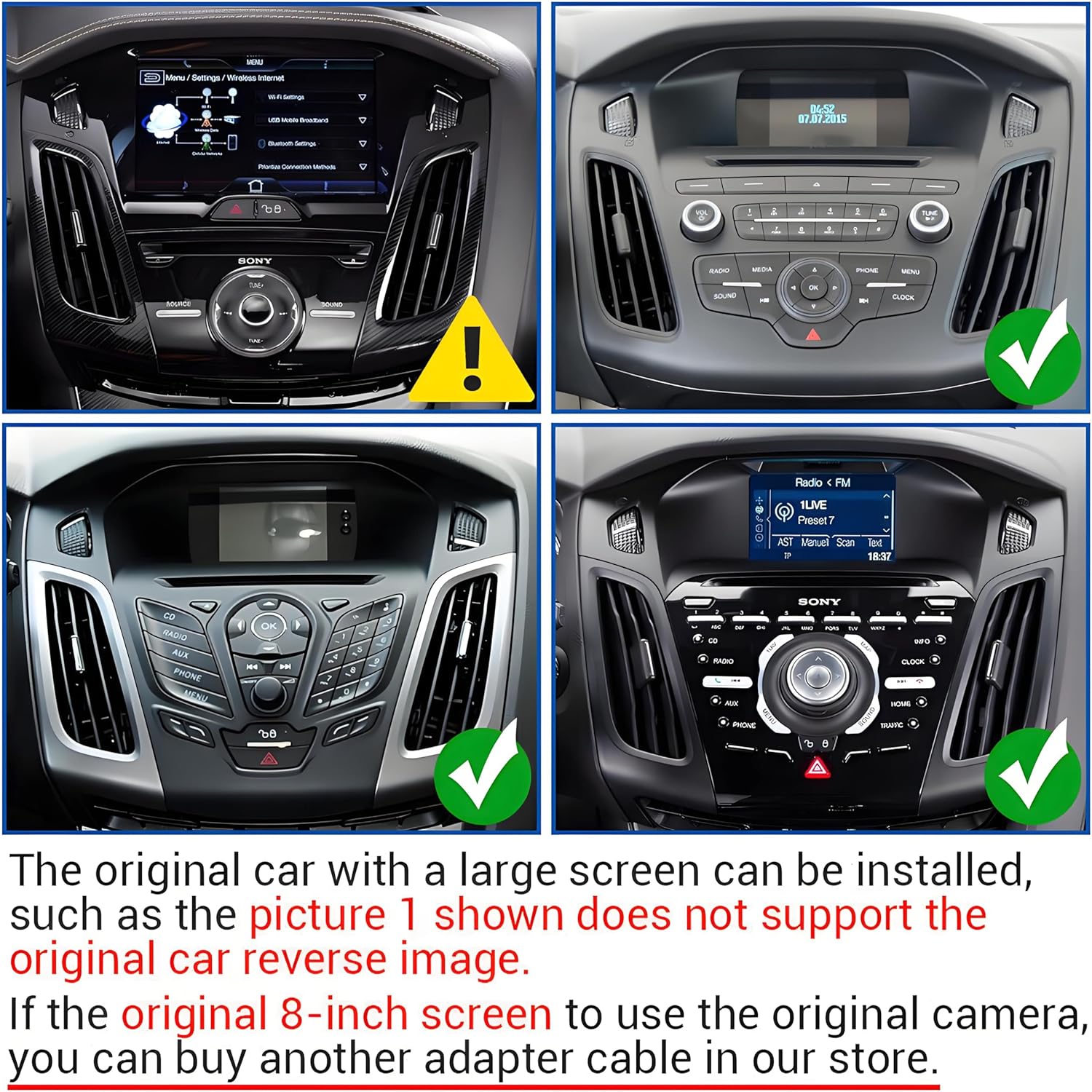
Figure 3: Compatibility information for different Ford Focus original radio setups. Note: Original cars with a large screen (Picture 1) do not support the original car reverse image. If the original 8-inch screen uses the original camera, an adapter cable may be required.
4. Operating Instructions
4.1 General Features
- Android 13 System: Experience seamless multitasking with a 4-core CPU, 2GB RAM, and 32GB ROM.
- HD Display: 1080P video decoder resolution with 2.5D tempered glass for enhanced protection and visual experience.
- Steering Wheel Control (SWC): Enjoy full control of your stereo with convenient steering wheel controls for an intuitive driving experience.
- Split Screen: Allows for simultaneous display of two applications, such as navigation and music.
- FM/RDS Radio: Built-in FM AM RDS tuner radio with 18 preset stations for news and music.
- EQ Settings: Adjust various popular sound effects to achieve optimal car audio quality.
Figure 4: Overview of CarPlay, Android Auto, and Mirror Link functionalities.

Figure 5: GPS Navigation with offline and online map support, and WiFi Hotspot for app downloads and online content.

Figure 6: Reversing Display automatically switches to AHD wide-angle backup camera view. Steering Wheel Control allows convenient stereo operation.

Figure 7: Bluetooth connectivity for calls and music, FM/RDS radio functions, and customizable EQ settings.
4.2 CarPlay & Android Auto
- Built-in Apple CarPlay and Android Auto for seamless smartphone integration (wired or wireless).
- Access calls, music, map navigation, and voice control for hands-free, safe driving.
Video 6: Instructions on how to use CarPlay with the upgraded Ford Focus radio (2012-2018 models).
4.3 GPS Navigation & WiFi
- Built-in offline map for North America.
- Online map support when connected to WiFi.
- Connect to WiFi to install or delete Android apps from the Application Store.
4.4 Bluetooth
- Built-in Bluetooth with A2DP for hands-free calling, phonebook synchronization, and music streaming.
4.5 Mirror Link
- Seamless integration with smartphones and other devices for accessing a wide range of audio content.
5. Specifications
| Feature | Detail |
|---|---|
| Item Weight | 4.74 pounds |
| Product Dimensions | 16.93 x 13.39 x 6.3 inches |
| Item Model Number | RT-QA1342X-WUYA-04 |
| Display Size | 9.7 Inches |
| Voice Command | Touchscreen |
| Brand | PHEZEN |
| Vehicle Service Type | Car |
| Special Feature | Bluetooth |
| Connectivity Technology | Bluetooth |
| Map Type | Worldwide |
| Audio Output Mode | Stereo |
| Mounting Type | Dashboard Mount |
6. Troubleshooting
If you encounter issues, please refer to the following common troubleshooting steps:
- No Power: Check all power connections and ensure the vehicle's fuse for the radio is intact.
- Screen Not Responding: Try restarting the unit. If the issue persists, check the display cable connection.
- CarPlay/Android Auto Not Connecting: Ensure Bluetooth is enabled on your phone and the radio. Verify the USB cable is securely connected if using a wired connection.
- No Sound: Check speaker wire connections and amplifier connections. Verify EQ settings are not set to mute or extremely low volume.
- GPS Signal Issues: Ensure the GPS antenna is properly installed and has a clear view of the sky.
- Steering Wheel Controls Not Working: Verify the CANBUS connection and ensure the controls are properly configured in the radio settings.
Video 7: Instructions on how to calibrate the car radio screen, which may resolve touch response issues.
7. Maintenance
To ensure the longevity and optimal performance of your car radio stereo, follow these maintenance guidelines:
- Screen Cleaning: Use a soft, lint-free cloth to gently wipe the touchscreen. For stubborn smudges, slightly dampen the cloth with water or a screen-safe cleaner. Avoid harsh chemicals or abrasive materials.
- Software Updates: Periodically check for software updates through the unit's settings or the manufacturer's website to ensure you have the latest features and bug fixes.
- Cable Connections: Occasionally check all visible cable connections to ensure they are secure and free from damage. Loose connections can lead to intermittent issues.
- Environmental Care: Avoid exposing the unit to extreme temperatures, direct sunlight for prolonged periods, or excessive moisture.
8. Warranty and Support
This product comes with a standard manufacturer's warranty. For specific warranty details, including coverage period and terms, please refer to the warranty card included in your product packaging or contact PHEZEN customer support.
For technical assistance, troubleshooting, or any other inquiries, please contact PHEZEN customer support through their official website or the contact information provided in your product documentation.