
1. Introduction
This manual provides detailed instructions for the safe and proper use of your Karini Drop Safe, Model 690-FD2D. This 4.0 cubic foot cash depository safe is designed for secure storage of valuables, featuring a robust steel construction, a digital combination lock, an anti-fishing drop slot, and an additional internal locking compartment. Please read this manual thoroughly before setup and operation.

Image 1: Karini Drop Safe with its drop slot and internal compartments visible.
2. Safety Information
- Always keep emergency keys in a secure location away from the safe.
- Do not store the external battery box inside the safe.
- Ensure the safe is securely mounted to a wall or floor to prevent unauthorized removal.
- Avoid exposing the safe to extreme temperatures or moisture.
3. Package Contents
Verify that all components are present:
- Karini Drop Safe (Model 690-FD2D)
- Emergency Keys (2 sets)
- Top Cabinet Key (2 sets)
- External Power Box (for emergency power)
- Expansion Bolts (6 for mounting)
- Fireproof Bag (1)
- Instruction Manual (this document)
- Durable Lining (pre-installed)
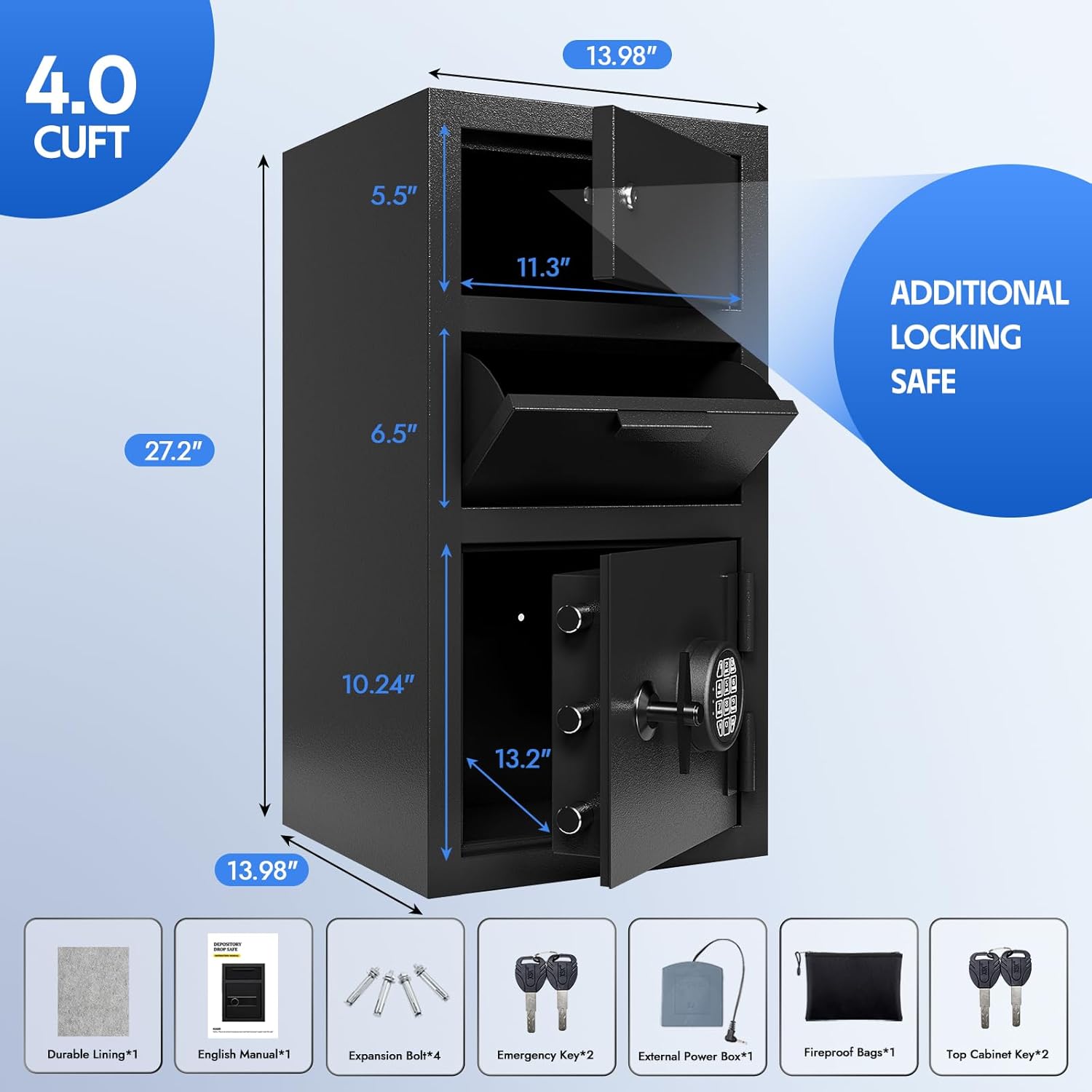
Image 2: Safe dimensions and included accessories.
4. Setup
4.1 Battery Installation
- Open the main safe door using the emergency key (refer to Section 5.2).
- Locate the battery compartment on the inside of the main door.
- Insert four (4) AA alkaline batteries (not included), ensuring correct polarity.
- Close the battery compartment cover.
4.2 Setting the Digital Combination
- With the main safe door open, press the red 'Setting Button' located on the inside of the door (near the battery compartment).
- The keypad will illuminate. Enter your desired 3-8 digit code.
- Press the '#' key to confirm. The safe will emit a confirmation sound.
- Test the new code with the door open before closing it.
4.3 Wall/Floor Mounting
For enhanced security, it is recommended to anchor the safe to a wall or floor.
- Choose a suitable location for the safe.
- Mark the drilling points through the pre-drilled holes inside the safe.
- Drill pilot holes into the wall or floor using an appropriate drill bit.
- Align the safe with the drilled holes and insert the provided expansion bolts.
- Tighten the bolts securely to fix the safe in place.

Image 3: Wall/Floor installation guide.
5. Operating Instructions
5.1 Opening with Digital Combination
- Enter your programmed digital combination on the keypad.
- Press the '#' key. The LED light will turn on.
- Within 5 seconds, turn the alloy steel knob clockwise to open the main safe door.
5.2 Opening with Emergency Key
Use this method if batteries are depleted or the combination is forgotten.
- Gently remove the digital keypad cover by turning it counter-clockwise.
- Insert the emergency key into the keyhole behind the keypad.
- Turn the key clockwise while simultaneously turning the alloy steel knob to open the main safe door.
5.3 Opening with External Battery Box
If internal batteries are dead and emergency keys are not accessible.
- Connect the external power box to the port located behind the digital keypad cover (after removing it).
- Enter your digital combination and press '#'.
- Turn the alloy steel knob clockwise to open the main safe door.

Image 4: Three methods for unlocking the safe.
5.4 Using the Drop Slot
The front drop slot allows for easy deposit of cash or small items without opening the main safe compartment. The anti-fishing design prevents items from being retrieved once deposited.
- Pull the drop slot drawer forward.
- Place items into the drawer.
- Push the drawer back into the safe. Items will fall into the main compartment.
5.5 Using the Additional Locking Safe
The top independent compartment provides an extra layer of security for highly sensitive items.
- Insert the top cabinet key into the lock on the upper door.
- Turn the key to unlock and open the compartment.
- Close the door and turn the key to lock it.
6. Anti-Theft Alarm System
The safe is equipped with an alarm system to deter unauthorized access.
- If an incorrect password is entered 3 consecutive times, the system will automatically lock for 20 seconds, and an audible alarm will sound for 20 seconds.
- If an incorrect password is entered 3 more consecutive times (total of 6), the system will lock for 5 minutes, and the alarm will sound for 5 minutes.
- To silence the alarm immediately, open the safe with the emergency key and remove one battery.
- To enable/disable all sounds (including the alarm), input "11#" on the keypad. A long "drop" sound indicates success.

Image 5: Anti-theft alarm system details.
7. Maintenance
- Cleaning: Wipe the safe's exterior with a soft, damp cloth. Avoid abrasive cleaners.
- Battery Replacement: Replace all four AA batteries when the low battery indicator appears or if the keypad becomes unresponsive. Always use new alkaline batteries.
- Key Care: Keep emergency and top cabinet keys clean and dry. Do not force keys into locks.
8. Troubleshooting
- Safe will not open with digital code:
- Ensure batteries are correctly installed and not depleted. Replace if necessary.
- Verify the correct code is being entered.
- If locked out due to incorrect entries, wait for the lockout period to expire or use the emergency key/external power box.
- Keypad is unresponsive:
- Check and replace batteries.
- Use the external power box if internal batteries are completely dead.
- Alarm sounds unexpectedly:
- This indicates incorrect code entry. Follow instructions in Section 6 to silence or reset.
9. Specifications
| Feature | Detail |
|---|---|
| Brand | Karini |
| Model Number | 690-FD2D |
| Product Dimensions | 13.98"D x 13.98"W x 27.2"H |
| Capacity | 4 Cubic Feet |
| Material | Alloy Steel |
| Lock Type | Electronic Combination Lock, Key |
| Color | Black |
| Item Weight | 67 Pounds |
| Mounting Type | Wall/Floor Mount |
| Special Features | Alarm System, Anti-Theft, Combination Lock, Drop slot |
10. Support
If you encounter any problems or have questions regarding your Karini Drop Safe, please refer to the contact information provided at the point of purchase or visit the official Karini website for assistance.