
1. Introduction
The Nautilus EasyClor HOME G5-03 is an advanced chlorine generator designed for automatic and efficient chlorination of residential swimming pools up to 60,000 liters. This system utilizes the electrolysis of salt present in the pool water to produce sodium hypochlorite, a powerful disinfectant, eliminating the need for traditional chemical chlorine handling. This manual provides essential information for the safe installation, operation, and maintenance of your EasyClor HOME G5-03 unit, ensuring clean, crystal-clear water with minimal effort.
2. Safety Information
Please read all safety instructions carefully before installing or operating the device. Failure to follow these instructions may result in injury, electric shock, or damage to the equipment.
- Electrical Safety: Ensure the unit is connected to a properly grounded electrical outlet. All electrical connections must be performed by a qualified electrician and comply with local codes. Disconnect power before performing any maintenance or service.
- Water Safety: Always ensure proper water flow through the cell during operation. Operating the unit without water flow can cause damage.
- Chemical Handling: Although the system reduces the need for traditional chlorine, proper handling of pool chemicals (e.g., pH adjusters, salt) is still necessary. Wear appropriate personal protective equipment.
- Children and Pets: Keep the device and its components out of reach of children and pets.
- Installation: Install the unit in a well-ventilated area, away from direct sunlight and corrosive chemicals.
3. Product Overview
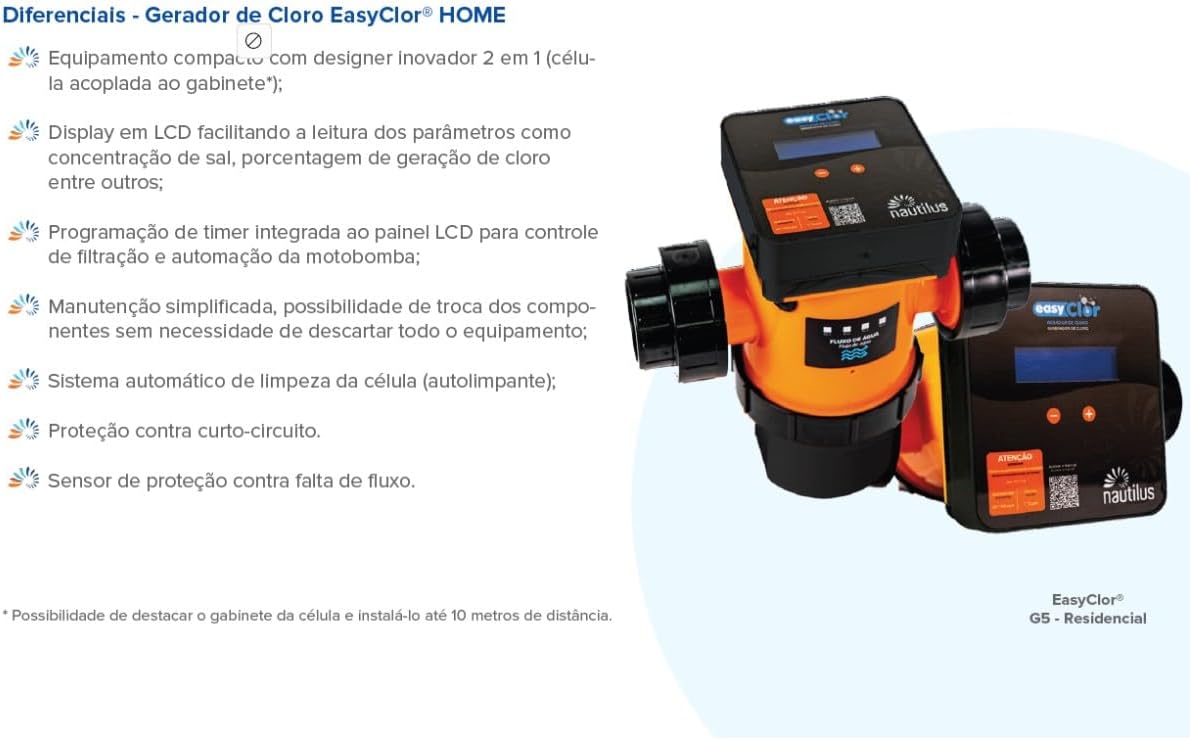
The Nautilus EasyClor HOME G5-03 consists of a compact control unit with a digital display and an electrolysis cell. The control unit manages chlorine production, while the cell, integrated into the pool's filtration system, converts salt into chlorine.

Key features include:
- Compact design with an innovative 2-in-1 cell (cell coupled to the cabinet).
- LCD display for easy reading of parameters such as salt concentration and chlorine generation percentage.
- Integrated timer programming on the LCD panel for filtration control and pump automation.
- Simplified maintenance with the possibility of replacing components without discarding the entire equipment.
- Automatic cell cleaning system (self-cleaning).
- Short-circuit protection.
- Flow sensor for protection against lack of water flow.
Note: The cell cabinet can be detached and installed up to 10 meters away from the control unit.
4. Setup and Installation
Proper installation is crucial for the optimal performance and longevity of your EasyClor HOME G5-03. It is recommended that installation be performed by a qualified pool technician.
4.1. Pre-Installation Checks
- Ensure the pool volume is within the recommended capacity (up to 60,000 liters for G5-03).
- Verify the electrical supply matches the unit's voltage (220 Volts AC).
- Check the plumbing for proper diameter (50mm) and ensure there is sufficient space for installation.
4.2. Physical Installation
- Cell Placement: Install the electrolysis cell in the return line of your pool's filtration system, after the filter and heater (if applicable), to ensure treated water flows directly back to the pool. Ensure the water flow direction matches the arrows on the cell.
- Control Unit Mounting: Mount the control unit in a dry, shaded, and well-ventilated area, close enough to the cell for cable connection.
- Plumbing Connections: Connect the cell to the pool's plumbing using appropriate PVC fittings and sealant. Ensure all connections are watertight.
4.3. Electrical Connections
- Connect the cell cable to the control unit.
- Connect the control unit to a dedicated, grounded 220V AC power supply.
- If using the integrated timer for the pump, connect the pump's power supply through the control unit as per the wiring diagram in the full manual.
4.4. Initial Pool Preparation
- Add Salt: Add pool-grade salt to achieve a concentration of 3 kg/m³ (3000 ppm). Distribute the salt evenly and allow it to dissolve completely before starting the unit.
- Balance Water Chemistry: Adjust pH (7.2-7.6), alkalinity, and stabilizer levels according to recommended pool chemistry guidelines.
5. Operating Instructions
The EasyClor HOME G5-03 is designed for intuitive operation, with a digital panel for monitoring and control.
5.1. Starting the Unit
- Ensure the pool pump is running and water is flowing through the cell.
- Turn on the power to the EasyClor HOME G5-03 control unit.
- The LCD display will illuminate, showing current operating parameters.
5.2. Adjusting Chlorine Production
- Use the '+' and '-' buttons on the control panel to adjust the chlorine production percentage. Start with a moderate setting and adjust as needed based on pool usage and chlorine demand.
- Monitor the free chlorine level in your pool regularly using a test kit. Aim for a free chlorine residual of 1-3 ppm.
5.3. Timer Programming
The integrated timer allows you to set the operating schedule for the chlorine generator and, if connected, your pool pump. Refer to the detailed programming instructions in the complete user manual for specific steps to set daily operating hours.
5.4. Monitoring
The digital display provides real-time information on:
- Chlorine production percentage.
- Salt concentration (indicated as 'ATENÇÃO' if outside optimal range).
- System status and error codes.
6. Maintenance
The EasyClor HOME G5-03 is designed for low maintenance, featuring an automatic self-cleaning cell. However, periodic checks are recommended.
6.1. Cell Cleaning
The unit includes an automatic reverse polarity self-cleaning function to prevent scale buildup on the cell plates. In areas with very hard water, manual cleaning may occasionally be required.
- Manual Cleaning (if necessary): Disconnect power to the unit and pump. Remove the cell from the plumbing. Inspect the cell plates for scale buildup. If present, soak the cell in a diluted acid solution (e.g., 1 part muriatic acid to 4 parts water) for a short period until the scale dissolves. Rinse thoroughly with fresh water before reinstallation.
6.2. Water Chemistry Monitoring
Regularly test your pool water for:
- Salt Level: Maintain salt concentration at 3 kg/m³ (3000 ppm). Low salt levels will reduce chlorine production and can damage the cell. High levels can cause corrosion.
- pH: Keep pH between 7.2 and 7.6.
- Free Chlorine: Maintain 1-3 ppm.
- Cyanuric Acid (Stabilizer): Maintain 30-50 ppm to protect chlorine from UV degradation.
7. Troubleshooting
This section addresses common issues you might encounter with your EasyClor HOME G5-03.
| Problem | Possible Cause | Solution |
|---|---|---|
| No chlorine production | Low salt level, no water flow, faulty cell, power issue. | Check salt level and add salt if needed. Ensure pump is running and filter is clean. Inspect cell for damage or excessive scale. Verify power supply. |
| "ATENÇÃO" or low salt warning on display | Insufficient salt in pool water. | Test salt level and add pool-grade salt as required to reach 3 kg/m³. Allow time for dissolution. |
| Excessive chlorine smell / irritation | High chlorine level, high chloramines. | Reduce chlorine production percentage. Shock the pool if chloramines are high. Ensure proper pH balance. |
| Unit not powering on | No power supply, tripped breaker, loose connection. | Check power outlet, circuit breaker, and all electrical connections. |
| Pool water is cloudy or green | Insufficient chlorine, poor filtration, unbalanced water chemistry. | Increase chlorine production. Backwash/clean filter. Test and adjust pH, alkalinity, and stabilizer. |
For issues not listed here or if troubleshooting steps do not resolve the problem, please contact Nautilus customer support or a qualified pool technician.
8. Specifications
Technical specifications for the Nautilus EasyClor HOME G5-03.
| Feature | Specification |
|---|---|
| Model | G5-03 |
| Nominal Capacity (g/h) | 15 |
| Minimum Water Flow (l/h) | 2,000 |
| Tubing Diameter (mm) | 50 |
| Maximum Working Pressure (kgf/cm²) | 1 |
| Power Supply Voltage (Vca) | 220 |
| Cell Voltage (Vcc) | 25 |
| Power Consumption (Wh) | 250 |
| Maximum Working Temperature (°C) | 40 |
| Salt Concentration (kg/m³) | 3 |
| Pool Water Temperature | >15°C and <40°C |
| Dimensions (cm) | 40 x 29 x 16 |
| Weight (kg) | 2.2 |

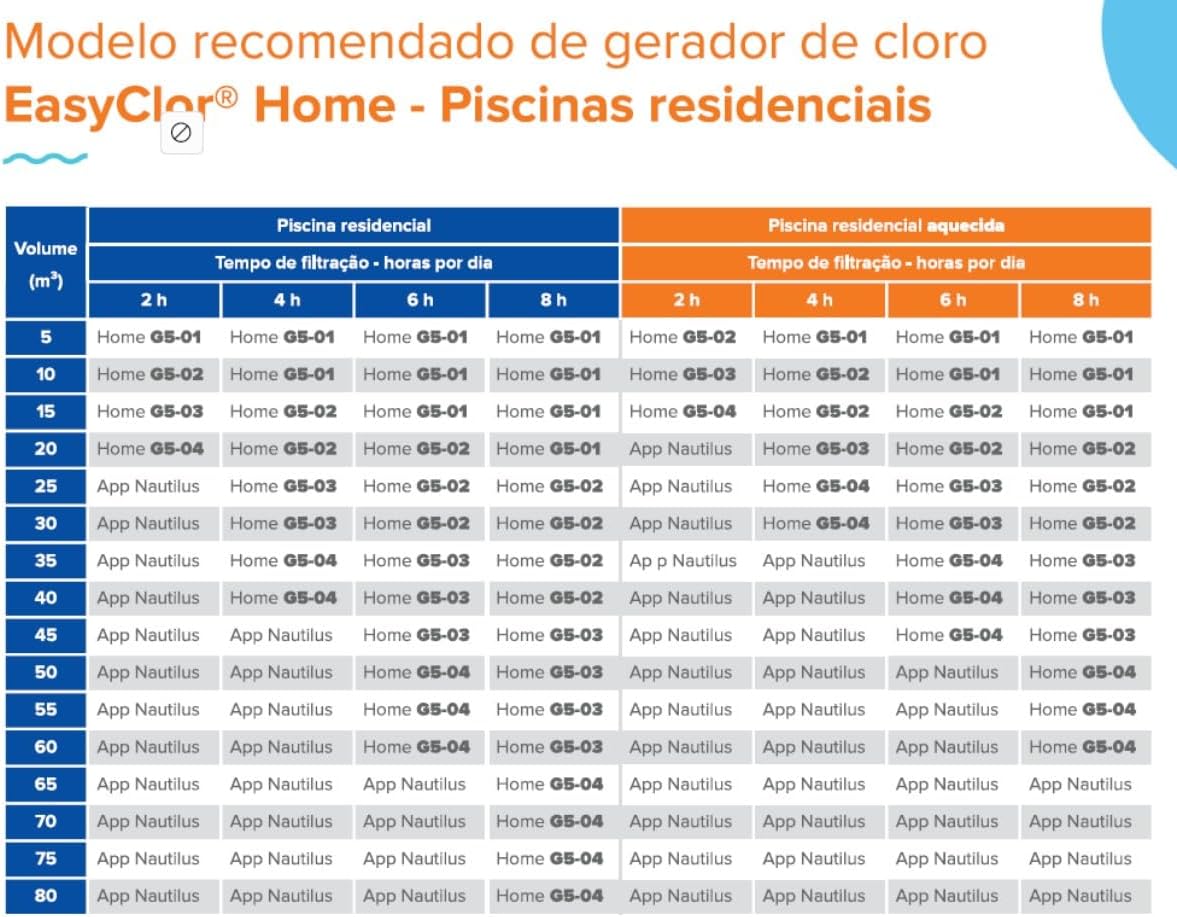
8.1. Recommended Model by Pool Volume
The following table provides guidance on selecting the appropriate EasyClor Home model based on your pool's volume and daily filtration time.
9. Warranty and Support
Nautilus products are manufactured to high-quality standards. For warranty information, please refer to the warranty card included with your product or visit the official Nautilus website. Keep your purchase receipt as proof of purchase.
9.1. Customer Support
If you have any questions, require technical assistance, or need to report a problem, please contact Nautilus customer support. Contact details can be found on the product packaging or the official Nautilus website.
When contacting support, please have the following information ready:
- Product Model: EasyClor HOME G5-03
- Date of Purchase
- Description of the issue