
Introduction
Thank you for choosing the DUSONLAP SU8 Sleep Earbuds. These mini wireless earbuds are designed for comfort, especially for side sleepers, offering true noise blocking and high-quality audio. Featuring Bluetooth 5.4 technology, IPX7 waterproofing, and intuitive touch controls, the SU8 earbuds provide a seamless and immersive listening experience for sleep, relaxation, or focus. This manual provides essential information on how to set up, operate, maintain, and troubleshoot your earbuds to ensure optimal performance and longevity.

Image: The DUSONLAP SU8 Sleep Earbuds in their charging case, showcasing their compact design and digital display.
Safety Information
Please read this safety information carefully before using your DUSONLAP SU8 Sleep Earbuds to ensure safe and proper operation.
- Hearing Protection: Avoid listening at high volume levels for extended periods to prevent hearing damage.
- Driving Safety: Do not use the earbuds while driving or engaging in activities that require full awareness of your surroundings.
- Choking Hazard: Keep earbuds and small parts away from children and pets.
- Temperature: Do not expose the earbuds or charging case to extreme temperatures (hot or cold).
- Water Exposure: While IPX7 waterproof, avoid submerging the earbuds in water for prolonged periods or exposing the charging case to water. Ensure earbuds are dry before placing them in the charging case.
- Cleaning: Use a soft, dry cloth for cleaning. Avoid harsh chemicals or abrasive materials.
- Disposal: Dispose of the product and batteries responsibly according to local regulations. Do not dispose of batteries in fire.
Package Contents
Verify that all items are present in your package:
- SU8 Sleep Earbuds x2 (Left and Right)
- SU8 Charging Case x1
- USB-C Charging Cable x1
- User Manual x1

Image: A visual representation of the DUSONLAP SU8 Sleep Earbuds package contents, including earbuds, charging case, USB-C cable, and user manual.
Product Overview
The DUSONLAP SU8 Sleep Earbuds are designed for comfort and performance. Key features include:
- Mini Portable Design: Weighing only 3 grams per earbud, made from soft, skin-friendly silicone.
- True Noise Blocking: Ergonomic in-ear design provides up to 24dB noise suppression.
- Premium Stereo Sound: Engineered with a 13mm dual chamber speaker driver unit for crisp, balanced sound with deep bass.
- Clear Call Quality: Equipped with ENC (Enhanced Noise Cancellation) technology for clear calls.
- Bluetooth 5.4: Advanced technology for fast, stable, and seamless connection up to 15m.
- LED Power Display: Digital display on the charging case shows charging status and remaining power.
- Long Battery Life: 5-7 hours listening time for earbuds, 40 hours total with charging case.
- USB-C Fast Charging: Convenient and quick charging.
- IPX7 Waterproof: Nano-coating technology protects against sweat and light rain.
- Touch Control: Intuitive touch sensors for managing calls, music, volume, and activating voice assistant.

Image: A woman comfortably wearing the DUSONLAP SU8 Sleep Earbuds, highlighting their ergonomic design and noise-blocking capabilities.
Setup
1. Charging the Earbuds and Case
Before first use, fully charge the charging case and earbuds.
- Place the earbuds into the charging case. Ensure they are correctly seated to make contact with the charging pins.
- Connect the USB-C charging cable to the charging port on the case and the other end to a USB power source (e.g., wall adapter, computer USB port).
- The LED digital display on the charging case will show the battery percentage, indicating the charging status. The earbuds will also show a charging indicator.
- Charging typically takes about 1.5 hours for a full charge.

Image: The DUSONLAP SU8 charging case displaying its LED power indicator, alongside graphics detailing the 40-hour total battery life and USB-C fast charging.
2. Pairing with Your Device
The SU8 earbuds feature one-step pairing for convenience.
- Ensure Bluetooth is enabled on your smartphone, tablet, or laptop.
- Open the lid of the charging case. The earbuds will automatically enter pairing mode (or connect to the last paired device).
- On your device, search for Bluetooth devices and select "SU8" from the list.
- Once connected, you will hear a confirmation tone, and your device will show "SU8 Connected audio".
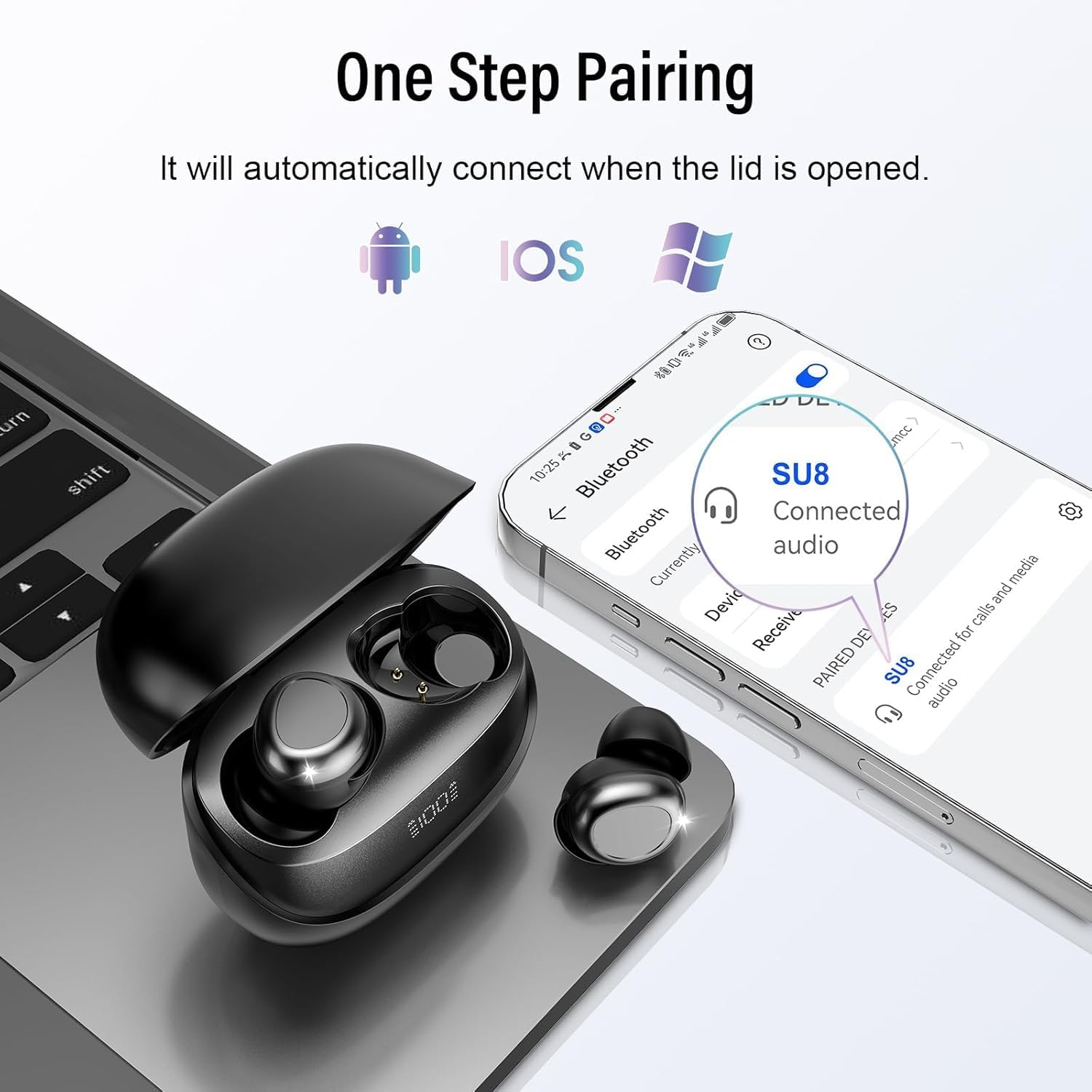
Image: The DUSONLAP SU8 Sleep Earbuds and their charging case next to a smartphone and laptop, illustrating the one-step pairing process with various devices.
3. Wearing the Earbuds
For optimal comfort and noise blocking, proper fit is essential.
- Choose the appropriate ear caps that provide a snug and comfortable fit for your ear canal.
- Place the earbud with the ear cap downwards and gently insert it into your ear canal.
- Twist the earbud slightly to lock it into place, ensuring a secure and comfortable seal.

Image: A step-by-step diagram illustrating the correct method to wear the DUSONLAP SU8 Sleep Earbuds, emphasizing ear cap selection, insertion, and twisting to secure the fit.
Operating Instructions
The DUSONLAP SU8 Sleep Earbuds feature intuitive touch controls on each earbud. The touch control area is typically the flat, outer surface of the earbud.

Image: A detailed graphic outlining the touch control functions for the DUSONLAP SU8 Sleep Earbuds, including commands for calls, music, volume, and sleep mode.
Call Control:
- Answer Call: Double-tap (x2) either earbud.
- Hang Up Call: Long press (2S) either earbud during a call.
- Reject Call: Long press (2S) either earbud when an incoming call is received.
Music Control:
- Play/Pause: Single-tap (x1) either earbud.
- Next Song: Triple-tap (x3) the right earbud.
- Previous Song: Triple-tap (x3) the left earbud.
- Volume Up: Single-tap (x1) the right earbud.
- Volume Down: Single-tap (x1) the left earbud.
Other Functions:
- Activate Voice Assistant (Siri/Google Assistant): Triple-tap (x3) either earbud.
- Sleep Mode: Quadruple-tap (x4) either earbud. In sleep mode, the earbuds will not shut down and will not emit low battery beeps, ensuring an undisturbed experience.
Maintenance
Proper maintenance ensures the longevity and performance of your DUSONLAP SU8 Sleep Earbuds.
- Cleaning: Regularly clean the earbuds and charging case with a soft, dry, lint-free cloth. Do not use abrasive cleaners, alcohol, or chemical solvents. Gently remove any earwax or debris from the ear tips and speaker mesh using a small, soft brush or cotton swab.
- Storage: When not in use, store the earbuds in their charging case to protect them from dust and damage. Store in a cool, dry place away from direct sunlight and extreme temperatures.
- Water Resistance: The earbuds are IPX7 waterproof, meaning they can withstand sweat and light rain. However, they are not designed for swimming or showering. Do not submerge them in water. Always ensure the earbuds are completely dry before placing them back into the charging case to prevent damage to the charging contacts.

Image: The DUSONLAP SU8 Sleep Earbuds shown with water droplets, visually confirming their IPX7 waterproof rating against sweat, water, and light rain.
Troubleshooting
If you encounter issues with your DUSONLAP SU8 Sleep Earbuds, try the following solutions:
| Problem | Possible Cause | Solution |
|---|---|---|
| Earbuds not pairing/connecting. | Bluetooth off, earbuds not in pairing mode, device too far, interference. | Ensure Bluetooth is on. Place earbuds in case, close lid, then open to re-enter pairing mode. Move closer to device. Turn off other Bluetooth devices. |
| Only one earbud working. | Low battery, earbud not connected, pairing issue. | Charge both earbuds fully. Place both earbuds in the case, close, then open. Re-pair with your device. |
| No sound or low volume. | Volume too low on device/earbuds, earbud not seated properly, dirty speaker mesh. | Increase volume on both your device and earbuds. Adjust earbud position for a better seal. Clean speaker mesh. |
| Charging case not charging. | Faulty cable/adapter, dirty charging port. | Try a different USB-C cable and power adapter. Clean the charging port gently. |
| Touch controls unresponsive. | Earbuds not connected, dirty touch surface. | Ensure earbuds are connected. Clean the touch control surface. |
Specifications
| Feature | Specification |
|---|---|
| Model Name | SU8 |
| Connectivity Technology | Wireless (Bluetooth 5.4) |
| Wireless Communication Technology | Bluetooth |
| Material | Silicone |
| Specific Uses for Product | Sleep |
| Charging Time | 1.5 Hours |
| Compatible Devices | Cellphones, Laptops, Tablets |
| Water Resistance Level | IPX7 Waterproof |
| Frequency Range | 20Hz - 20,000Hz |
| Battery Average Life (Total) | 47 Hours (5-7 hours earbuds + 40 hours case) |
| Battery Type | Lithium Polymer (included) |
| Item Weight | 80 g (Parcel Dimensions: 8.9 x 8 x 3.2 cm) |
| Noise Control | Active Noise Cancellation (ENC for calls) |
| Ear Placement | In-Ear (designed for side sleepers) |
Warranty and Support
DUSONLAP provides a 30-day free warranty for the SU8 Sleep Earbuds. For any product-related inquiries, technical assistance, or warranty claims, please contact our customer service team. We offer 24/7 after-sales service to ensure your satisfaction.
Please refer to the contact information provided on the product packaging or the official DUSONLAP website for support details.