
1. Introduction
This manual provides detailed instructions for the safe and efficient operation of your INNOVV P1 Portable Tire Inflator Air Compressor. Please read this manual thoroughly before using the device and retain it for future reference. The INNOVV P1 is designed for inflating tires on cars, motorcycles, bicycles, and various sports equipment, featuring a compact design, high efficiency, and automatic shut-off functionality.
2. Package Contents
Verify that all items listed below are included in your package:
- INNOVV P1 Portable Tire Inflator Air Compressor
- Braided Air Hose
- Presta Valve Adapter
- Ball Needle Adapter
- Swimming Ring Nozzle
- Type-C Charging Cable
- Storage Bag
- User Manual (this document)

Image: The INNOVV P1 package contents, including the inflator, air hose, various adapters, charging cable, and storage bag.
3. Product Overview
The INNOVV P1 is a compact and powerful cordless tire inflator designed for convenience and efficiency. It features an aluminum casing for enhanced durability and heat dissipation, an LED screen for clear pressure readings, and multiple inflation modes.
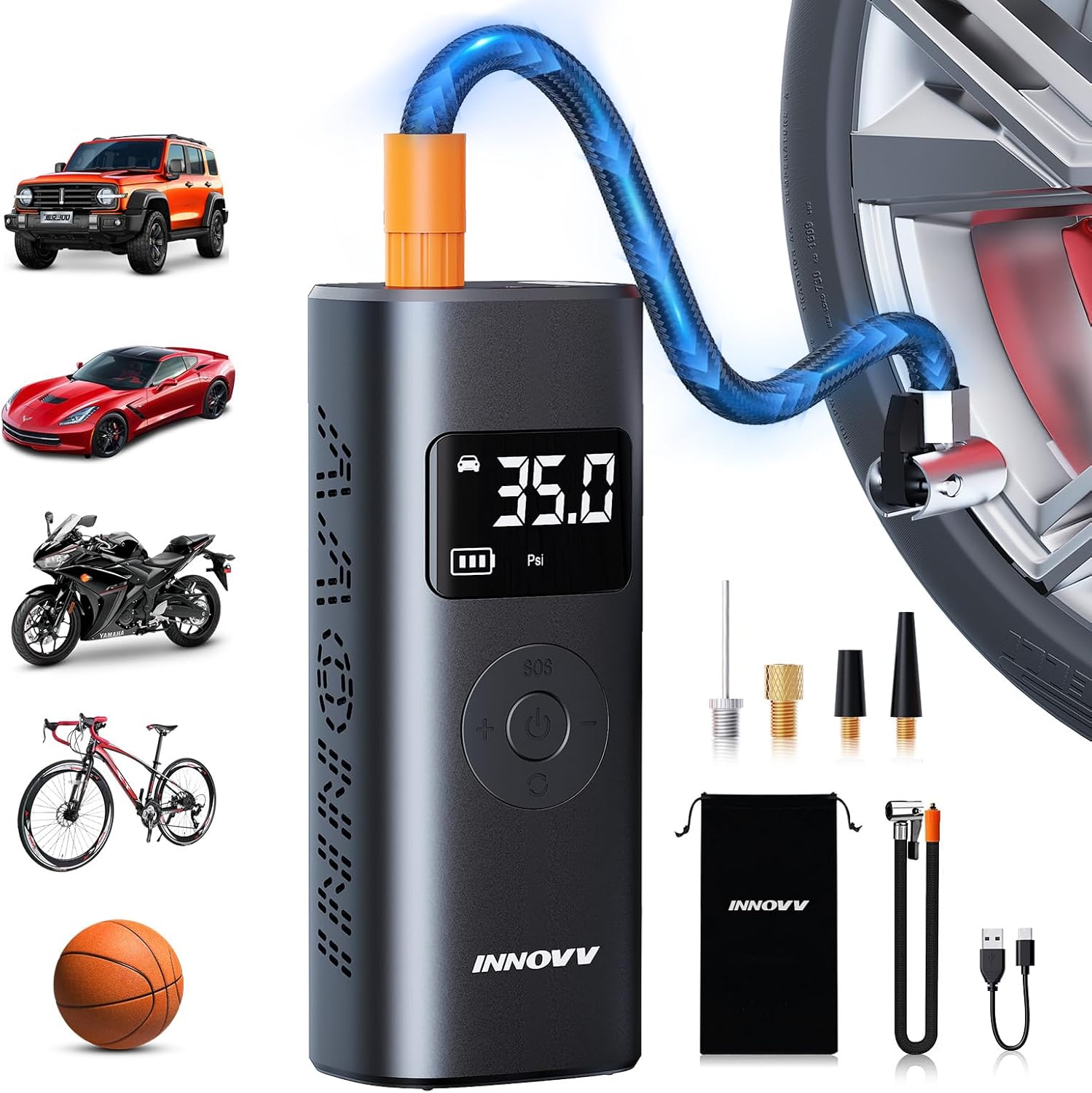
Image: The INNOVV P1 portable tire inflator with its digital display, control buttons, and various accessories, demonstrating its use for cars, motorcycles, bikes, and balls.
Key Features:
- High Pressure Output: Up to 150 PSI for various inflation needs.
- Cordless Operation: Built-in 6000mAh rechargeable battery.
- Auto-Shutoff: Automatically stops when preset pressure is reached.
- Digital LED Display: Clear real-time pressure readings and mode selection.
- Multiple Modes: Pre-set modes for Car, Motorcycle, Bike, Ball, and Custom.
- Multi-functional: Integrated LED light (Normal, SOS, Flashing) and power bank function (Type-C and USB output ports).
- Efficient Cooling: Aluminum casing and built-in fan for optimal heat dissipation.

Image: An internal view highlighting the built-in speed fan and L-shaped cooling air duct, illustrating the advanced heat dissipation system of the INNOVV P1.

Image: The compact dimensions of the INNOVV P1 inflator and its extended air pipe, demonstrating its portability and ease of storage in various vehicles or bags.
4. Specifications
| Feature | Specification |
|---|---|
| Model Number | P1 |
| Max Pressure | 150 PSI |
| Battery Capacity | 6000mAh (Lithium Ion) |
| Input Charging Port | Type-C |
| Output Charging Port | USB (for external devices) |
| Product Dimensions | 8.99 x 5.99 x 16.99 cm |
| Item Weight | 810 g |
| Material | Aluminum |
| Color | Grey |
5. Charging the Device
Before first use, fully charge the INNOVV P1. The device features a built-in 6000mAh rechargeable battery.
- Locate the Type-C input charging port on the device.
- Connect the provided Type-C charging cable to the inflator and a suitable USB power adapter (not included).
- The LED display will indicate the charging status. A full battery icon signifies a complete charge.
A single full charge can inflate approximately 8 car tires (195/65R15) from 30-35 PSI or operate continuously for 30 minutes.

Image: An illustration showing the INNOVV P1's 6000mAh battery capacity and its ability to inflate multiple car, motorcycle, bike, and ball tires on a single charge.
6. Setup
Follow these steps to prepare your INNOVV P1 for inflation:
- Attach the Air Hose: Screw the braided air hose securely into the inflation port on the top of the device.
- Select the Correct Adapter: Choose the appropriate nozzle adapter for the item you wish to inflate (e.g., Presta valve adapter for some bicycles, ball needle for sports balls, swimming ring nozzle for inflatables).
- Connect to Valve: Securely attach the air hose with the selected adapter to the valve stem of the tire or inflatable item. Ensure a tight seal to prevent air leakage.
7. Operating Instructions
The INNOVV P1 offers intuitive operation with pre-set modes and an auto-shutoff feature.
- Power On: Press and hold the power button (usually the central button) to turn on the device. The LED display will illuminate, showing the current tire pressure.
- Select Inflation Mode: Press the 'M' button (Mode button) to cycle through the pre-set modes: Car, Motorcycle, Bike, Ball, and Custom Mode. Each mode has a default pressure range.
- Set Desired Pressure: Use the '+' and '-' buttons to adjust the target pressure. In Custom Mode, you can set any desired pressure value within the device's range.
- Start Inflation: Once the desired pressure is set, press the power button again to start inflation. The device will display the real-time pressure as it inflates.
- Auto-Shutoff: The inflator will automatically stop once the pre-set target pressure is reached, preventing over-inflation.
- Disconnect: Carefully disconnect the air hose from the valve stem. A small amount of air may escape, which is normal.
- Power Off: Press and hold the power button to turn off the device.

Image: The INNOVV P1 inflating a car tire, demonstrating its wireless and fast inflation capability, reaching desired pressure in approximately one minute for standard car tires.

Image: The INNOVV P1 displaying its digital interface with various preset modes for car, motorcycle, bike, and ball inflation, along with their respective pressure ranges.

Image: A visual representation of the INNOVV P1's versatility, showing its application across various items like car tires, motorcycle tires, bicycle tires, sports balls, and swimming inflatables, with recommended pressure ranges for each mode.
8. Multi-Functional Features
8.1 LED Lighting
The INNOVV P1 includes an integrated LED light for convenience in low-light conditions or emergencies.
- Normal Light: Press the 'SOS' button once to turn on the steady white LED light.
- SOS Mode: Press the 'SOS' button a second time to activate the flashing red SOS signal.
- Flashing Mode: Press the 'SOS' button a third time for a rapid flashing white light.
- Turn Off: Press the 'SOS' button a fourth time to turn off the light.
8.2 Power Bank Function
The device can also serve as a power bank to charge other electronic devices.
- Connect your electronic device (e.g., smartphone) to the USB output port or Type-C port on the inflator using an appropriate charging cable.
- The inflator's battery will provide backup power.

Image: The INNOVV P1 demonstrating its multiple functions, including external discharge for charging mobile devices and various LED light modes (Normal, SOS, Flashing) for emergency and maintenance use.
9. Maintenance
Proper maintenance ensures the longevity and optimal performance of your INNOVV P1.
- Cleaning: Wipe the device with a soft, dry cloth. Do not use harsh chemicals or abrasive cleaners.
- Storage: Store the inflator in a cool, dry place, away from direct sunlight and extreme temperatures. Use the provided storage bag to protect it from dust and damage.
- Battery Care: For optimal battery life, charge the device at least once every three months if not in regular use. Avoid fully discharging the battery for extended periods.
- Hose and Adapters: Ensure the air hose and adapters are clean and free from debris before and after each use. Check for any signs of wear or damage.
10. Troubleshooting
If you encounter issues with your INNOVV P1, refer to the following common problems and solutions:
| Problem | Possible Cause | Solution |
|---|---|---|
| Device does not turn on | Low battery; Power button not pressed correctly | Charge the device; Press and hold the power button for 3 seconds |
| No inflation or slow inflation | Air hose not securely connected; Adapter not properly attached to valve; Leakage; Target pressure too low | Ensure all connections are tight; Check for damage to hose/adapters; Increase target pressure if necessary |
| Device stops unexpectedly | Reached preset pressure (auto-shutoff); Overheating; Low battery | Check current pressure; Allow device to cool down; Recharge the device |
| Inaccurate pressure reading | Loose connection; Sensor issue | Ensure connections are tight; If problem persists, contact customer support |
If the problem persists after attempting these solutions, please contact INNOVV customer support.
11. Safety Information
Please observe the following safety precautions:
- Do not leave the inflator unattended during operation.
- Keep out of reach of children.
- Do not operate the device in wet conditions or near flammable liquids/gases.
- Avoid prolonged continuous operation to prevent overheating. Allow the device to cool down if it becomes hot.
- Always check the recommended pressure for the item you are inflating to avoid over-inflation and potential damage or injury.
- Do not disassemble or attempt to repair the device yourself. Contact qualified personnel for service.
- Use only the provided charging cable and accessories.
12. Warranty and Support
For warranty information, technical support, or service inquiries, please refer to the warranty card included with your product or visit the official INNOVV website. Contact details for customer support are typically available on the product packaging or the manufacturer's website.
