
1. Introduction
Thank you for choosing the TRIUMPHKEY Electric Sit-Stand Desk. This desk is designed to provide a flexible and ergonomic workspace, allowing you to easily switch between sitting and standing positions. This manual provides detailed instructions for assembly, operation, maintenance, and troubleshooting to ensure optimal performance and longevity of your desk.
The TRIUMPHKEY Electric Sit-Stand Desk features a spacious 110 x 60 cm surface, a robust steel frame, and a quiet electric motor for smooth height adjustments. It is equipped with a memory function to save your preferred heights and a convenient hook for accessories.

An overview of the TRIUMPHKEY Electric Sit-Stand Desk, showcasing its spacious surface and modern design, suitable for various office setups.
2. Safety Warnings
- Weight Limit: Do not exceed the maximum load capacity of 80 kg (176 lbs). Overloading the desk can lead to instability or tipping.
- Stability: Ensure the desk is placed on a flat, stable surface before and during height adjustments.
- Clearance: Keep the area around the desk clear of obstructions during height adjustments to prevent damage or injury.
- Children and Pets: Keep children and pets away from the desk during operation.
- Power Cord: Ensure the power cord is not pinched or damaged. Do not operate the desk with a damaged cord.
- Liquid Spills: Avoid spilling liquids on the control panel or motor components. In case of a spill, immediately unplug the desk and allow it to dry completely before use.
- Disassembly: Do not attempt to disassemble or repair the motor or control unit yourself. Contact customer support for assistance.
3. Package Contents
Before beginning assembly, please verify that all components are present and undamaged. If any parts are missing or damaged, please contact customer support.
- Desktop sections
- Desk legs (2)
- Foot pads (2)
- Crossbar/Support frame
- Control panel
- Motor and power adapter
- Headphone hook
- Assembly hardware (screws, bolts, Allen keys)
- Instruction manual

The desk comes with pre-drilled parts and detailed instructions for easy assembly, typically completed within 30 minutes.
4. Assembly Instructions
Assembly is designed to be straightforward and can typically be completed in under 30 minutes. Follow these steps carefully:
- Prepare the Workspace: Clear a spacious area for assembly. Lay out all components and hardware.
- Assemble the Desk Legs: Attach the foot pads to the bottom of each desk leg using the provided screws.
- Connect the Crossbar: Secure the crossbar to the desk legs. Ensure all connections are tight.
- Attach the Desktop: Carefully place the desktop sections onto the assembled frame. Align the pre-drilled holes and secure the desktop to the frame using the appropriate screws.
- Install the Control Panel: Mount the control panel to the underside of the desktop in the designated area.
- Connect the Motor and Power: Connect the motor cables to the control panel and the power adapter. Route cables neatly using any provided cable management clips.
- Attach Headphone Hook: Install the headphone hook to the side of the desk as desired.
- Final Check: Double-check all screws and connections to ensure the desk is stable and secure.
5. Operating Instructions
5.1 Height Adjustment
The desk's height can be adjusted between 71 cm and 119 cm.
- To Raise: Press and hold the UP (^) button on the control panel. Release the button when the desired height is reached.
- To Lower: Press and hold the DOWN (v) button on the control panel. Release the button when the desired height is reached.

This image illustrates the desk's flexible height adjustment range, allowing users to switch between sitting and standing positions for improved ergonomics. The height can be adjusted from 71 cm to 119 cm.
5.2 Memory Presets
The desk allows you to save up to three preferred height settings for quick adjustments.
- To Save a Height:
- Adjust the desk to your desired height using the UP/DOWN buttons.
- Press the M button. The display will show 'S-'.
- Within 3 seconds, press one of the memory buttons (1, 2, or 3). The current height is now saved to that preset.
- To Use a Saved Height: Simply press the corresponding memory button (1, 2, or 3). The desk will automatically move to the saved height.

The multifunctional control panel features a digital height display, memory buttons to save up to three preferred heights, and intuitive up/down arrows for precise adjustment.
5.3 Silent Operation
The desk operates with a noise level below 50 dB, ensuring minimal disturbance in your workspace.

Designed for quiet operation, the desk's motor produces less than 50 dB of noise during height adjustments, maintaining a peaceful work environment.
6. Maintenance
- Cleaning: Wipe the desk surface and frame with a soft, damp cloth. Avoid abrasive cleaners or harsh chemicals that could damage the finish.
- Inspections: Periodically check all screws and connections to ensure they remain tight. Retighten if necessary.
- Cable Management: Ensure cables are properly managed and not tangled or pinched, especially during height adjustments.
- Motor Care: The electric motor is designed for maintenance-free operation. Do not lubricate or attempt to open the motor housing.
7. Troubleshooting
| Problem | Possible Cause | Solution |
|---|---|---|
| Desk does not move. | Power cord disconnected; Motor cable loose; Overload. | Check power connection; Ensure motor cables are securely plugged in; Reduce weight on the desk (max 80 kg). |
| Desk moves unevenly or makes unusual noise. | Loose connections; Obstruction; Uneven weight distribution. | Check all assembly screws; Remove any obstructions; Distribute weight evenly on the desktop. |
| Memory function not working. | Incorrect saving procedure. | Refer to Section 5.2 to correctly save height presets. |
| Error code on display. | System fault. | Unplug the desk for 10 minutes, then plug it back in. If the error persists, contact customer support. |
8. Specifications
- Brand: TRIUMPHKEY
- Model Number: 0788
- Color: Beige
- Product Dimensions (L x W x H): 110 x 60 x 71 cm (43.3 x 23.6 x 27.9 inches)
- Adjustable Height Range: 71 cm to 119 cm (27.9 to 46.8 inches)
- Item Weight: 16.6 kg (36.6 lbs)
- Maximum Load Capacity: 80 kg (176 lbs)
- Noise Level (during adjustment): < 50 dB
- Material: Alloy Steel frame, Metal tabletop
- Finish Type: Powder Coated
- Desk Design: Sit-Stand Desk
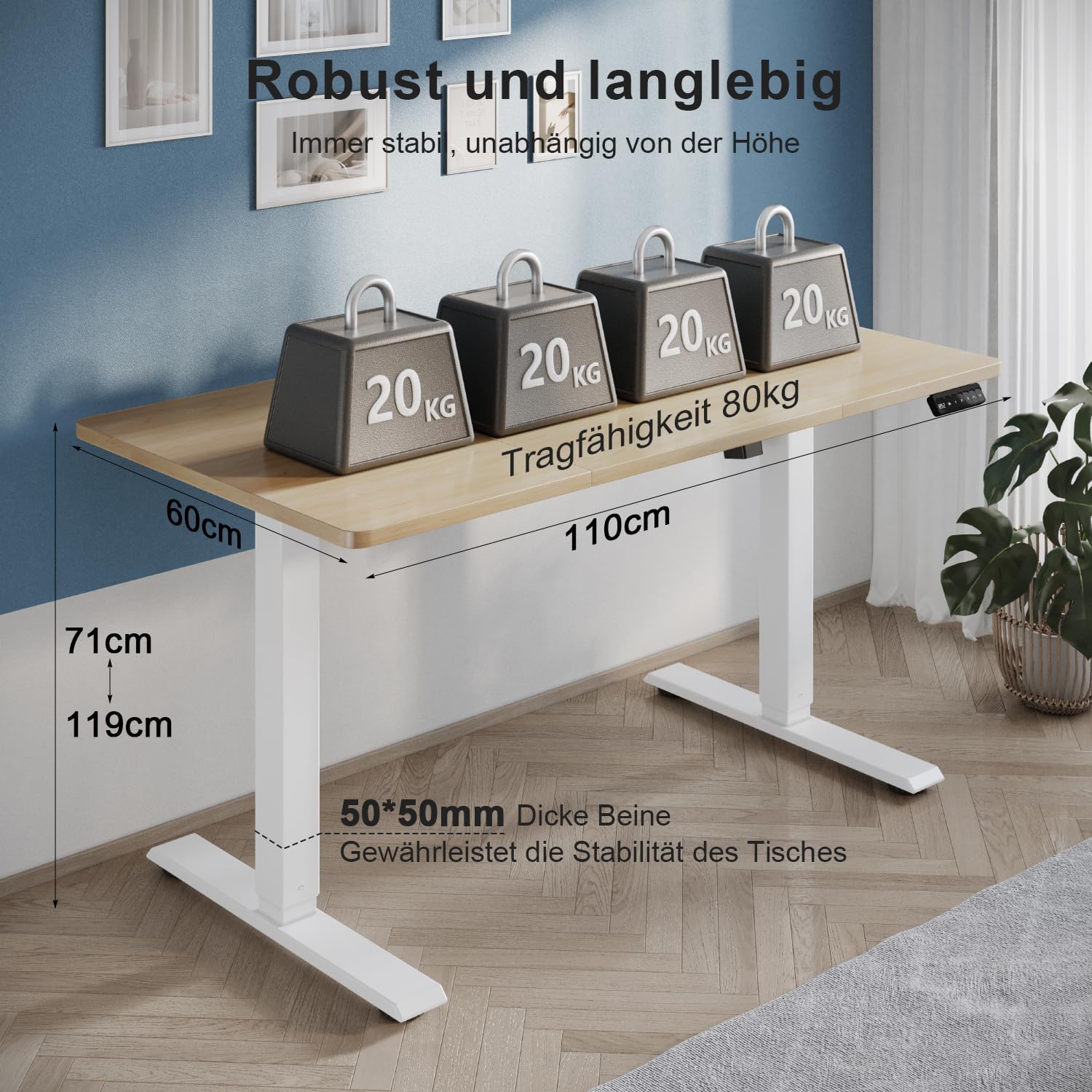
The desk's robust industrial-grade steel structure and stable tabletop support a maximum load of 80 kg, ensuring durability and stability even at various heights.
9. Warranty and Support
For warranty information, please refer to the documentation provided with your purchase or contact TRIUMPHKEY customer support. If you encounter any issues not covered in the troubleshooting section, or require further assistance, please reach out to our support team through the retailer where you purchased the product.
For more information about TRIUMPHKEY products, you may visit the official brand store: TRIUMPHKEY Store.
