
Introduction
Thank you for purchasing the GIANTEX 59 Inch Computer Desk with Charging Station. This manual provides important information regarding the safe assembly, operation, and maintenance of your new desk. Please read it thoroughly before assembly and retain it for future reference.
Safety Information
Important Safety Instructions:
- Always assemble the desk according to the provided instructions.
- Ensure all parts are securely fastened before use.
- Do not exceed the weight limit of 275 lbs (125 kg) on the desktop.
- Do not exceed the weight limit of 55 lbs (25 kg) on each shelf.
- Place the desk on a flat, stable surface to prevent tipping.
- Keep liquids away from the built-in power strip to avoid electrical hazards.
- Do not attempt to modify the desk or its electrical components.
Package Contents
Before beginning assembly, please verify that all components are present and undamaged. The package should include:
- 1 x Computer Desk (all necessary parts)
- 1 x User Guide (this manual)
- Assembly Hardware (screws, tools, etc.)
If any parts are missing or damaged, please contact customer support.
Assembly Instructions
Detailed assembly instructions are included in your package. Please follow the step-by-step guide carefully to ensure correct and safe assembly of your desk.

Image: Desk dimensions and components. The desk measures 59 inches wide, 24 inches deep, and 30 inches high. It features a main tabletop, a side storage unit with two shelves, and a power cord extending from the tabletop.
- Unpack all components and lay them out on a clean, soft surface to prevent scratches.
- Identify all parts and hardware using the provided parts list.
- Follow the numbered steps in the assembly guide. Do not overtighten screws until all components are aligned.
- Once assembled, ensure the desk is stable and all connections are secure.
Features
The GIANTEX Computer Desk is designed with several features to enhance your workspace:
- Ample Workspace: A 59-inch tabletop provides generous space for multiple monitors, keyboards, and other essentials.
- Integrated Storage: Two metal mesh shelves offer organized storage. The middle shelf is removable to accommodate a computer tower.
- Built-in Charging Station: Features 2 AC outlets (125V/12A), 1 USB port (5V/2.4A), and 1 Type-C port (12W Max) for convenient device charging.
- Headphone Hook: A convenient hook is included for hanging headphones or bags.
- Sturdy Construction: Built with a robust metal frame, reinforced crossbars, and adjustable foot pads for stability.

Image: Built-in Power Strip. This image shows the integrated power strip with two AC outlets, one USB-A port, and one USB-C port, along with a 4.9 ft power cord.
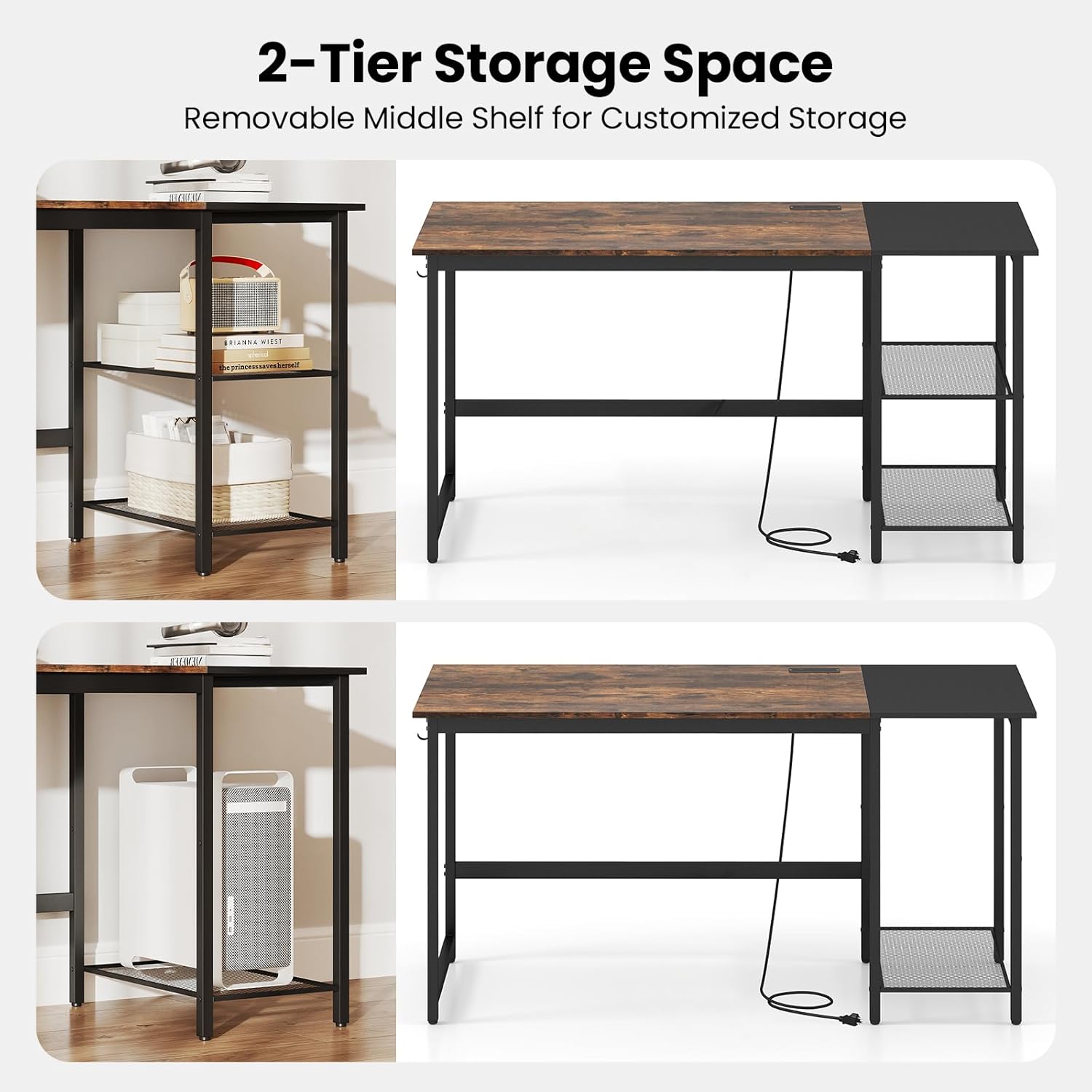
Image: 2-Tier Storage Space. This image illustrates the flexibility of the side shelves, showing how the middle shelf can be removed to create space for larger items like a computer tower.
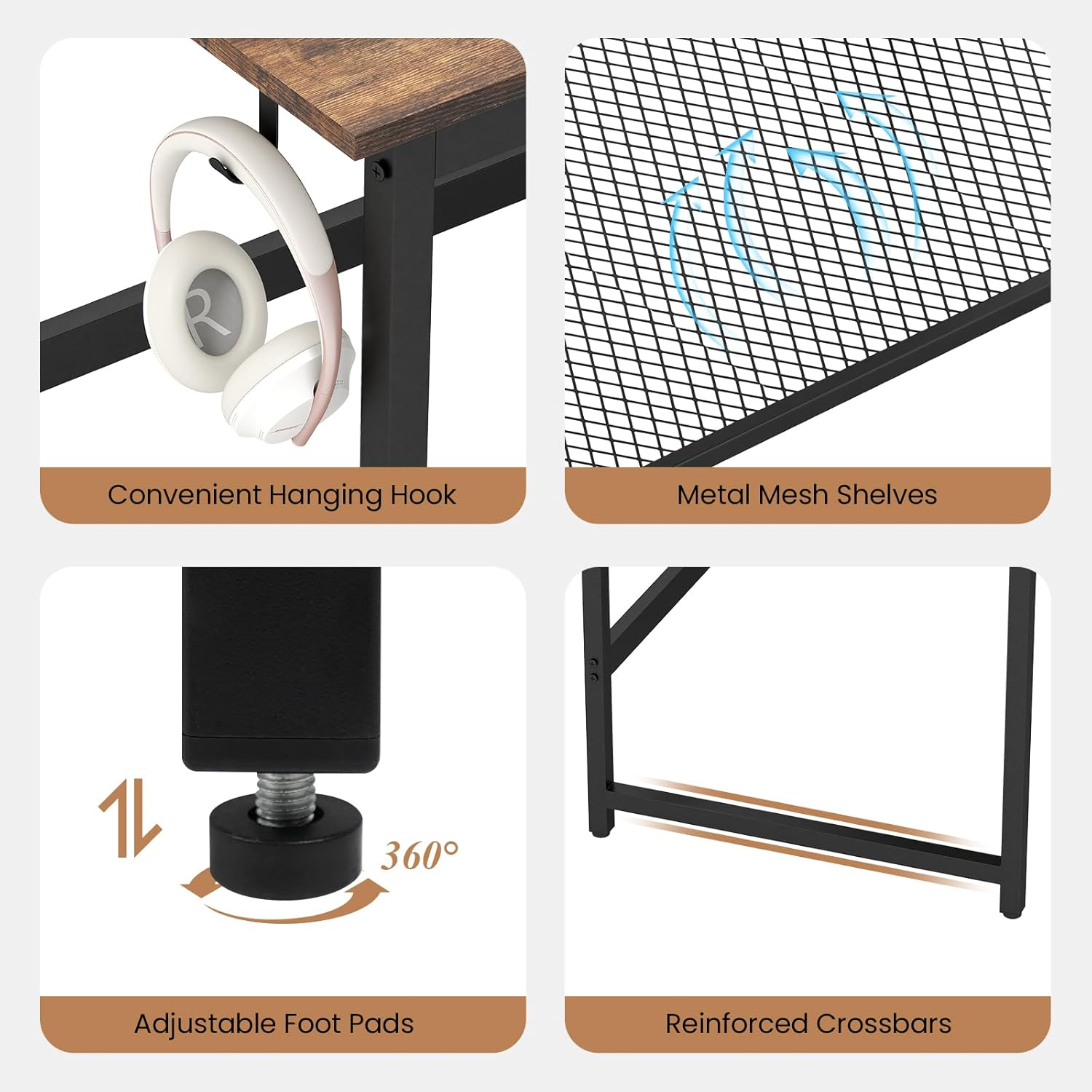
Image: Detailed Features. This composite image highlights the convenient hanging hook for headphones, the durable metal mesh shelves, the adjustable foot pads for stability on uneven floors, and the reinforced crossbars for structural integrity.
Setup
After assembly, follow these steps for initial setup:
- Placement: Choose a suitable location for your desk, ensuring it is on a level surface and away from direct sunlight or heat sources.
- Leveling: Adjust the foot pads at the bottom of the desk legs to ensure stability and prevent wobbling.
- Power Connection: Plug the desk's power cord into a standard wall outlet.
- Cable Management: Utilize the desk's design to manage cables neatly, preventing clutter and potential hazards.

Image: Desk in a home office setting. This image shows the desk fully set up with a laptop, monitor, and other office supplies, demonstrating its ample workspace.
Operating the Charging Station
The integrated charging station provides convenient power access for your electronic devices.
- AC Outlets: Plug in devices requiring standard AC power, such as monitors, lamps, or laptops.
- USB-A Port: Connect USB-A compatible devices for charging (e.g., smartphones, tablets).
- USB-C Port: Connect USB-C compatible devices for charging.
Note: Ensure the total power draw of all connected devices does not exceed the charging station's maximum capacity to prevent overload.
Maintenance
To ensure the longevity and appearance of your desk, follow these maintenance guidelines:
- Cleaning: Wipe the desk surfaces with a soft, damp cloth. Avoid harsh chemicals or abrasive cleaners that may damage the finish.
- Spills: Clean up spills immediately to prevent staining or damage to the wood grain finish.
- Hardware Check: Periodically check all screws and fasteners to ensure they remain tight. Retighten if necessary.
- Weight Distribution: Distribute weight evenly across the desktop and shelves to maintain stability and prevent warping.
Troubleshooting
If you encounter any issues with your desk, refer to the following common solutions:
| Problem | Possible Cause | Solution |
|---|---|---|
| Desk is wobbly | Uneven floor; loose fasteners | Adjust the foot pads; tighten all assembly screws. |
| Charging station not working | Desk not plugged in; overloaded circuit; faulty device cable | Ensure power cord is securely plugged into a working outlet; reduce number of connected devices; test with a different device cable. |
| Parts do not fit during assembly | Incorrect orientation; wrong parts used | Refer to the assembly instructions and diagrams carefully; ensure correct parts are used for each step. |
If the problem persists, please contact GIANTEX customer support for assistance.
Specifications
| Feature | Detail |
|---|---|
| Model Number | GX-10887-BC |
| Product Dimensions (D x W x H) | 24" x 59" x 30" (61 cm x 150 cm x 76 cm) |
| Desktop Weight Capacity | 275 lbs (125 kg) |
| Shelf Weight Capacity (each) | 55 lbs (25 kg) |
| Material | Engineered Wood, Metal |
| Color | Rustic Brown & Black |
| Power Outlets | 2 x AC Outlets (125V/12A) |
| USB Ports | 1 x USB-A (5V/2.4A), 1 x USB-C (12W Max) |
| Power Cord Length | 4.9 ft (1.5 m) |
Warranty and Support
GIANTEX products are manufactured with quality and care. For warranty information or technical support, please refer to the contact details provided with your purchase documentation or visit the official GIANTEX website.
Contact Information:
- Website: GIANTEX Official Store (for general inquiries)
- Customer Service: Refer to your purchase receipt or product packaging for specific contact details.