
1. Introduction
The Varstrom EKD01 is an advanced TFT LCD display designed for BAFANG mid-motor electric bicycles. It provides essential riding data, customizable settings, and smart features to enhance your ebike experience. With its intuitive interface and robust design, the EKD01 display is an excellent choice for ebike enthusiasts seeking reliable performance and comprehensive control.

Figure 1: Varstrom EKD01 Ebike Display. This image shows the front view of the EKD01 display unit with its color screen and control buttons on the left side, and the green M5 waterproof connector on the right.
2. Key Features
- Display Type: 2.4-inch IPS TFT Color LCD display, offering clear and vibrant visuals.
- User Interface: Features three integrated buttons for easy navigation and control.
- PAS Levels: Supports optional Pedal Assist System (PAS) levels from 0-3, 0-5, or 0-9, allowing for customized power assistance.
- Charging Port: Equipped with a convenient Type-C USB charging port (5V/1A) for external devices.
- Design & Material: Slim, modern design with a durable, high-quality ABS plastic casing.
- Waterproof Rating: IP67 certified, providing excellent resistance against water and dust.
- Multi-language Support: Offers 9 adjustable languages including English, French, German, Spanish, Italian, Polish, Chinese, Dutch, and Czech.
- Navigation Function: Includes a navigation mirroring feature via the BIKEGO app (trial period applies).
- Odometer Reset: Allows the odometer (ODO) to be reset to zero, a unique feature compared to many other models.
- Battery Information Monitoring: Displays detailed battery information such as temperature, total voltage, current, remaining capacity, and full capacity (requires BAFANG communication-enabled battery and controller).
- Adjustable Brightness: Screen brightness can be set to 30%, 50%, 75%, or 100%.

Figure 2: High-tech Display Features. This image highlights various features of the EKD01 display, including PAS levels, holder size compatibility, screen type, password, language options, charging port, and brightness settings.

Figure 3: Multifunction LCD Display. This image illustrates the various indicators and data points shown on the EKD01 screen, such as headlight, brake, navigation, maintenance tips, battery level, real-time speed, average speed, gear indicator, and odometer.
3. Compatibility
The EKD01 display is specifically designed for use with BAFANG mid-motors that utilize the CAN communication protocol. It is crucial to verify your motor's communication protocol before purchase and installation to ensure compatibility.
- Compatible Motors: Exclusively compatible with BAFANG mid-motors (e.g., BBS CAN Series Motor).
- Incompatible Motors: Not compatible with BAFANG UART Series Motors, BBS Wheel Hub Motors, or other brand motors.
- Handlebar Diameter: Designed to fit handlebars with a diameter of 22.2 mm or 25.4 mm.
- Connector Type: Features a 5-pin round female waterproof M5 connector.
Important Note: Please refer to the second product image on the product page to confirm compatibility with your specific BAFANG motor.
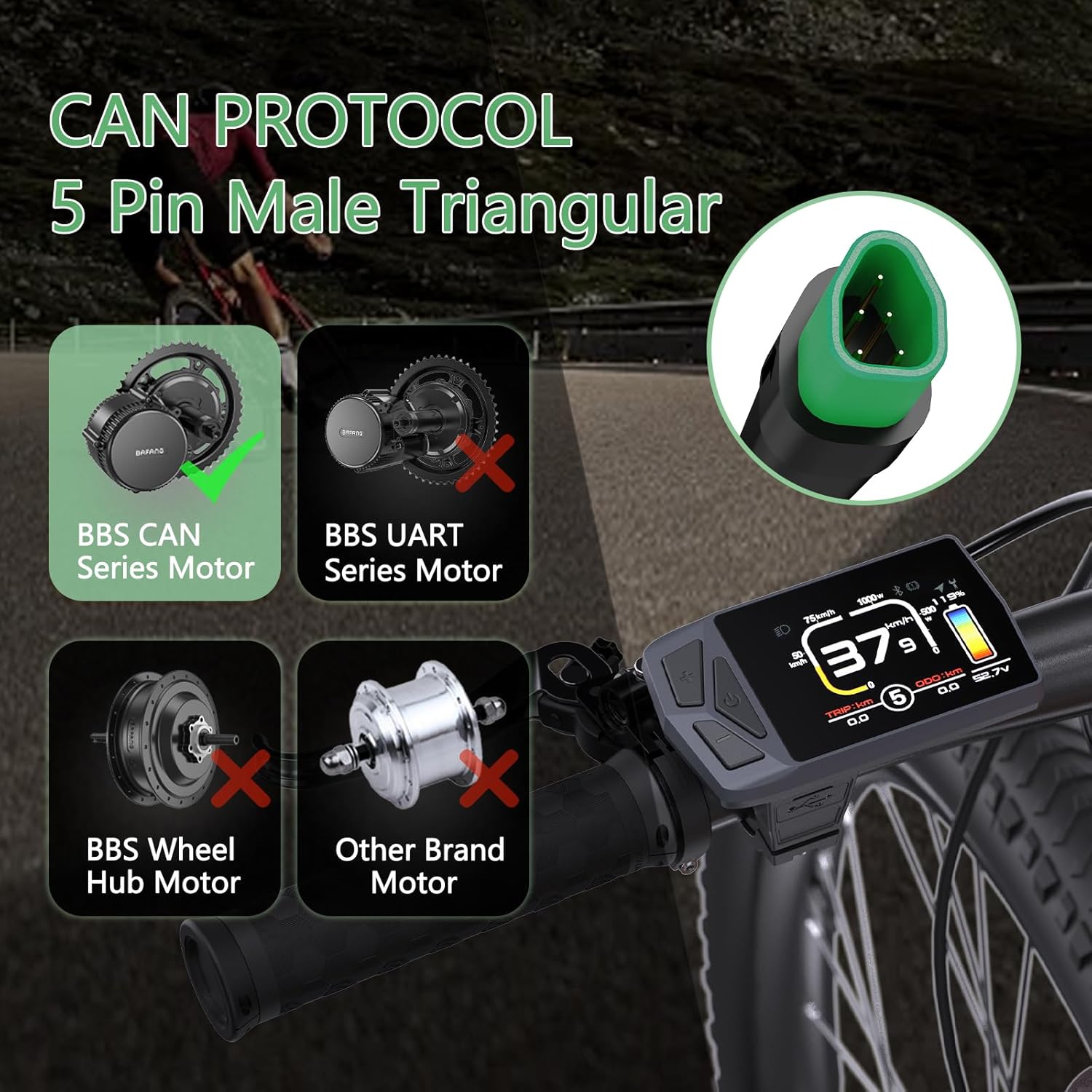
Figure 4: CAN Protocol Compatibility. This image clearly indicates that the EKD01 display is compatible with BAFANG BBS CAN Series Motors and not with UART series, hub motors, or other brands.
4. Setup & Installation
Follow these steps to properly install your Varstrom EKD01 display on your ebike:
- Prepare Handlebar: Ensure your handlebar has a clear section with a diameter of either 22.2 mm or 25.4 mm for mounting the display.
- Mount the Display: Securely attach the EKD01 display to the chosen handlebar section using the provided mounting bracket. Ensure it is positioned for optimal visibility and accessibility of the buttons.
- Connect to Motor: Locate the 5-pin round female waterproof M5 connector on the EKD01 display cable. Connect this to the corresponding male connector from your BAFANG CAN protocol mid-motor. Ensure the connection is firm and secure to prevent water ingress.
- Cable Management: Route the display cable neatly along your ebike frame, securing it with cable ties to prevent snagging or damage during riding.
- Initial Power On: Once installed, power on your ebike system. The EKD01 display should illuminate and show the default screen.
Note: If the display does not power on or shows an error, double-check all connections and ensure your BAFANG motor is indeed CAN protocol compatible.
5. Operation
The EKD01 display features three intuitive buttons for operation:
- Power Button (Middle):
- Press and hold to turn the display ON/OFF.
- Short press to cycle through different display modes (e.g., Trip Distance, Odometer, Max Speed, Average Speed).
- Up Button (+):
- Increases the Pedal Assist System (PAS) level.
- Navigates up in menu options.
- Down Button (-):
- Decreases the Pedal Assist System (PAS) level.
- Navigates down in menu options.
Basic Functions:
- Power On/Off: Press and hold the middle button for approximately 2 seconds.
- Adjust PAS Level: Use the Up (+) and Down (-) buttons to select your desired PAS level (0-9). Level 0 provides no motor assistance.
- Headlight Control: (If connected and supported by your motor system) A dedicated headlight indicator is present on the display. Refer to your motor's manual for specific headlight control methods, often integrated with the display's power button or a separate button on the ebike.
- Real-time Data: The display shows real-time speed, battery level, current power output (W), trip distance (TRIP), and total odometer (ODO).
6. Settings and Advanced Functions
To access the settings menu, typically press and hold a combination of buttons (e.g., Up and Down buttons simultaneously) or follow specific instructions in the on-screen prompts.
Menu Options:
- Language Selection: Choose from 9 available languages.
- Brightness Adjustment: Set screen brightness to 30%, 50%, 75%, or 100%.
- Password: The default password for accessing certain settings is 2020. It is recommended to change this for security.
- PAS Level Configuration: Adjust the range of PAS levels (e.g., 0-3, 0-5, 0-9) to match your preference or local regulations.
- Unit Settings: Switch between metric (km/h) and imperial (mph) units.
- Odometer (ODO) Reset: The EKD01 allows you to reset the total odometer reading. Proceed with caution as this action is usually irreversible.
- Navigation Mirroring: Connect your smartphone via the BIKEGO app to mirror navigation interfaces directly onto the EKD01 display. This feature may have a trial period followed by a paid subscription.
- Battery Info Monitoring: Access detailed battery statistics including temperature, total voltage, current, remaining capacity, and full capacity. This requires a BAFANG communication-enabled battery and controller.

Figure 5: Navigation Mirroring. This image demonstrates how the EKD01 display can mirror navigation information from the BIKEGO app on a smartphone, providing turn-by-turn directions directly on your ebike display.

Figure 6: Battery Information Monitoring. This image shows the "Battery Info" screen on the EKD01 display, detailing parameters such as temperature, total voltage, current, reserved capacity, and full capacity.
7. Maintenance
Proper maintenance ensures the longevity and optimal performance of your EKD01 display.
- Cleaning: Wipe the display screen and casing with a soft, damp cloth. Avoid using abrasive cleaners or solvents that could damage the screen or plastic.
- Water Resistance: The IP67 rating provides protection against dust and temporary immersion in water. However, avoid prolonged submersion or high-pressure water jets. Always ensure the USB Type-C port cover is securely closed when not in use.
- Connector Care: Keep the M5 waterproof connector clean and free of debris. Ensure it is always securely connected to prevent moisture ingress.
- Temperature: Store and operate the display within the specified temperature range (-20°C to +70°C). Avoid exposing it to extreme heat or cold for extended periods.
- Physical Damage: Protect the display from impacts and drops. While durable, excessive force can cause damage.
8. Troubleshooting
If you encounter issues with your EKD01 display, refer to the following common problems and solutions:
| Problem | Possible Cause | Solution |
|---|---|---|
| Display does not power on. | Loose connection, no power from battery, incompatible motor. | Check all cable connections, especially the M5 connector. Ensure ebike battery is charged and powered on. Verify motor is BAFANG CAN protocol. |
| Display shows error code. | Motor or sensor issue, communication error. | Refer to your BAFANG motor manual for specific error code meanings. Try restarting the ebike system. Check motor and sensor connections. |
| PAS levels not changing. | Buttons not responding, internal software issue. | Ensure buttons are not stuck. Try a system restart. If issue persists, contact support. |
| Navigation not working. | BIKEGO app not connected, app issue, trial expired. | Ensure Bluetooth connection to smartphone and BIKEGO app is active. Check app settings and subscription status. |
If you cannot resolve the issue using the above steps, please contact Varstrom customer support or your ebike dealer for further assistance.
9. Technical Specifications
| Feature | Specification |
|---|---|
| Model | EKD01 |
| Screen Type | 2.4" IPS TFT Color LCD |
| Resolution | 320 x 240 px |
| Dimensions (L x W x H) | 86.8 mm x 50.5 mm x 12.5 mm (3.41" x 1.99" x 0.49") |
| Waterproof Rating | IP67 |
| Connector Type | M5 Waterproof Connector (5-pin female) |
| Voltage Compatibility | 12V / 32V / 48V / 60V |
| Operating Temperature | -20°C to +70°C |
| Storage Temperature | -30°C to +80°C |
| USB Charging Port | Type-C, 5V/1A |
| Adjustable PAS Levels | 0-3, 0-5, 0-9 (Optional) |
| Adjustable Languages | 9 (English, French, German, Spanish, Italian, Polish, Chinese, Dutch, Czech) |
| Default Password | 2020 |
| Speed Limit | 0 km/h ~ 99 km/h |
| Cable Length | 260 mm (10.2") |
| Brightness Settings | 30%, 50%, 75%, 100% |
| Light-sensitive | No |

Figure 7: Product Specification Diagram. This image provides a visual representation of the EKD01 display's dimensions, connector type, and other key specifications.
10. Warranty and Support
For warranty information, technical support, or service inquiries regarding your Varstrom EKD01 display, please contact the seller or manufacturer directly. Keep your purchase receipt as proof of purchase.
Manufacturer: Shenzhen Yihang Cross-border E-commerce Co., Ltd.
For the most up-to-date support information, please visit the official Varstrom website or the platform where you purchased the product.


