
1. Product Overview
The ecoCalm 12-inch Solar Exhaust Fan is designed to provide efficient ventilation for various spaces such as greenhouses, attics, garages, and sheds. This system includes a 5000mAh rechargeable battery, two 30W bifacial solar panels, and an intelligent thermostat for automatic temperature control.
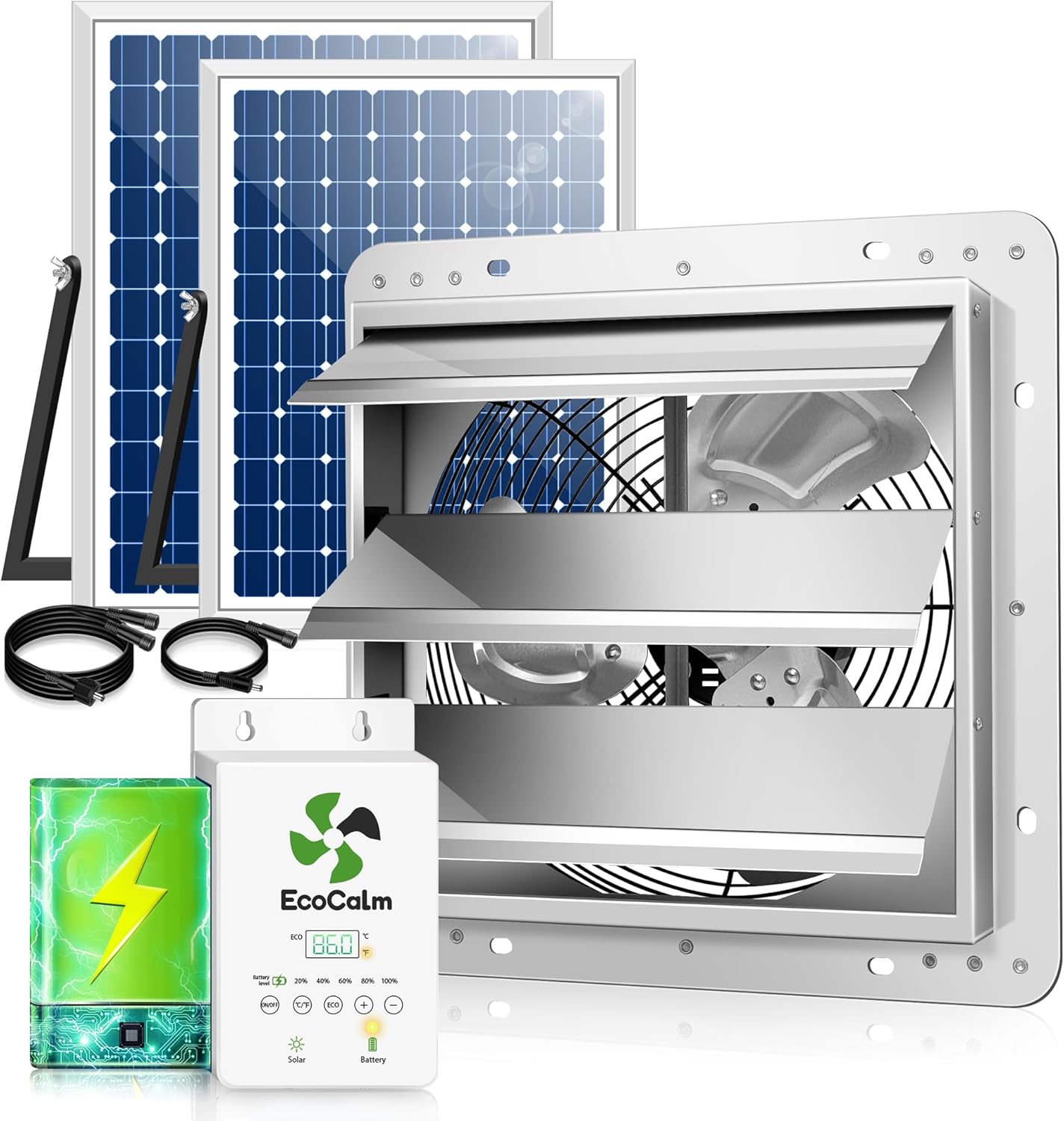
Image 1.1: The ecoCalm 12-inch Solar Exhaust Fan system, including the fan, solar panels, and control unit.
Key Features:
- Solar Power with Battery Backup: Equipped with a 5000mAh rechargeable battery, providing up to 6 hours of operation during nighttime or cloudy conditions after a full charge. The system intelligently switches power sources based on sunlight availability.
- Adjustable Thermostat Control: Built-in intelligent temperature control system allows users to set desired ambient temperatures for automatic fan activation and deactivation.
- Bifacial Solar Panels: Two 30W transparent rear panels generate power from both sides, increasing power generation efficiency by up to 130% (up to 48W total).
- High Airflow: Enhanced blade design and engineered motor deliver 680 CFM airflow, suitable for spaces up to 1600 ft³.
- Durable and Waterproof: Features IP44 waterproof fan blades and a 14.8ft long cable, suitable for outdoor installation.
Video 1.1: An overview of the ecoCalm Solar Exhaust Fan with Battery, demonstrating its operation and solar charging capabilities.
2. Safety Information
Please read all safety instructions carefully before installation and operation. Failure to follow these instructions may result in electric shock, fire, or serious injury.
- Electrical Safety: Ensure all connections are secure and properly insulated. Do not operate the fan with damaged cables or if the system appears compromised.
- Installation: Install the fan and solar panels in a stable location, away from flammable materials. Ensure proper ventilation around the fan to prevent overheating.
- Water Exposure: While the fan blades are IP44 waterproof, the control unit and electrical connections should be protected from direct heavy rain or prolonged submersion.
- Children and Pets: Keep children and pets away from the fan during operation to prevent injury.
- Maintenance: Disconnect power before performing any maintenance or cleaning.
- Disposal: Dispose of the product and its components, especially the battery, according to local regulations.
3. Setup and Installation
3.1 Package Contents
Verify that all components are present in the package:
- 2 x 30W Solar Panels
- 1 x 12-inch Exhaust Fan
- 1 x Solar Powerbank (Control Unit with Battery)
- Cables (1.1m / 43.3inch and 4.5m / 177.3inch)
- 1 x User Manual
- Screw Set and 3M Stickers for mounting

Image 3.1: All included accessories: two solar panels, exhaust fan, solar power bank, cables, manual, and mounting hardware.
3.2 Installation Steps
- Choose Location: Select a suitable location for the exhaust fan (window or wall mount) and solar panels. Ensure the solar panels receive maximum direct sunlight throughout the day.
- Mount Fan: Securely mount the 12-inch exhaust fan. Refer to the dimensions image for precise measurements.
- Mount Solar Panels: Use the provided brackets and screws to mount the two solar panels. Position them to optimize sun exposure.
- Connect Cables: Connect the solar panels to the solar power bank (control unit) and then connect the power bank to the exhaust fan using the provided cables. Ensure all connections are tight and secure.

Image 3.2: Detailed dimensions for the exhaust fan, solar panels, and control unit to assist with installation planning.

Image 3.3: Illustrates various installation environments for the fan, including attics, garages, sheds, and greenhouses.
Video 3.1: A step-by-step guide on how to properly connect the cords for the ecoCalm solar fan system.
4. Operating Instructions
4.1 Power Modes
The ecoCalm solar exhaust fan operates using solar power during the day and automatically switches to battery power when sunlight is insufficient or at night. The 5000mAh battery provides approximately 6 hours of ventilation on a full charge.
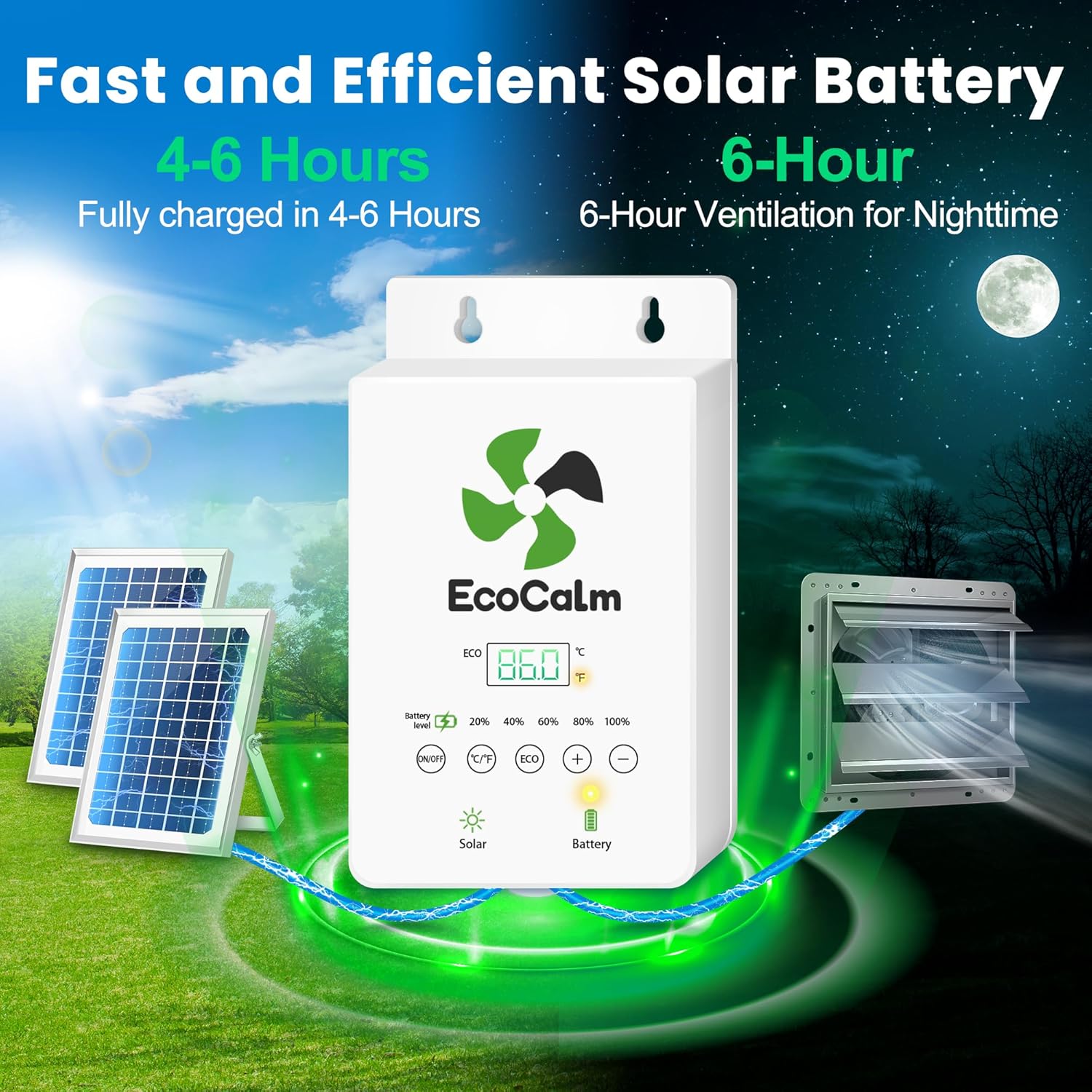
Image 4.1: The control unit displaying battery charge level and indicating power source (solar or battery).
4.2 Thermostat Control
The intelligent temperature control system allows you to set specific temperature thresholds for automatic fan operation.

Image 4.2: The control unit interface showing temperature display and ECO mode settings for automatic fan control.
Setting Temperature Thresholds:
- Access Settings: Tap the 'ECO' button to view the current ECO mode settings.
- Enter Programming Mode: Long press the 'ECO' button to enter the temperature setting mode.
- Switch ON/OFF Temperature: Tap the 'ECO' button to switch between setting the 'ON' temperature (P1) and 'OFF' temperature (P2).
- Adjust Temperature: Use the '+' and '-' buttons to adjust the desired temperature for P1 or P2.
- Confirm Setting: Tap the 'ECO' button again to confirm the setting and exit programming mode.
The fan will automatically turn on when the ambient temperature exceeds the set 'ON' temperature (P1) and turn off when it drops below the set 'OFF' temperature (P2).

Image 4.3: Visual guide for setting the ON and OFF temperature thresholds on the control unit.
4.3 Manual Operation
To manually turn the fan ON or OFF, press the 'ON/OFF' button on the control unit. In manual mode, the thermostat settings are overridden.
5. Maintenance
Regular maintenance ensures optimal performance and longevity of your ecoCalm solar exhaust fan.
- Cleaning Solar Panels: Periodically clean the surface of the solar panels with a soft, damp cloth to remove dust, dirt, or debris that may reduce efficiency. Do not use abrasive cleaners.
- Fan Cleaning: Inspect the fan blades and grille for any accumulation of dust or obstructions. Carefully clean with a soft brush or cloth. Ensure the fan is powered off before cleaning.
- Cable Inspection: Regularly check all cables and connections for signs of wear, damage, or loose connections. Repair or replace any damaged components immediately.
- Battery Health: While the battery is designed for long life, ensure it is regularly charged by placing solar panels in direct sunlight. Avoid prolonged periods of complete discharge.
6. Troubleshooting
If you encounter issues with your ecoCalm solar exhaust fan, refer to the following troubleshooting guide:
| Problem | Possible Cause | Solution |
|---|---|---|
| Fan not running | No sunlight / Low battery charge Loose cable connection Temperature not met (ECO mode) | Ensure solar panels are in direct sunlight to charge battery. Check battery level on control unit. Verify all cables are securely connected. Check thermostat settings (P1/P2). Switch to manual mode to test fan. |
| Battery not charging | Insufficient sunlight Dirty solar panels Damaged solar panel or cable | Relocate solar panels to an area with more direct sunlight. Clean solar panel surfaces. Inspect panels and cables for damage. Contact support if damaged. |
| Thermostat not working as expected | Incorrect temperature settings Sensor obstruction | Review and adjust P1 (ON) and P2 (OFF) temperature settings as per operating instructions. Ensure the temperature sensor on the control unit is not obstructed. |
| Display difficult to read in sunlight | High ambient light conditions | This is a known characteristic. Adjust viewing angle or shade the display temporarily for better readability. |
7. Specifications
| Feature | Detail |
|---|---|
| Brand | ecoCalm |
| Model Number | KP-SEF240812 |
| Electric Fan Design | Exhaust Fan |
| Power Source | Solar Powered |
| Special Feature | Thermostat Control |
| Mounting Type | Window Mount, Wall Mount |
| Material | Metal |
| Wattage | 30 watts (per panel) |
| Air Flow Capacity | 680 Cubic Feet Per Minute (CFM) |
| Indoor/Outdoor Usage | Outdoor |
| Control Method | Touch |
| Battery Capacity | 5000mAh |
| Cable Length | 14.8 ft (approx. 4.5m) |
| Item Weight | 8.94 Kilograms |
8. Warranty and Support
This ecoCalm product is covered by a manufacturer's warranty against defects in materials and workmanship. Please refer to the warranty card included in your package for specific terms and conditions, including the warranty period and claim procedures.
For technical support, troubleshooting assistance, or warranty claims, please contact ecoCalm customer service through the retailer where the product was purchased or visit the official ecoCalm website for contact information.
Please retain your proof of purchase for warranty purposes.
