
Introduction
This manual provides detailed instructions for the assembly, operation, and maintenance of your TRIUMPHKEY Electric Sit-Stand Desk. Designed for home and office use, this height-adjustable desk promotes an active and productive work environment. Please read this manual thoroughly before assembly and use to ensure proper function and safety.

Image: The TRIUMPHKEY Electric Sit-Stand Desk, showcasing its spacious black tabletop and sturdy design, equipped with various office essentials.
Setup and Assembly
The TRIUMPHKEY Electric Sit-Stand Desk is designed for easy assembly. The kit includes all necessary detailed instructions and pre-drilled parts, allowing for completion in less than 30 minutes. Ensure all components are present before beginning assembly.
Assembly Steps:
- Unpack Components: Carefully remove all parts from the packaging and lay them out on a clean, soft surface to prevent scratches. Verify all parts listed in the instruction manual are present.
- Attach Legs to Frame: Follow the provided diagrams to securely attach the desk legs to the main frame using the designated screws and tools.
- Mount Tabletop: Place the tabletop sections onto the assembled frame, aligning them with the pre-drilled holes. Secure the tabletop using the provided fasteners.
- Install Control Panel and Accessories: Attach the control panel to the underside of the desk in the desired location. Connect all necessary cables. Install the headphone hook as per instructions.
- Cable Management: Use any included cable ties or management clips to organize power cords and other cables for a tidy workspace.

Image: Desk components neatly arranged on a rug, illustrating the 'Easy Assembly' feature with all parts ready for installation.
Operating Instructions
Your TRIUMPHKEY desk features flexible height adjustment and memory functions for personalized comfort.
Height Adjustment:
- The desk height can be adjusted between 71 cm and 119 cm.
- Use the Up (▲) and Down (▼) buttons on the control panel to manually raise or lower the desk to your desired height.
- The digital display will show the current height in centimeters.

Image: Two individuals demonstrating the desk's height flexibility, one seated and one standing, with an arrow indicating the 71-119 cm adjustment range.
Memory Presets:
The desk allows you to save up to 3 preferred heights for quick adjustment.
- To Save a Height: Adjust the desk to your desired height using the Up/Down buttons. Press the M button, then immediately press one of the preset buttons (1, 2, or 3) until you hear a beep or see the display flash. The height is now saved to that preset.
- To Use a Saved Height: Simply press the corresponding preset button (1, 2, or 3). The desk will automatically move to the saved height.

Image: A detailed view of the multifunctional control panel, highlighting the digital display, memory setting buttons (M, 1, 2, 3), and height adjustment arrows.
Additional Features:
- Headphone Hook: A convenient hook is integrated for hanging headphones or bags, keeping your workspace tidy.
- Quiet Operation: The desk operates with a noise level below 50 dB during adjustment, ensuring a quiet environment.

Image: A visual representation of the desk's quiet operation, with a sound level indicator showing less than 50 dB, ensuring minimal disturbance.
Maintenance
Regular maintenance ensures the longevity and optimal performance of your TRIUMPHKEY Electric Sit-Stand Desk.
- Cleaning: Wipe the desk surface and legs with a soft, damp cloth. Avoid abrasive cleaners or harsh chemicals that could damage the finish.
- Cable Check: Periodically inspect all cables for any signs of wear or damage. Ensure they are securely connected and not pinched.
- Weight Limit: Do not exceed the maximum weight capacity of 80 kg to prevent damage to the motor and frame.
- Lubrication: The lifting mechanism is generally maintenance-free. If you notice any unusual friction or noise, consult customer support. Do not attempt to lubricate internal components yourself.
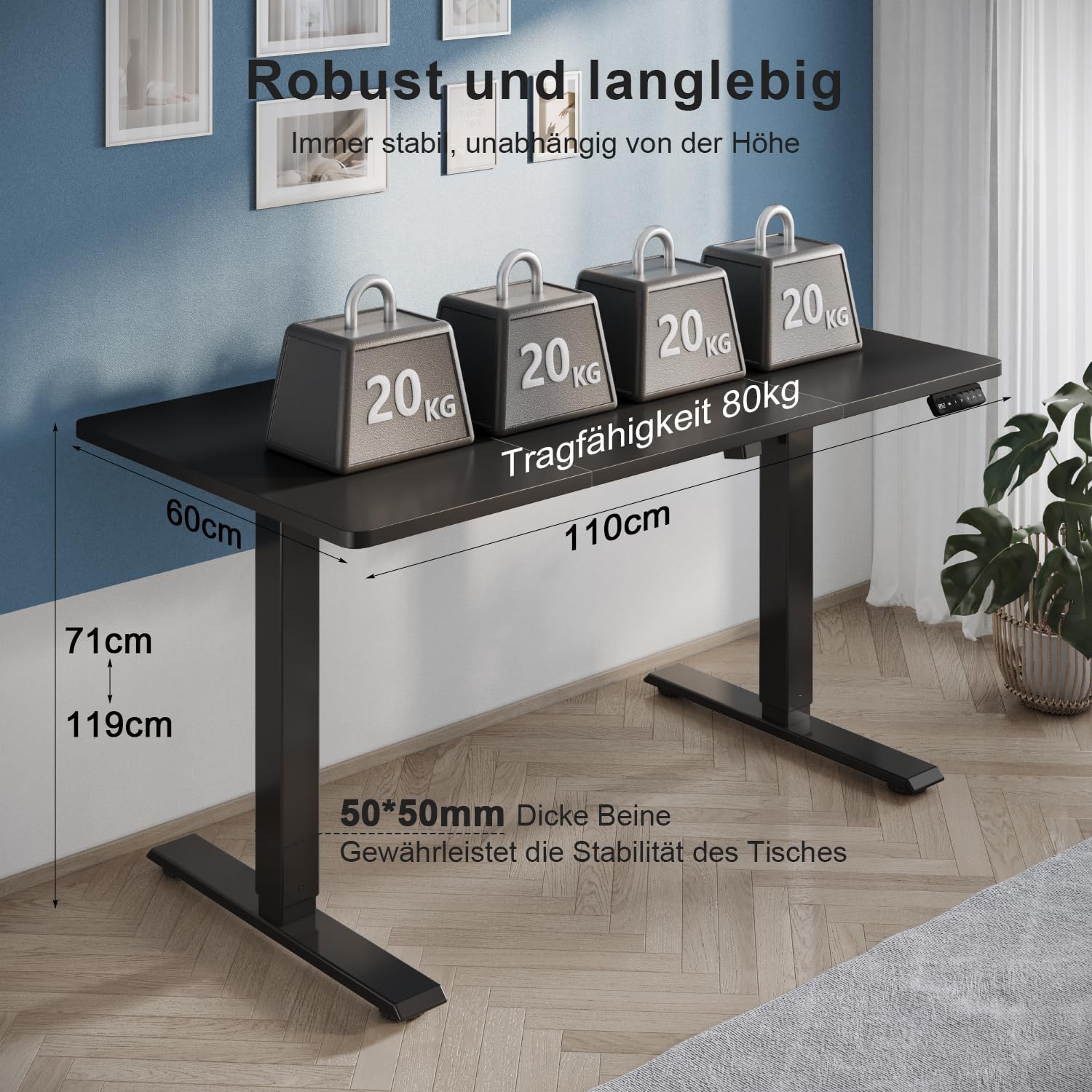
Image: The desk supporting four 20 kg weights, totaling 80 kg, demonstrating its robust industrial-grade steel structure and stability.
Troubleshooting
If you encounter any issues with your TRIUMPHKEY Electric Sit-Stand Desk, please refer to the following common troubleshooting steps:
- Desk Not Moving:
- Check if the power cord is securely plugged into both the desk and a working power outlet.
- Ensure there are no obstructions preventing the desk from moving up or down.
- Try resetting the desk by unplugging it for 30 seconds and then plugging it back in.
- Uneven Movement:
- Verify that the desk is placed on a level surface.
- Ensure all screws and connections from assembly are tight.
- Error Codes on Display:
- If an error code appears, consult the full product manual (if provided separately) or contact customer support for specific instructions.
- Unusual Noises:
- Minor motor sounds during adjustment are normal. If you hear grinding, clicking, or other loud, unusual noises, stop operation and contact customer support.
If these steps do not resolve the issue, please contact TRIUMPHKEY customer support for further assistance.
Specifications
| Brand | TRIUMPHKEY |
| Model Number | 0788 |
| Color | Black |
| Product Dimensions (L x W x H) | 110 x 60 x 71 cm (minimum height) |
| Height Adjustment Range | 71 cm to 119 cm |
| Item Weight | 16.6 Kilograms |
| Maximum Load Capacity | 80 kg |
| Noise Level (during adjustment) | Less than 50 dB |
| Included Components | Desk frame, tabletop, control panel, headphone hook, assembly hardware |
| Assembly Required | Yes |
| Country of Origin | China |
Warranty and Support
TRIUMPHKEY is committed to providing high-quality products. For information regarding warranty coverage, please refer to the warranty card included with your product or visit the official TRIUMPHKEY website.
For technical support, replacement parts, or any questions not covered in this manual, please contact TRIUMPHKEY customer service. Contact details can typically be found on the product packaging, the official website, or your purchase receipt.
