
1. Introduction
Thank you for purchasing the Toshiba 55Z570RP 55-inch 4K Ultra HD Smart QLED TV. This television combines advanced display technology with smart features to deliver an immersive viewing experience. This manual provides essential information for the safe and efficient use of your new TV, covering setup, operation, maintenance, and troubleshooting.
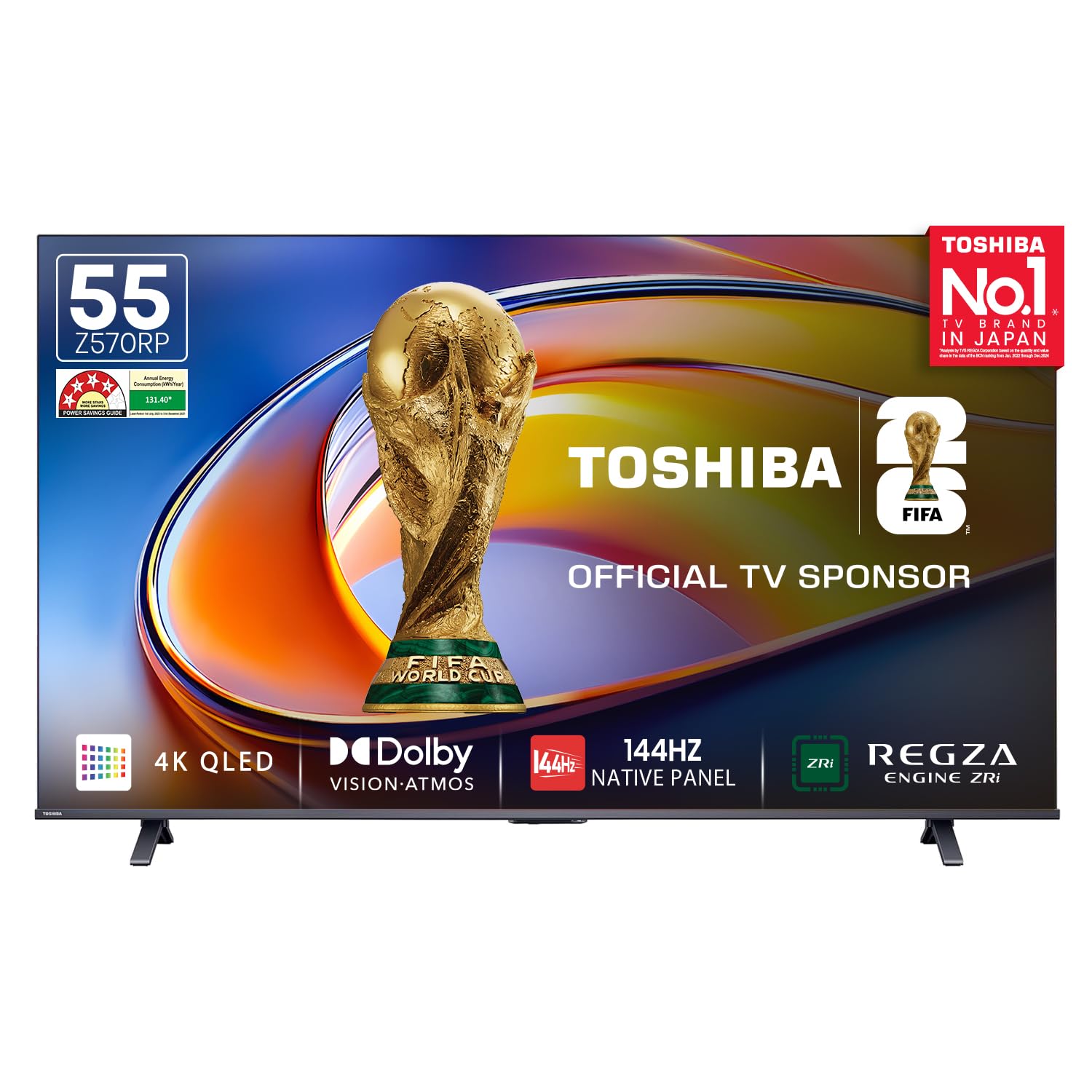
Figure 1: Toshiba 55Z570RP 55-inch 4K Ultra HD Smart QLED TV. This image shows the sleek design of the television with its slim bezels and central stand.
2. Important Safety Information
Please read all safety instructions carefully before using your TV and keep this manual for future reference. Failure to follow these instructions may result in fire, electric shock, personal injury, or damage to your TV.
- Power Source: Connect the TV only to an AC power outlet of the specified voltage (100-240V AC, 50/60Hz).
- Ventilation: Ensure adequate ventilation around the TV. Do not block ventilation openings.
- Water and Moisture: Do not expose the TV to rain or moisture. Do not place objects filled with liquids, such as vases, on the TV.
- Heat: Keep the TV away from heat sources like radiators, heat registers, stoves, or other apparatus that produce heat.
- Cleaning: Unplug the TV from the wall outlet before cleaning. Use a soft, dry cloth. Do not use liquid cleaners or aerosol cleaners.
- Mounting: When mounting the TV on a wall, follow the instructions provided by the wall mount manufacturer. Ensure the wall mount is securely installed.
- Children: Do not allow children to climb on the TV or its stand.
- Lightning: Unplug the TV during lightning storms or when unused for long periods.
3. Setup
3.1. Unboxing and Package Contents
Carefully remove the TV and all accessories from the packaging. Inspect for any damage. Keep the original packaging for potential future transport or returns.

Figure 2: Packaging contents. This image illustrates the components included in the box: 1 TV unit, Voice Remote, User Manual, Power Cable, 2 Table Stands with screws, and a Warranty Card.
Package Contents:
- Toshiba 55Z570RP Television (1N)
- Remote Control (1N)
- Table Stand (2N)
- AAA Batteries (2N)
- User Manual (1N)
- Warranty Card (1N)
3.2. Attaching the Table Stand
- Place the TV screen-down on a soft, flat surface (e.g., a blanket) to prevent scratches.
- Align each stand base with the corresponding slots on the bottom of the TV.
- Secure each stand base with the provided screws.
- Carefully lift the TV to an upright position on a stable, level surface.
3.3. Wall Mounting (Optional)
If you choose to wall-mount your TV, ensure you use a VESA-compatible wall mount. Follow the instructions provided with your wall mount kit. It is recommended to have professional installation for wall mounting.
3.4. Connecting External Devices
Your Toshiba TV offers various connectivity options. Refer to the port diagram below for connection points.

Figure 3: Rear connectivity ports. This image details the various input and output ports on the back of the TV, including USB, Headphone, AV Input, HDMI (with eARC), ANT (Antenna), Ethernet, and Digital Audio Out.
- HDMI Ports (3): Connect set-top boxes, gaming consoles, Blu-ray players, etc. HDMI 2 supports eARC for enhanced audio return.
- USB Ports (2): Connect USB storage devices for media playback.
- Ethernet (LAN) Port: Connect to your home network via a wired connection.
- AV Input: Connect older devices using composite video and stereo audio cables.
- Antenna (RF) Input: Connect an aerial for terrestrial TV broadcasts.
- Digital Audio Out (Optical/SPDIF): Connect to a soundbar or AV receiver for digital audio output.
- Headphone Jack: Connect headphones for private listening.
3.5. Power Connection
After connecting all necessary devices, plug the power cord into the TV's power input, then plug the other end into a wall outlet. The TV will enter standby mode.
3.6. Initial Setup Wizard
Press the Power button on the remote control or TV. The TV will guide you through the initial setup process, which includes:
- Language selection
- Network connection (Wi-Fi or Ethernet)
- Time zone and date settings
- Channel scanning (for antenna/cable connections)
- Accepting terms and conditions
4. Operating Your TV
4.1. Remote Control Overview
Familiarize yourself with the remote control buttons for easy navigation.

Figure 4: Remote control. This image displays the layout of the TV's remote control, featuring power, number keys, navigation pad, volume, channel, and dedicated app buttons for Netflix, YouTube, Prime Video, and more.
- Power (⏻): Turns the TV on or off.
- Number Buttons (0-9): Select channels directly.
- Guide: Access the electronic program guide.
- Subtitle: Toggle subtitles on/off.
- Navigation Pad (Up/Down/Left/Right/OK): Navigate menus and confirm selections.
- Back (↶): Return to the previous screen.
- Home (⌂): Go to the Smart TV home screen.
- Exit: Exit current menu or app.
- Volume (+/-): Adjust volume level.
- Channel (⌸/⌷): Change channels.
- Mute (🔇): Mute or unmute sound.
- Info: Display program information.
- Dedicated App Buttons: Quick access to popular streaming services like Netflix, YouTube, Prime Video.
4.2. Smart TV Features (VIDAA OS)
Your Toshiba TV runs on the VIDAA Smart OS, providing access to a wide range of apps and services.

Figure 5: VIDAA Smart OS Home Screen. This image shows the user interface of the VIDAA operating system, displaying various streaming app icons like Netflix, Prime Video, Disney+ Hotstar, SonyLIV, YouTube, and more, along with content recommendations.
- Home Screen: Access apps, inputs, settings, and recommendations.
- App Store: Download and install additional applications.
- Voice Control: Use the built-in voice assistant (Far Field Voice Control) to search for content, control playback, and manage TV settings. Simply say "Hey VIDAA" or press the voice button on your remote.
- Screen Sharing: Cast content from your smartphone or tablet to the TV.
- VIDAA Mobile App: Control your TV using your smartphone by downloading the VIDAA app.
4.3. Picture Settings
Optimize your viewing experience with various picture settings.
- Picture Modes: Standard, Cinema Day, Cinema Night, Dynamic, Sports.
- Dolby Vision IQ / HDR10+ Adaptive: Automatically adjusts picture settings based on ambient light and content metadata for optimal viewing.
- AI 4K Upscaling: Enhances lower-resolution content to near 4K quality.
- AI Picture Optimizer: Intelligently adjusts picture parameters for various content types.
- AI Auto View Pro: Automatically optimizes picture settings based on ambient lighting conditions.
4.4. Sound Settings
Adjust audio settings for an immersive sound experience.
- Sound Modes: Standard, Theatre, Music, Speech, Late Night, Sports.
- Dolby Atmos: Provides immersive, multi-dimensional audio.
- REGZA Power Audio Pro: Enhances audio output for clear and powerful sound.
4.5. Gaming Features
The Toshiba 55Z570RP is designed for an enhanced gaming experience.
- Game Mode PRO: Optimizes input lag and picture settings for gaming.
- Native 144Hz Panel: Delivers ultra-smooth motion for fast-paced games.
- VRR (Variable Refresh Rate): Synchronizes the TV's refresh rate with the game console's frame rate to eliminate screen tearing.
- ALLM (Auto Low Latency Mode): Automatically switches the TV to low-latency mode when a game console is detected.
- AMD FreeSync Premium: Provides fluid, artifact-free performance at virtually any framerate.
5. Maintenance
5.1. Cleaning the Screen
- Turn off the TV and unplug it from the power outlet.
- Gently wipe the screen with a soft, dry, lint-free cloth.
- For stubborn marks, lightly dampen the cloth with water or a screen-cleaning solution specifically designed for TVs. Do not spray liquid directly onto the screen.
- Avoid using abrasive cleaners, alcohol, benzene, or thinners, as these can damage the screen.
5.2. Cleaning the TV Body
- Wipe the TV frame and stand with a soft, dry cloth.
- Do not use any liquid cleaners directly on the TV body.
6. Troubleshooting
Before contacting customer support, try the following solutions for common issues:
| Problem | Possible Solution |
|---|---|
| No power |
|
| No picture, but sound is present |
|
| No sound, but picture is present |
|
| Remote control not working |
|
| Cannot connect to Wi-Fi |
|
7. Specifications
Below are the key technical specifications for the Toshiba 55Z570RP TV.

Figure 6: Product dimensions. This image provides detailed measurements of the Toshiba Z570RP 55-inch TV, showing width, height, and depth both with and without the stand.
| Feature | Detail |
|---|---|
| Model Number | 55Z570RP |
| Screen Size | 55 Inches (139 cm) |
| Display Technology | QLED TV |
| Resolution | 4K Ultra HD (3840x2160) |
| Refresh Rate | 144 Hz |
| HDR Support | Dolby Vision IQ, HDR10+ Adaptive, HDR10 |
| Sound Output | 24 Watts Speakers |
| Audio Technology | Dolby Atmos, REGZA Power Audio Pro |
| Operating System | VIDAA OS |
| Connectivity | 3 HDMI ports (2 HDMI 2.1, 1 HDMI 2.0, HDMI 2 eARC), 2 USB 2.0 ports, Dual-band Wi-Fi, Bluetooth 5.0, Ethernet, Optical Digital Audio Out, AV Input |
| Processor | REGZA Engine ZRi |
| Dimensions (with stand) | 123.3W x 76.6H x 31.3D cm |
| Dimensions (without stand) | 123.3W x 71.7H x 8D cm |
| Weight (without stand) | 11.4 Kilograms |
| Power Consumption | 130 Watts |
| Annual Energy Consumption | 131.45 kWh |
8. Warranty and Support
Warranty Information: Your Toshiba 55Z570RP TV comes with a 2-year warranty on the TV product and accessories from the date of purchase. Please refer to the warranty card included in your package for detailed terms and conditions.
Customer Support: For technical assistance, service requests, or warranty claims, please contact Toshiba customer support. Refer to your warranty card or the Toshiba official website for contact details specific to your region.
Online Resources: Visit the official Toshiba website for product updates, FAQs, and additional support resources.


