
1. Introduction
The GameSir X5 Lite is a versatile mobile gaming controller designed for an enhanced gaming experience on various devices. It offers precise control, ergonomic design, and broad compatibility, making it suitable for a wide range of mobile games.

Image: The GameSir X5 Lite controller attached to an iPad Mini, demonstrating its use for gaming. The controller extends on both sides of the tablet, providing a console-like grip.
2. Package Contents
- GameSir X5 Lite Mobile Gaming Controller
- User Manual
Please ensure all items are present upon unboxing. If any components are missing or damaged, contact GameSir customer support.
3. Product Features
- Type-C Mobile Gamepad: Compatible with iPhone 15/16 series, iPad mini, and Android devices. Supports phones ranging from 105mm to 213mm (4.13-8.39 inches) in length.
- Hall Effect Sticks: Advanced Hall Effect sticks provide precise 360° control with enhanced durability, minimizing drift and dead zones.
- Pass-Through Charging & Lightweight Design: Allows charging your device while gaming without interruption. Weighing only 135.4g, its lightweight design and ergonomically laser-engraved textured grips ensure comfort during extended gaming sessions.
- Turbo Function & Durable Buttons: Features a customizable Turbo function for A/B/X/Y/LB/RB/LT/RT buttons, enabling faster and more efficient input. Equipped with cushioned and durable membrane triggers and buttons for comfortable and quiet operation.
- Customizable App: The GameSir app (Android only) allows for controller customization, including button remapping and joystick settings. Some features are accessible via on-the-fly button combinations.
- Wide Game Compatibility: Supports a broad range of controller-supported Android and iOS games, including popular titles like Call of Duty, Genshin Impact, Minecraft, and Diablo Immortal.

Image: The GameSir X5 Lite controller is shown being held, highlighting its light weight of 135.4g, which is less than an iPhone 16 (170g).

Image: A detailed view of the GameSir Hall Effect sticks, emphasizing their precision and durability with a visual representation of their advanced technology.

Image: A composite image illustrating key features of the controller: durable membrane buttons, ample space for large phone cameras, the movable Type-C port, interchangeable silicone pads for protection, and the ergonomic textured grips.
4. Setup Guide
4.1 Connecting Your Device
- Gently extend the left side of the GameSir X5 Lite controller.
- Align your USB-C compatible smartphone or tablet with the controller's movable Type-C port.
- Carefully insert your device into the Type-C port.
- Extend the right side of the controller to securely hold your device in place. Ensure your device is centered and firmly seated.
The controller is plug-and-play, meaning it should be recognized by your device automatically once connected.

Image: The GameSir X5 Lite controller is shown extended with an iPad Mini, illustrating its universal compatibility and maximum supported length of 213mm for various devices.
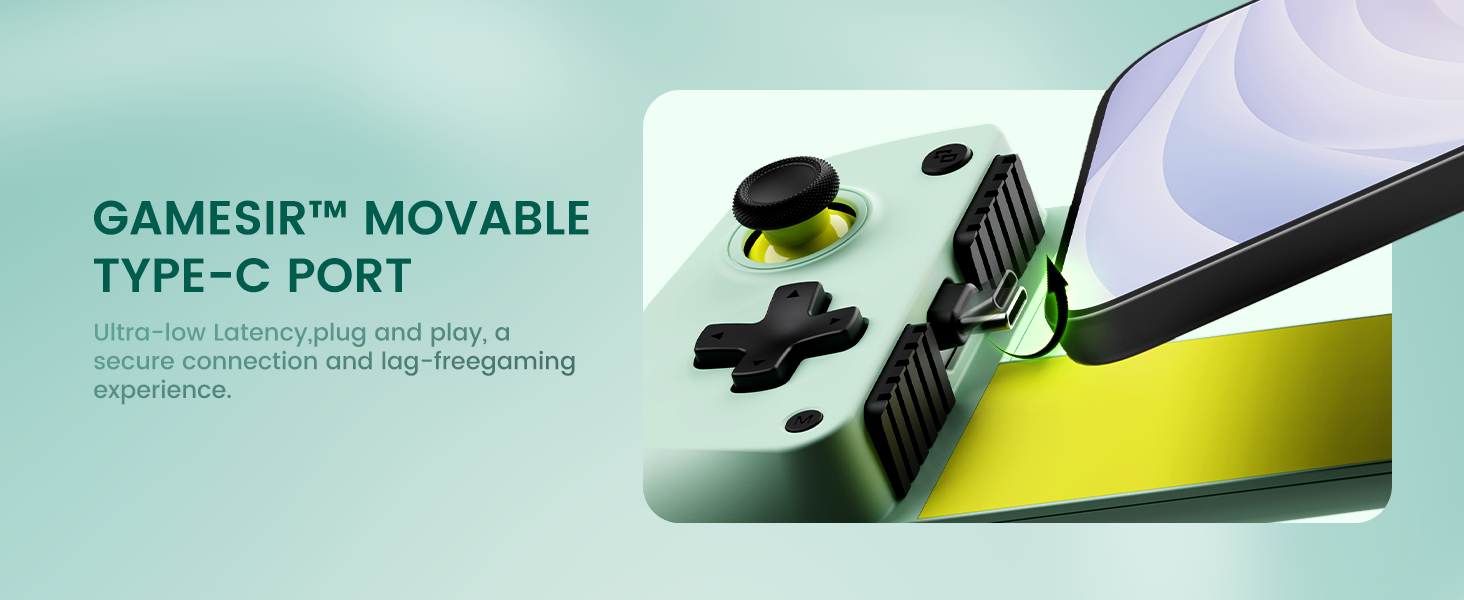
Image: A detailed view of the GameSir Movable Type-C Port, demonstrating its secure, low-latency, plug-and-play connection with a mobile device.
4.2 Installing the GameSir App (Android Only)
For advanced customization and firmware updates, download the official GameSir App from the Google Play Store. This app is currently available for Android devices only.
5. Operating Instructions
5.1 Basic Controls
The GameSir X5 Lite features standard gamepad controls:
- Left/Right Analog Sticks: For movement and camera control.
- D-Pad: For directional input, typically used in retro games or menu navigation.
- A/B/X/Y Buttons: Action buttons for in-game commands.
- LB/RB: Shoulder buttons.
- LT/RT: Trigger buttons.
- M Button: Multi-function button for special commands.
5.2 Special Functions
The controller includes several versatile combo key functions:
- Activate Turbo Function: Double click the 'M' button, then press the desired A/B/X/Y/LB/RB/LT/RT button to enable Turbo mode for that button. Repeat the process to deactivate.
- Adjust Volume: Press the 'M' button and the D-pad Up/Down to adjust the device volume.
- Take Screenshot: Double click the 'M' button to capture a screenshot.
- Switch Layout: Press the 'M' button and the 'A' button to switch between controller layouts (if supported by the GameSir App).

Image: A visual guide detailing the versatile combo key functions of the GameSir X5 Lite, including how to activate Turbo, adjust volume, and take screenshots using the 'M' button in combination with other controls.
5.3 Pass-Through Charging
The controller supports pass-through charging. Connect a USB-C charging cable to the controller's charging port to charge your mobile device while playing. This ensures uninterrupted gaming sessions.
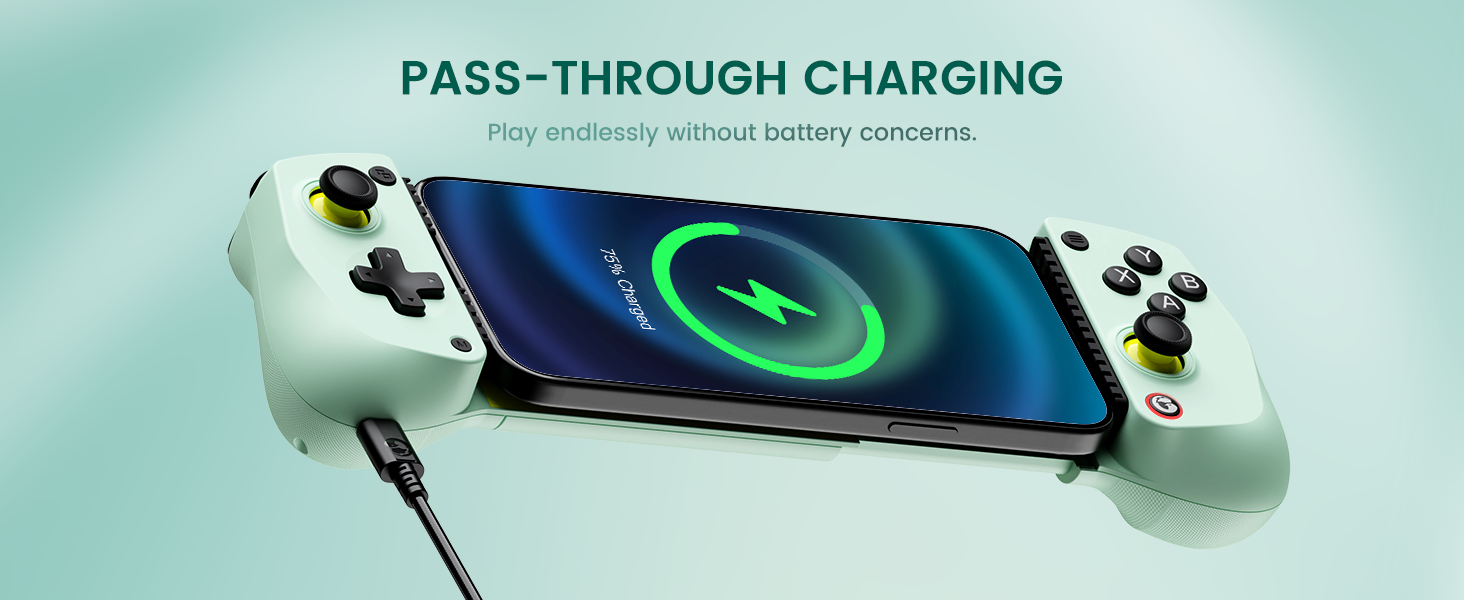
Image: The GameSir X5 Lite controller is shown with a smartphone connected, demonstrating the pass-through charging feature that allows the phone to charge while in use with the controller.
6. Maintenance
- Cleaning: Use a soft, dry cloth to clean the controller. Avoid using abrasive cleaners or solvents.
- Storage: Store the controller in a cool, dry place away from direct sunlight and extreme temperatures.
- Handling: Avoid dropping the controller or subjecting it to strong impacts, as this may damage internal components.
7. Troubleshooting
| Problem | Possible Cause | Solution |
|---|---|---|
| Controller not recognized by device. | Loose connection, incompatible device, or software issue. | Ensure the device is securely connected to the Type-C port. Restart your mobile device. Verify your device's compatibility. |
| Buttons or sticks unresponsive. | Software glitch, physical obstruction, or damage. | Disconnect and reconnect the controller. Clean around the buttons/sticks. If using Android, check GameSir App settings. |
| D-pad diagonal inputs are difficult. | Specific D-pad design or user input technique. | Ensure precise thumb placement for diagonal movements. Practice with the D-pad to familiarize yourself with its feel. |
| Pass-through charging not working. | Charging cable issue, power source, or device not supporting pass-through. | Try a different USB-C charging cable and power adapter. Ensure your device supports charging via the controller's Type-C port. |
| GameSir App not functioning correctly. | App compatibility (Android only), outdated app version, or software bug. | Ensure you are using an Android device. Update the GameSir App to the latest version. Clear app cache/data or reinstall the app. |
8. Specifications
- Model Number: GameSir X5 Lite
- Connectivity: USB-C (Direct connection)
- Compatible Devices: Android smartphones/tablets, iPhone 15/16 series, iPad Mini (USB-C)
- Supported Device Length: 105mm ~ 213mm (4.13-8.39 inches)
- Sticks: Hall Effect Sticks
- Triggers/Buttons: Cushioned Membrane Buttons
- Weight: Approximately 135.4g (4.59 ounces)
- Dimensions: 8.43 x 3.7 x 2.09 inches (Package Dimensions)
- Manufacturer: GameSir
- Release Date: April 22, 2025
9. Warranty and Support
For warranty information, please refer to the documentation included with your purchase or visit the official GameSir website. GameSir provides customer support for product inquiries, technical assistance, and warranty claims.
Official GameSir Website: www.gamesir.hk
Please retain your proof of purchase for any warranty-related services.


