
1. Introduction
Thank you for choosing the PELONIS 40-Inch Tower Fan. This oscillating fan features an innovative washable design, providing 2000 CFM airflow at 28ft/s, 4 speeds, 2 modes, and 90° oscillation with a quiet 23dB operation. This manual provides important information for the safe and efficient use of your new tower fan. Please read it thoroughly before operation and retain it for future reference.

Figure 1: PELONIS 40-Inch Tower Fan (Model PSFZ40DR5ALG)
2. Important Safety Instructions
When using electrical appliances, basic precautions should always be followed to reduce the risk of fire, electric shock, and injury to persons, including the following:
- Read all instructions before using this fan.
- Use this fan only as described in this manual. Other uses not recommended by the manufacturer may cause fire, electric shock, or injury to persons.
- Do not operate the fan with a damaged cord or plug. Discard the fan or return to an authorized service facility for examination and/or repair.
- Do not run cord under carpeting. Do not cover cord with throw rugs, runners, or similar coverings. Arrange cord away from traffic area and where it will not be tripped over.
- To disconnect the fan, turn controls to OFF, then remove plug from outlet.
- Do not insert or allow foreign objects to enter any ventilation or exhaust opening as this may cause an electric shock or fire, or damage the fan.
- Do not operate in areas where gasoline, paint, or flammable liquids are used or stored.
- Always unplug the fan before moving, cleaning, or when not in use.
- This fan is intended for household use only.
3. Package Contents
Please check the package contents upon opening. If any items are missing or damaged, contact customer support.
- PELONIS 40-Inch Tower Fan Unit
- Fan Base (2 parts)
- Remote Control
- User Manual (this document)
4. Setup and Assembly
Follow these steps to assemble your PELONIS Tower Fan:
- Assemble the Base: Connect the two halves of the fan base together. Ensure they snap securely into place.
- Attach Base to Fan Unit: Align the assembled base with the bottom of the main fan unit. Secure the base to the fan unit using the provided nut, turning clockwise until tight. Route the power cord through the designated channel in the base for stability.
- Remote Control Battery: Open the battery compartment on the remote control and insert the required batteries (not always included, check packaging).
- Placement: Place the fan on a firm, level surface. Ensure there is adequate space around the fan for proper airflow and oscillation.
- Power Connection: Plug the power cord into a standard 120V AC electrical outlet.

Figure 2: Effortless Setup - Twist Lock and Lift the Upper Body
Video 1: How to install Pelonis Washable Tower Fan. This video demonstrates the assembly process for the PELONIS tower fan, including attaching the base and preparing it for use.
5. Operating Instructions
Your PELONIS Tower Fan can be operated using the control panel on the top of the unit or the included remote control.
Control Panel and Remote Functions:
- Power Button (⏻): Turns the fan ON or OFF.
- Speed Button (⇌): Cycles through 4 fan speeds (Low, Medium, High, Turbo).
- Mode Button (☽): Selects between 2 wind modes:
- Normal Mode: Provides a consistent airflow.
- Sleep Mode: Gradually decreases fan speed for quiet operation during sleep.
- Oscillation Button (↻): Activates or deactivates the 90° oscillation feature, distributing air across a wider area.
- Timer Button (⏱): Sets the auto-off timer for up to 7 hours. Press repeatedly to cycle through timer settings.

Figure 3: Remote Control and Fan Settings

Figure 4: 90° Oscillation for Wide Coverage
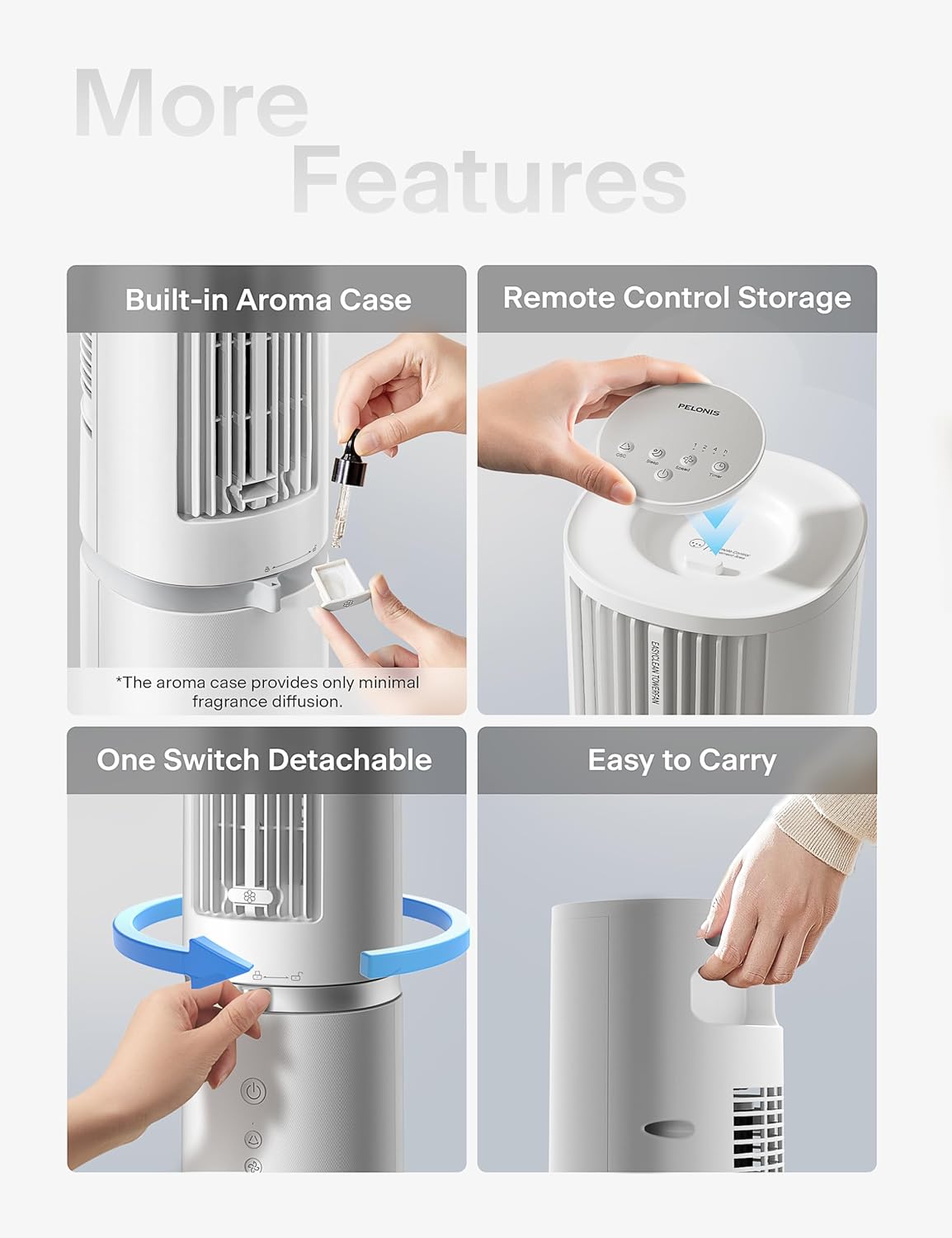
Figure 5: Additional Features including Aroma Case and Remote Storage
6. Maintenance and Cleaning
The PELONIS Tower Fan features an innovative washable design for easy cleaning. Regular cleaning ensures optimal performance and extends the life of your fan.
Cleaning Instructions:
- Unplug the Fan: Always ensure the fan is unplugged from the power outlet before cleaning.
- Detach Upper Body: The fan's upper body is detachable for thorough cleaning. Twist the lock mechanism at the base of the upper section and lift it off the motor unit.
- Washable Components: The detachable upper body, including the air outlet grille and internal components, can be washed directly with water. Use mild soap and a soft cloth or sponge if necessary. Ensure no electronic components are exposed to water.
- Dry Thoroughly: Allow all washed parts to air dry completely before reassembling. Ensure no moisture remains, especially in crevices.
- Wipe Base Unit: Wipe the motor base unit with a soft, damp cloth. Do not immerse the base unit in water.
- Reassemble: Once all parts are dry, carefully reattach the upper body to the motor unit, ensuring it locks securely into place.
Note: The aroma case (if present) can be cleaned by wiping it with a damp cloth. Do not use harsh chemicals.
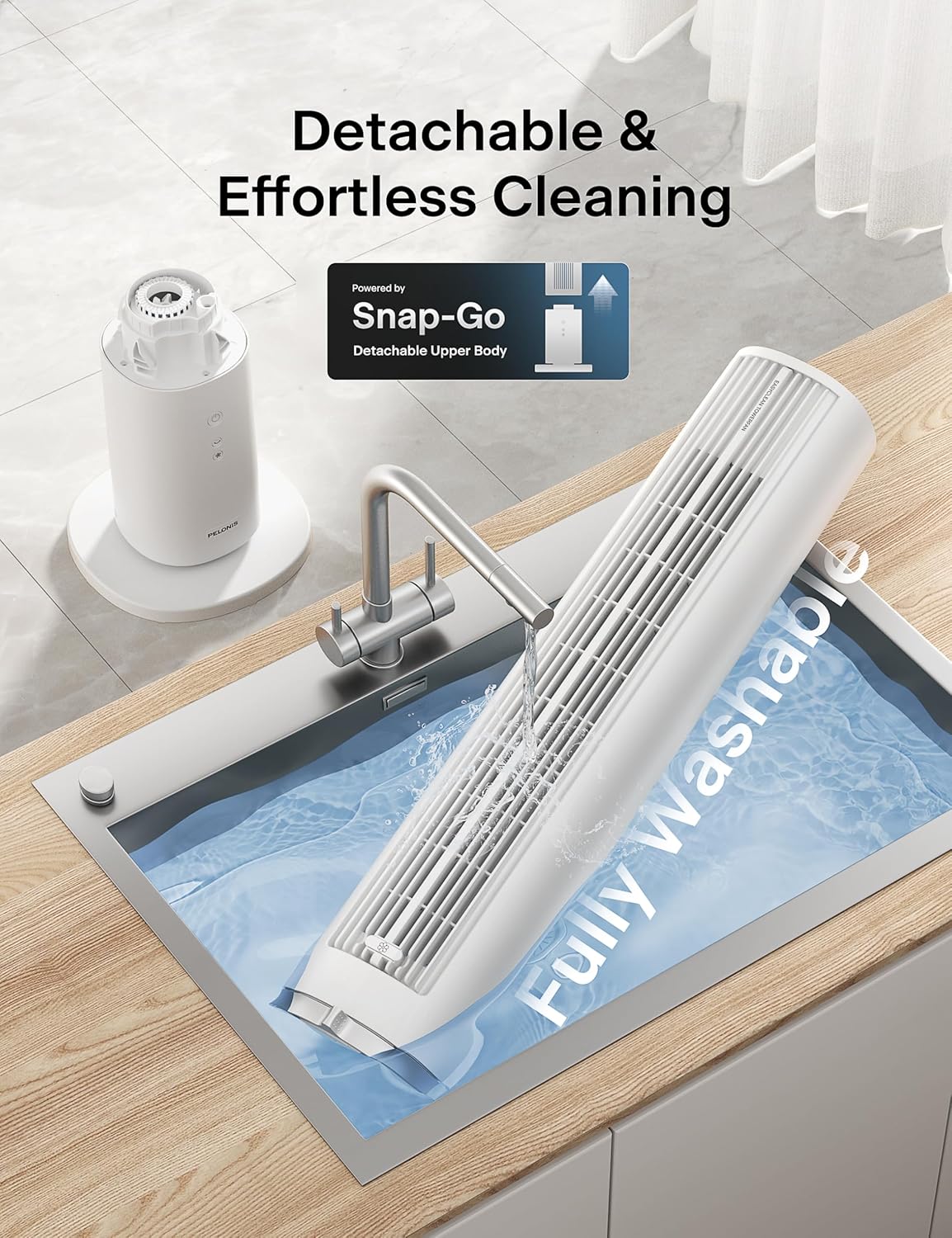
Figure 6: Detachable and Fully Washable Design

Figure 7: One-Twist Detachable Mechanism
7. Troubleshooting Guide
If your fan is not operating correctly, please refer to the following common issues and solutions:
| Problem | Possible Cause | Solution |
|---|---|---|
| Fan does not turn on. | Not plugged in; power outlet not working; power button not pressed. | Ensure fan is securely plugged into a working outlet. Press the power button. |
| Weak or no airflow. | Fan speed too low; air intake/outlet blocked; internal components dirty. | Increase fan speed. Check for obstructions. Clean the fan as per maintenance instructions. |
| Fan is noisy during operation. | Fan not on a level surface; internal components dirty; foreign object inside. | Place fan on a flat, stable surface. Clean the fan. If noise persists, contact support. |
| Remote control not working. | Batteries are dead or incorrectly inserted; remote not pointed at receiver. | Replace batteries. Ensure correct polarity. Point remote towards the fan's control panel. |
| Oscillation not working. | Oscillation function not activated. | Press the oscillation button on the control panel or remote. |
8. Product Specifications
| Feature | Detail |
|---|---|
| Brand | PELONIS |
| Model Name | PSFZ40DR5ALG |
| Model Number | PSFZ40DR5ALG |
| Color | White |
| Style | Upgraded with Washable Design |
| Product Dimensions (D x W x H) | 10.82"D x 10.82"W x 40.6"H |
| Item Weight | 7.03 Kilograms |
| Power Source | AC/DC |
| Wattage | 45 watts |
| Voltage | 120 Volts |
| Number of Speeds | 4 |
| Wind Modes | Normal, Sleep |
| Oscillation | 90° |
| Noise Level | 23 Decibels |
| Air Flow Capacity | 2000 Cubic Feet Per Minute (CFM) |
| Air Speed | 28 Feet Per Second (ft/s) |
| Timer | Up to 7 hours |
| Control Method | Button Control, Remote Control |
| Included Components | Remote |
| Indoor/Outdoor Usage | Indoor |
9. Warranty and Customer Support
PELONIS products are manufactured to the highest quality standards. For specific warranty information, please refer to the warranty card included with your product or visit the official PELONIS website.
If you encounter any issues or have questions regarding your PELONIS 40-Inch Tower Fan, please contact our customer support team:
- Online Support: Visit the PELONIS Store on Amazon for FAQs and product information.
- Contact Information: Refer to your product packaging or the official PELONIS website for direct customer service contact details (phone, email).
Please have your model number (PSFZ40DR5ALG) and purchase date ready when contacting support.
