
1. Introduction
Thank you for purchasing the JVC XS-N3214PB Portable Bluetooth Party Speaker. This manual provides important information regarding the setup, operation, and maintenance of your speaker. Please read it thoroughly before using the product to ensure proper function and to maximize your listening experience. Keep this manual for future reference.
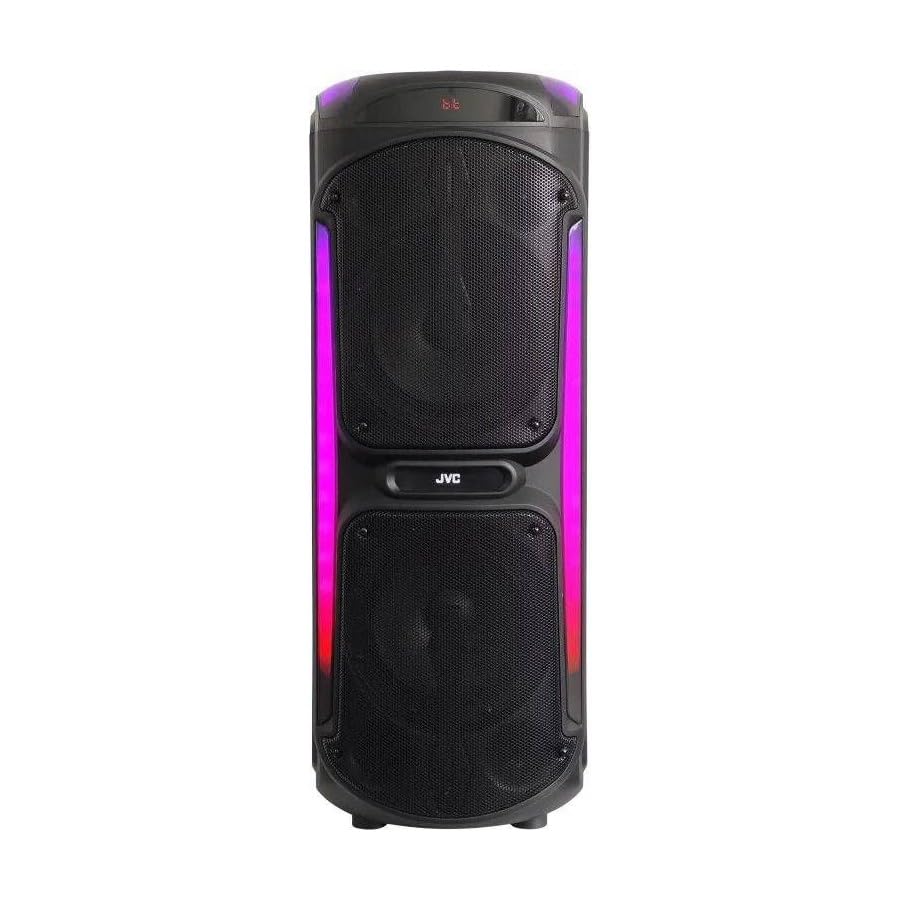
Image: The JVC XS-N3214PB Portable Bluetooth Party Speaker, shown with two microphones, highlighting its versatile connectivity options including Bluetooth, FM Radio, MP3 playback, AUX input, and USB input. The speaker features integrated LED lighting.
2. Safety Information
To ensure safe operation and prevent damage, please observe the following precautions:
- Do not expose the speaker to water, moisture, or extreme temperatures.
- Do not attempt to disassemble or modify the speaker. Refer all servicing to qualified personnel.
- Keep the speaker away from heat sources, direct sunlight, and flammable materials.
- Use only the specified charging adapter.
- Avoid placing heavy objects on the speaker.
- Clean the speaker with a soft, dry cloth. Do not use liquid cleaners or aerosols.
- Ensure proper ventilation around the speaker during use.
3. Package Contents
Verify that all items are present in the package:
- JVC XS-N3214PB Portable Bluetooth Party Speaker (1 unit)
- Power Adapter/Charging Cable (1 unit)
- Remote Control (1 unit)
- User Manual (this document)
- (Optional: Microphone, if included with your specific purchase)
4. Product Overview
4.1. Features
- Powerful 800W Audio Output
- Bluetooth Wireless Connectivity
- Built-in Rechargeable Battery for Portability
- Integrated LED Party Lights
- FM Radio Tuner
- USB Playback
- AUX Input
- Microphone Input for Karaoke
- Remote Control Operation
- Deep Bass Performance
4.2. Controls and Ports
Familiarize yourself with the speaker's control panel and connection ports. (Refer to diagrams in the full printed manual for exact locations).
- Power Button: Turns the speaker on/off.
- Mode Button: Switches between Bluetooth, FM, USB, and AUX modes.
- Volume Control: Adjusts the master volume.
- Play/Pause Button: Controls media playback.
- Previous/Next Track Buttons: Navigates through tracks or FM stations.
- LED Light Button: Toggles LED lighting effects.
- Microphone Volume/Echo Controls: Adjusts microphone input and echo effect.
- USB Port: For USB drive playback.
- AUX Input (3.5mm): For connecting external audio devices.
- Microphone Input (6.35mm): For connecting a wired microphone.
- DC IN Port: For connecting the power adapter to charge the speaker.
5. Setup
5.1. Charging the Speaker
- Connect the power adapter to the DC IN port on the speaker.
- Plug the other end of the power adapter into a wall outlet.
- The charging indicator light will illuminate (color may vary) to show the speaker is charging.
- Allow approximately 4-6 hours for a full charge. The indicator light may change or turn off when fully charged.
- Disconnect the power adapter once charging is complete or when using the speaker on battery power.
5.2. Powering On/Off
- To Power On: Press and hold the Power button for a few seconds until the display illuminates.
- To Power Off: Press and hold the Power button again for a few seconds until the display turns off.
6. Operating Instructions
6.1. Bluetooth Pairing
- Power on the speaker. It will automatically enter Bluetooth pairing mode, indicated by a flashing Bluetooth icon or voice prompt.
- On your mobile device (smartphone, tablet, etc.), enable Bluetooth and search for available devices.
- Select "JVC XS-N3214PB" from the list of devices.
- Once paired, the speaker will confirm with an audible tone or a solid Bluetooth icon.
- You can now play audio from your device through the speaker.
6.2. FM Radio
- Press the Mode button until "FM" is displayed.
- Press the Play/Pause button to automatically scan and save available FM stations.
- Use the Previous/Next Track buttons to navigate between saved stations.
6.3. USB Playback
- Insert a USB flash drive (formatted to FAT32) containing MP3 audio files into the USB port.
- The speaker will automatically switch to USB mode and begin playing the first track. If not, press the Mode button to select USB.
- Use the Play/Pause and Previous/Next Track buttons to control playback.
6.4. AUX Input
- Connect one end of a 3.5mm audio cable (not included) to the AUX IN port on the speaker.
- Connect the other end of the cable to the audio output of your external device (e.g., MP3 player, laptop).
- Press the Mode button until "AUX" is displayed.
- Control playback and volume from your external device.
6.5. Microphone and Karaoke Function
- Connect a wired microphone (not included) to the Microphone Input port.
- Adjust the microphone volume and echo effect using the dedicated controls on the speaker.
- Play music via Bluetooth, USB, or AUX, and sing along through the microphone.
6.6. LED Party Lights
Press the LED Light button to cycle through different lighting modes or to turn the lights off.
6.7. Remote Control
The included remote control allows for convenient operation of the speaker from a distance. Functions include power on/off, mode selection, volume adjustment, track control, and LED light control. Ensure the remote control has working batteries and is pointed towards the speaker's sensor.
7. Maintenance
- Cleaning: Wipe the speaker's exterior with a soft, dry, lint-free cloth. Do not use abrasive cleaners, waxes, or solvents.
- Storage: If storing the speaker for an extended period, ensure it is fully charged, then power it off. Store in a cool, dry place away from direct sunlight. Recharge the battery every few months to maintain its lifespan.
- Battery Care: To prolong battery life, avoid fully discharging the speaker frequently. Charge it before the battery is completely depleted.
8. Troubleshooting
| Problem | Possible Cause | Solution |
|---|---|---|
| Speaker does not power on. | Battery is depleted. Power cable not connected. | Charge the speaker. Ensure power cable is securely connected to both speaker and outlet. |
| No sound. | Volume is too low. Incorrect mode selected. Device not paired (Bluetooth). AUX cable loose. | Increase volume on speaker and source device. Press Mode button to select correct input. Re-pair Bluetooth device. Check AUX cable connection. |
| Bluetooth device cannot pair. | Speaker not in pairing mode. Device too far. Interference. | Ensure speaker is in Bluetooth mode and flashing. Move device closer to speaker. Turn off other Bluetooth devices. |
| USB playback not working. | USB drive not formatted correctly (FAT32). Unsupported file format. USB drive faulty. | Ensure USB drive is FAT32 and contains MP3 files. Try a different USB drive. |
| Remote control not working. | Batteries depleted. Obstruction between remote and speaker. | Replace remote control batteries. Ensure clear line of sight to speaker's IR sensor. |
9. Specifications
| Model Number | XS-N3214PB |
| Brand | JVC |
| Output Power | 800W (Peak) |
| Connectivity | Bluetooth, USB, AUX (3.5mm), FM Radio, Microphone Input (6.35mm) |
| Audio Output Mode | Stereo |
| Material | Plastic |
| Mounting Type | Floor Standing |
| Control Method | Remote, Button |
| Dimensions (D x W x H) | 35D x 31W x 94H centimetres |
| Included Components | 1 x JVC XS-N3214PB 800W Party Portable Bluetooth Speaker, Power Adapter, Remote Control, User Manual |
10. Warranty and Support
10.1. Warranty Information
This JVC XS-N3214PB speaker comes with a 1 Year Warranty from the date of purchase. This warranty covers manufacturing defects and workmanship under normal use. It does not cover damage caused by misuse, accidents, unauthorized modifications, or normal wear and tear. Please retain your proof of purchase for warranty claims.
10.2. Customer Support
For technical assistance, warranty claims, or product inquiries, please contact JVC customer support through the retailer where the product was purchased or visit the official JVC website for contact information specific to your region.


