
Introduction
Welcome to your new AEOCKY RHEA-001 Dehumidifier. This manual provides essential information for the safe operation, effective use, and proper maintenance of your appliance. Please read these instructions thoroughly before using the dehumidifier and retain them for future reference.
Important Safety Instructions
To reduce the risk of fire, electric shock, or injury when using your dehumidifier, follow these basic precautions:
- Read all instructions before using this appliance.
- Do not operate any dehumidifier with a damaged cord or plug.
- Ensure the unit is placed on a level, stable surface to prevent tipping.
- Do not block the air inlet or outlet. Maintain at least 20 cm (8 inches) clearance around the unit.
- Always unplug the dehumidifier before cleaning or servicing.
- Do not use the appliance near water or in excessively damp environments where water may splash onto it.
- Keep children and pets away from the unit during operation.
- Use only the power supply specified on the rating label.
- Do not attempt to repair or modify the unit yourself. Contact qualified service personnel for repairs.
Product Overview
Unit Components
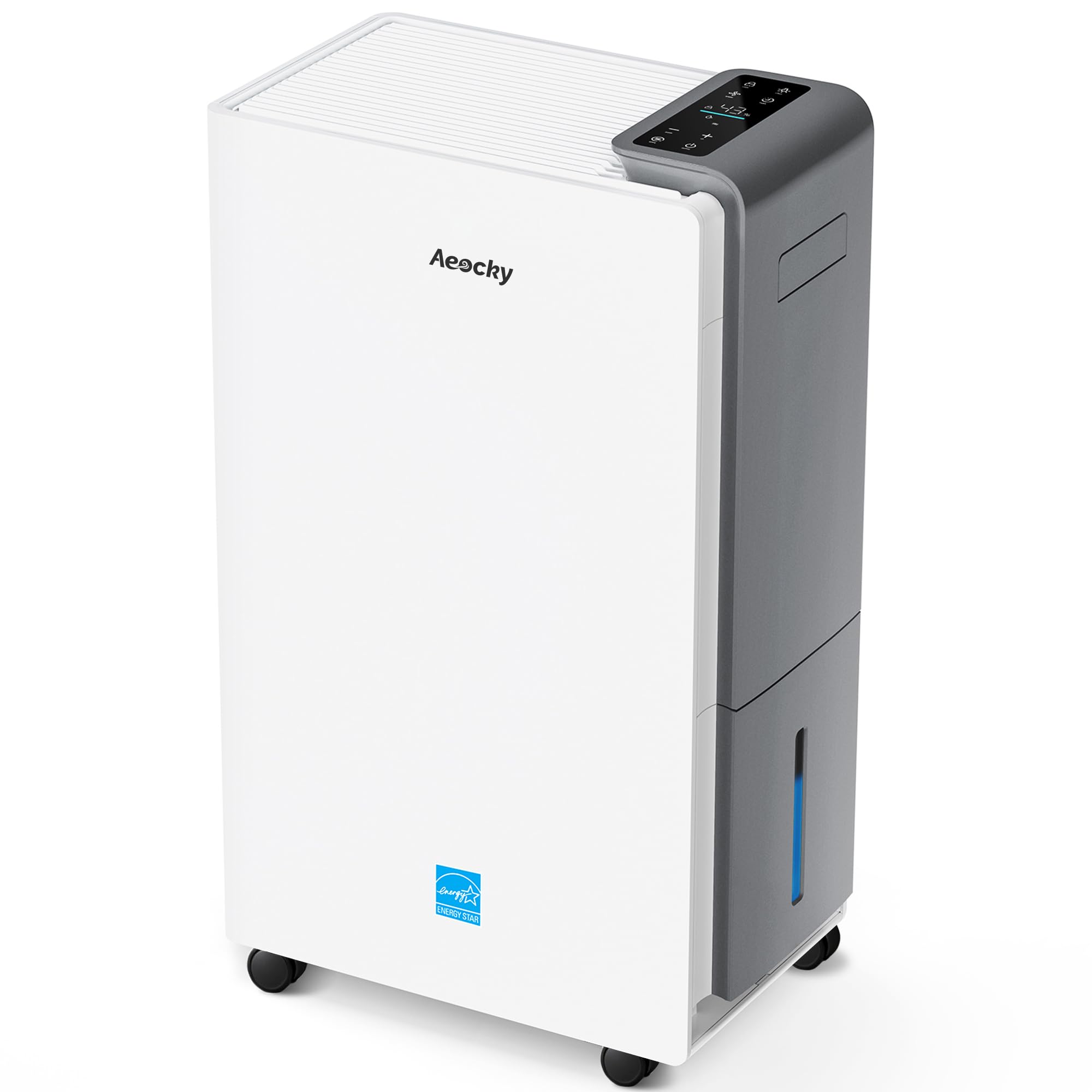
Figure 1: Front view of the AEOCKY RHEA-001 Dehumidifier.
The AEOCKY RHEA-001 dehumidifier features a compact design with a front air intake and top air outlet. Key components include the control panel, water tank, and integrated casters for mobility.
Control Panel

Figure 2: Detailed view of the control panel.
The control panel allows you to manage all functions of the dehumidifier. It typically includes buttons for Power, Mode selection, Fan Speed, Timer, Humidity Setting, and a digital display for current humidity and settings. An ambient light indicator may also be present to show current humidity levels at a glance.
Setup and Placement
Unpacking
- Carefully remove the dehumidifier from its packaging.
- Remove all packing materials, including any tape or protective films.
- Check for any shipping damage. If the unit is damaged, do not operate it and contact customer support.
Placement Guidelines
- Place the dehumidifier on a firm, level surface that can support its weight when the water tank is full.
- Ensure there is at least 20 cm (8 inches) of space on all sides of the unit for proper airflow.
- Avoid placing the unit near heat sources, in direct sunlight, or in areas exposed to extreme temperatures.
- For optimal performance, close all doors and windows in the room where the dehumidifier is operating.
Initial Power-On
- Plug the power cord into a grounded electrical outlet.
- The unit will emit a beep and the display will illuminate briefly.
- Press the Power button to turn on the dehumidifier.
Operating Instructions
Power On/Off
Press the Power button to turn the unit on or off.
Setting Desired Humidity Level
Press the Humidity button (often indicated by '+' or '-' symbols) to adjust the desired humidity level. The range is typically between 40% and 80% relative humidity (RH). The unit will operate until the set humidity level is reached, then cycle on and off to maintain it.
Fan Speed Control
Press the Fan Speed button to cycle through available fan speeds (e.g., Low, Medium, High). Higher fan speeds result in faster dehumidification and increased noise.
Timer Function
Press the Timer button to set a delay for the unit to turn on or off. Use the humidity adjustment buttons to set the desired hours (e.g., 1-24 hours).
Operation Modes
- Auto Mode: The unit automatically adjusts operation based on the ambient humidity to maintain a comfortable level.
- Constant Humidity Mode: The unit operates to maintain the user-set humidity level.
- Continuous Mode: The unit runs continuously regardless of the humidity level, ideal for very damp conditions or drying clothes.
- Smart Drying Mode: Optimized for drying laundry or other items by running at high fan speed and continuous dehumidification.
- Sleep Mode: Operates at the lowest fan speed for quiet operation, often with dimmed display lights.
Child Lock
Press and hold the Child Lock button (or a combination of buttons as indicated on the unit) for a few seconds to activate or deactivate the child lock. This prevents accidental changes to settings.
Drainage Options

Figure 3: Illustration of the three available drainage methods.
Your AEOCKY RHEA-001 dehumidifier offers multiple drainage options to suit your needs:
1. Manual Drainage (Water Tank)
- When the water tank is full, the unit will automatically shut off and an indicator light will illuminate.
- Carefully pull out the water tank from the unit.
- Empty the collected water into a sink or drain.
- Slide the empty tank back into the unit until it clicks into place. The dehumidifier will resume operation.
2. Continuous Drainage (Hose)
For continuous operation without needing to empty the tank, use the included drain hose:
- Locate the continuous drain outlet on the back or side of the unit.
- Remove the rubber stopper (if present).
- Attach one end of the included drain hose to the outlet, ensuring a secure connection.
- Route the other end of the hose to a suitable drain (e.g., floor drain, large bucket), ensuring it is sloped downwards for gravity drainage.
- Ensure the hose is not kinked or blocked.
3. Garden Hose Connection
For connecting to a standard garden hose, use the provided adapter:
- Follow steps for continuous drainage to attach the drain hose.
- Attach the garden hose adapter to the end of the drain hose.
- Connect a standard garden hose to the adapter.
- Ensure all connections are tight to prevent leaks.
Maintenance

Figure 4: Key features including the washable nylon filter.
Regular maintenance ensures optimal performance and extends the lifespan of your dehumidifier.
Cleaning the Air Filter
The air filter should be cleaned every two weeks or more frequently depending on usage and air quality.
- Turn off the dehumidifier and unplug it from the power outlet.
- Locate the air filter, usually on the back or side of the unit.
- Remove the filter by sliding it out.
- Wash the filter with warm, soapy water. Rinse thoroughly and allow it to air dry completely before reinstalling. Do not use a dishwasher.
- Reinsert the dry filter into the unit.
Cleaning the Unit Exterior
- Wipe the exterior of the unit with a soft, damp cloth.
- Do not use harsh chemicals, abrasive cleaners, or solvents, as these can damage the surface.
Storage
If the unit will not be used for an extended period:
- Empty the water tank and ensure it is clean and dry.
- Clean the air filter.
- Unplug the power cord and coil it neatly.
- Store the dehumidifier in an upright position in a cool, dry place, away from direct sunlight and extreme temperatures.
Troubleshooting Guide
Before contacting customer support, please refer to the following table for common issues and solutions:
| Problem | Possible Cause | Solution |
|---|---|---|
| Dehumidifier does not turn on. | No power; Power cord unplugged; Water tank full or incorrectly installed. | Check power supply; Plug in power cord; Empty and correctly reinstall water tank. |
| Unit is running but not collecting water. | Room temperature too low; Humidity level already low; Air filter clogged; Continuous drain hose blocked or improperly installed. | Dehumidifiers operate best above 5°C (41°F); Check ambient humidity; Clean air filter; Check drain hose for kinks or blockages. |
| Unit is noisy. | Unit not on a level surface; Air filter clogged; Fan speed set to high. | Place on a level surface; Clean air filter; Reduce fan speed. |
| Frost appears on coils. | Room temperature too low. | The unit has an auto-defrost function. If frost persists, move the unit to a warmer area. |
| Error code displayed. | Internal malfunction. | Refer to the specific error code in the full user manual (if available) or contact customer support. |
Specifications
| Feature | Detail |
|---|---|
| Brand | AEOCKY |
| Model Name | RHEA |
| Model Number | RHEA-001 |
| Dehumidification Capacity | 80 Pints/Day |
| Coverage Area | Up to 5000 Sq.Ft |
| Tank Volume | 1.45 Gallons |
| Wattage | 280 Watts |
| Operation Modes | Auto, Constant Humidity, Continuous, Smart Drying, Sleep |
| Special Features | Adjustable Humidity Control (40%-80%), Child Lock, Fan Speed Control, Timer, Auto-Defrost |
| Noise Level | Approx. 44dB (Quiet Performance) |
| Dimensions (D x W x H) | 36.7D x 22W x 61.2H cm |
| Material Type | Metal |
| Included Components | Drain Hose, Garden Hose Adapter (In the tank), Quick Start Guide |
| Certifications | ENERGY STAR Most Efficient 2025, ETL, RoHS, NRCan |
Warranty and Customer Support
Warranty Information
The AEOCKY RHEA-001 Dehumidifier comes with a 3-year machine warranty. This warranty covers defects in materials and workmanship under normal use. Please retain your proof of purchase for warranty claims.
Customer Support
If you encounter any issues not covered in the troubleshooting guide or require further assistance, please contact AEOCKY customer support. For the most up-to-date contact information, please refer to the product packaging or visit the official AEOCKY website.
You can also visit the AEOCKY Store on Amazon for more product information and support resources.
