
1. Introduction
This manual provides detailed instructions for the installation, operation, and maintenance of your ARRAROWN ZK-1002T Bluetooth Amplifier Board. This 2.0 channel stereo amplifier module features 100W+100W output, Bluetooth 5.0 connectivity, AUX input, and independent treble and bass controls. Please read this manual thoroughly before use to ensure proper function and longevity of the product.
2. Product Features
- Audio Power Amplifier Board: ZK-1002T with 100W+100W power output and Bluetooth 5.0 wireless connection.
- Versatile Inputs: Supports both Bluetooth and AUX audio inputs.
- 2.0 Channel Stereo Output: Delivers clear stereo sound with minimal distortion.
- Treble and Bass Control: Independent adjustment buttons for customized sound.
- APP Control: Additional functions available via a dedicated application.
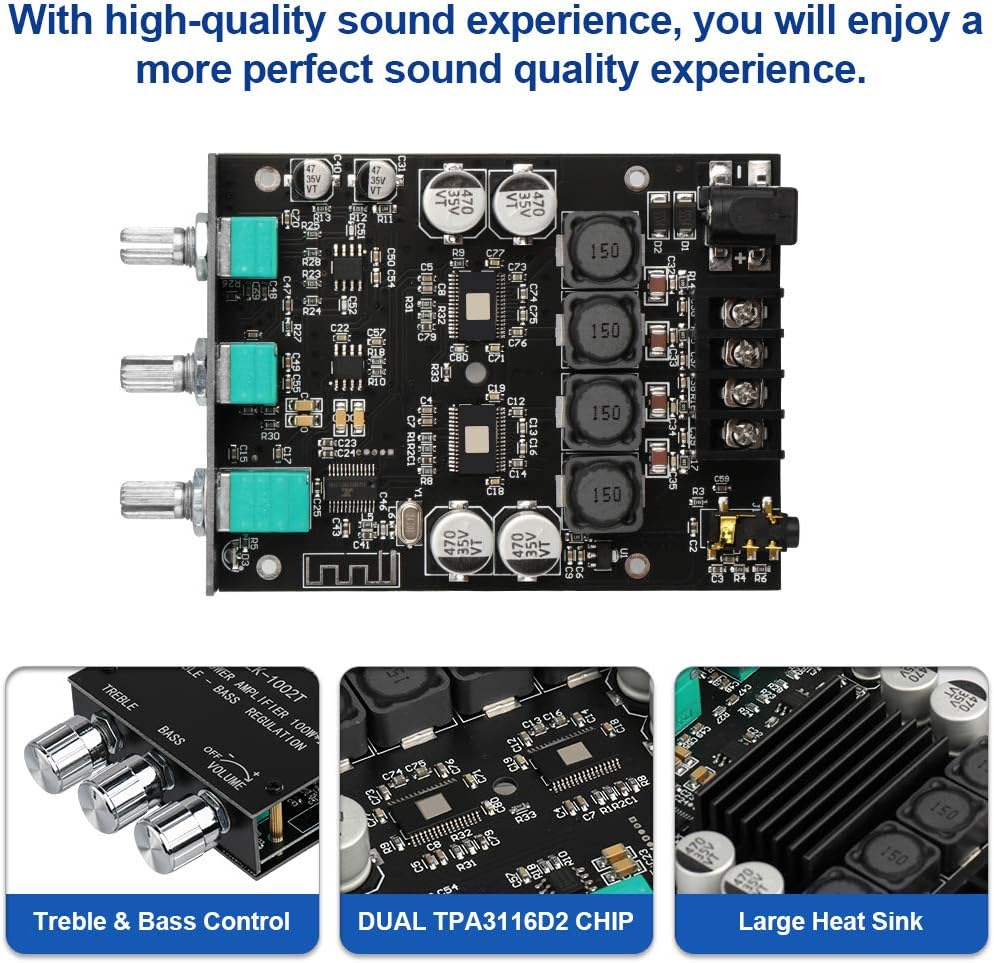
- Enhanced Sound Quality: Features a powerful audio chip, AM interference suppression, shielded power inductance, and low-noise operational amplifier.
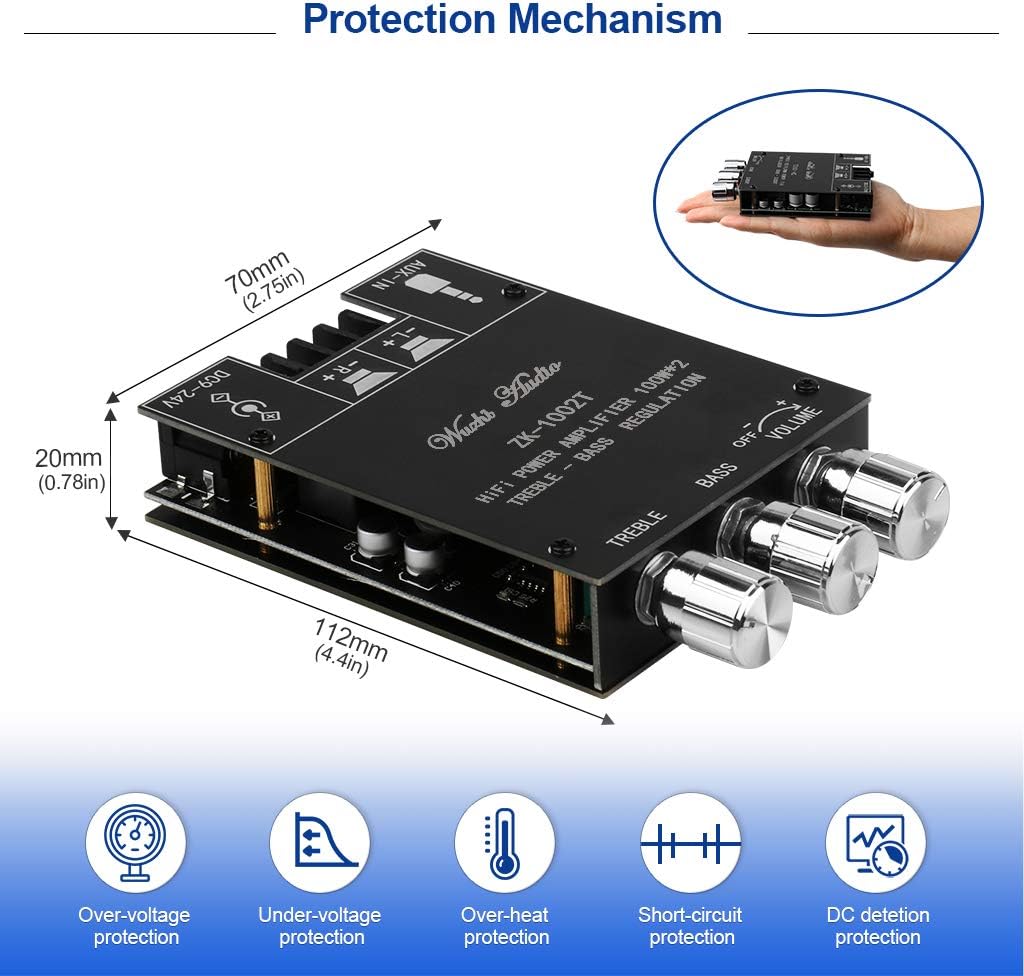
- Protective Functions: Includes over-voltage, under-voltage, over-heat, and short-circuit protection, housed in a protective case.
3. Package Contents
The following items are included in your package:
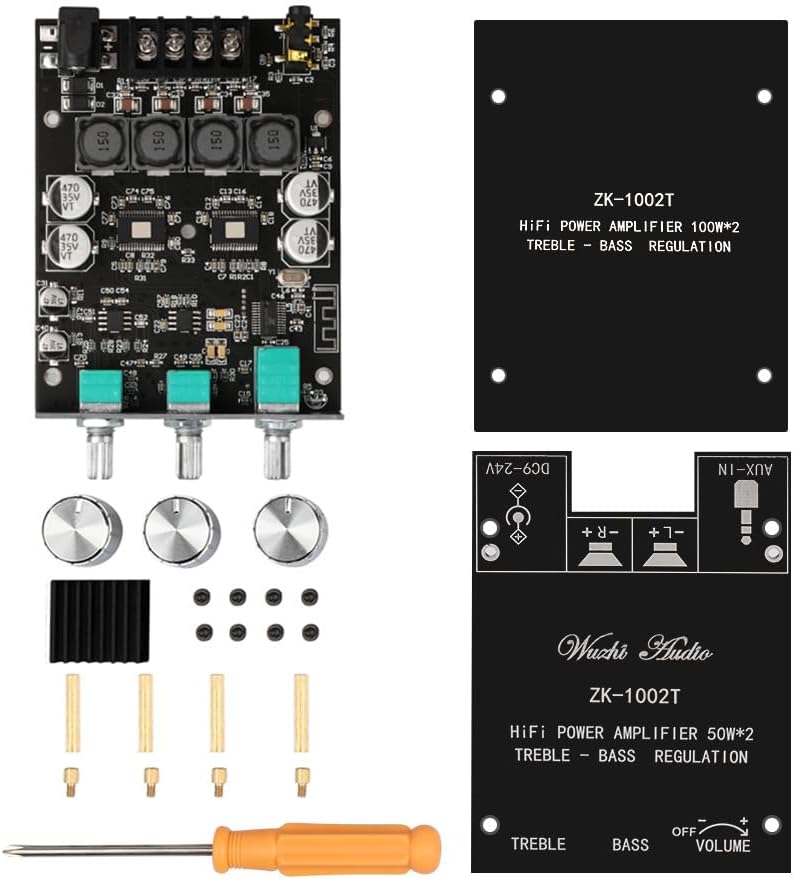
- ZK-1002T Bluetooth Amplifier Module
- Protective Panel
- Screws for assembly
- Screwdriver
Note: A power cord and power supply (DC 9-24V adapter) are not included and must be purchased separately.
4. Setup and Assembly
Follow these steps to assemble and connect your amplifier board:
- Attach Protective Panel: Use the provided screws and standoffs to attach the protective panel to the amplifier board. Ensure all connections remain accessible.
- Connect Speakers: Connect your passive speakers to the "Left channel output" and "Right channel output" terminals. Ensure correct polarity (+ and -).
- Connect Power Supply: Connect a DC 9-24V power adapter to the "Power input" terminal. Ensure the power adapter's polarity matches the board's requirements (center negative for some models, verify if not explicitly stated). The ZK-1002T typically uses a standard DC jack.
- Choose Audio Input:
- Bluetooth: Power on the device. The amplifier will enter Bluetooth pairing mode.
- AUX Input: Connect an audio source (e.g., smartphone, MP3 player) to the "AUX input" jack using a 3.5mm audio cable. Note: When using AUX mode, ensure any active Bluetooth connection to the module has been disconnected.

5. Operating Instructions
- Power On/Off: Rotate the Volume knob clockwise to turn the amplifier on. Rotate counter-clockwise until it clicks to turn off.
- Bluetooth Pairing:
- Once powered on, the amplifier will automatically enter Bluetooth pairing mode.
- On your audio device (e.g., smartphone), search for Bluetooth devices and select "ZK-1002T" (or similar name) to connect.
- A confirmation sound will indicate a successful connection.
- AUX Input Usage:
- Connect your audio source to the AUX input jack.
- Ensure no Bluetooth device is actively connected to the amplifier. If a Bluetooth device is connected, disconnect it to enable AUX input.
- Adjusting Volume: Use the large Volume knob to control the overall output volume.
- Adjusting Treble and Bass: Use the dedicated Treble and Bass control knobs to fine-tune your audio output according to your preference.
- APP Control: Download the official application (if available) to access additional features and controls for the amplifier. Follow the app's instructions for pairing and usage.

6. Troubleshooting
| Problem | Possible Cause | Solution |
|---|---|---|
| No sound output. |
|
|
| Bluetooth not connecting. |
|
|
| Sound distortion. |
|
|
| APP control not working. |
|
|
7. Specifications
| Feature | Detail |
|---|---|
| Model | ZK-1002T |
| Brand | ARRAROWN |
| Output Power | 100W + 100W (200 Watts Max) |
| Number of Channels | 2.0 (Stereo) |
| Bluetooth Version | 5.0 |
| Input Voltage | DC 9-24V |
| Audio Inputs | Bluetooth, AUX (3.5mm) |
| Controls | Volume, Treble, Bass |
| Protection Mechanisms | Over-voltage, Under-voltage, Over-heat, Short-circuit |
| Material | Plastic |
| Mounting Type | Freestanding |
| Dimensions (Approx.) | 112mm (4.4in) x 70mm (2.75in) x 20mm (0.78in) |

8. Maintenance
To ensure optimal performance and longevity of your ZK-1002T amplifier board, follow these maintenance guidelines:
- Cleaning: Use a soft, dry cloth to gently wipe the surface of the amplifier board. Avoid using liquid cleaners or solvents, as they may damage the electronic components.
- Environment: Operate the amplifier in a clean, dry environment, away from excessive dust, moisture, and direct sunlight.
- Ventilation: Ensure adequate airflow around the amplifier to prevent overheating, especially during prolonged use at high volumes.
- Connections: Periodically check all cable connections (power, speakers, AUX) to ensure they are secure and free from corrosion.
9. Warranty and Support
The ARRAROWN ZK-1002T Bluetooth Amplifier Board comes with a 2-Year Warranty from the date of purchase. This warranty covers manufacturing defects and malfunctions under normal use.
For technical support, troubleshooting assistance, or warranty claims, please contact ARRAROWN customer service through the retailer where you purchased the product or visit the official ARRAROWN store page on Amazon: ARRAROWN Store.
Please retain your proof of purchase for warranty validation.