
VENTION FHW
VENTION Powerhive Fuel Rod Mini Power Bank User Manual
Model: FHW
Product Overview
The VENTION Powerhive Fuel Rod is a compact and portable 5000 mAh mini power bank designed for quick charging of various mobile devices. It features integrated USB-C and Lightning cables, bi-directional fast charging, and an LED display for battery status. Its unique design includes a lanyard for easy portability and a gradient color finish.
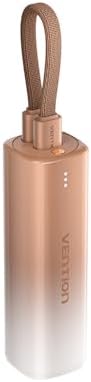
Image: The VENTION Powerhive Fuel Rod Mini Power Bank, showcasing its compact size and gold-to-white gradient design with an integrated lanyard.
Setup and Initial Use
Before first use, it is recommended to fully charge your Powerhive Fuel Rod. The power bank supports 18W fast charging for itself.
- Charging the Power Bank: Connect a compatible USB-C power adapter (not included) to the USB-C input port on the power bank. The LED indicators will illuminate to show the charging progress.
- Identifying Ports: The power bank features built-in Lightning and USB-C cables for output, and a USB-C port for input/output.

Image: A detailed view of the VENTION Powerhive Fuel Rod's charging end, highlighting the integrated Lightning and USB-C output cables, and the USB-C input port for self-charging.
Operating Instructions
The Powerhive Fuel Rod is designed for convenient and efficient charging of your devices.
- Charging Devices:
- For Apple devices (iPhone 8-14 series): Use the integrated Lightning cable. It provides up to 20W output.
- For iPhone 15 series and Android phones: Use the integrated USB-C cable. It provides up to 20W output.
- Simply plug the appropriate cable into your device, and charging will begin automatically.
- Checking Battery Level: The integrated LED display indicates the remaining battery capacity of the power bank. Observe the LED lights to monitor the charging status and remaining power.
- Bi-directional Fast Charging: Both charging your mobile phone and recharging the power bank itself can be done quickly using the same cable type (USB-C).

Image: An illustration demonstrating the wide compatibility of the VENTION Powerhive Fuel Rod with various devices such as smartphones, tablets, smartwatches, and earbuds.

Image: A close-up of the VENTION Powerhive Fuel Rod highlighting its LED display for power management and its ergonomic design when held in hand.
Maintenance and Care
To ensure the longevity and optimal performance of your VENTION Powerhive Fuel Rod, follow these maintenance guidelines:
- Cleaning: Wipe the power bank with a soft, dry cloth. Avoid using harsh chemicals or abrasive materials.
- Storage: Store the power bank in a cool, dry place away from direct sunlight and extreme temperatures.
- Portability: The integrated lanyard allows for easy carrying. Avoid excessive pulling or twisting of the lanyard to prevent damage.
- Safety Features: The power bank is equipped with multiple safety mechanisms including short circuit protection, overvoltage protection, over-current protection, deep discharge protection, reverse polarity protection, and overload protection. These features help prevent damage to both the power bank and your connected devices.

Image: A person demonstrating the lanyard design of the VENTION Powerhive Fuel Rod, showing how it can be easily carried by hand or attached to a bag.

Image: A graphic detailing the multiple safety protections built into the Lithium Polymer Battery of the VENTION Powerhive Fuel Rod, ensuring safe charging.
Troubleshooting
If you encounter issues with your VENTION Powerhive Fuel Rod, refer to the following common troubleshooting steps:
- Power Bank Not Charging:
- Ensure the charging cable and power adapter are securely connected and functional.
- Verify the power adapter meets the 18W input requirement for fast charging.
- Check if the LED indicators are showing any activity.
- Device Not Charging from Power Bank:
- Confirm the correct built-in cable (Lightning or USB-C) is used for your device.
- Ensure your device's charging port is clean and free of debris.
- Check if the power bank has sufficient charge indicated by the LED display.
- If the power bank's safety protections are triggered (e.g., due to short circuit), it may temporarily stop outputting power. Disconnect and reconnect the device.
- Slow Charging:
- Ensure both the power bank and the device support fast charging protocols.
- Using non-original or low-quality cables can affect charging speed.
Specifications
| Feature | Detail |
|---|---|
| Brand | VENTION |
| Model Number | FHW |
| Battery Capacity | 5000 mAh |
| Product Dimensions | 5.3 x 3.9 x 1.3 inches |
| Item Weight | 6.1 ounces |
| Connector Type | USB Type C, Lightning (built-in cables) |
| Special Features | Over Charging Protection, Pocket Size, Fast Charging, Scratch Resistant, LED Display |
| Color | Gold |
| Manufacturer | VENTION |
| Date First Available | April 14, 2025 |
Warranty and Support
For warranty information or technical support regarding your VENTION Powerhive Fuel Rod Mini Power Bank, please contact VENTION customer service directly. Refer to the product packaging or the official VENTION website for contact details.
Manufacturer: VENTION
Product ASIN: B0F4QYLRV1
Related documentsFHW

Ask a question about this manual
Ask about setup, troubleshooting, compatibility, parts, safety, or missing instructions. Manuals+ will review the question and use this page’s manual context to help answer it.