Download PDFFree PDF. The Save button below keeps a bookmark and private notes in your account.
FLEXISPOT Queen Adjustable Bed Frame User Manual
Model: Queen
1. Important Safety Information
Please read all instructions carefully before assembly and use. Keep this manual for future reference.
Weight Capacity: Do not exceed the maximum weight capacity of 750 lbs.
Pinch Points: Be cautious of pinch points when assembling, using, or maintaining the bed frame.
Children and Pets: Keep children and pets away from the bed frame during operation.
Power Source: Ensure the power source is stable and correctly connected.
2. Setup and Assembly
The FLEXISPOT Adjustable Bed Frame is designed for quick assembly. Follow these steps for proper setup.
2.1 Unboxing and Component Identification
Carefully remove all components from the packaging. Verify all parts are present against the included parts list.
Image: Various components of the adjustable bed frame, including frame sections and hardware.
2.2 Frame Assembly
Connect the main frame sections using the provided bolts and Allen wrench. Ensure the 'Head' indicators align correctly.
Attach the adjustable legs to the frame. Tighten each section of the bed legs securely during installation.
Install the bed base panels onto the frame. Ensure the plastic components are facing upwards. Pre-tighten all screws before final tightening, prioritizing the two screws closest to the head when assembling the H3 bed frame.
Image: Partially assembled bed frame with legs attached.
2.3 Motor and Electrical Connections
Differentiate between long and short motors, and long and short sheet metal connectors. Attach the appropriate motors to their designated positions on the frame.
Connect all motor cables to the control box, matching the color-coded connectors.
Connect the power adapter to the control box and then to a power outlet.
Video: Detailed installation guide for the FlexiSpot Adjustable Bed Frame, demonstrating step-by-step assembly of components, motor attachment, and electrical connections.
2.4 Mattress Retainer Bar Installation
Insert the mattress retainer bar into the designated holes at the foot of the bed frame to prevent mattress shifting.
3. Operating Instructions
Your FLEXISPOT Adjustable Bed Frame comes with a wireless remote for easy control of its features.
3.1 Wireless Remote Control
The wireless remote allows you to adjust various settings. Ensure three AAA batteries are installed (not included).
Image: Diagram illustrating the functions of the wireless remote control, including head/foot massage, vibration timing, under-bed light, zero gravity, flashlight, head up/down, foot up/down, flat position, and memory positions (M1, M2, M3).
3.2 Adjustable Comfort Positions
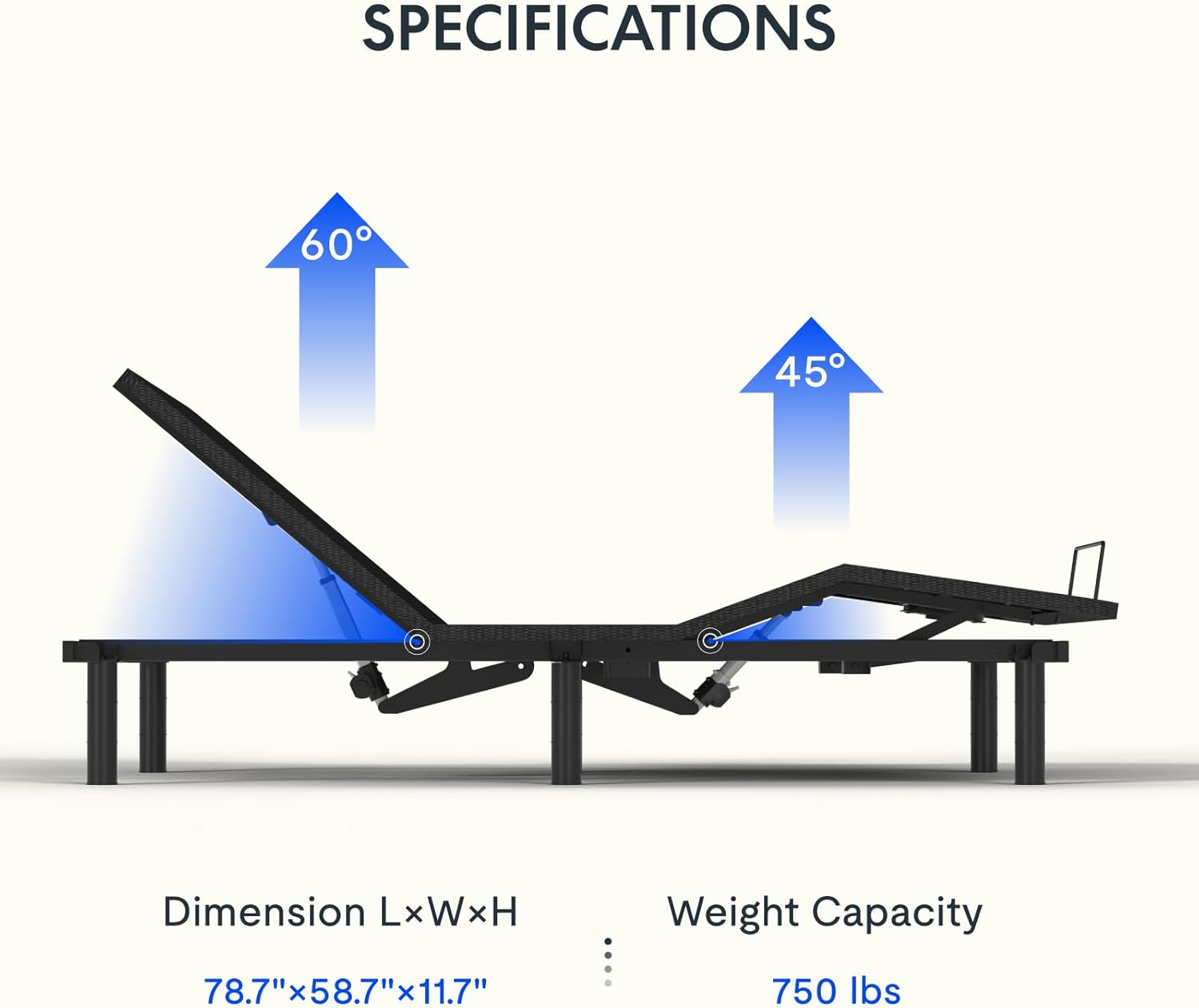
Head Incline: Adjust the head section from 0 to 60 degrees for optimal viewing or reading.
Foot Incline: Adjust the foot section from 0 to 45 degrees to elevate your legs.
Zero Gravity: Press the 'ZG' button to achieve a weightless sensation, promoting relaxation and stress relief.
Memory Positions: Save your favorite positions using the M1, M2, and M3 buttons. The initial setup includes M1 (Anti-snore), M2 (Relaxation), and M3 (TV Position).
Flat Position: Press 'FLAT' to return the bed to a completely flat position.
Image: A person relaxing in the zero-gravity position on the adjustable bed, with arrows indicating the elevation of head and foot sections.
3.3 Massage Function
Activate the massage function for enhanced comfort. You can customize intensity and duration.
Intensity: Adjust massage intensity from 0 to 6.
Duration: Choose massage session durations of 10, 20, or 30 minutes.
Image: A couple relaxing on the adjustable bed, illustrating the interactive dual massage function with adjustable intensities and time settings.
Video: Demonstration of the FlexiSpot Adjustable Bed Frame's massage function, showing the bed vibrating and the remote control options for intensity and timer settings.
3.4 Underbed Light and Flashlight
Underbed Light: Activate the underbed light for soft illumination at night.
Flashlight: The remote control includes a flashlight feature for easy operation in the dark.
4. Maintenance
Regular maintenance ensures the longevity and optimal performance of your adjustable bed frame.
Cleaning: Wipe the frame with a damp cloth. Avoid harsh chemicals.
Motor Inspection: Periodically check motor connections and moving parts for any obstructions or wear.
Remote Batteries: Replace AAA batteries in the wireless remote as needed.
Cable Management: Ensure all cables are securely fastened and not pinched or tangled.
5. Troubleshooting
If you encounter any issues, refer to the following common troubleshooting steps:
No Power: Check if the power cord is securely plugged into the wall outlet and the control box. Ensure the outlet is functional.
Remote Not Responding: Replace the remote control batteries. Re-pair the remote with the bed frame if necessary (refer to specific pairing instructions in the full manual).
Motor Noise: A slight hum from the motor during operation is normal. Excessive or unusual noise may indicate an obstruction or loose part. Inspect the area around the motors.
Uneven Adjustment: Ensure all bed legs are adjusted to the same height.
6. Specifications
Detailed specifications for your FLEXISPOT Queen Adjustable Bed Frame.
Image: A diagram detailing the product dimensions (78.7"L x 58.7"W x 11.7"H) and maximum weight capacity (750 lbs) of the adjustable bed frame.
Feature
Detail
Size
Queen
Material
Alloy Steel
Product Dimensions
78.74"L x 58.66"W x 11.73"H
Style
Modern
Special Features
Adjustable Bed Frame with Massage, Zero Gravity, Memory Positions, Underbed Light, Wireless Remote
Included Components
Adjustable Bed Frame
Maximum Weight Recommendation
750 Pounds
Adjustable Leg Height Options
3'', 6'', 9''
Assembly Required
Yes
7. Warranty and Support
For warranty information and customer support, please contact FLEXISPOT directly.
Manufacturer: FLEXISPOT
Brand: FLEXISPOT
Online Support: Visit the official FLEXISPOT website for FAQs, support resources, and contact information.
Ask about setup, troubleshooting, compatibility, parts, safety, or missing instructions. Manuals+ will review the question and use this page’s manual context to help answer it.