
1. Introduction
Thank you for choosing the Viamotion Under Desk Elliptical Machine. This manual provides essential information for the safe and efficient operation, maintenance, and troubleshooting of your new fitness equipment. Please read this manual thoroughly before use and retain it for future reference.
2. Important Safety Instructions
WARNING: To reduce the risk of serious injury, read all instructions before using this product.
- Consult your physician before starting any exercise program.
- Use the machine only for its intended purpose as described in this manual.
- Keep children and pets away from the machine during operation.
- Place the machine on a stable, level surface.
- Ensure adequate space around the machine for safe operation.
- Do not use if the power cord or plug is damaged.
- Do not attempt to service the machine yourself. Contact customer support for assistance.
- Maximum user weight recommendation: 100 Pounds (approximately 45 kg).
3. Package Contents
Carefully unpack your Viamotion Under Desk Elliptical Machine and check for the following items:
- Viamotion Under Desk Elliptical Machine
- Remote Control
- Power Adapter
- User Manual (this document)
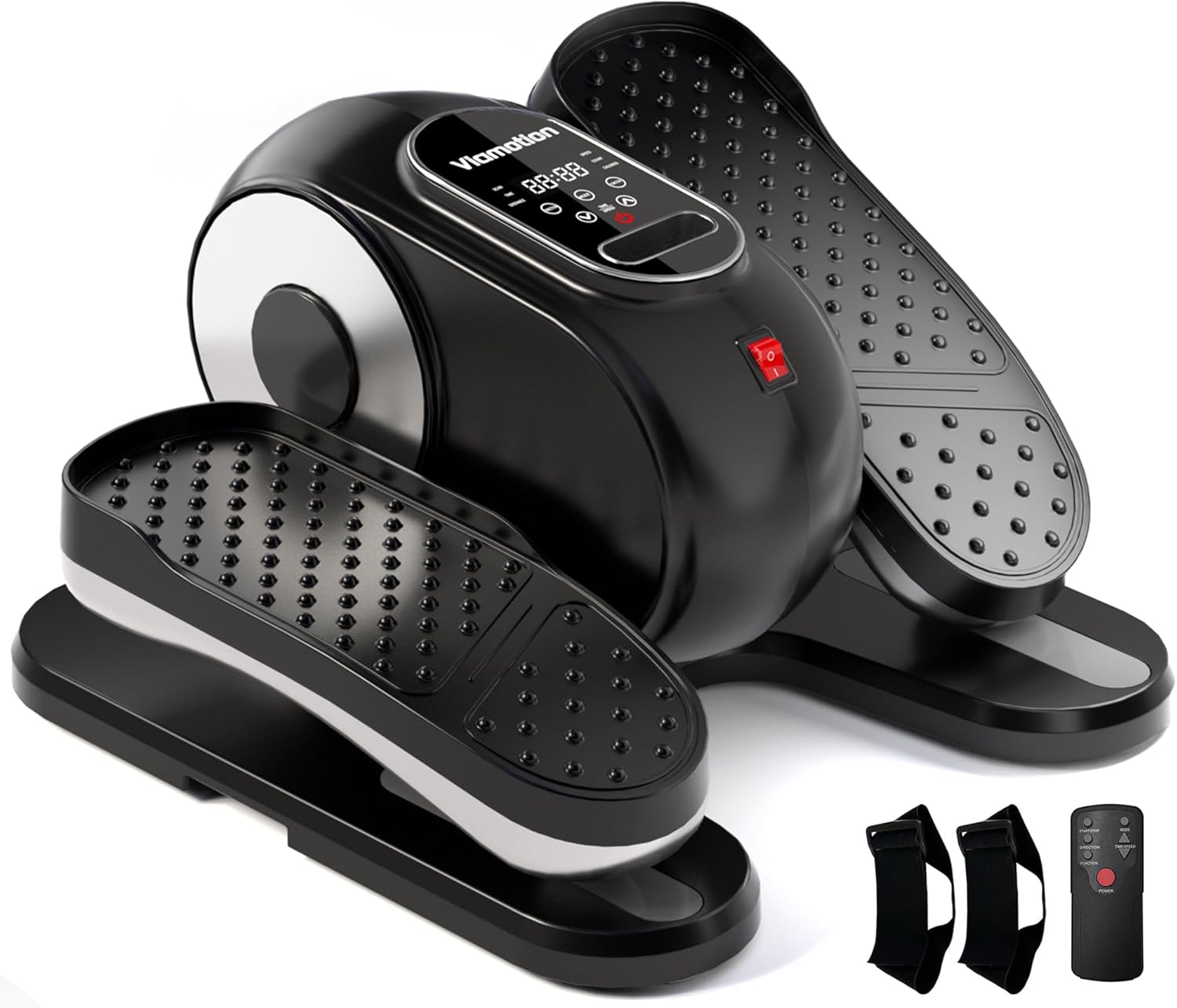
Figure 3.1: Viamotion Under Desk Elliptical Machine and accessories.
4. Setup
The Viamotion Under Desk Elliptical Machine comes pre-assembled for immediate use. Follow these steps to set it up:
- Placement: Position the elliptical machine on a flat, stable surface under your desk or in your desired exercise area. Ensure there is enough space for your legs to move freely.
- Power Connection: Connect the power adapter to the elliptical machine's power port and then plug it into a standard electrical outlet.
- Remote Control: Ensure the remote control has working batteries.

Figure 4.1: The compact design of the Viamotion Under Desk Elliptical Machine, showing its dimensions for space-saving placement.
5. Operating Instructions
The Viamotion Under Desk Elliptical Machine offers both manual and automatic modes, controlled via the integrated display and the remote control.
5.1 Control Panel Overview

Figure 5.1: Detailed view of the user-friendly control panel and display.
The control panel displays various metrics and allows for mode selection. The remote control provides convenient access to all functions without needing to bend down.
5.2 Getting Started
- Sit comfortably in a chair with the elliptical machine placed in front of you.
- Place your feet securely on the pedals.
- Press the POWER button on the remote control or the machine to turn it on.
5.3 Manual Mode (HA Mode)
In Manual Mode, you can adjust the speed from 1 to 12 levels.
- Press the MODE button until "HA" (Manual Mode) is displayed.
- Use the TIME/SPEED + and TIME/SPEED - buttons on the remote or machine to adjust the speed.
- The pedals will move forward or backward depending on the selected direction. Use the DIRECTION button to change the pedal movement.

Figure 5.2: Demonstrating comfortable use of the elliptical machine while seated.
5.4 Automatic Mode (P1-P12)
The machine features 12 pre-programmed automatic modes (P1-P12) with timed speed and direction changes.
- Press the MODE button until a "P" mode (e.g., P1, P2) is displayed.
- Use the TIME/SPEED + and TIME/SPEED - buttons to select the desired program (P1-P12).
- The machine will automatically adjust speed and direction according to the selected program.

Figure 5.3: The elliptical machine is suitable for various users, including those seeking relaxation or seniors.
5.5 Display Functions
The display cycles through various metrics:
- SCAN: Automatically cycles through all metrics.
- TIME: Duration of your exercise session.
- DISTANCE: Estimated distance covered.
- SPEED: Current speed level.
- COUNT: Number of pedal rotations.
- CALORIES: Estimated calories burned.

Figure 5.4: The machine operates quietly, allowing for use during other activities like reading.
6. Maintenance
Regular maintenance ensures the longevity and optimal performance of your elliptical machine.
- Cleaning: Wipe down the machine with a soft, damp cloth after each use. Avoid abrasive cleaners or solvents.
- Storage: Store the machine in a cool, dry place away from direct sunlight and extreme temperatures.
- Inspection: Periodically check all parts for wear and tear. If any components are damaged, discontinue use and contact customer support.
7. Troubleshooting
If you encounter any issues with your Viamotion Under Desk Elliptical Machine, refer to the following common problems and solutions:
| Problem | Possible Cause | Solution |
|---|---|---|
| Machine does not power on. | Power cord not properly connected; power outlet not working. | Ensure the power cord is securely plugged into both the machine and a working electrical outlet. Test the outlet with another device. |
| Remote control not responding. | Batteries are dead or incorrectly inserted. | Replace the batteries in the remote control. Ensure they are inserted with the correct polarity. |
| Pedals are not moving smoothly. | Obstruction; internal mechanism issue. | Check for any obstructions around the pedals. If the issue persists, contact customer support. |
| Unusual noise during operation. | Loose components; internal friction. | Ensure all visible screws are tightened. If the noise continues, discontinue use and contact customer support. |
8. Specifications
| Feature | Detail |
|---|---|
| Brand | Viamotion |
| Model | Under Desk Elliptical Machine |
| Product Dimensions | 39.6D x 38.4W x 23.7H Centimetres (approx. 15.6 x 15.1 x 9.3 inches) |
| Item Weight | 5.13 kg (approx. 11.3 lbs) |
| Maximum Weight Recommendation | 100 Pounds (approx. 45 kg) |
| Material | Plastic |
| Speed Levels (Manual Mode) | 1-12 Adjustable Speeds |
| Automatic Modes | 12 Pre-programmed Modes (P1-P12) |
| Control | Integrated Control Panel, Remote Control |
| Noise Level | Quiet operation (less than 15dB as per product claims) |
9. Warranty and Support
For warranty information, product registration, or technical support, please refer to the documentation included with your purchase or visit the official Viamotion website. This manual does not contain specific warranty details or direct support contact information.