
1. Introduction
The LinkTap Q1 is a 4-zone smart watering timer system designed for efficient and precise garden irrigation. It consists of a wireless controller and a valve unit with four integrated flow meters, allowing for accurate control and monitoring of water usage across multiple watering zones. This system utilizes a proprietary Zigbee protocol for stable and extended wireless coverage.
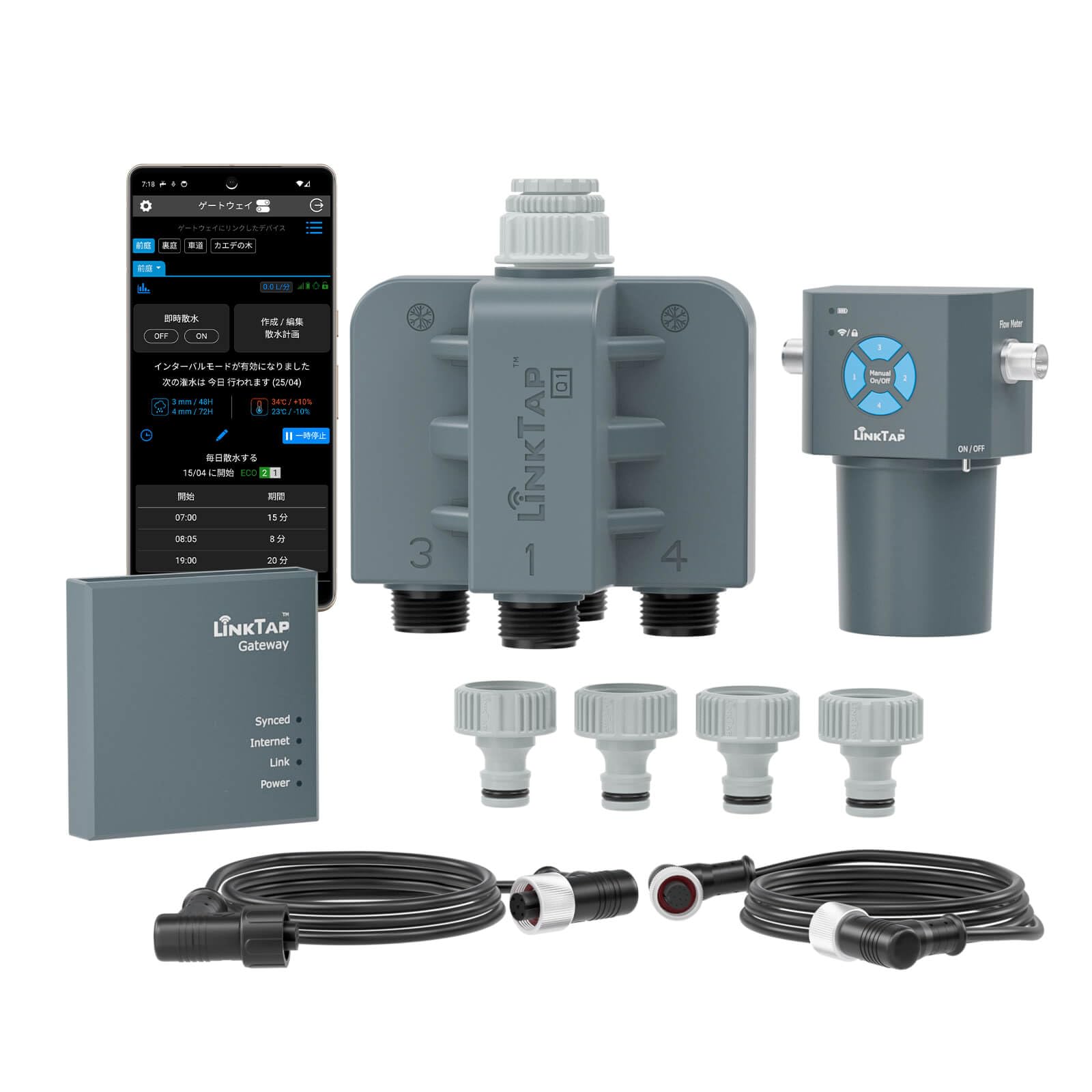
Image: LinkTap Q1 4-Zone Wireless Automatic Watering Timer and Gateway components.
2. Product Overview
The LinkTap Q1 system features a unique two-piece design for enhanced safety and improved wireless performance. It allows for precise control over four independent watering zones.

Image: Illustration of the LinkTap Q1's two-piece design, showing the wireless controller and the 4-zone valve unit connected to a faucet.
The Q1 system offers advanced functionality, including weather-responsive watering, real-time fault detection, and flexible scheduling. It provides an expandable watering solution, allowing connection of up to 15 LinkTap devices to a single gateway.

Image: Visual comparison showing that one LinkTap Q1 (4-zone) unit provides the functionality of four LinkTap G2S units.
3. Setup Instructions
3.1 Powering the Device
The LinkTap Q1 operates on a standard 9V battery. Ensure the battery is correctly inserted into the controller unit. For alternative power options, a LinkTap DC Converter (sold separately) can be used to connect to a solar panel or AC-DC adapter.

Image: The LinkTap Q1 controller showing the compartment for two 9V batteries (alkaline or lithium).

Image: The LinkTap Q1 system powered by an optional solar panel.
3.2 Installation
Attach the valve unit to your outdoor faucet. Connect the wireless controller to the valve unit using the provided cable. For optimal wireless performance, position the controller in a suitable location. Standard 1m cables are included, with optional 3m or 10m cables available for extended reach.
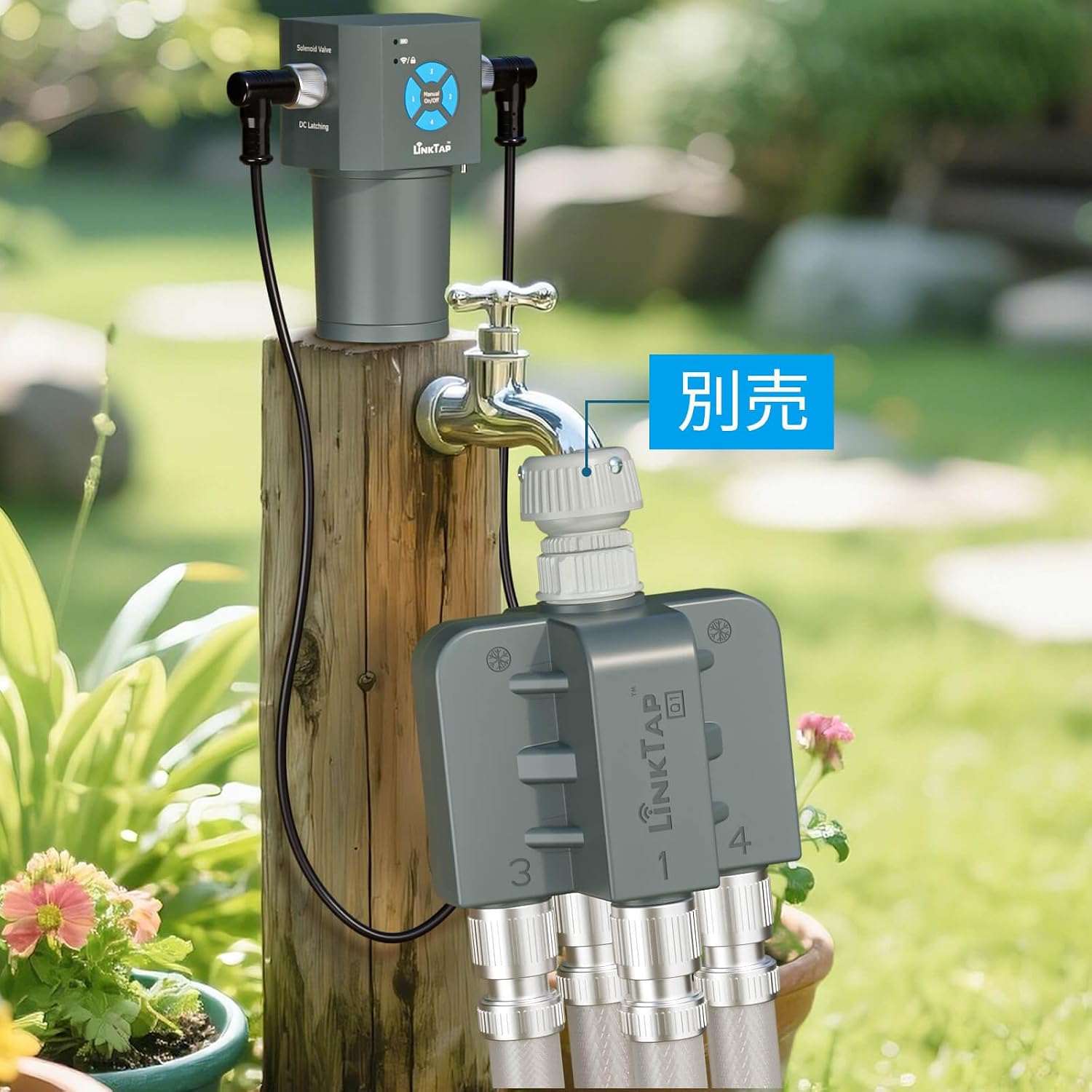
Image: The LinkTap Q1 valve unit attached to a faucet, with the controller mounted on a wooden post. Note: DC converter and solar panel are sold separately.

Image: The LinkTap Q1 controller positioned away from the faucet using an extended cable for better signal.
3.3 App Connection
Download the LinkTap app from your device's app store. Follow the in-app instructions to connect your Q1 system to your home network. The app will guide you through scanning a QR code on the device for easy pairing.

Image: A smartphone screen showing the LinkTap app scanning a QR code on the device for initial setup.
3.4 System Expansion
The LinkTap Q1 system is expandable. You can connect up to 15 LinkTap devices (including G1S, G2S, D1, T1, Q1, and ValveLinker) to a single gateway. A single user account can manage up to 20 gateways, allowing for comprehensive control of large or complex watering systems.

Image: An example setup showing how the LinkTap Q1 can be expanded to manage up to 8 zones from a single faucet using additional valve units.

Image: Diagram illustrating a LinkTap mesh network with an extender to improve wireless coverage for devices.
4. Operating Instructions
4.1 Scheduling Watering
Use the LinkTap app to create and manage flexible watering schedules for each of your four zones. The app allows for detailed customization of watering times, durations, and frequency.

Image: Screenshots of the LinkTap app showing options for setting up watering schedules.
4.2 Manual Watering
You can initiate manual watering directly from the device or through the LinkTap app. This allows for immediate watering outside of your set schedules.

Image: Screenshot of the LinkTap app showing the interface for initiating manual watering with time or volume settings.

Image: The LinkTap Q1 controller displaying manual watering options and current status.
4.3 Smart Features
- Weather-Responsive Watering: The system can automatically adjust watering based on local weather conditions, such as rain or temperature changes.
- Automatic Freeze Protection: A built-in temperature sensor helps prevent damage by automatically pausing watering during freezing conditions.
- Water Usage Monitoring: The integrated flow meters allow you to monitor water consumption for each zone.

Image: Illustration of the rain skip feature, where watering automatically stops before, during, or after rain.

Image: Diagram showing automatic watering adjustments (increase/decrease/pause) based on temperature changes.

Image: The LinkTap Q1 system with an icon indicating a built-in temperature sensor and automatic freeze protection.

Image: Screenshots of the LinkTap app displaying watering history, total duration/volume, and flow rate graphs.
5. Maintenance
The LinkTap Q1 features a modular and repairable design. Individual components can be replaced if necessary, reducing waste and extending the product's lifespan. Regularly check the battery level and replace batteries as needed to ensure continuous operation.

Image: An icon indicating the LinkTap Q1's battery life of approximately 1.3 years.
The lightweight valve unit is designed to minimize stress on the inlet, reducing the risk of leaks and slippage over long-term use. The device has an IP66 rating, indicating it is protected against powerful water jets and dust, making it suitable for outdoor use.

Image: An icon representing the IP66 rating, indicating the device's resistance to water and dust.
6. Troubleshooting
6.1 Real-time Fault Detection & Alerts
The LinkTap Q1 system provides real-time fault detection and alerts to notify you of potential issues, such as valve malfunctions, water supply interruptions, or pipe ruptures/blockages. These alerts are sent to your connected devices, ensuring you are informed promptly.

Image: Diagram showing the LinkTap system detecting faults (valve malfunction, water cut-off, pipe rupture/blockage) and sending alerts via the internet to users.

Image: Icons indicating alerts for power loss, internet disconnection, and low battery, ensuring system reliability.
6.2 Connectivity Issues
If you experience connectivity issues, ensure your gateway is within range of your Wi-Fi router and the Q1 controller is within range of the gateway. The Zigbee protocol provides stable and wide coverage, but physical obstructions can affect signal strength. Consider adding a LinkTap Extender for larger areas or complex layouts.

Image: The LinkTap Q1 controller showing a strong wireless signal indicator, contrasting with a weak signal indicator on a distant valve unit.
7. Specifications
| Feature | Detail |
|---|---|
| Brand | LinkTap |
| Model Number | Q1 (GW-02, TP-2BS) |
| Dimensions (D x W x H) | 13.1 cm x 12.1 cm x 10 cm |
| Item Weight | 780 grams |
| Number of Zones | 4 |
| Color | Dark Gray |
| Power Source | 9V Battery (Alkaline or Lithium) or optional DC Converter |
| Wireless Protocol | Proprietary Zigbee |
| Waterproof Rating | IP66 |
| GTIN | 696168002071 |

Image: Detailed dimensions of the LinkTap Q1 valve unit.
8. Warranty & Support
The LinkTap Q1 comes with a 2-year warranty. For technical support, troubleshooting assistance, or warranty claims, please visit the official LinkTap website or contact LinkTap customer service directly. You can find contact information on the LinkTap store page or within the LinkTap app.
Official LinkTap Store: LinkTap Store on Amazon.co.jp
