
1. Introduction
Thank you for choosing the Spigen ArcStation Essential 47W Dual Port GaN USB-C Charger. This compact and powerful charger is designed to provide efficient and safe charging for a wide range of USB-C compatible devices, including smartphones, tablets, and laptops. Featuring GaN technology, it delivers high power output in a small form factor, supporting Power Delivery (PD 3.0) and Programmable Power Supply (PPS) for optimized fast charging.
2. Package Contents
- Spigen ArcStation Essential 47W Charger x 1
- User Manual x 1
- Storage Box x 1
Note: USB-C charging cables are not included and must be purchased separately.
3. Product Overview

Image 3.1: The Spigen ArcStation Essential 47W charger, showcasing its compact design and dual USB-C ports. It highlights its fast, powerful, and portable characteristics, with examples of charging a Galaxy S25 Ultra to 70% in 30 minutes and a MacBook Air 15" M2 to 70% in 1 hour.

Image 3.2: A visual representation of the charger's space-saving, compact design, comparing its size to a larger, older charger. It also features a diagram illustrating the internal GaN (Gallium Nitride) chip technology, which enables high power output in a smaller form factor. Dimensions are provided: 31.00 x 41.00 x 44.50 (mm) / 105g.
The ArcStation Essential 47W charger features two USB-C ports, allowing you to charge two devices simultaneously. Its advanced GaN technology ensures high efficiency and a compact size, making it ideal for travel and everyday use. It supports various fast charging protocols for broad compatibility.
4. Setup and Connection
- Plug into Power Outlet: Insert the charger into a standard wall power outlet (Type F – 2 pins, Germany compatible). Ensure the outlet provides 100-240 Volts AC.
- Connect USB-C Cable: Obtain a compatible USB-C to USB-C charging cable (not included). Connect one end of the cable to one of the USB-C ports on the charger.
- Connect to Device: Connect the other end of the USB-C cable to your device (e.g., smartphone, tablet, laptop).
- Dual Device Charging: To charge a second device, connect another USB-C cable to the remaining port and then to your second device.
Note: For optimal fast charging, use high-quality USB-C cables that support Power Delivery (PD) and the required wattage for your device.
5. Operating Instructions
5.1 Single Device Charging
When charging a single device, the charger can deliver up to 47W through one USB-C port, depending on the device's power requirements and the cable's capabilities. The charger automatically detects the connected device and delivers the optimal charging power.
5.2 Dual Device Charging

Image 5.1: Illustration showing the charger's capability to charge one device (e.g., a laptop at 47W via USB-C) and two devices simultaneously (e.g., Port 1 at 27W and Port 2 at 20W, totaling 47W). This demonstrates the intelligent power distribution.
When two devices are connected, the 47W total power output is intelligently distributed between the two USB-C ports. For example, one port might deliver 27W and the other 20W, depending on the devices' needs. This ensures both devices receive efficient charging without exceeding the charger's total capacity.
5.3 Smart Power Distribution (Quantum Boost)

Image 5.2: A conceptual image illustrating the "Smart Power Distribution" feature, also referred to as Quantum Boost. This technology optimizes power delivery for each connected device, ensuring efficient and fast charging. Key benefits include high speed, auto detection, universal compatibility, and powerful output.
The charger incorporates "Quantum Boost" technology for smart power distribution. It automatically detects the power requirements of connected devices and adjusts the output accordingly, providing optimized power delivery for fast and safe charging. This includes support for Power Delivery (PD 3.0) and Programmable Power Supply (PPS) protocols.
6. Safety Information and Features
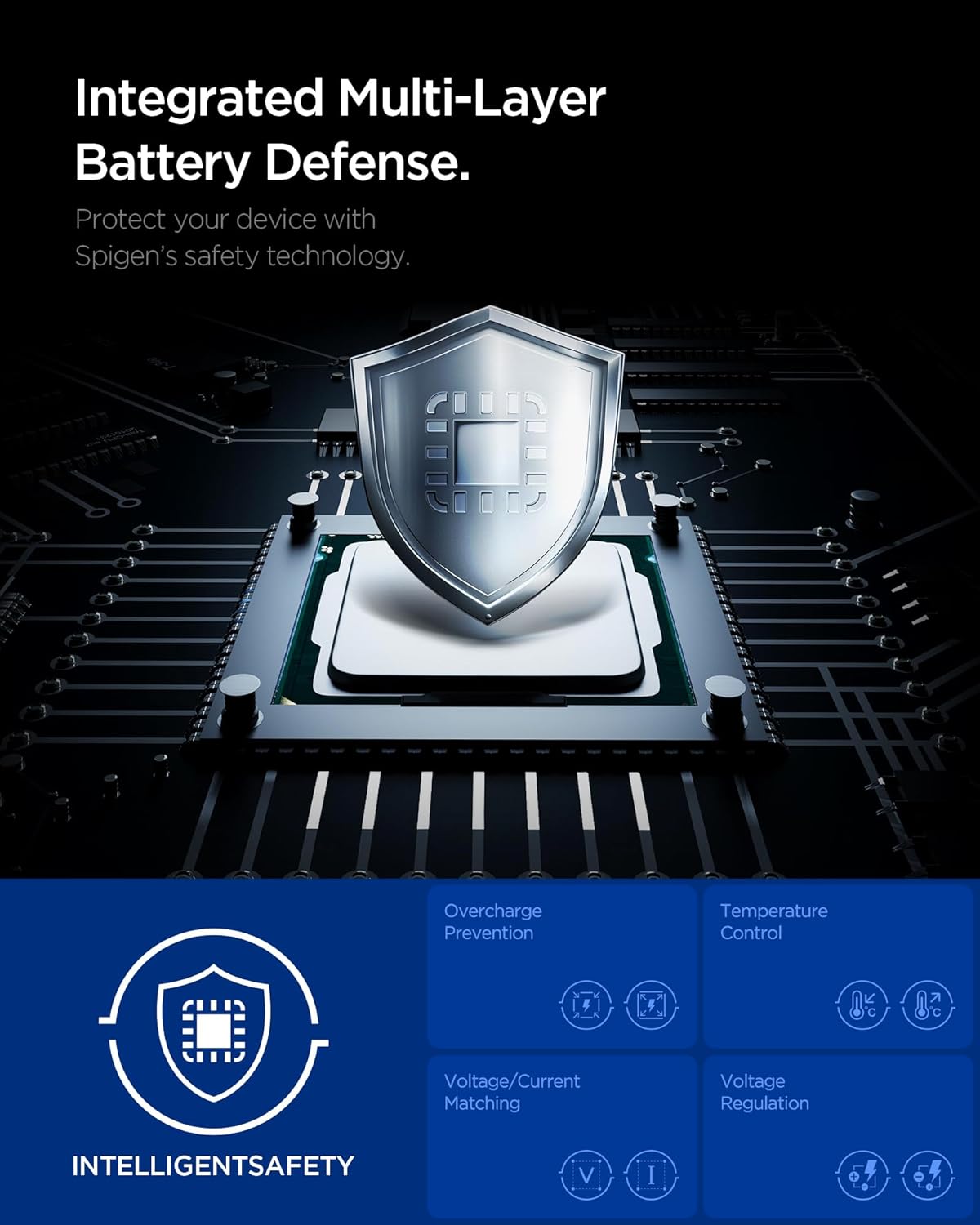
Image 6.1: Diagram illustrating the "Integrated Multi-Layer Battery Defense" system, branded as "INTELLIGENTSAFETY". This system protects devices with Spigen's safety technology, including features like overcharge prevention, temperature control, voltage/current matching, and voltage regulation.
The Spigen ArcStation Essential 47W charger is equipped with an "INTELLIGENTSAFETY" system, providing multi-layer protection for your devices and the charger itself. These safety features include:
- Overcharge Prevention: Protects your device's battery from damage due to excessive charging.
- Temperature Control: Monitors and regulates the charger's temperature to prevent overheating.
- Voltage/Current Matching: Ensures the correct voltage and current are delivered to the connected device.
- Voltage Regulation: Maintains stable voltage output for consistent and safe charging.
General Safety Precautions:
- Do not expose the charger to liquids, moisture, or extreme temperatures.
- Do not disassemble, modify, or attempt to repair the charger.
- Keep out of reach of children.
- Unplug the charger from the wall outlet when not in use or during electrical storms.
- Use only with compatible devices and appropriate USB-C cables.
7. Maintenance
- Cleaning: Disconnect the charger from the power outlet and all devices before cleaning. Use a soft, dry cloth to wipe the surface. Do not use liquid cleaners or aerosols.
- Storage: Store the charger in a cool, dry place away from direct sunlight and extreme temperatures.
- Cable Care: Avoid bending or crimping charging cables excessively, as this can damage them and affect charging performance.
8. Troubleshooting
| Problem | Possible Cause | Solution |
|---|---|---|
| Device not charging. |
|
|
| Slow charging. |
|
|
| Charger feels warm. |
|
|
9. Specifications
| Feature | Detail |
|---|---|
| Model Number | ACH08707 |
| Brand | Spigen |
| Total Power Output | 47 Watts (Max) |
| Input Voltage | 100-240 Volts AC |
| Output Voltage | 11 Volts (Max) |
| Output Current | 3 Amps (Max) |
| Amperage | 1.2 Amps (Input) |
| Connector Type | USB Type C (x2) |
| Special Features | Fast Charging, Dual Device Charging, GaN Technology, PPS, PD 3.0 |
| Compatible Devices | Cellular Phones, Tablets, Laptops (USB-C compatible) |
| Plug Type | Type F – 2 pins (Germany) |
| Color | White |
| Dimensions (approx.) | 31.00 x 41.00 x 44.50 mm |
| Weight (approx.) | 105g |
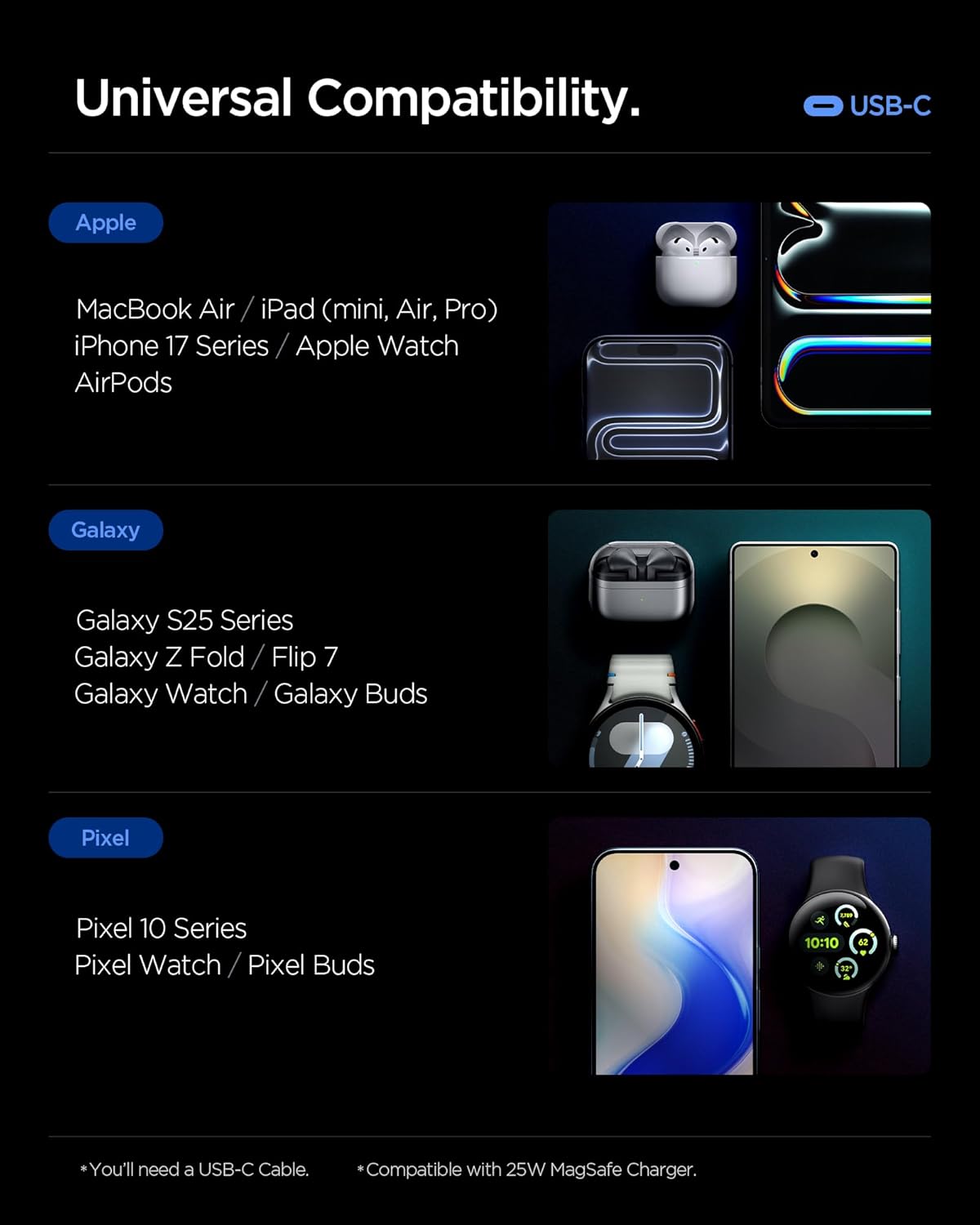
Image 9.1: A visual guide to the universal compatibility of the Spigen ArcStation Essential 47W charger. It lists compatible devices across Apple (MacBook Air/iPad, iPhone 17 Series, Apple Watch, AirPods), Galaxy (S25 Series, Z Fold/Flip 7, Watch, Buds), and Pixel (Pixel 10 Series, Watch, Buds) ecosystems, all connecting via USB-C.
10. Warranty and Support
Spigen products are designed for durability and performance. For warranty information and customer support, please refer to the official Spigen website or contact their customer service directly. Please retain your proof of purchase for any warranty claims.
For further assistance, visit the Spigen Brand Store.


