Introduction
This manual provides detailed instructions for the setup, operation, and maintenance of your North Edge Tank3 Digital Wrist Watch. Please read this manual thoroughly to ensure proper use and to maximize the watch's features and longevity.
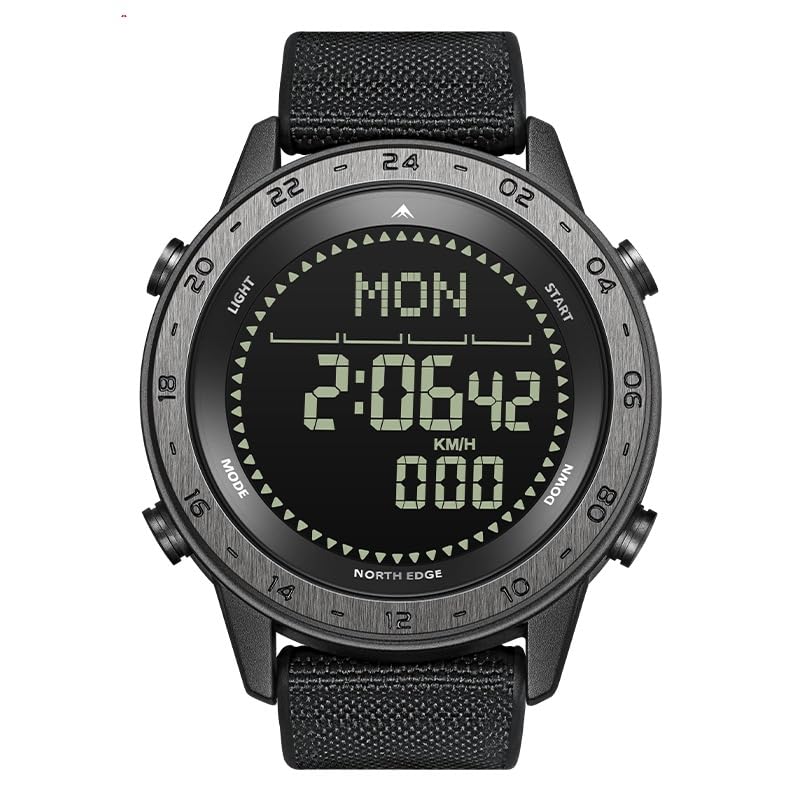
Figure 1: Front view of the North Edge Tank3 Digital Wrist Watch, showcasing its rugged design and digital display.
Product Overview
The North Edge Tank3 is a multifunctional sports watch designed for durability and precision. It features a robust build, a clear digital display, and a variety of functions suitable for outdoor activities and daily use.
Key Features:
- HD TN Display with Harden PMMA Protector
- Metal Bezel and Wear-resistant Strap (PU+Nylon)
- 50M Water Resistance
- Integrated Compass Function
- Chronograph and Countdown Timer
- EL Backlight for low-light conditions
- Pedometer and Pacer functions
- Perpetual Calendar and Alarm
- Low Battery Reminder
- 12/24 Hour Selection
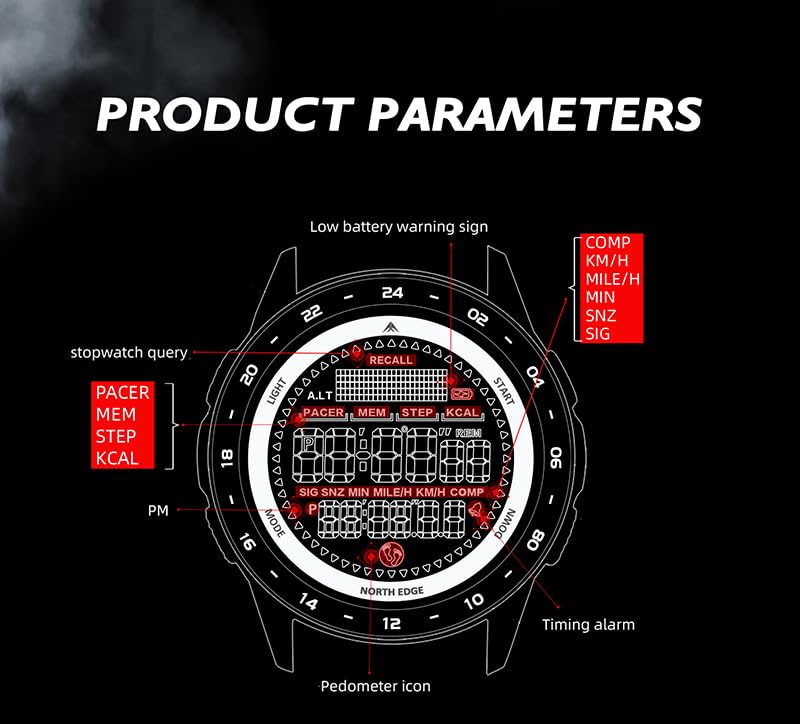
Figure 2: Diagram illustrating the various display parameters and indicators on the Tank3 watch face, including low battery warning, stopwatch query, and pedometer icon.
Setup
Initial Power On:
The watch is typically shipped in a low-power state. Press and hold the LIGHT button (usually top-left) for a few seconds to activate the display. If the display does not turn on, the battery may be low.
Setting Time and Date:
- Press the MODE button (usually bottom-left) repeatedly until you reach the Time Setting mode. This is often indicated by flashing digits.
- Use the START button (usually top-right) to adjust the flashing value (e.g., hours, minutes).
- Use the DOWN button (usually bottom-right) to move to the next setting field (e.g., from hours to minutes, then to date).
- Repeat steps 2 and 3 until all time and date settings are correct.
- Press the MODE button again to exit the setting mode and save your changes.
12/24 Hour Format Selection:
In the Time Setting mode, you can usually toggle between 12-hour and 24-hour formats by pressing the START button when the hour digits are flashing.
Operating Instructions
Mode Navigation:
Press the MODE button to cycle through the different functions of the watch. The typical sequence includes:
- Time Display
- Chronograph (Stopwatch)
- Countdown Timer
- Alarm
- Pedometer/Pacer
- Compass
Using the EL Backlight:
To illuminate the display in low-light conditions, simply press the LIGHT button (top-left). The backlight will remain active for a few seconds.

Figure 3: The Tank3 watch display clearly visible in the dark, demonstrating the effectiveness of the EL backlight function.
Compass Function:
The Tank3 watch features a digital compass. To use it:
- Navigate to the Compass mode using the MODE button.
- Hold the watch horizontally and rotate your body slowly until the compass stabilizes and points North.
- The display will show the current direction (N, NE, E, SE, S, SW, W, NW) and often a numerical bearing.

Figure 4: Visual representation of the compass function on the Tank3 watch, indicating cardinal directions and numerical azimuth for navigation.
Chronograph (Stopwatch):
- Enter Chronograph mode. The display will show "00:00:00" or similar.
- Press START to begin timing.
- Press START again to pause.
- Press DOWN to reset the stopwatch to zero.
Pedometer Function:
The watch automatically tracks your steps when in Pedometer mode. Ensure your personal settings (stride length, weight) are correctly configured for accurate readings, if applicable (check watch settings menu).
- Navigate to Pedometer mode.
- The watch will display your current step count, distance, and calories burned.
- To reset the pedometer, refer to the watch's specific settings menu, usually accessed by holding a button in Pedometer mode.
Maintenance
Cleaning:
Wipe the watch case and strap regularly with a soft, damp cloth. For stubborn dirt, a mild soap solution can be used, followed by rinsing with clean water and drying thoroughly. Avoid harsh chemicals or abrasive materials.
Water Resistance:
The Tank3 watch is rated for 50M water resistance. This means it is suitable for showering, swimming in shallow water, and general water exposure. It is not suitable for diving, snorkeling, or high-pressure water activities. Do not operate buttons underwater.
Battery Replacement:
The watch uses a CR2430 battery. When the low battery reminder appears, it is recommended to replace the battery promptly. Battery replacement should ideally be performed by a qualified watch technician to ensure proper sealing and water resistance integrity.
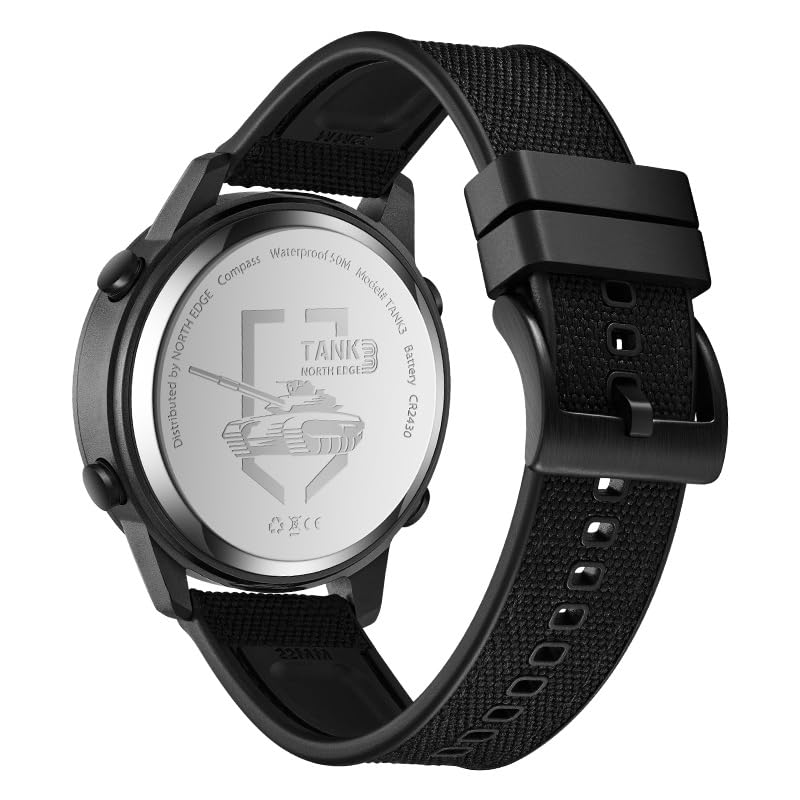
Figure 5: Rear view of the North Edge Tank3 watch, highlighting the stainless steel back cover and battery compartment, which houses the CR2430 battery.
Storage:
When not in use for extended periods, store the watch in a cool, dry place away from direct sunlight and extreme temperatures.
Troubleshooting
| Problem | Possible Cause | Solution |
|---|---|---|
| Display is blank or dim. | Low battery; watch in sleep mode. | Press LIGHT button to wake. Replace battery if low battery indicator is shown or if display remains dim. |
| Buttons are unresponsive. | Watch may be frozen; water ingress. | Try a soft reset (hold all buttons for a few seconds, if applicable). If water ingress is suspected, seek professional service. |
| Time is inaccurate. | Time not set correctly; battery low. | Re-set the time and date as per "Setup" section. Replace battery if necessary. |
| Compass reading is incorrect. | Interference from magnetic fields; needs calibration. | Move away from electronic devices or large metal objects. Refer to watch's specific instructions for compass calibration (if available). |
Specifications
| Feature | Detail |
|---|---|
| Model Number | Tank3 |
| Display Type | HD TN Display |
| Case Material | Metal Bezel (Zinc alloy) |
| Case Thickness | 13mm / 0.51in |
| Diameter | 44mm / 1.73in |
| Strap Material | Wear resistant strap (PU+Nylon) |
| Strap Width | 22mm / 0.87in |
| Total Length of Watch | 257mm / 10.12in |
| Water Resistance | 50M |
| Battery Type | CR2430 |
| Net Weight | 82g |
| Manufacturer | Xiamen North Edge Technology Co. Ltd |
| Country of Origin | China |

Figure 6: Detailed diagram outlining the physical dimensions and material specifications of the North Edge Tank3 watch.
Warranty and Support
For warranty information and customer support, please refer to the official NORTH EDGE website or contact your point of purchase. Keep your proof of purchase for any warranty claims.
Manufacturer: Xiamen North Edge Technology Co. Ltd
Importer: Vijay Gupta F No 148F Silver City Theme Derabassi-140507
Packer: Vijay Gupta. F No 148F B5 SCT,Derabassi
For further assistance, please visit the NORTH EDGE brand page on Amazon.


