
1. Introduction
Thank you for choosing the ALLmeter Digital Angle Gauge. This precision instrument is designed to provide accurate and reliable angle measurements for a wide range of applications, including woodworking, construction, automotive tasks, and home improvement projects. This manual provides essential information for the safe and effective use of your device. Please read it thoroughly before operation and retain it for future reference.
2. Product Overview
2.1 Key Features
- High Precision: Provides accurate measurements with a precision of ±0.1° at 0° and 90°, and ±0.2° at other angles.
- Magnetic V-Groove Base: Ensures secure attachment to metal surfaces, including round pipes, for stable, hands-free measurements.
- Backlit VA LCD Screen: Enhanced display with white characters on a black background for clear readings in various lighting conditions, featuring automatic display inversion for upside-down use.
- Multiple Measurement Modes: Supports degrees (°), percentages (%), millimeters per meter (mm/m), and inches per foot (in/ft).
- Zero and Hold Functions: For relative and absolute angle measurements, and to freeze readings on the display.
- Durable and Portable: Compact design with an IP52 waterproof and dust protection rating, suitable for diverse environments.
- Automatic Shut-off: Powers off after 3 minutes of inactivity to conserve battery life.
2.2 Package Contents
Upon unpacking, please verify that all items listed below are present and in good condition:
- 1 x ALLmeter Digital Angle Gauge
- 2 x AAA Batteries
- 1 x Mini Screwdriver
- 1 x Carrying Bag
- 1 x User Manual

Image: The ALLmeter Digital Angle Gauge shown with its complete accessory kit, including two AAA batteries, a mini screwdriver for battery compartment access, and a protective carrying bag.
3. Safety Information
To ensure safe operation and prevent damage to the device, please observe the following safety precautions:
3.1 General Safety
- Do not attempt to disassemble or modify the device. This may void the warranty and cause damage.
- Keep the device away from strong magnetic fields, as this may affect measurement accuracy.
- Avoid exposing the device to extreme temperatures, direct sunlight, or high humidity.
- Clean the device with a soft, dry cloth. Do not use abrasive cleaners or solvents.
- This device is rated IP52 for dust and splash protection. Do not immerse it in water.
3.2 Battery Safety
- Use only AAA alkaline batteries as specified.
- Ensure batteries are inserted with correct polarity (+/-).
- Do not mix old and new batteries, or different types of batteries.
- Remove batteries if the device will not be used for an extended period to prevent leakage.
- Dispose of used batteries according to local regulations.
4. Setup
4.1 Battery Installation
- Locate the battery compartment cover on the back of the device.
- Use the provided mini screwdriver to loosen the screw on the battery compartment cover.
- Remove the cover.
- Insert two AAA batteries, ensuring the correct polarity (+ and -) as indicated inside the compartment.
- Replace the battery compartment cover and tighten the screw securely.
5. Operating Instructions
5.1 Power On/Off
- Press the ZERO ON/OFF button to turn the device on.
- Press and hold the ZERO ON/OFF button for approximately 3 seconds to turn the device off.
- The device will automatically power off after 3 minutes of inactivity.
5.2 Zeroing (Calibration)
To ensure accurate measurements, it is recommended to zero the device on a known flat, level surface before use.
- Place the angle gauge on a perfectly flat and level surface.
- Press the ZERO ON/OFF button briefly. The display should show 0.00°.
- The device is now calibrated and ready for absolute angle measurements.
5.3 HOLD Function
The HOLD function allows you to freeze the current reading on the display.
- While taking a measurement, briefly press the HOLD button. The current reading will be frozen on the screen, indicated by a 'H' icon.
- Press the HOLD button again to release the reading and resume live measurement.
5.4 Measurement Modes (Absolute vs. Relative)
The device supports two measurement modes: Absolute Angle and Relative Angle.

Image: Visual representation of the two measurement modes. Mode 1 (Absolute angle) shows the device measuring 30.0° from a horizontal reference. Mode 2 (Relative angle) shows the device zeroed on a 30° surface, then measuring a relative angle of 10.0° from that new zero.
- Absolute Angle Mode: This is the default mode after power-on or zeroing on a level surface. It measures the angle relative to the true horizontal plane.
- Relative Angle Mode: To measure the angle between two surfaces, place the device on the first surface and press the ZERO ON/OFF button to set it as the new 0° reference. Then, move the device to the second surface, and the display will show the angle difference between the two surfaces.
5.5 Unit Switching
The device can display measurements in four different units.
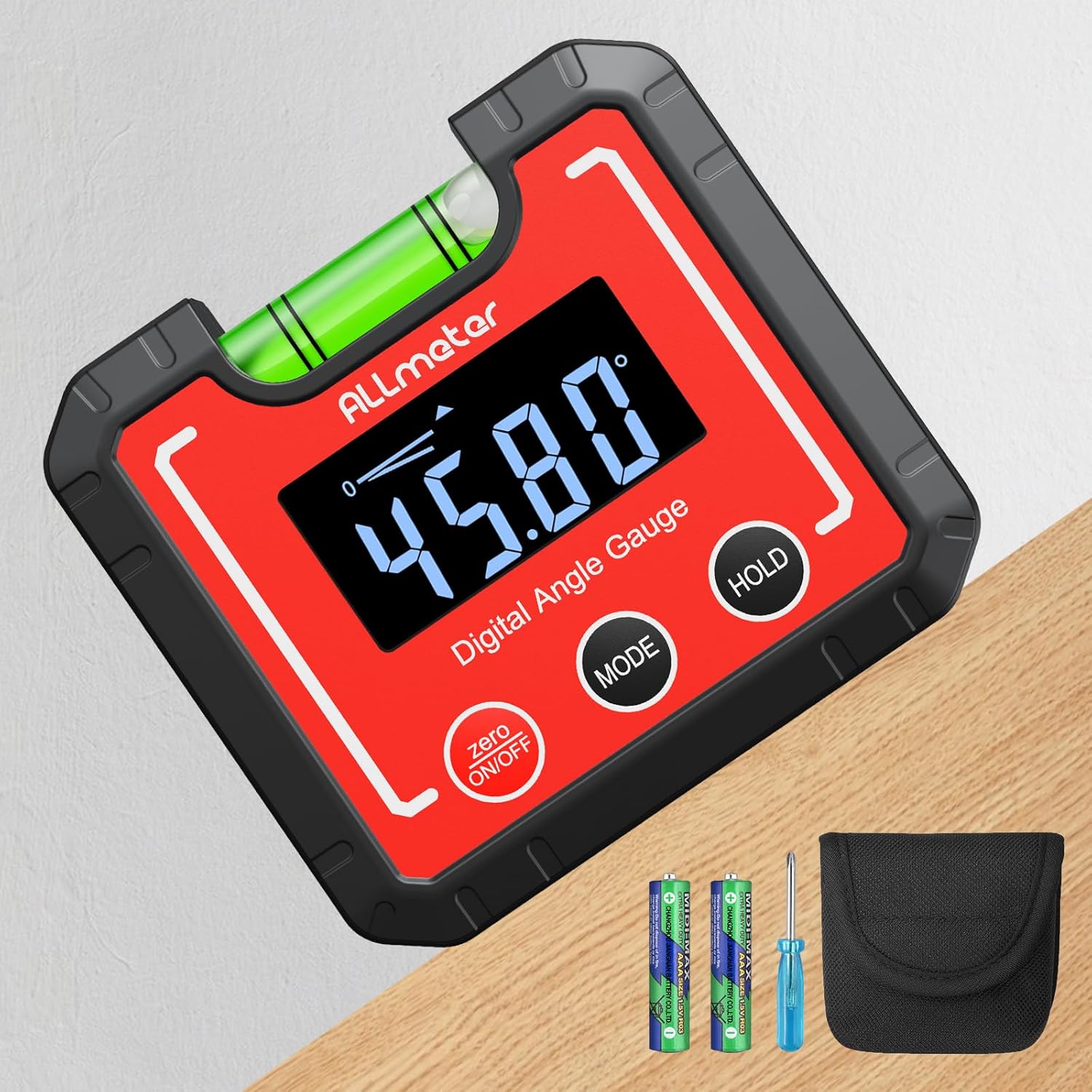
Image: The digital angle gauge displaying measurements in four different units: degrees (°), percentage (%), millimeters per meter (mm/m), and inches per foot (in/ft).
- Briefly press the MODE button to cycle through the available measurement units: Degrees (°), Percentage (%), Millimeters per meter (mm/m), and Inches per foot (in/ft).
5.6 Automatic Display Reversal
The display automatically inverts when the device is used upside down, ensuring easy readability from any orientation.

Image: This image demonstrates three key features: the HOLD function (1) which keeps the screen read, the Magnetic V-slot on the bottom (2) for attaching to curved surfaces, and the Automatically Reversal Data (3) which ensures the display orientation is always correct for easier access to data.
5.7 Magnetic V-Groove Base
The strong magnetic V-groove base allows for secure attachment to various metal surfaces, including flat and curved objects like pipes, for stable and hands-free operation.

Image: A close-up view of the VA LCD display, showing a clear reading of 15.00 degrees, demonstrating its visibility even in low-light conditions.
5.8 Horizontal Bubble Level
The integrated horizontal bubble level allows for quick visual leveling, even when the digital display is not powered on.

Image: The digital angle gauge positioned on a circular saw blade, highlighting the horizontal bubble level. The digital display shows an angle of 45.00 degrees.
6. Maintenance
6.1 Cleaning
- Wipe the device with a soft, dry, or slightly damp cloth.
- Do not use harsh chemicals, abrasive cleaners, or solvents, as these can damage the casing or display.
- Ensure no liquid enters the device openings.
6.2 Storage
- Store the device in its protective carrying bag when not in use.
- Keep the device in a cool, dry place, away from direct sunlight and extreme temperatures.
- Remove batteries if storing for an extended period (more than one month) to prevent battery leakage and potential damage to the device.

Image: The digital angle gauge on a wooden surface with water droplets, illustrating its IP52 sealing and dust protection. The edge lines on both sides provide practical reference points for measurements.
7. Troubleshooting
| Problem | Possible Cause | Solution |
|---|---|---|
| Device does not power on. | Dead or incorrectly installed batteries. | Check battery polarity. Replace with new AAA batteries. |
| Inaccurate readings. | Not zeroed correctly; strong magnetic interference; device not stable. | Re-zero the device on a known flat surface. Move away from magnetic sources. Ensure device is stable on the measurement surface. |
| Display is dim or flickering. | Low battery power. | Replace batteries. |
| Display does not invert automatically. | Internal sensor issue. | Try turning the device off and on again. If the problem persists, contact customer support. |
8. Specifications
| Parameter | Value |
|---|---|
| Measurement Range | 0–360° (4 x 90°) |
| Resolution | 0.05° |
| Accuracy | ±0.1° at 0° and 90°; ±0.2° at other angles |
| Units | Degrees (°), Percentage (%), mm/m, in/ft |
| Power Supply | 2 x AAA Batteries (included) |
| Automatic Shut-off | After 3 minutes of inactivity |
| Operating Temperature | 0 °C to 40 °C (32 °F to 104 °F) |
| Dimensions (L x W x H) | 68 x 32 x 62 mm (2.68 x 1.26 x 2.44 inches) |
| Weight | 100 g (0.22 lbs) |
| IP Rating | IP52 (Dust and splash protected) |
| Model Number | ALL074-FBAALL |
9. Warranty and Support
Specific warranty information for this product is not provided within this manual. For details regarding warranty coverage, terms, and conditions, please refer to the documentation included with your purchase or contact ALLmeter customer support directly.
For technical support, troubleshooting assistance, or inquiries about your ALLmeter Digital Angle Gauge, please visit the official ALLmeter website or contact their customer service department using the contact information provided at the point of purchase or on the manufacturer's official channels.