
MINDKEEPS F06
MINDKEEPS YU Xiang F06 EC-135 RC Helicopter User Manual
Model: F06 (EC-135 Replica)
1. Introduction
Thank you for choosing the MINDKEEPS YU Xiang F06 EC-135 RC Helicopter. This manual provides essential information for the safe operation, assembly, and maintenance of your new remote-controlled helicopter. Please read this manual thoroughly before operating the aircraft to ensure proper function and to prevent damage or injury.
The F06 EC-135 is a 1:36 scale replica featuring brushless motors, a 6-axis gyroscope, and 3D/6G dual flight modes for enhanced stability and control. It is designed for users aged 15 and above.
Safety Precautions
- Always operate the helicopter in open areas, away from people, animals, and obstacles.
- Ensure the battery is fully charged before each flight.
- Do not operate in strong winds or adverse weather conditions.
- Keep hands and face clear of rotating blades.
- Supervise children and beginners during operation.
- Turn off the helicopter and remote control when not in use.

Figure 1: The MINDKEEPS YU Xiang F06 EC-135 RC Helicopter and its retail packaging.
2. Package Contents
Verify that all items listed below are included in your package:
- Aircraft (F06 EC-135 RC Helicopter) x 1
- Instruction Manual x 1
- Dedicated USB Charger x 1
- Main Blade x 4 (2 installed, 2 spares)
- Tail Blade x 1 (spare)
- Intelligent Battery (LI-POLY 7.4V 1200MAH 25C) x 1

Figure 2: The F06 EC-135 helicopter shown alongside its packaging, indicating the contents.
3. Specifications
| Feature | Detail |
|---|---|
| Material | High Pressure Thermoplastic Technology, Nylon/Carbon Fiber Reinforced |
| Rotor Diameter | 330mm |
| Fuselage Length | 350mm |
| Height | 120mm |
| Aircraft Weight | 278g |
| Drive Motor | 2507 1300KV Brushless Motor |
| Lock Tail Motor | 1204 7000KV Brushless Motor |
| Steering Gear | 4.3g Metal Digital Steering Gear |
| Remote Control | 2.4G RC |
| RC Distance | >120m |
| Battery | LI-POLY Smart Battery 7.4V (1200MAH) 25C |
| Charger | USB |
| Charging Time | Approximately 70 minutes |
| Using Time | 8-10 minutes |
| Recommended Age | 15 years and up |

Figure 3: The F06 EC-135 helicopter on a digital scale, indicating its weight of 278 grams.
4. Setup
4.1 Battery Charging
- Connect the dedicated USB charger to a USB power source (e.g., computer USB port, USB wall adapter).
- Connect the intelligent battery to the USB charger.
- The charger's indicator light will show the charging status. Refer to the charger's specific instructions for light indications (typically red for charging, green for fully charged).
- Charging time is approximately 70 minutes. Do not overcharge the battery.
4.2 Battery Installation
- Ensure the helicopter is powered off.
- Locate the battery compartment on the helicopter.
- Carefully insert the charged intelligent battery into the compartment, ensuring the connectors align.
- Connect the battery to the helicopter's power port.
- Secure the battery compartment cover.
4.3 Remote Control Preparation
- Install the required batteries (not included) into the remote control. Refer to the remote control's manual for battery type and installation.
- Turn on the remote control.
4.4 Pairing the Helicopter and Remote Control
- Place the helicopter on a flat, level surface.
- Power on the helicopter. The indicator lights on the helicopter will flash.
- Power on the remote control.
- Move the throttle stick (left stick) all the way up, then all the way down.
- The indicator lights on the helicopter will become solid, indicating successful pairing.
5. Operating Instructions
5.1 Basic Controls
The 2.4G RC remote control typically features the following functions:
- Throttle (Left Stick Up/Down): Controls the helicopter's altitude.
- Rudder (Left Stick Left/Right): Controls the helicopter's rotation around its vertical axis (yaw).
- Elevator (Right Stick Up/Down): Controls forward and backward movement (pitch).
- Aileron (Right Stick Left/Right): Controls sideways movement (roll).
- 3D/6G Mode Switch: Toggles between flight modes.
5.2 Flight Modes (3D/6G Dual Mode)
- 6G (Self-Stabilizing) Mode: Ideal for beginners. The 6-axis gyroscope and optical flow positioning system provide enhanced stability, automatically correcting the helicopter's attitude to maintain level flight. This mode simplifies control, making it easier to learn.
- 3D (Acrobatic) Mode: For experienced pilots. This mode allows for advanced maneuvers and inverted flight, offering full control without automatic stabilization. Switch to this mode only after mastering 6G mode.
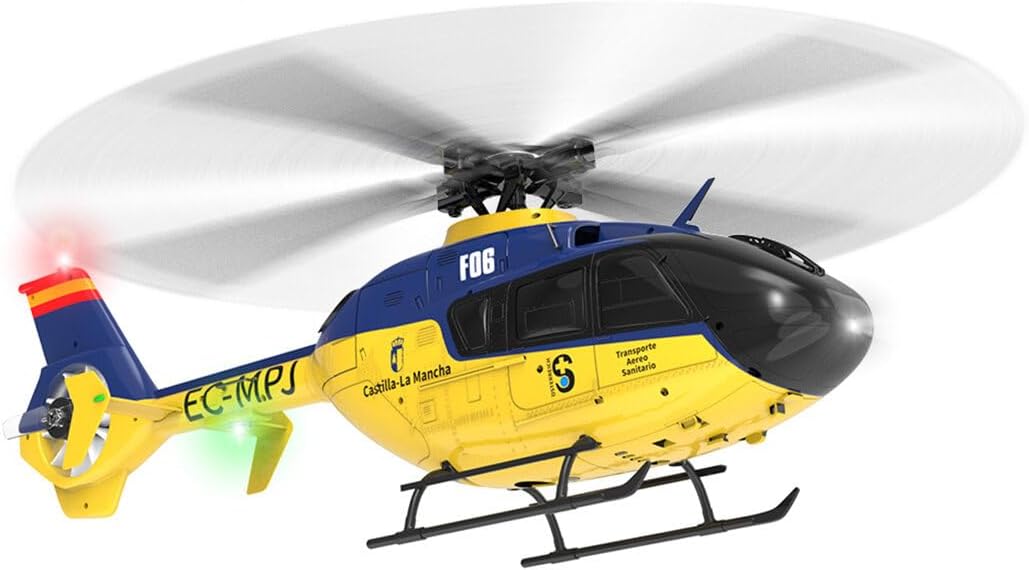
Figure 4: The F06 EC-135 helicopter illustrating its optical flow positioning system for stable flight.
5.3 First Flight Tips
- Choose an open, calm environment with no wind.
- Start in 6G mode for maximum stability.
- Gently increase the throttle to lift off slowly. Practice hovering at a low altitude.
- Make small, precise control inputs. Avoid sudden movements.
- If you lose control, immediately reduce the throttle to zero to prevent damage.
- Practice basic maneuvers like hovering, forward/backward flight, and turning before attempting advanced operations.

Figure 5: The F06 EC-135 helicopter in stable flight, showcasing its design and operational capabilities.
6. Maintenance
6.1 Cleaning
- After each flight, gently wipe the helicopter with a soft, dry cloth to remove dust and debris.
- Do not use water or chemical cleaners, as they may damage electronic components.
6.2 Storage
- Store the helicopter and remote control in a cool, dry place, away from direct sunlight and extreme temperatures.
- Remove batteries from the remote control if storing for extended periods.
- Store the intelligent flight battery with a partial charge (around 50%) if not used for a long time to prolong its lifespan.
6.3 Blade Replacement
- If main or tail blades become damaged, replace them with the provided spare parts.
- Ensure the new blades are installed correctly and securely before flying.
7. Troubleshooting
| Problem | Possible Cause | Solution |
|---|---|---|
| Helicopter does not power on. | Battery not charged or not connected properly. | Ensure battery is fully charged and correctly connected. |
| Helicopter does not respond to remote control. | Not paired, remote control batteries low, or out of range. | Re-pair the helicopter and remote control. Replace remote control batteries. Ensure you are within the operating range (>120m). |
| Unstable flight or drifts. | Not calibrated, damaged blades, or strong wind. | Ensure helicopter is placed on a level surface for power-on calibration. Check blades for damage and replace if necessary. Avoid flying in windy conditions. |
| Short flight time. | Battery not fully charged or aging battery. | Ensure battery is fully charged. Consider replacing the battery if it's old and capacity has degraded. |
8. Warranty and Support
For warranty information, technical support, or replacement parts, please contact the seller or manufacturer directly. Retain your proof of purchase for any warranty claims.
Manufacturer: MINDKEEPS
Model Number: PJ0AO10GF4358A78W
Ask a question about this manual
Ask about setup, troubleshooting, compatibility, parts, safety, or missing instructions. Manuals+ will review the question and use this page’s manual context to help answer it.