
Introduction
The Bushnell Golf Phantom 3 Slope GPS Handheld is designed to provide accurate distance measurements and course information to enhance your golf game. This device features a touchscreen interface, preloaded courses, hazard information, and slope compensation. This manual provides detailed instructions for its setup, operation, maintenance, and troubleshooting.

Image: The Bushnell Golf Phantom 3 Slope GPS Handheld device shown with its included accessories, including a belt clip and golf towel.
Setup
1. Initial Charging
Before first use, fully charge the device using the provided charging cable. The device contains 1 Lithium Ion battery (included) and provides approximately 18 hours of battery life on a full charge.
2. Powering On/Off
- To power on: Press and hold the power button located on the side of the device.
- To power off: Press and hold the power button until the shutdown prompt appears, then confirm.
3. Bushnell Golf App Connection and Updates
The Bushnell Golf app provides additional features and allows for easy course updates. Download the app from your device's app store and follow the in-app instructions to pair your Phantom 3 Slope GPS Handheld via Bluetooth. This connection facilitates auto course updates and scorekeeping.

Image: The Bushnell Golf application icon, used for device pairing and course updates.
Operating Instructions
1. Touchscreen Interface and Auto Features
The Phantom 3 features an intuitive touchscreen interface. It includes auto course recognition, auto hole recognition, and auto score prompt functionalities. These features are designed to minimize manual input, allowing you to focus on your game.
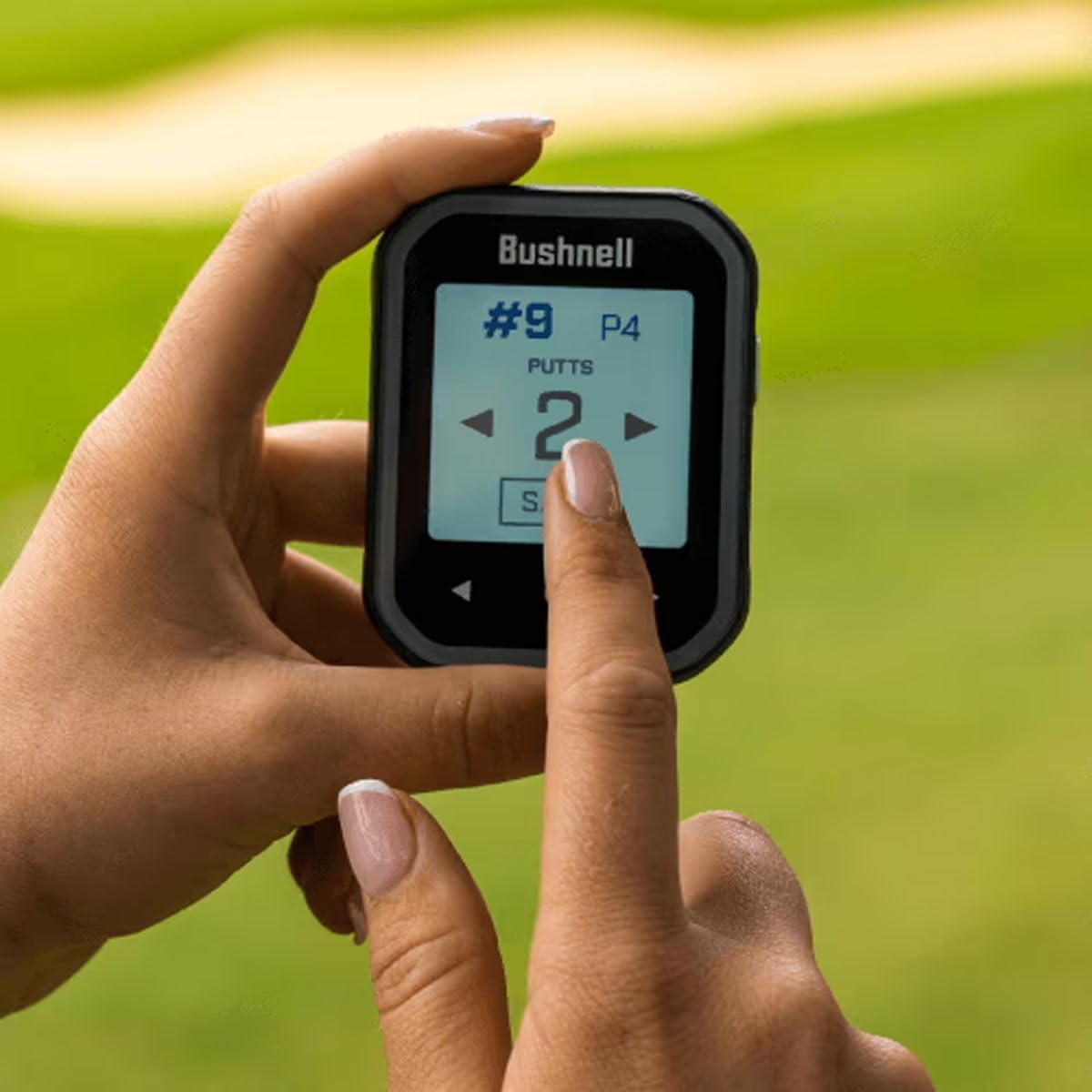
Image: A user interacting with the touchscreen of the Phantom 3 device to input score data, specifically the number of putts.

Image: The Phantom 3 touchscreen displaying a graphical representation of a golf hole with distance information.
2. Front, Center, and Back Distances
The device comes preloaded with over 38,000 worldwide courses. It displays large, easy-to-read distances to the front, center, and back of the green. This information is crucial for selecting the correct club.
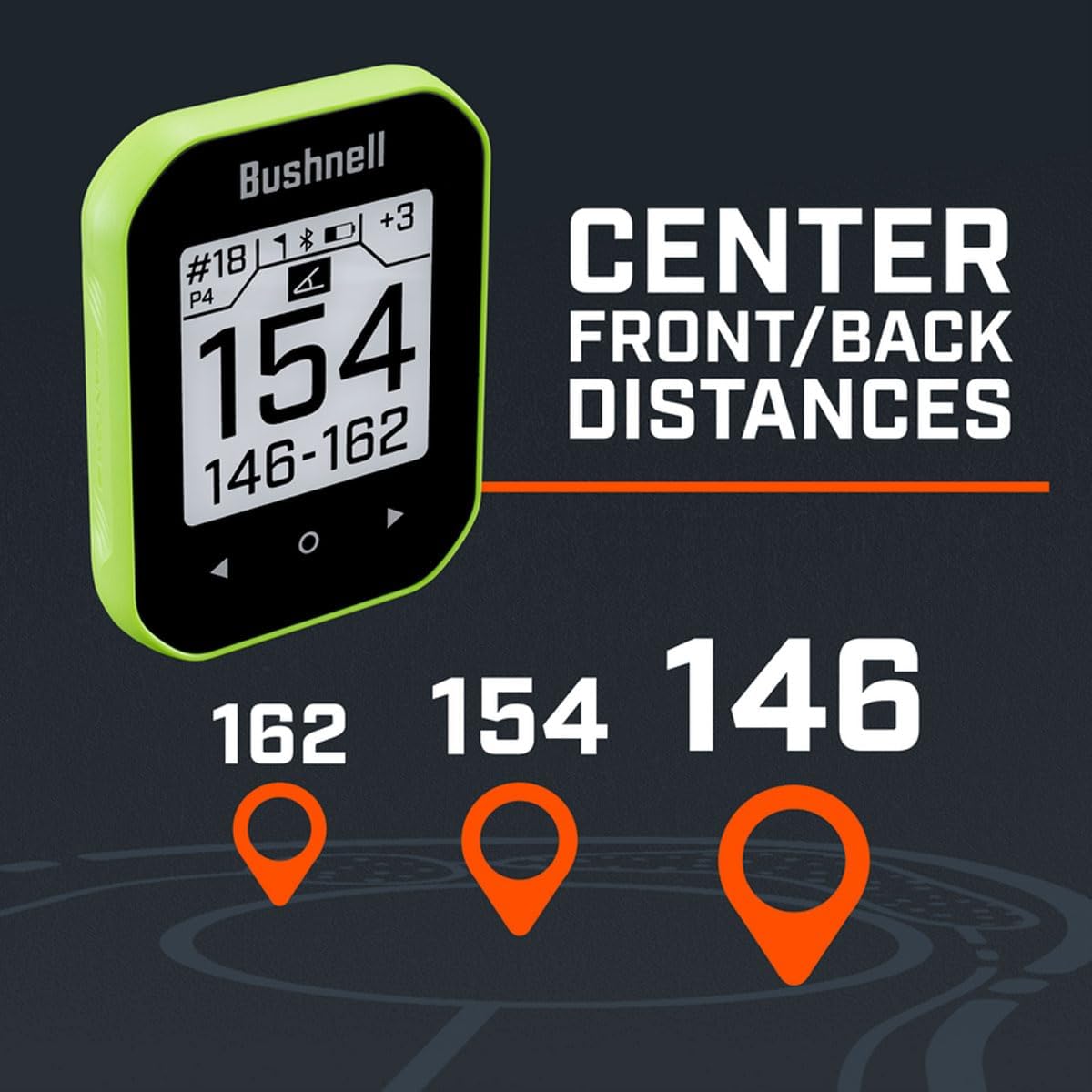
Image: The Phantom 3 device showing the front, center, and back distances to the green, with corresponding visual markers.

Image: An aerial view diagram illustrating the front, center, and back distances to a golf green from a player's perspective.
3. Hazard Information
The device provides up to 6 hazard and layup distances per hole. Access this information to plan your shots effectively and avoid obstacles.

Image: The Phantom 3 device screen displaying a list of hazard types and their corresponding distances.

Image: The Phantom 3 device, attached to a golf cart, displaying hazard information on its screen.

Image: A graphic demonstrating how hazard information is presented on the Bushnell Phantom 3 device, showing distances to various obstacles.
4. Greenview with Movable Pin Placement
This feature allows you to cycle through different pin locations on the green. By selecting the current pin position, you can obtain a more precise distance to the flag, aiding in better shot accuracy.

Image: A graphical icon depicting a flagstick on a golf green, symbolizing the pin placement feature.
5. Slope Compensation
The Phantom 3 Slope GPS Handheld incorporates slope compensation, which adjusts distances based on elevation changes. This provides a "plays like" distance, accounting for uphill or downhill shots, offering a more accurate measurement for club selection.

Image: A graphical icon illustrating the slope compensation feature, showing an angled line over a horizontal line.

Image: A diagram explaining how slope compensation works, showing the difference between horizontal distance and "plays like" distance for an uphill shot.
6. BITE Magnetic Cart Mount
The integrated BITE magnetic cart mount allows you to securely attach the device to a golf cart or other metallic surfaces. This keeps the GPS unit readily accessible during your round.

Image: The Bushnell Phantom 3 device highlighting its BITE magnetic mount feature, shown attaching to a golf cart.

Image: A graphical icon depicting a horseshoe magnet, representing the BITE magnetic mount feature.

Image: The Bushnell Phantom 3 device attached to a golf bag using its carabiner clip, displaying course information.

Image: A close-up view of the Bushnell Phantom 3's protective case with an integrated belt clip and carabiner.
Maintenance
- Cleaning: Use a soft, damp cloth to clean the device. Avoid abrasive cleaners or solvents.
- Storage: Store the device in a cool, dry place when not in use. Avoid extreme temperatures.
- Battery Care: To maintain optimal battery life, avoid fully discharging the battery frequently. Charge the device regularly.
- Software Updates: Regularly check for and install software updates via the Bushnell Golf app to ensure optimal performance and access to the latest course data.
Troubleshooting
| Problem | Solution |
|---|---|
| Device does not power on. | Ensure the device is fully charged. Connect to a power source and attempt to power on after a few minutes. |
| Inaccurate distances or no GPS signal. | Ensure you are in an open area with a clear view of the sky. Check for updated course data via the Bushnell Golf app. Perform a device reset if the issue persists. |
| Touchscreen unresponsive. | Restart the device. Ensure the screen is clean and dry. If unresponsive after restart, contact customer support. |
| Difficulty connecting to Bushnell Golf App. | Ensure Bluetooth is enabled on both devices. Restart both the Phantom 3 and your smartphone. Re-attempt pairing through the app. |
Specifications
- Model Number: 362401
- Item Weight: 2.75 ounces
- Product Dimensions: 0.7 x 2.36 x 2.99 inches
- Display Size: 2.2 Inches
- Battery Type: 1 Lithium Ion battery (included)
- Battery Life: Approximately 18 Hours
- Connectivity: Bluetooth
- Special Features: Touchscreen, Slope Compensation, BITE Magnetic Mount, Preloaded with 38,000+ Courses
- Included Components: Bushnell Golf Phantom 3 Handheld Slope GPS, Belt Clip, Signature Series Golf Towel
Warranty and Support
The Bushnell Golf Phantom 3 Slope GPS Handheld comes with a 1 Year Limited Warranty. For warranty claims, technical support, or further assistance, please refer to the official Bushnell Golf website or contact their customer service department. Keep your proof of purchase for warranty validation.
For additional resources and the latest information, visit: www.bushnellgolf.com


